
Red Fusion for Windows 7

sergiogarcia9

︻┳テ=一
Guru
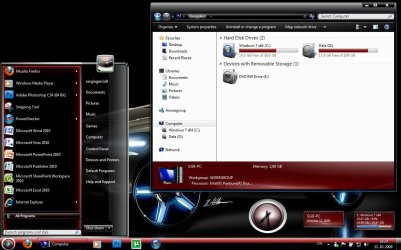
The final release of my theme for windows 7, called Red Fusion. This is my first theme of this kind. ;)
THIS THEME ONLY WORKS 100% ON X64 ATM. If you are using it on x86 the all programs bar will show as a white bar, instead of the red one in the screenshot.
pic1.jpg

The theme includes:

  • 3x Custom Gadgets
  • The theme itself
  • 1 exclusive Start Button
  • 15 High Res Wallpapers
  • 1 Logon screen + app to change it


Download


Also please visit my profile on DA.
http://sergiogarcia9.deviantart.com/

Please comment :)
 
Last edited:
Another great grapic package from the graphics Guru. Nice!
 

My Computer

Computer Manufacturer/Model Number
Self Built
OS
Windows 7 ultimate 64 bit / XP Home sp3
CPU
intel Core 2 Duo E8400 3.0ghz
Motherboard
Asus P5ND bios 1401
Memory
8 gigs 1066 OCZ Fata1ty
Graphics Card(s)
EVGA GTX 580 Call of Duty Black Ops Edition
Sound Card
Creative Soundblaster Audigy 2zs
Monitor(s) Displays
Asus 24in LCD's 2MS X2
Screen Resolution
1920x1080p @60Hz
Hard Drives
WD Caviar 500 Black/ WD Caviar 200 Blue
PSU
OCZ 700W GameXtreme
Case
NZXT Apollo
Cooling
Corsair H50 CPU/120mm x3 /60mm x2 /Corsair Dominator Ram
Keyboard
Logitech Bluetooth Wireless MX5000
Mouse
Logitech Bluetooth Wireless MX1000
Internet Speed
Download 19.83 Upload 0.97
Other Info
Logitech Z2300 Speakers/ Bose Noise Cancelling Headphones/Avermedia PCI-e Hybrid TV Bravo/Epson NX415 all in one/ 4 Port Powered USB Hub/ LG 10x Bluray Burner /TSST Corp DVDRW External
Nice job Sergio can't wait for another theme.
 

My Computer

Computer Manufacturer/Model Number
HP Compaq Presario/SR5113WM
OS
Windows 7 Ultimate x64/ Windows Vista Ultimate x64
CPU
AMD Athlon 64 X2 3600+ 1.9Ghz
Motherboard
Asus M2N68-LA
Memory
PNY Optima Memory DDR2 2GB 2x1 kit
Graphics Card(s)
PNY Nvidia 8400 GS 256MB
Sound Card
On board RealTek
Monitor(s) Displays
Acer X163W LCD
Screen Resolution
1366x768
Hard Drives
Western Digital 160 GB SATA 3G (3.0Gb/sec)
7200 rpm
Western Digital 160 GB IDE
PSU
Dynex 400w
Case
Nothin Special
Cooling
Stock
Keyboard
Standard 102 key with volume and sleep buttons
Mouse
Wireless Logitech LX7
Internet Speed
Comcrap 10mb cable
Other Info
Insignia 2.1 speakers, wireless Xbox 360 controller w/plug n play charger, Belkin wireless G + mimo usb network adapter.
Nice job Sergio! Red isn't really my thing, but it's a great looking theme. Can't wait to see more great themes from you. :D
 

My Computer

Computer type
PC/Desktop
Computer Manufacturer/Model Number
SuperBeast
OS
Windows 10 Tech Preview 9926 x64
CPU
AMD FX-8350
Motherboard
Gigabyte GA-990FXA-UD3
Memory
16GB DDR3 1333
Graphics Card(s)
Asus R9 290 DirectCU II OC, Gigabyte Windforce R9 290 OC
Sound Card
Integrated w/ Creative A250 2.1 speakers
Monitor(s) Displays
Main: Asus VN289H 28" Secondary: Acer G246HL 24"
Screen Resolution
1920x1080
Hard Drives
128 GB SanDisk Ultra Plus (Windows drive)

240 GB Crucial M500 SSD (Games drive)

1 TB WDC WD10EACS 7200RPM HDD (Data drive)

2 TB Seagate Expansion Desktop external HDD (Backup drive)
PSU
900w Antec HCG-900
Case
Raidmax Agusta Full ATX
Cooling
Corsair H80
Keyboard
Cooler Master Devastator MB24
Mouse
Cooler Master Devastator MS2K 1000/1600/2000 DPI
Internet Speed
100Mbps cable
Antivirus
Avast!
Browser
Chrome
Question: How do you change the background color for the left (programs) side of the start menu. I applied this theme but it doesn't effect the start menu...
 

My Computer

OS
Windows 7 Enterprise 64 bit
How do you make or edit start orbs and progress bars?
 

My Computer

Computer Manufacturer/Model Number
HP dv7t 1000 CTO
OS
Windows 7 Ultimate 7600 RTM - Windows Server 2008 R2 7600 RTM Dual Boot
CPU
Intel Core Duo
Memory
4 gigs
Graphics Card(s)
NVIDIA 9600 GT
Sound Card
IDT HD Audio
Monitor(s) Displays
Generic 1680x1050
Screen Resolution
1680x1050
Hard Drives
TOSHIBA MK2552GSX ATA Device 320 gigs
Mouse
Synaptics Port Device PS/2
btw while i'm here i can announce that there is a new theme coming called Carbon Fusion which will be a carbon based theme with custom gadgets, Wallpapers etc. :D
 
btw while i'm here i can announce that there is a new theme coming called Carbon Fusion which will be a carbon based theme with custom gadgets, Wallpapers etc. :D

Waiting in anticipation! :)
 

My Computer

Computer type
PC/Desktop
Computer Manufacturer/Model Number
Self built.
OS
Windows 7 RTM 64bit, Windows 8 Pro 64bit
CPU
Intel i5-2500K @ 3.3Ghz
Motherboard
Asus Maximus IV GENE-Z/GEN3
Memory
16GB G.Skill RaptorX 1600MHz DDR3
Graphics Card(s)
N570GTX Twin Frozr III Power Edition
Sound Card
SupremeFX X-Fi 2
Monitor(s) Displays
BenQ XL2420T 120Hz 24 inch gaming monitor, Acer V233H 23 inc
Screen Resolution
1920x1080
Hard Drives
320GB Seagate Barracuda
WD 1TB Black Caviar
2TB WD Green Caviar
Samsung SSD 840 PRO Series
PSU
CoolerMaster Silent Pro Gold 1200WATT 80 Plus Gold
Case
CoolerMaster HAF X RC-942
Cooling
CoolerMaster V6GT Multi-Platform CPU Cooler
Keyboard
Logitech G510 Gaming Keyboard
Mouse
Logitech G700 Gaming Mouse
Antivirus
Norton Internet Security
Browser
Firefox 21
Other Info
Logitech Extreme 3D Pro Gaming Joystick, Logitech G930 Wireless Gaming Headset
View attachment 32003
The final release of my theme for windows 7, called Red Fusion. This is my first theme of this kind. ;)
THIS THEME ONLY WORKS 100% ON X64 ATM. If you are using it on x86 the all programs bar will show as a white bar, instead of the red one in the screenshot.

View attachment 31121

The theme includes:

  • 3x Custom Gadgets
  • The theme itself
  • 1 exclusive Start Button
  • 15 High Res Wallpapers
  • 1 Logon screen + app to change it

Download


Also please visit my profile on DA.
sergiogarcia9 on deviantART

Please comment :)
I got this theme on my home premium 64 (oem if that matters ) anyway I really like it and everything looks like your picture above except my taskbar, how did you get the taskbar like that ? heres what mine looks like. thanks.
 

Attachments

  • Untitled.jpg
    Untitled.jpg
    590.2 KB · Views: 312
Last edited:

My Computer

Computer type
PC/Desktop
Computer Manufacturer/Model Number
Self Built
OS
Win 10 Pro x64
CPU
Intel I5-2500K @3.3GHz
Motherboard
Asrock P67 Extreme4
Memory
16GB G.Skill Ripjaws X (4x4GB)
Graphics Card(s)
EVGA GeForce 750 Ti SC 2GB
Sound Card
ASUS Xonar DG 5.1 Channels 24-bit 96KHz PCI Interface Sound
Monitor(s) Displays
auria eq2367
Screen Resolution
1920 x 1080
Hard Drives
250GB Samsung 850 EVO SSD
1TB WD Blue
1TB Hitachi
PSU
SeaSonic X 650W 80 Plus Gold
Case
Corsair Obsidian 750D
Cooling
Corsair H60, Three 140mm case fans
Keyboard
Logitech Wireless Keyboard K520
Mouse
Logitech Wireless Mouse M310
Internet Speed
Wave Broadband ~ 100 dn 5 up
Antivirus
Windows Defender, Malwarebytes Premium
Browser
Edge, IE11, Chrome
Other Info
Laptop specs: HP g7-1365dx /
CPU: AMD A6-3420M APU with Radeon(tm) HD Graphics /
RAM: Crucial 8Gb (2x4Gb) /
SSD: Crucial M4-CT128M4SSD2 ATA Device/ FW 000F /
GFX: AMD Radeon HD 6520G /
OS: Windows 10 Pro x64
View attachment 32003
The final release of my theme for windows 7, called Red Fusion. This is my first theme of this kind. ;)
THIS THEME ONLY WORKS 100% ON X64 ATM. If you are using it on x86 the all programs bar will show as a white bar, instead of the red one in the screenshot.

View attachment 31121

The theme includes:

  • 3x Custom Gadgets
  • The theme itself
  • 1 exclusive Start Button
  • 15 High Res Wallpapers
  • 1 Logon screen + app to change it

Download


Also please visit my profile on DA.
sergiogarcia9 on deviantART

Please comment :)
I got this theme on my home premium 64 (oem if that matters ) anyway I really like it and everything looks like your picture above except my taskbar, how did you get the taskbar like that ? heres what mine looks like. thanks.

I really dont know why :S Do you have a tweak applied? Or a Windowsblinds skin installed?
 
View attachment 32003
The final release of my theme for windows 7, called Red Fusion. This is my first theme of this kind. ;)
THIS THEME ONLY WORKS 100% ON X64 ATM. If you are using it on x86 the all programs bar will show as a white bar, instead of the red one in the screenshot.

View attachment 31121

The theme includes:

  • 3x Custom Gadgets
  • The theme itself
  • 1 exclusive Start Button
  • 15 High Res Wallpapers
  • 1 Logon screen + app to change it

Download


Also please visit my profile on DA.
sergiogarcia9 on deviantART

Please comment :)
I got this theme on my home premium 64 (oem if that matters ) anyway I really like it and everything looks like your picture above except my taskbar, how did you get the taskbar like that ? heres what mine looks like. thanks.

I really dont know why :S Do you have a tweak applied? Or a Windowsblinds skin installed?
No tweak or windowsblinds skin and I just did this clean install two days ago, I tried messing with different window colors and tints but that didn't do anything ?
 

My Computer

Computer type
PC/Desktop
Computer Manufacturer/Model Number
Self Built
OS
Win 10 Pro x64
CPU
Intel I5-2500K @3.3GHz
Motherboard
Asrock P67 Extreme4
Memory
16GB G.Skill Ripjaws X (4x4GB)
Graphics Card(s)
EVGA GeForce 750 Ti SC 2GB
Sound Card
ASUS Xonar DG 5.1 Channels 24-bit 96KHz PCI Interface Sound
Monitor(s) Displays
auria eq2367
Screen Resolution
1920 x 1080
Hard Drives
250GB Samsung 850 EVO SSD
1TB WD Blue
1TB Hitachi
PSU
SeaSonic X 650W 80 Plus Gold
Case
Corsair Obsidian 750D
Cooling
Corsair H60, Three 140mm case fans
Keyboard
Logitech Wireless Keyboard K520
Mouse
Logitech Wireless Mouse M310
Internet Speed
Wave Broadband ~ 100 dn 5 up
Antivirus
Windows Defender, Malwarebytes Premium
Browser
Edge, IE11, Chrome
Other Info
Laptop specs: HP g7-1365dx /
CPU: AMD A6-3420M APU with Radeon(tm) HD Graphics /
RAM: Crucial 8Gb (2x4Gb) /
SSD: Crucial M4-CT128M4SSD2 ATA Device/ FW 000F /
GFX: AMD Radeon HD 6520G /
OS: Windows 10 Pro x64
View attachment 32003
I got this theme on my home premium 64 (oem if that matters ) anyway I really like it and everything looks like your picture above except my taskbar, how did you get the taskbar like that ? heres what mine looks like. thanks.

I really dont know why :S Do you have a tweak applied? Or a Windowsblinds skin installed?
No tweak or windowsblinds skin and I just did this clean install two days ago, I tried messing with different window colors and tints but that didn't do anything ?
Did you follow the guide on how to install it? And did you apply the Uxtheme patcher?
 
I really dont know why :S Do you have a tweak applied? Or a Windowsblinds skin installed?
No tweak or windowsblinds skin and I just did this clean install two days ago, I tried messing with different window colors and tints but that didn't do anything ?
Did you follow the guide on how to install it? And did you apply the Uxtheme patcher?
Yea I followed the guide step by step and yes I applied the Uxtheme patcher. Should I uninstall and try it again ?
 

My Computer

Computer type
PC/Desktop
Computer Manufacturer/Model Number
Self Built
OS
Win 10 Pro x64
CPU
Intel I5-2500K @3.3GHz
Motherboard
Asrock P67 Extreme4
Memory
16GB G.Skill Ripjaws X (4x4GB)
Graphics Card(s)
EVGA GeForce 750 Ti SC 2GB
Sound Card
ASUS Xonar DG 5.1 Channels 24-bit 96KHz PCI Interface Sound
Monitor(s) Displays
auria eq2367
Screen Resolution
1920 x 1080
Hard Drives
250GB Samsung 850 EVO SSD
1TB WD Blue
1TB Hitachi
PSU
SeaSonic X 650W 80 Plus Gold
Case
Corsair Obsidian 750D
Cooling
Corsair H60, Three 140mm case fans
Keyboard
Logitech Wireless Keyboard K520
Mouse
Logitech Wireless Mouse M310
Internet Speed
Wave Broadband ~ 100 dn 5 up
Antivirus
Windows Defender, Malwarebytes Premium
Browser
Edge, IE11, Chrome
Other Info
Laptop specs: HP g7-1365dx /
CPU: AMD A6-3420M APU with Radeon(tm) HD Graphics /
RAM: Crucial 8Gb (2x4Gb) /
SSD: Crucial M4-CT128M4SSD2 ATA Device/ FW 000F /
GFX: AMD Radeon HD 6520G /
OS: Windows 10 Pro x64
No tweak or windowsblinds skin and I just did this clean install two days ago, I tried messing with different window colors and tints but that didn't do anything ?
Did you follow the guide on how to install it? And did you apply the Uxtheme patcher?
Yea I followed the guide step by step and yes I applied the Uxtheme patcher. Should I uninstall and try it again ?
Yeah do that. I'm sorry if that doesnt work, i dont got a solution for it :(
 

My Computer

Computer type
PC/Desktop
Computer Manufacturer/Model Number
Self Built
OS
Win 10 Pro x64
CPU
Intel I5-2500K @3.3GHz
Motherboard
Asrock P67 Extreme4
Memory
16GB G.Skill Ripjaws X (4x4GB)
Graphics Card(s)
EVGA GeForce 750 Ti SC 2GB
Sound Card
ASUS Xonar DG 5.1 Channels 24-bit 96KHz PCI Interface Sound
Monitor(s) Displays
auria eq2367
Screen Resolution
1920 x 1080
Hard Drives
250GB Samsung 850 EVO SSD
1TB WD Blue
1TB Hitachi
PSU
SeaSonic X 650W 80 Plus Gold
Case
Corsair Obsidian 750D
Cooling
Corsair H60, Three 140mm case fans
Keyboard
Logitech Wireless Keyboard K520
Mouse
Logitech Wireless Mouse M310
Internet Speed
Wave Broadband ~ 100 dn 5 up
Antivirus
Windows Defender, Malwarebytes Premium
Browser
Edge, IE11, Chrome
Other Info
Laptop specs: HP g7-1365dx /
CPU: AMD A6-3420M APU with Radeon(tm) HD Graphics /
RAM: Crucial 8Gb (2x4Gb) /
SSD: Crucial M4-CT128M4SSD2 ATA Device/ FW 000F /
GFX: AMD Radeon HD 6520G /
OS: Windows 10 Pro x64
Yea I followed the guide step by step and yes I applied the Uxtheme patcher. Should I uninstall and try it again ?
Yeah do that. I'm sorry if that doesnt work, i dont got a solution for it :(
No problem Sergio, I love your work and thanks for the help. I'll post back with my results. Thanks again !:D
Well I uninstalled all of it and then d/l and reinstalled and it's the same as it was before , I'll just keep it like this I kinda like the clear taskbar anyway . By the way these are great pics they look awesome on my new monitor and I'll be sportin' this theme for awhile . Thanks for sharing your awesome work with us !:thumbsup:
 

My Computer

Computer type
PC/Desktop
Computer Manufacturer/Model Number
Self Built
OS
Win 10 Pro x64
CPU
Intel I5-2500K @3.3GHz
Motherboard
Asrock P67 Extreme4
Memory
16GB G.Skill Ripjaws X (4x4GB)
Graphics Card(s)
EVGA GeForce 750 Ti SC 2GB
Sound Card
ASUS Xonar DG 5.1 Channels 24-bit 96KHz PCI Interface Sound
Monitor(s) Displays
auria eq2367
Screen Resolution
1920 x 1080
Hard Drives
250GB Samsung 850 EVO SSD
1TB WD Blue
1TB Hitachi
PSU
SeaSonic X 650W 80 Plus Gold
Case
Corsair Obsidian 750D
Cooling
Corsair H60, Three 140mm case fans
Keyboard
Logitech Wireless Keyboard K520
Mouse
Logitech Wireless Mouse M310
Internet Speed
Wave Broadband ~ 100 dn 5 up
Antivirus
Windows Defender, Malwarebytes Premium
Browser
Edge, IE11, Chrome
Other Info
Laptop specs: HP g7-1365dx /
CPU: AMD A6-3420M APU with Radeon(tm) HD Graphics /
RAM: Crucial 8Gb (2x4Gb) /
SSD: Crucial M4-CT128M4SSD2 ATA Device/ FW 000F /
GFX: AMD Radeon HD 6520G /
OS: Windows 10 Pro x64
Yeah do that. I'm sorry if that doesnt work, i dont got a solution for it :(
No problem Sergio, I love your work and thanks for the help. I'll post back with my results. Thanks again !:D
Well I uninstalled all of it and then d/l and reinstalled and it's the same as it was before , I'll just keep it like this I kinda like the clear taskbar anyway . By the way these are great pics they look awesome on my new monitor and I'll be sportin' this theme for awhile . Thanks for sharing your awesome work with us !:thumbsup:
No problem, i'm glad you enjoy it :) btw have a look at the other theme i just released :D http://www.sevenforums.com/customization/29955-carbon-fusion-windows-7-a.html
 
Back
Top