Solved How to change background color of Folders in Windows 7


Download


Press the download button and Save rqColor.bat to your Downloads folder

Code:
cd %HOMEDRIVE%%HOMEPATH%\Downloads

reg query "HKCU\Control Panel\Colors" /s > Downloads\HKCUcolor.txt

reg query "HKCU\Control Panel\Desktop\Colors" /s >> Downloads\HKCUcolor.txt

Open a Command Prompt (standard user is ok)

Enter the following commands
cd Downloads
rqColor
exit​

Attach the resulting text file, HKCUcolor.txt, to a new post.
(use the paperclip icon on the posting menu to attach the file)

Thanks,

Bill
.
 

Attachments

My Computer My Computer

At a glance

x64 (6.3.9600) Win8.1 Pro & soon dual boot x6...AMD A6-3420M APU with Radeon(tm) HD Graphics6.00 GBAMD Radeon(TM) HD 6520G
Computer type
Laptop
Computer Manufacturer/Model Number
HP Pavilion dv6-6c10us
OS
x64 (6.3.9600) Win8.1 Pro & soon dual boot x64 (6.1.7601) Win7_SP1 HomePrem
CPU
AMD A6-3420M APU with Radeon(tm) HD Graphics
Motherboard
Hewlett-Packard 1805
Memory
6.00 GB
Graphics Card(s)
AMD Radeon(TM) HD 6520G
Sound Card
(1) AMD High Definition Audio Device (2) IDT High Definiti
Monitor(s) Displays
HP W2072a 20" LCD (1600 x 900) @ 60 Hz
Screen Resolution
1366 x 768 x 32 bits (4294967296 colors) @ 60 Hz
Hard Drives
ST640LM0 00 HM641JI SATA Disk Device
Keyboard
Logitech k520 wireless KB
Mouse
Logitech m320 wireless mouse (bundled with KB)
Internet Speed
15/5 | 54 MB Wireless 'n'
Antivirus
Realtime: Defender or Avast | On-demand: Malwarebytes, ESET
Browser
IE 11 on Win8, IE 10 on win 7
Other Info
Media: [Gimp, Audacity, VLC] || Comm: [WEmail 2012, Skype] || Productivity: [OpenOffice,| Textpad] || Utils: [Sysinternals, cCleaner, Speccy, Defraggler]

There was no text file ? Unless you wanted me to take a picture of the c-prompt after I entered it ? I did open it but it just auto opened the c-prompt then closed.
 

My Computer My Computer

At a glance

Windows 7 Ultimate 64-bit SP1Phenom II X4 98012.0GB Dual-Channel DDR3 @ 669MHz (9-9-9-24)2047MB NVIDIA GeForce GTX 650 Ti (Gigabyte)
Computer type
PC/Desktop
Computer Manufacturer/Model Number
custom build
OS
Windows 7 Ultimate 64-bit SP1
CPU
Phenom II X4 980
Motherboard
GA-890GPA-UD3H
Memory
12.0GB Dual-Channel DDR3 @ 669MHz (9-9-9-24)
Graphics Card(s)
2047MB NVIDIA GeForce GTX 650 Ti (Gigabyte)
Monitor(s) Displays
EQ3266e auria tv monitor
Screen Resolution
1360 x 768
Hard Drives
1863GB Western Digital WDC WD20EARX-00PASB0 ATA Device (SATA)
119GB OCZ-VERTEX4 ATA Device (SSD)
465GB Western Digital WDC WD5000AAKS-75A7B0 ATA Device (SATA)
PSU
Rosewill Xtreme Series RX750
Case
Antec Nine Hundred
Cooling
CPU water cooled and Case air cooled
Keyboard
Logitech wireless k260
Mouse
Logitech wireless M210
Antivirus
Malewarebytes,SpyBot S&D,SuperAntispyware
Browser
FireFoxe 30.0
Hmm, I checked the batch file on the post above and there should be a HKCUcolor.txt file in your downloads.

Instead of trying to find out what happened, just run these commands in a c-prompt

Grab a screen shot after the each command and post the screen shots

Code:
reg query "HKCU\Control Panel\Colors" /s

reg query "HKCU\Control Panel\Desktop\Colors" /s
 

My Computer My Computer

At a glance

x64 (6.3.9600) Win8.1 Pro & soon dual boot x6...AMD A6-3420M APU with Radeon(tm) HD Graphics6.00 GBAMD Radeon(TM) HD 6520G
Computer type
Laptop
Computer Manufacturer/Model Number
HP Pavilion dv6-6c10us
OS
x64 (6.3.9600) Win8.1 Pro & soon dual boot x64 (6.1.7601) Win7_SP1 HomePrem
CPU
AMD A6-3420M APU with Radeon(tm) HD Graphics
Motherboard
Hewlett-Packard 1805
Memory
6.00 GB
Graphics Card(s)
AMD Radeon(TM) HD 6520G
Sound Card
(1) AMD High Definition Audio Device (2) IDT High Definiti
Monitor(s) Displays
HP W2072a 20" LCD (1600 x 900) @ 60 Hz
Screen Resolution
1366 x 768 x 32 bits (4294967296 colors) @ 60 Hz
Hard Drives
ST640LM0 00 HM641JI SATA Disk Device
Keyboard
Logitech k520 wireless KB
Mouse
Logitech m320 wireless mouse (bundled with KB)
Internet Speed
15/5 | 54 MB Wireless 'n'
Antivirus
Realtime: Defender or Avast | On-demand: Malwarebytes, ESET
Browser
IE 11 on Win8, IE 10 on win 7
Other Info
Media: [Gimp, Audacity, VLC] || Comm: [WEmail 2012, Skype] || Productivity: [OpenOffice,| Textpad] || Utils: [Sysinternals, cCleaner, Speccy, Defraggler]
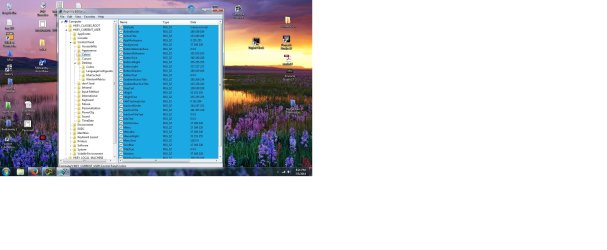
Have it now thanks.
 

Attachments

My Computer My Computer

At a glance

Windows 7 Ultimate 64-bit SP1Phenom II X4 98012.0GB Dual-Channel DDR3 @ 669MHz (9-9-9-24)2047MB NVIDIA GeForce GTX 650 Ti (Gigabyte)
Computer type
PC/Desktop
Computer Manufacturer/Model Number
custom build
OS
Windows 7 Ultimate 64-bit SP1
CPU
Phenom II X4 980
Motherboard
GA-890GPA-UD3H
Memory
12.0GB Dual-Channel DDR3 @ 669MHz (9-9-9-24)
Graphics Card(s)
2047MB NVIDIA GeForce GTX 650 Ti (Gigabyte)
Monitor(s) Displays
EQ3266e auria tv monitor
Screen Resolution
1360 x 768
Hard Drives
1863GB Western Digital WDC WD20EARX-00PASB0 ATA Device (SATA)
119GB OCZ-VERTEX4 ATA Device (SSD)
465GB Western Digital WDC WD5000AAKS-75A7B0 ATA Device (SATA)
PSU
Rosewill Xtreme Series RX750
Case
Antec Nine Hundred
Cooling
CPU water cooled and Case air cooled
Keyboard
Logitech wireless k260
Mouse
Logitech wireless M210
Antivirus
Malewarebytes,SpyBot S&D,SuperAntispyware
Browser
FireFoxe 30.0
Ok, it looks as though the values in the default subkey for both keys are incorrect (note the commas)
All sub keys under Desktop\Colors also have commas, should be spaces, not commas
27 169 228​
regedit and modify the
Default subkey - delete the value


HKEY_CURRENT_USER\Control Panel\Desktop\Colors
InfoWindow 27 169 228
Window 27 169 228


Look at Callender's screen shots in post# 15 - it should be
Default (value not set)​

Code:
HKEY_CURRENT_USER\Control Panel\Colors
[B](Default)    REG_SZ    27,169,228[/B]
InfoWindow    REG_SZ    27 169 228
Window    REG_SZ    27 169 228


HKEY_CURRENT_USER\Control Panel\Desktop\Colors
[B](Default)    REG_SZ    27,169,228[/B]
InfoWindow    REG_SZ    27,169,228
Window    REG_SZ    27,169,228
 

My Computer My Computer

At a glance

x64 (6.3.9600) Win8.1 Pro & soon dual boot x6...AMD A6-3420M APU with Radeon(tm) HD Graphics6.00 GBAMD Radeon(TM) HD 6520G
Computer type
Laptop
Computer Manufacturer/Model Number
HP Pavilion dv6-6c10us
OS
x64 (6.3.9600) Win8.1 Pro & soon dual boot x64 (6.1.7601) Win7_SP1 HomePrem
CPU
AMD A6-3420M APU with Radeon(tm) HD Graphics
Motherboard
Hewlett-Packard 1805
Memory
6.00 GB
Graphics Card(s)
AMD Radeon(TM) HD 6520G
Sound Card
(1) AMD High Definition Audio Device (2) IDT High Definiti
Monitor(s) Displays
HP W2072a 20" LCD (1600 x 900) @ 60 Hz
Screen Resolution
1366 x 768 x 32 bits (4294967296 colors) @ 60 Hz
Hard Drives
ST640LM0 00 HM641JI SATA Disk Device
Keyboard
Logitech k520 wireless KB
Mouse
Logitech m320 wireless mouse (bundled with KB)
Internet Speed
15/5 | 54 MB Wireless 'n'
Antivirus
Realtime: Defender or Avast | On-demand: Malwarebytes, ESET
Browser
IE 11 on Win8, IE 10 on win 7
Other Info
Media: [Gimp, Audacity, VLC] || Comm: [WEmail 2012, Skype] || Productivity: [OpenOffice,| Textpad] || Utils: [Sysinternals, cCleaner, Speccy, Defraggler]
Ok, it looks as though the values in the default subkey for both keys are incorrect (note the commas)
All sub keys under Desktop\Colors also have commas, should be spaces, not commas
27 169 228​
regedit and modify the
Default subkey - delete the value


HKEY_CURRENT_USER\Control Panel\Desktop\Colors
InfoWindow 27 169 228
Window 27 169 228


Look at Callender's screen shots in post# 15 - it should be
Default (value not set)​
Code:
HKEY_CURRENT_USER\Control Panel\Colors
[B](Default)    REG_SZ    27,169,228[/B]
InfoWindow    REG_SZ    27 169 228
Window    REG_SZ    27 169 228


HKEY_CURRENT_USER\Control Panel\Desktop\Colors
[B](Default)    REG_SZ    27,169,228[/B]
InfoWindow    REG_SZ    27,169,228
Window    REG_SZ    27,169,228

Ok thanks that is done.
 

My Computer My Computer

At a glance

Windows 7 Ultimate 64-bit SP1Phenom II X4 98012.0GB Dual-Channel DDR3 @ 669MHz (9-9-9-24)2047MB NVIDIA GeForce GTX 650 Ti (Gigabyte)
Computer type
PC/Desktop
Computer Manufacturer/Model Number
custom build
OS
Windows 7 Ultimate 64-bit SP1
CPU
Phenom II X4 980
Motherboard
GA-890GPA-UD3H
Memory
12.0GB Dual-Channel DDR3 @ 669MHz (9-9-9-24)
Graphics Card(s)
2047MB NVIDIA GeForce GTX 650 Ti (Gigabyte)
Monitor(s) Displays
EQ3266e auria tv monitor
Screen Resolution
1360 x 768
Hard Drives
1863GB Western Digital WDC WD20EARX-00PASB0 ATA Device (SATA)
119GB OCZ-VERTEX4 ATA Device (SSD)
465GB Western Digital WDC WD5000AAKS-75A7B0 ATA Device (SATA)
PSU
Rosewill Xtreme Series RX750
Case
Antec Nine Hundred
Cooling
CPU water cooled and Case air cooled
Keyboard
Logitech wireless k260
Mouse
Logitech wireless M210
Antivirus
Malewarebytes,SpyBot S&D,SuperAntispyware
Browser
FireFoxe 30.0
I missed the values with commas the first time on these subkeys

HKEY_CURRENT_USER\Control Panel\Desktop\Colors
WindowFrame 205,30,201
Scrollbar 27,169,228

regedit and modify the value on
WindowFrame 205 30 201
Scrollbar 27 169 228

spaces, not commas

Run the rqColor.bat file again and attach the new HKCUcolor.txt file

I built a table that shows what the last HKCUcolor.txt file had in it (fixes applied in the test). Some are very light or white - if you scroll over the description, (object column) you can read the lighter colors.

HKEY_CURRENT_USER\Control Panel\Colors
Object | RGB
Background | 27 169 228
Scrollbar | 27 169 228
ActiveTitle | 153 180 209
InactiveTitle | 191 205 219
Menu | 27 169 228
Window | 27 169 228
WindowFrame | 100 100 100
MenuText | 128 0 0
WindowText | 0 0 0
TitleText | 0 0 0
ActiveBorder | 180 180 180
InactiveBorder | 244 247 252
AppWorkspace | 0 255 255
Hilight | 51 153 255
HilightText | 255 255 255
ButtonFace | 240 240 240
ButtonShadow | 160 160 160
GrayText | 109 109 109
ButtonText | 0 0 0
InactiveTitleText | 0 0 0
ButtonHilight | 255 255 255
ButtonDkShadow | 105 105 105
ButtonLight | 227 227 227
InfoText | 0 0 0
InfoWindow | 27 169 228
ButtonAlternateFace | 0 0 0
HotTrackingColor | 0 102 204
GradientActiveTitle | 185 209 234
GradientInactiveTitle | 215 228 242
MenuHilight | 51 153 255
MenuBar | 27 169 228
Default (not set) |

Note that you have different values set in the two keys for some sub-keys (WindowFrame for example).
 

My Computer My Computer

At a glance

x64 (6.3.9600) Win8.1 Pro & soon dual boot x6...AMD A6-3420M APU with Radeon(tm) HD Graphics6.00 GBAMD Radeon(TM) HD 6520G
Computer type
Laptop
Computer Manufacturer/Model Number
HP Pavilion dv6-6c10us
OS
x64 (6.3.9600) Win8.1 Pro & soon dual boot x64 (6.1.7601) Win7_SP1 HomePrem
CPU
AMD A6-3420M APU with Radeon(tm) HD Graphics
Motherboard
Hewlett-Packard 1805
Memory
6.00 GB
Graphics Card(s)
AMD Radeon(TM) HD 6520G
Sound Card
(1) AMD High Definition Audio Device (2) IDT High Definiti
Monitor(s) Displays
HP W2072a 20" LCD (1600 x 900) @ 60 Hz
Screen Resolution
1366 x 768 x 32 bits (4294967296 colors) @ 60 Hz
Hard Drives
ST640LM0 00 HM641JI SATA Disk Device
Keyboard
Logitech k520 wireless KB
Mouse
Logitech m320 wireless mouse (bundled with KB)
Internet Speed
15/5 | 54 MB Wireless 'n'
Antivirus
Realtime: Defender or Avast | On-demand: Malwarebytes, ESET
Browser
IE 11 on Win8, IE 10 on win 7
Other Info
Media: [Gimp, Audacity, VLC] || Comm: [WEmail 2012, Skype] || Productivity: [OpenOffice,| Textpad] || Utils: [Sysinternals, cCleaner, Speccy, Defraggler]
Here is the new file. I did notice that I was missing the "Background" first one in the list ?
 

Attachments

My Computer My Computer

At a glance

Windows 7 Ultimate 64-bit SP1Phenom II X4 98012.0GB Dual-Channel DDR3 @ 669MHz (9-9-9-24)2047MB NVIDIA GeForce GTX 650 Ti (Gigabyte)
Computer type
PC/Desktop
Computer Manufacturer/Model Number
custom build
OS
Windows 7 Ultimate 64-bit SP1
CPU
Phenom II X4 980
Motherboard
GA-890GPA-UD3H
Memory
12.0GB Dual-Channel DDR3 @ 669MHz (9-9-9-24)
Graphics Card(s)
2047MB NVIDIA GeForce GTX 650 Ti (Gigabyte)
Monitor(s) Displays
EQ3266e auria tv monitor
Screen Resolution
1360 x 768
Hard Drives
1863GB Western Digital WDC WD20EARX-00PASB0 ATA Device (SATA)
119GB OCZ-VERTEX4 ATA Device (SSD)
465GB Western Digital WDC WD5000AAKS-75A7B0 ATA Device (SATA)
PSU
Rosewill Xtreme Series RX750
Case
Antec Nine Hundred
Cooling
CPU water cooled and Case air cooled
Keyboard
Logitech wireless k260
Mouse
Logitech wireless M210
Antivirus
Malewarebytes,SpyBot S&D,SuperAntispyware
Browser
FireFoxe 30.0
I took a quick look and all of the values look like they are the correct syntax (3 numbers - no commas)

Background is only in HKEY_CURRENT_USER\Control Panel\Colors
??? missing the "Background" first one in the list ???
Background was there - I built the table from your HKCUcolor.txt file in post # 24

If you meant there isn't one in the HKEY_CURRENT_USER\Control Panel\Desktop\Colors key, that's different than missing.
There is no background subkey for this key, only the other key.

Please try not to over think this, always refer back to Callender's post for the definitive list.

What do you see now as far as colors? Post a screen shot of the window
 

My Computer My Computer

At a glance

x64 (6.3.9600) Win8.1 Pro & soon dual boot x6...AMD A6-3420M APU with Radeon(tm) HD Graphics6.00 GBAMD Radeon(TM) HD 6520G
Computer type
Laptop
Computer Manufacturer/Model Number
HP Pavilion dv6-6c10us
OS
x64 (6.3.9600) Win8.1 Pro & soon dual boot x64 (6.1.7601) Win7_SP1 HomePrem
CPU
AMD A6-3420M APU with Radeon(tm) HD Graphics
Motherboard
Hewlett-Packard 1805
Memory
6.00 GB
Graphics Card(s)
AMD Radeon(TM) HD 6520G
Sound Card
(1) AMD High Definition Audio Device (2) IDT High Definiti
Monitor(s) Displays
HP W2072a 20" LCD (1600 x 900) @ 60 Hz
Screen Resolution
1366 x 768 x 32 bits (4294967296 colors) @ 60 Hz
Hard Drives
ST640LM0 00 HM641JI SATA Disk Device
Keyboard
Logitech k520 wireless KB
Mouse
Logitech m320 wireless mouse (bundled with KB)
Internet Speed
15/5 | 54 MB Wireless 'n'
Antivirus
Realtime: Defender or Avast | On-demand: Malwarebytes, ESET
Browser
IE 11 on Win8, IE 10 on win 7
Other Info
Media: [Gimp, Audacity, VLC] || Comm: [WEmail 2012, Skype] || Productivity: [OpenOffice,| Textpad] || Utils: [Sysinternals, cCleaner, Speccy, Defraggler]
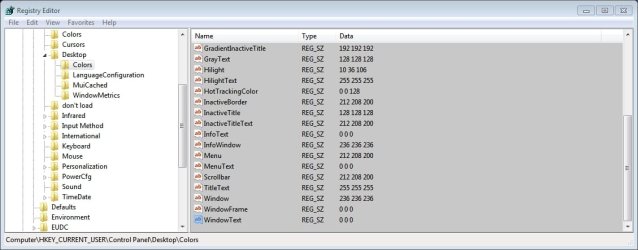
It is Interesting that some of the windows are changed but the one I really want wont change and that is the computer window.
 

Attachments

  • computer 1.jpg
    computer 1.jpg
    138.5 KB · Views: 9
  • regedit 1.jpg
    regedit 1.jpg
    194.1 KB · Views: 10

My Computer My Computer

At a glance

Windows 7 Ultimate 64-bit SP1Phenom II X4 98012.0GB Dual-Channel DDR3 @ 669MHz (9-9-9-24)2047MB NVIDIA GeForce GTX 650 Ti (Gigabyte)
Computer type
PC/Desktop
Computer Manufacturer/Model Number
custom build
OS
Windows 7 Ultimate 64-bit SP1
CPU
Phenom II X4 980
Motherboard
GA-890GPA-UD3H
Memory
12.0GB Dual-Channel DDR3 @ 669MHz (9-9-9-24)
Graphics Card(s)
2047MB NVIDIA GeForce GTX 650 Ti (Gigabyte)
Monitor(s) Displays
EQ3266e auria tv monitor
Screen Resolution
1360 x 768
Hard Drives
1863GB Western Digital WDC WD20EARX-00PASB0 ATA Device (SATA)
119GB OCZ-VERTEX4 ATA Device (SSD)
465GB Western Digital WDC WD5000AAKS-75A7B0 ATA Device (SATA)
PSU
Rosewill Xtreme Series RX750
Case
Antec Nine Hundred
Cooling
CPU water cooled and Case air cooled
Keyboard
Logitech wireless k260
Mouse
Logitech wireless M210
Antivirus
Malewarebytes,SpyBot S&D,SuperAntispyware
Browser
FireFoxe 30.0
It might be a good idea to
  • backup your registry
    ,
  • export HKCU\Control Panel\Colors
    and
  • export HKCU\Control Panel\Desktop\Colors

I'm not sure if I understand; ... but the one I really want wont change and that is the computer window.

Your images show Libraries (white background) and the registry editor (blue background - was blue the color you set?)

Do you mean the Desktop background? All other windows sit on the desktop.

I think Callender has a better handle on the color registry keys.

Here's a good color code reference, it uses periods to delineate R.G.B.

In this exercise, the registry keys use spaces to delineate R G B
 

My Computer My Computer

At a glance

x64 (6.3.9600) Win8.1 Pro & soon dual boot x6...AMD A6-3420M APU with Radeon(tm) HD Graphics6.00 GBAMD Radeon(TM) HD 6520G
Computer type
Laptop
Computer Manufacturer/Model Number
HP Pavilion dv6-6c10us
OS
x64 (6.3.9600) Win8.1 Pro & soon dual boot x64 (6.1.7601) Win7_SP1 HomePrem
CPU
AMD A6-3420M APU with Radeon(tm) HD Graphics
Motherboard
Hewlett-Packard 1805
Memory
6.00 GB
Graphics Card(s)
AMD Radeon(TM) HD 6520G
Sound Card
(1) AMD High Definition Audio Device (2) IDT High Definiti
Monitor(s) Displays
HP W2072a 20" LCD (1600 x 900) @ 60 Hz
Screen Resolution
1366 x 768 x 32 bits (4294967296 colors) @ 60 Hz
Hard Drives
ST640LM0 00 HM641JI SATA Disk Device
Keyboard
Logitech k520 wireless KB
Mouse
Logitech m320 wireless mouse (bundled with KB)
Internet Speed
15/5 | 54 MB Wireless 'n'
Antivirus
Realtime: Defender or Avast | On-demand: Malwarebytes, ESET
Browser
IE 11 on Win8, IE 10 on win 7
Other Info
Media: [Gimp, Audacity, VLC] || Comm: [WEmail 2012, Skype] || Productivity: [OpenOffice,| Textpad] || Utils: [Sysinternals, cCleaner, Speccy, Defraggler]
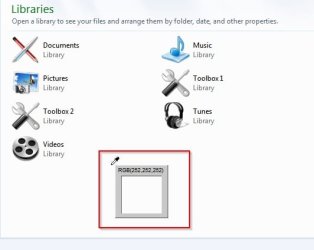
I meant the "Libraries" sorry about that one.
 

My Computer My Computer

At a glance

Windows 7 Ultimate 64-bit SP1Phenom II X4 98012.0GB Dual-Channel DDR3 @ 669MHz (9-9-9-24)2047MB NVIDIA GeForce GTX 650 Ti (Gigabyte)
Computer type
PC/Desktop
Computer Manufacturer/Model Number
custom build
OS
Windows 7 Ultimate 64-bit SP1
CPU
Phenom II X4 980
Motherboard
GA-890GPA-UD3H
Memory
12.0GB Dual-Channel DDR3 @ 669MHz (9-9-9-24)
Graphics Card(s)
2047MB NVIDIA GeForce GTX 650 Ti (Gigabyte)
Monitor(s) Displays
EQ3266e auria tv monitor
Screen Resolution
1360 x 768
Hard Drives
1863GB Western Digital WDC WD20EARX-00PASB0 ATA Device (SATA)
119GB OCZ-VERTEX4 ATA Device (SSD)
465GB Western Digital WDC WD5000AAKS-75A7B0 ATA Device (SATA)
PSU
Rosewill Xtreme Series RX750
Case
Antec Nine Hundred
Cooling
CPU water cooled and Case air cooled
Keyboard
Logitech wireless k260
Mouse
Logitech wireless M210
Antivirus
Malewarebytes,SpyBot S&D,SuperAntispyware
Browser
FireFoxe 30.0
Ok, Libraries it is then, thanks.

Libraries are a different beast, they're not really folders. There is an xml file that defines them. I'll look to see if there is a way to define color in the xml, or a way to get color changes to be applied to Libraries.

Now we're getting to the core issue.


I found another registry key that defines color
HKCU\Control Panel\Desktop\WindowMetrics​
and modified rqColor.bat to query that key as well

you can run the query by hand
reg query "HKCU\Control Panel\Desktop\WindowMetrics" /s​
or download and run the new rqColor.bat

Download


The download might be appended with a numeric - rqColor (1).bat - to avoid that, rename or delete the existing rqColor.bat file before downloading the new one.

the WindowsMetrics key might affect Libraries, I don't know. Post the results of the query (either a screen shot of the "by hand query" or a new HKCUcolor.txt file produced by the new rqColor.bat.


There's also another way to change colors through Windows Control Panel > Display > Change Colors
You have to start with a Basic or High Contrast > Windows Classic theme.

This method is preferred over registry editing for two reasons
1) You don't run the risk of corrupting the registry
2) You can preview the colors selected (albeit a small color box)

It will take some additional customization to set the desktop background image, sounds, screen saver, etc. - but that's why it's called customization :)

See: http://www.sevenforums.com/tutorials/282-window-color-appearance-change.html
Scroll down to OPTION TWO, step 7 describes color changes

The tutorial explicitly states that this will only work if you select the Windows Classic theme as the base.

Post any progress or questions. Thanks.
 

Attachments

My Computer My Computer

At a glance

x64 (6.3.9600) Win8.1 Pro & soon dual boot x6...AMD A6-3420M APU with Radeon(tm) HD Graphics6.00 GBAMD Radeon(TM) HD 6520G
Computer type
Laptop
Computer Manufacturer/Model Number
HP Pavilion dv6-6c10us
OS
x64 (6.3.9600) Win8.1 Pro & soon dual boot x64 (6.1.7601) Win7_SP1 HomePrem
CPU
AMD A6-3420M APU with Radeon(tm) HD Graphics
Motherboard
Hewlett-Packard 1805
Memory
6.00 GB
Graphics Card(s)
AMD Radeon(TM) HD 6520G
Sound Card
(1) AMD High Definition Audio Device (2) IDT High Definiti
Monitor(s) Displays
HP W2072a 20" LCD (1600 x 900) @ 60 Hz
Screen Resolution
1366 x 768 x 32 bits (4294967296 colors) @ 60 Hz
Hard Drives
ST640LM0 00 HM641JI SATA Disk Device
Keyboard
Logitech k520 wireless KB
Mouse
Logitech m320 wireless mouse (bundled with KB)
Internet Speed
15/5 | 54 MB Wireless 'n'
Antivirus
Realtime: Defender or Avast | On-demand: Malwarebytes, ESET
Browser
IE 11 on Win8, IE 10 on win 7
Other Info
Media: [Gimp, Audacity, VLC] || Comm: [WEmail 2012, Skype] || Productivity: [OpenOffice,| Textpad] || Utils: [Sysinternals, cCleaner, Speccy, Defraggler]
Themes

Hi Slatybart and Damando25. Looks like you've been working hard!

Damando25 - you backed up your original settings as shown in this post?

Well hopefully you did. Anyway after some messing about on my machine it seems that those color settings will only take effect for the Libraries window if you choose to use the Windows 7 Basic or Classic Themes.

You can save your current theme and test this for yourself.

Here I've applied the Landscapes theme:

The left pane color choice is over-ridden by the Landscape theme regardless of the registry settings.

Background a.jpg

The same goes for the Libraries pane. I've used a color picker to show actual color applied by use of the Landscapes theme.

Background b.jpg
 

My Computer My Computer

At a glance

Microsoft Windows 7 Home Premium 64-bit 7601 ...AMD C-60 APU with Radeon(tm) HD Graphics4.00 GBAMD Radeon HD 6290 Graphics
Computer type
Laptop
Computer Manufacturer/Model Number
ASUS
OS
Microsoft Windows 7 Home Premium 64-bit 7601 Multiprocessor Free Service Pack 1
CPU
AMD C-60 APU with Radeon(tm) HD Graphics
Motherboard
ASUSTeK COMPUTER INC. X501U
Memory
4.00 GB
Graphics Card(s)
AMD Radeon HD 6290 Graphics
Sound Card
(1) AMD High Definition Audio Device (2) Realtek High Defi
Screen Resolution
1366 x 768 x 32 bits (4294967296 colors) @ 60 Hz
Hard Drives
Hitachi HTS545050A7E380 SATA Disk Device
Antivirus
Comodo CIS & FW, SecureAplus App Whitelisting, Threatfire
Browser
Cyberfox 64bit, Opera 64bit, Airfox
Other Info
Spy-The-Spy, HitmanPro.Alert, Norton Connect Safe, MJRegWatcher, BitDefender TrafficLight, Voodoo Shield, Zemana AntiMalware
Well done...

Ok, Libraries it is then, thanks.

Libraries are a different beast, they're not really folders. There is an xml file that defines them. I'll look to see if there is a way to define color in the xml, or a way to get color changes to be applied to Libraries.

Now we're getting to the core issue.

:thumbsup:
 

My Computer My Computer

At a glance

Microsoft Windows 7 Home Premium 64-bit 7601 ...AMD C-60 APU with Radeon(tm) HD Graphics4.00 GBAMD Radeon HD 6290 Graphics
Computer type
Laptop
Computer Manufacturer/Model Number
ASUS
OS
Microsoft Windows 7 Home Premium 64-bit 7601 Multiprocessor Free Service Pack 1
CPU
AMD C-60 APU with Radeon(tm) HD Graphics
Motherboard
ASUSTeK COMPUTER INC. X501U
Memory
4.00 GB
Graphics Card(s)
AMD Radeon HD 6290 Graphics
Sound Card
(1) AMD High Definition Audio Device (2) Realtek High Defi
Screen Resolution
1366 x 768 x 32 bits (4294967296 colors) @ 60 Hz
Hard Drives
Hitachi HTS545050A7E380 SATA Disk Device
Antivirus
Comodo CIS & FW, SecureAplus App Whitelisting, Threatfire
Browser
Cyberfox 64bit, Opera 64bit, Airfox
Other Info
Spy-The-Spy, HitmanPro.Alert, Norton Connect Safe, MJRegWatcher, BitDefender TrafficLight, Voodoo Shield, Zemana AntiMalware
The left pane color choice is over-ridden by the Landscape theme regardless of the registry settings.

The same goes for the Libraries pane. I've used a color picker to show actual color applied by use of the Landscapes theme.

Nice work Callender and thanks for providing real world testing.

Then you're saying that the customized colors do not affect the left pane, or the landscape theme overrides. I think I'm confused by Landscape.

You could have chosen a brighter color in your color picker example - fuchsia (#ff0080 | 255 0 128) perhaps - ;)
:roflmao:
 

My Computer My Computer

At a glance

x64 (6.3.9600) Win8.1 Pro & soon dual boot x6...AMD A6-3420M APU with Radeon(tm) HD Graphics6.00 GBAMD Radeon(TM) HD 6520G
Computer type
Laptop
Computer Manufacturer/Model Number
HP Pavilion dv6-6c10us
OS
x64 (6.3.9600) Win8.1 Pro & soon dual boot x64 (6.1.7601) Win7_SP1 HomePrem
CPU
AMD A6-3420M APU with Radeon(tm) HD Graphics
Motherboard
Hewlett-Packard 1805
Memory
6.00 GB
Graphics Card(s)
AMD Radeon(TM) HD 6520G
Sound Card
(1) AMD High Definition Audio Device (2) IDT High Definiti
Monitor(s) Displays
HP W2072a 20" LCD (1600 x 900) @ 60 Hz
Screen Resolution
1366 x 768 x 32 bits (4294967296 colors) @ 60 Hz
Hard Drives
ST640LM0 00 HM641JI SATA Disk Device
Keyboard
Logitech k520 wireless KB
Mouse
Logitech m320 wireless mouse (bundled with KB)
Internet Speed
15/5 | 54 MB Wireless 'n'
Antivirus
Realtime: Defender or Avast | On-demand: Malwarebytes, ESET
Browser
IE 11 on Win8, IE 10 on win 7
Other Info
Media: [Gimp, Audacity, VLC] || Comm: [WEmail 2012, Skype] || Productivity: [OpenOffice,| Textpad] || Utils: [Sysinternals, cCleaner, Speccy, Defraggler]
Libraries Color

Then you're saying that the customized colors do not affect the left pane, or the landscape theme overrides. I think I'm confused by Landscape.

You could have chosen a brighter color in your color picker example - fuchsia (#ff0080 | 255 0 128) perhaps - ;)
:roflmao:

Well as far as I can work out if I use Basic or Classic themes then colors for both the left pane and the Libraries pane along with Explorer window are defined by the settings applied in

HKEY_CURRENT_USER\Control Panel\Colors

HKEY_CURRENT_USER\Control Panel\Desktop\Colors

However choosing another theme results in those color settings being ignored for left pane and libraries.

Explorer window seems to follow the color set in the registry regardless of the theme. I only tested Landscape!

When using Landscape the Libraries pane color remained set to 252 252 252 - even though it wasn't the choice defined by me in the registry. I checked at the time and 252 252 252 didn't appear anywhere in

HKEY_CURRENT_USER\Control Panel\Colors

HKEY_CURRENT_USER\Control Panel\Desktop\Colors
 

My Computer My Computer

At a glance

Microsoft Windows 7 Home Premium 64-bit 7601 ...AMD C-60 APU with Radeon(tm) HD Graphics4.00 GBAMD Radeon HD 6290 Graphics
Computer type
Laptop
Computer Manufacturer/Model Number
ASUS
OS
Microsoft Windows 7 Home Premium 64-bit 7601 Multiprocessor Free Service Pack 1
CPU
AMD C-60 APU with Radeon(tm) HD Graphics
Motherboard
ASUSTeK COMPUTER INC. X501U
Memory
4.00 GB
Graphics Card(s)
AMD Radeon HD 6290 Graphics
Sound Card
(1) AMD High Definition Audio Device (2) Realtek High Defi
Screen Resolution
1366 x 768 x 32 bits (4294967296 colors) @ 60 Hz
Hard Drives
Hitachi HTS545050A7E380 SATA Disk Device
Antivirus
Comodo CIS & FW, SecureAplus App Whitelisting, Threatfire
Browser
Cyberfox 64bit, Opera 64bit, Airfox
Other Info
Spy-The-Spy, HitmanPro.Alert, Norton Connect Safe, MJRegWatcher, BitDefender TrafficLight, Voodoo Shield, Zemana AntiMalware
This is really buggy to me but I am glad it is finally working the way I need it. I had changed it when "Callender" said to do so before but it did not change and I was logging off all the time and nothing happened Now I accidentally rebooted and everything changed to the color I picked. I am So happy :) but also believe it should have changed just by logging off too.
 

My Computer My Computer

At a glance

Windows 7 Ultimate 64-bit SP1Phenom II X4 98012.0GB Dual-Channel DDR3 @ 669MHz (9-9-9-24)2047MB NVIDIA GeForce GTX 650 Ti (Gigabyte)
Computer type
PC/Desktop
Computer Manufacturer/Model Number
custom build
OS
Windows 7 Ultimate 64-bit SP1
CPU
Phenom II X4 980
Motherboard
GA-890GPA-UD3H
Memory
12.0GB Dual-Channel DDR3 @ 669MHz (9-9-9-24)
Graphics Card(s)
2047MB NVIDIA GeForce GTX 650 Ti (Gigabyte)
Monitor(s) Displays
EQ3266e auria tv monitor
Screen Resolution
1360 x 768
Hard Drives
1863GB Western Digital WDC WD20EARX-00PASB0 ATA Device (SATA)
119GB OCZ-VERTEX4 ATA Device (SSD)
465GB Western Digital WDC WD5000AAKS-75A7B0 ATA Device (SATA)
PSU
Rosewill Xtreme Series RX750
Case
Antec Nine Hundred
Cooling
CPU water cooled and Case air cooled
Keyboard
Logitech wireless k260
Mouse
Logitech wireless M210
Antivirus
Malewarebytes,SpyBot S&D,SuperAntispyware
Browser
FireFoxe 30.0
Here is proof. Thanks again to both of you for being so patient with me. :)
 

Attachments

  • done custome colors.jpg
    done custome colors.jpg
    82.9 KB · Views: 18

My Computer My Computer

At a glance

Windows 7 Ultimate 64-bit SP1Phenom II X4 98012.0GB Dual-Channel DDR3 @ 669MHz (9-9-9-24)2047MB NVIDIA GeForce GTX 650 Ti (Gigabyte)
Computer type
PC/Desktop
Computer Manufacturer/Model Number
custom build
OS
Windows 7 Ultimate 64-bit SP1
CPU
Phenom II X4 980
Motherboard
GA-890GPA-UD3H
Memory
12.0GB Dual-Channel DDR3 @ 669MHz (9-9-9-24)
Graphics Card(s)
2047MB NVIDIA GeForce GTX 650 Ti (Gigabyte)
Monitor(s) Displays
EQ3266e auria tv monitor
Screen Resolution
1360 x 768
Hard Drives
1863GB Western Digital WDC WD20EARX-00PASB0 ATA Device (SATA)
119GB OCZ-VERTEX4 ATA Device (SSD)
465GB Western Digital WDC WD5000AAKS-75A7B0 ATA Device (SATA)
PSU
Rosewill Xtreme Series RX750
Case
Antec Nine Hundred
Cooling
CPU water cooled and Case air cooled
Keyboard
Logitech wireless k260
Mouse
Logitech wireless M210
Antivirus
Malewarebytes,SpyBot S&D,SuperAntispyware
Browser
FireFoxe 30.0
Great

Glad to hear that it's sorted. Slatybart did most of the work so credit to him!

Logging off/ on works for me but that wasn't tested using different themes.
 

My Computer My Computer

At a glance

Microsoft Windows 7 Home Premium 64-bit 7601 ...AMD C-60 APU with Radeon(tm) HD Graphics4.00 GBAMD Radeon HD 6290 Graphics
Computer type
Laptop
Computer Manufacturer/Model Number
ASUS
OS
Microsoft Windows 7 Home Premium 64-bit 7601 Multiprocessor Free Service Pack 1
CPU
AMD C-60 APU with Radeon(tm) HD Graphics
Motherboard
ASUSTeK COMPUTER INC. X501U
Memory
4.00 GB
Graphics Card(s)
AMD Radeon HD 6290 Graphics
Sound Card
(1) AMD High Definition Audio Device (2) Realtek High Defi
Screen Resolution
1366 x 768 x 32 bits (4294967296 colors) @ 60 Hz
Hard Drives
Hitachi HTS545050A7E380 SATA Disk Device
Antivirus
Comodo CIS & FW, SecureAplus App Whitelisting, Threatfire
Browser
Cyberfox 64bit, Opera 64bit, Airfox
Other Info
Spy-The-Spy, HitmanPro.Alert, Norton Connect Safe, MJRegWatcher, BitDefender TrafficLight, Voodoo Shield, Zemana AntiMalware
Back
Top