Solved AERO themes causes severe lag in the web browsers.

DARKWORLD

New member
Member
Local time
10:15 AM
Messages
20
I am using two web browsers (IE11 & Chrome) and when any AERO theme is enabled those browsers starting to lag after awhile (tabs opening/closes in 2 frames, scrolling lag and any website layout becomes laggy), I can fix it by minimizing and maximizing them but it gets annoying really quickly since it could happen multiple times in a few minutes or so.

If I switch theme to windows classic - nothing of this happens.

Additional thing I noticed is that when lag appears - taskbar thumbnail preview animation also appears to be slow, not smooth like it usually is.

What could be the cause of this?

Laptop Conf: i7 2.4 Ghz 3630QM, 8 GB RAM, NVIDIA GT650M SLI, Windows 7 Ultimate x64 SP1 + all updates.

SOLVED

Solution for NVIDIA owners:

1) Go to NVIDIA Control Panel -> Manage 3D Settings -> Program Settings.
2) Add Desktop Window Manager (DWM.exe at windows/system32 folder) and Explorer.exe (at windows folder) there.
3) In Power Management Mode for both applications change settings from "Adaptive" to "Prefer Maximum Performance".
4) Hit "Apply" and reboot your system.
 
Last edited:

My Computer My Computer

Computer type
Laptop
Computer Manufacturer/Model Number
Lenovo Y500
OS
Microsoft Windows 7 Ultimate 64-bit 7601 Multiprocessor Free Service Pack 1
CPU
Intel(R) Core(TM) i7-3630QM CPU @ 2.40GHz
Motherboard
Mobile Intel HM76 Express
Memory
8.00 GB
Graphics Card(s)
(1) NVIDIA GeForce GT 650M (2) NVIDIA GeForce GT 650M
Sound Card
(1) NVIDIA Virtual Audio Device (Wave Extensible) (WDM) (2
Screen Resolution
1920 x 1080 x 32 bits (4294967296 colors) @ 59 Hz
Hard Drives
(1) Crucial_ CT256M550SSD3 SCSI Disk Device
(2) ST1000LM 024 HN-M101MBB SCSI Disk Device

My Computer My Computer

Computer type
PC/Desktop
OS
Windows 10 Home x64
CPU
INTEL Core i5-750 Quad-Core 3.37GHz
Motherboard
ASUS P7P55D
Memory
HyperX Fury Black Series 8GB (2 x 4GB) 1866Mhz
Graphics Card(s)
EVGA GeForce GTX 750 Superclocked 1GB 128-Bit GDDR5
Monitor(s) Displays
LG 32MA68HY 32" IPS
Screen Resolution
1920 x 1080
Hard Drives
Samsung 840 Evo 120GB, SEAGATE 500GB Barracuda® 7200.12, SATA 3 Gb/s, 7200 RPM, 16MB cache
PSU
ANTEC TruePower New TP-550, 80 PLUS, 550W
Case
ANTEC Three Hundred Illusion
Cooling
COOLER MASTER Hyper 212 Plus, 4 x 120mm 1 x 140mm Noctua's
Internet Speed
85 + Mbps
Antivirus
Avast
Browser
Vivaldi
Hello, thank you.

Resource monitor during lag doesn't show anything strange. CPU usage at about 3-5%, RAM about 40-50% used.

Also I tried adjusting visual effects for best performance, but ultimately it just switches to windows classic theme and I have no such problems with classic themes.
 

My Computer My Computer

Computer type
Laptop
Computer Manufacturer/Model Number
Lenovo Y500
OS
Microsoft Windows 7 Ultimate 64-bit 7601 Multiprocessor Free Service Pack 1
CPU
Intel(R) Core(TM) i7-3630QM CPU @ 2.40GHz
Motherboard
Mobile Intel HM76 Express
Memory
8.00 GB
Graphics Card(s)
(1) NVIDIA GeForce GT 650M (2) NVIDIA GeForce GT 650M
Sound Card
(1) NVIDIA Virtual Audio Device (Wave Extensible) (WDM) (2
Screen Resolution
1920 x 1080 x 32 bits (4294967296 colors) @ 59 Hz
Hard Drives
(1) Crucial_ CT256M550SSD3 SCSI Disk Device
(2) ST1000LM 024 HN-M101MBB SCSI Disk Device

My Computer My Computer

Computer type
PC/Desktop
OS
Windows 10 Home x64
CPU
INTEL Core i5-750 Quad-Core 3.37GHz
Motherboard
ASUS P7P55D
Memory
HyperX Fury Black Series 8GB (2 x 4GB) 1866Mhz
Graphics Card(s)
EVGA GeForce GTX 750 Superclocked 1GB 128-Bit GDDR5
Monitor(s) Displays
LG 32MA68HY 32" IPS
Screen Resolution
1920 x 1080
Hard Drives
Samsung 840 Evo 120GB, SEAGATE 500GB Barracuda® 7200.12, SATA 3 Gb/s, 7200 RPM, 16MB cache
PSU
ANTEC TruePower New TP-550, 80 PLUS, 550W
Case
ANTEC Three Hundred Illusion
Cooling
COOLER MASTER Hyper 212 Plus, 4 x 120mm 1 x 140mm Noctua's
Internet Speed
85 + Mbps
Antivirus
Avast
Browser
Vivaldi
Thanks for suggestion!

I did a clean startup and I cant say for sure, but the issue seems to be gone now. Need some further testing though, since it randomly occurs and sometimes not very often.

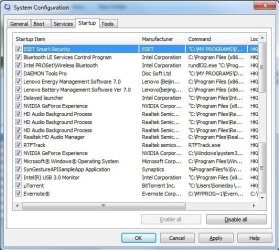
I cant see anything criminal among those programs though... Mostly NVIDIA/Intel programs & a defrag utility.

EDIT: Spoke too soon I guess, worked whole day without those lag's, but in the evening they appeared again for no reason and all that during clean startup... Totally clueless right now.
 
Last edited:

My Computer My Computer

Computer type
Laptop
Computer Manufacturer/Model Number
Lenovo Y500
OS
Microsoft Windows 7 Ultimate 64-bit 7601 Multiprocessor Free Service Pack 1
CPU
Intel(R) Core(TM) i7-3630QM CPU @ 2.40GHz
Motherboard
Mobile Intel HM76 Express
Memory
8.00 GB
Graphics Card(s)
(1) NVIDIA GeForce GT 650M (2) NVIDIA GeForce GT 650M
Sound Card
(1) NVIDIA Virtual Audio Device (Wave Extensible) (WDM) (2
Screen Resolution
1920 x 1080 x 32 bits (4294967296 colors) @ 59 Hz
Hard Drives
(1) Crucial_ CT256M550SSD3 SCSI Disk Device
(2) ST1000LM 024 HN-M101MBB SCSI Disk Device
I'm swamped with work during the week. I'll ask for some more eyes for your problem. A Guy
 

My Computer My Computer

Computer type
PC/Desktop
OS
Windows 10 Home x64
CPU
INTEL Core i5-750 Quad-Core 3.37GHz
Motherboard
ASUS P7P55D
Memory
HyperX Fury Black Series 8GB (2 x 4GB) 1866Mhz
Graphics Card(s)
EVGA GeForce GTX 750 Superclocked 1GB 128-Bit GDDR5
Monitor(s) Displays
LG 32MA68HY 32" IPS
Screen Resolution
1920 x 1080
Hard Drives
Samsung 840 Evo 120GB, SEAGATE 500GB Barracuda® 7200.12, SATA 3 Gb/s, 7200 RPM, 16MB cache
PSU
ANTEC TruePower New TP-550, 80 PLUS, 550W
Case
ANTEC Three Hundred Illusion
Cooling
COOLER MASTER Hyper 212 Plus, 4 x 120mm 1 x 140mm Noctua's
Internet Speed
85 + Mbps
Antivirus
Avast
Browser
Vivaldi
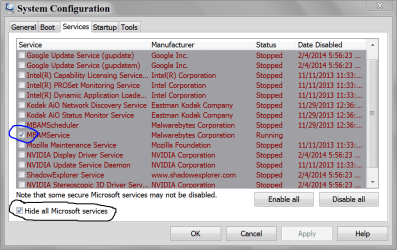
Did you turn off the Nvidia software which tags along with the driver which is all that's really needed unless you overclock or need other special settings not provided by Win7? I always turn it all off in msconfig>Startup and >Services after Hiding all MS Services. Nothing is really needed in either place except your AV.

If you left any other Startups or Non-MS Services under msconfig then I'd turn them all off, including for a limited time your AV to test without it.

Try uninstalling Display driver in Device Manager and Control Panel>Programs then enable Automatically deliver drivers via Windows Update (Step 3) and Check for Updates, install all Important and Optional to see if it delivers a driver Win7 wants, and/or patches which are needed for the hardware to run correctly.

On the chance its a failing GPU, edit out of Visual Effects fading, sliding, animation, dragging intact and Selection Rectangle which put a strain on resources so I always edit out on low-resource machines - same principle to reduce strain on possibly failing GPU.

If no joy, work through the other http://www.sevenforums.com/tutorials/220165-troubleshooting-steps-windows-7-a.html
 
Last edited:

My Computer My Computer

Computer type
PC/Desktop
Computer Manufacturer/Model Number
Home made Desktop
OS
Windows 10 Pro. 64/ version 1709 Windows 7 Pro/64
CPU
Intel i7-6800K @ 4.3
Motherboard
ASUS X-99 Deluxe II
Memory
Corsair Platinum 16 gig @2400
Graphics Card(s)
EVGA GTX 1070 OC
Monitor(s) Displays
Asus 27" LED LCD/VE278Q
Screen Resolution
1920-1080 or 1280-720 HDMI
Hard Drives
INTEL SSD 730-240 Gb Sata 3.0/
PSU
EVGA Platium 1200W
Case
Phanteks Luxe Tempered Glass 8 fans/ one radiator
Cooling
XSPC/ Water Cooled CPU
Keyboard
Das 4 Professional
Mouse
Logitech M705/MX Anywhere 2-S
Internet Speed
100 mbits
Antivirus
Microsoft Security Essentials/ Malwarebytes Premium 3.0/ SAS
Browser
I.E. 11 default/Firefox/ ISP Time Warner Cable/Spectrum
Other Info
LG BluRay Burner/
Sound system-KLipsch-THX/
Icy Dock ssd Hot Swap bays.
Did you turn off the Nvidia software which tags along with the driver which is all that's really needed unless you overclock or need other special settings not provided by Win7? I always turn it all off in msconfig>Startup and >Services after Hiding all MS Services. Nothing is really needed in either place except your AV.
Yeah, I tried disabling all the NVIDIA services, it didnt help.

If you left any other Startups or Non-MS Services under msconfig then I'd turn them all off, including for a limited time your AV to test without it.
Hmm, okay, I'll try and test with AV turned off.

Try uninstalling Display driver in Device Manager and Control Panel>Programs then enable Automatically deliver drivers via Windows Update (Step 3) and Check for Updates, install all Important and Optional to see if it delivers a driver Win7 wants, and/or patches which are needed for the hardware to run correctly.
I did that too, not helping at all, thanks for suggestion tho.

On the chance its a failing GPU, edit out of Visual Effects fading, sliding, animation, dragging intact and Selection Rectangle which put a strain on resources so I always edit out on low-resource machines - same principle to reduce strain on possibly failing GPU.
But in games it working fine, no lags or anything... Also I bought W8 2 months ago and browsers never lagged in W8.

Sorry, I didnt quite get it. You want me to post lists of services/startup programs or something else? I am not sure what you outlined there...
 

My Computer My Computer

Computer type
Laptop
Computer Manufacturer/Model Number
Lenovo Y500
OS
Microsoft Windows 7 Ultimate 64-bit 7601 Multiprocessor Free Service Pack 1
CPU
Intel(R) Core(TM) i7-3630QM CPU @ 2.40GHz
Motherboard
Mobile Intel HM76 Express
Memory
8.00 GB
Graphics Card(s)
(1) NVIDIA GeForce GT 650M (2) NVIDIA GeForce GT 650M
Sound Card
(1) NVIDIA Virtual Audio Device (Wave Extensible) (WDM) (2
Screen Resolution
1920 x 1080 x 32 bits (4294967296 colors) @ 59 Hz
Hard Drives
(1) Crucial_ CT256M550SSD3 SCSI Disk Device
(2) ST1000LM 024 HN-M101MBB SCSI Disk Device
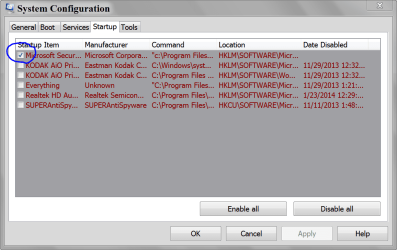
Try uninstalling and reinstalling Flash player using the tool and download from Adobe: Uninstall Flash Player | Windows

I would uninstall all Nvidia in Control Panel, reboot, rightclick on PC in Devices and Printers to enable Hardwsre Auto Updating. Check for Updates to install all Important and Optional which should include drivers and needed patches that may resolve your issue. These may be suppressed by the Nvidia bloatware which causes only problems seen here.
 

My Computer My Computer

Computer type
PC/Desktop
Computer Manufacturer/Model Number
Home made Desktop
OS
Windows 10 Pro. 64/ version 1709 Windows 7 Pro/64
CPU
Intel i7-6800K @ 4.3
Motherboard
ASUS X-99 Deluxe II
Memory
Corsair Platinum 16 gig @2400
Graphics Card(s)
EVGA GTX 1070 OC
Monitor(s) Displays
Asus 27" LED LCD/VE278Q
Screen Resolution
1920-1080 or 1280-720 HDMI
Hard Drives
INTEL SSD 730-240 Gb Sata 3.0/
PSU
EVGA Platium 1200W
Case
Phanteks Luxe Tempered Glass 8 fans/ one radiator
Cooling
XSPC/ Water Cooled CPU
Keyboard
Das 4 Professional
Mouse
Logitech M705/MX Anywhere 2-S
Internet Speed
100 mbits
Antivirus
Microsoft Security Essentials/ Malwarebytes Premium 3.0/ SAS
Browser
I.E. 11 default/Firefox/ ISP Time Warner Cable/Spectrum
Other Info
LG BluRay Burner/
Sound system-KLipsch-THX/
Icy Dock ssd Hot Swap bays.
Try uninstalling and reinstalling Flash player using the tool and download from Adobe: Uninstall Flash Player | Windows
Okay, I just did a clean FP install. Cant really tell if it will still lag though, need further testing.
The problem here is that FP is preinstalled in Chrome as it says o adobe website so the only way to reinstall it is to delete Chrome and I already tried that, so it probably wont work.

I would uninstall all Nvidia in Control Panel, reboot, rightclick on PC in Devices and Printers to enable Hardwsre Auto Updating. Check for Updates to install all Important and Optional which should include drivers and needed patches that may resolve your issue. These may be suppressed by the Nvidia bloatware which causes only problems seen here.
Yeah, tried that too, it just finds some older drivers, no patches or fixes though.

So the best so far is to do a clean startup, that somehow suppresses the lag but after a few hours it occurs again...

What I wanted is you to post pictures like I posted except from your computer.
Your msconfig. The ones I posted was just a example of what I would like to see from your computer.

The tutorial I posted will show you how.


Screenshots and Files - Upload and Post in Seven Forums

http://www.sevenforums.com/tutorials/9733-screenshots-files-upload-post-seven-forums.html
Sorry, I misunderstood that.

Here they are:
 

Attachments

  • final1.jpg
    final1.jpg
    68.1 KB · Views: 46
  • final2.jpg
    final2.jpg
    67.7 KB · Views: 46

My Computer My Computer

Computer type
Laptop
Computer Manufacturer/Model Number
Lenovo Y500
OS
Microsoft Windows 7 Ultimate 64-bit 7601 Multiprocessor Free Service Pack 1
CPU
Intel(R) Core(TM) i7-3630QM CPU @ 2.40GHz
Motherboard
Mobile Intel HM76 Express
Memory
8.00 GB
Graphics Card(s)
(1) NVIDIA GeForce GT 650M (2) NVIDIA GeForce GT 650M
Sound Card
(1) NVIDIA Virtual Audio Device (Wave Extensible) (WDM) (2
Screen Resolution
1920 x 1080 x 32 bits (4294967296 colors) @ 59 Hz
Hard Drives
(1) Crucial_ CT256M550SSD3 SCSI Disk Device
(2) ST1000LM 024 HN-M101MBB SCSI Disk Device
How did we go from understanding the need to have nothing starting up with Win7 for best performance, to having as many startups checked as the grossest factory install?

Do you have the Lenovo factory install which like all factory installs is the worst possible install of Win7 one can have? If so I would strongly consider doing a http://www.sevenforums.com/tutorials/219487-clean-reinstall-factory-oem-windows-7-a.html#post1839164 since no tech enthusiast would run the factory install which is larded with bloatware and poorly-written duplicate utilities that interfere with better versions built into Win7.

That said, I also allow Lenovo Energy Mgmt but only for the purpose of throttling the battery charge to 75% when on A/C to preserve its life. There may always be one factory utility that is studied to be useful.
 
How did we go from understanding the need to have nothing starting up with Win7 for best performance, to having as many startups checked as the grossest factory install?

Do you have the Lenovo factory install which like all factory installs is the worst possible install of Win7 one can have? If so I would strongly consider doing a http://www.sevenforums.com/tutorials/219487-clean-reinstall-factory-oem-windows-7-a.html#post1839164 since no tech enthusiast would run the factory install which is larded with bloatware and poorly-written duplicate utilities that interfere with better versions built into Win7.

That said, I also allow Lenovo Energy Mgmt but only for the purpose of throttling the battery charge to 75% when on A/C to preserve its life. There may always be one factory utility that is studied to be useful.
I said I tried booting without those and it still causes lag...

And no, its not a factory install its just a MS copy I downloaded from their site with OEM drivers.

By the way could it possibly be caused by those KB updates? Because when I installed this I thought there gonna be a huge batch of updates to install, but no - there were only like 4 updates and that's all. Seems like its been updated somehow already.
 

My Computer My Computer

Computer type
Laptop
Computer Manufacturer/Model Number
Lenovo Y500
OS
Microsoft Windows 7 Ultimate 64-bit 7601 Multiprocessor Free Service Pack 1
CPU
Intel(R) Core(TM) i7-3630QM CPU @ 2.40GHz
Motherboard
Mobile Intel HM76 Express
Memory
8.00 GB
Graphics Card(s)
(1) NVIDIA GeForce GT 650M (2) NVIDIA GeForce GT 650M
Sound Card
(1) NVIDIA Virtual Audio Device (Wave Extensible) (WDM) (2
Screen Resolution
1920 x 1080 x 32 bits (4294967296 colors) @ 59 Hz
Hard Drives
(1) Crucial_ CT256M550SSD3 SCSI Disk Device
(2) ST1000LM 024 HN-M101MBB SCSI Disk Device
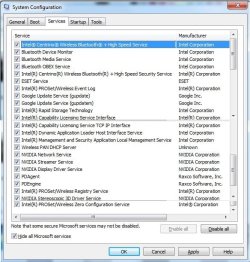
Post #12 shows just what I thought.
You posted that you turned all those things off. I don't see where you stated you turned them all back on again.
Misinformation is worse than no information.

Have a nice day.
 

My Computer My Computer

Computer type
PC/Desktop
Computer Manufacturer/Model Number
Home made Desktop
OS
Windows 10 Pro. 64/ version 1709 Windows 7 Pro/64
CPU
Intel i7-6800K @ 4.3
Motherboard
ASUS X-99 Deluxe II
Memory
Corsair Platinum 16 gig @2400
Graphics Card(s)
EVGA GTX 1070 OC
Monitor(s) Displays
Asus 27" LED LCD/VE278Q
Screen Resolution
1920-1080 or 1280-720 HDMI
Hard Drives
INTEL SSD 730-240 Gb Sata 3.0/
PSU
EVGA Platium 1200W
Case
Phanteks Luxe Tempered Glass 8 fans/ one radiator
Cooling
XSPC/ Water Cooled CPU
Keyboard
Das 4 Professional
Mouse
Logitech M705/MX Anywhere 2-S
Internet Speed
100 mbits
Antivirus
Microsoft Security Essentials/ Malwarebytes Premium 3.0/ SAS
Browser
I.E. 11 default/Firefox/ ISP Time Warner Cable/Spectrum
Other Info
LG BluRay Burner/
Sound system-KLipsch-THX/
Icy Dock ssd Hot Swap bays.
You were advised you didn't need to run with all of those freeloaders starting up with Windows and said you'd turned them off, but the screenshot show otherwise - enough startups to choke a horse. This defeats the purpose of running a Clean Boot with only the AV and absolutely needed programs that you can't do without starting with Windows, which always gives best performance and many fewer issues. This is not guesswork. Our forums tutorial on turning off Startup Programs - Change has been followed by several million users. These are firmly established Best Practices.

When you reinstalled you obviously reimported a bunch of Lenovo programs that are not needed and defeat the purpose of doing a Clean Reinstall. These duplicate and interfere with much better versions built into Win7 causing issues. If you're not willing to do a perfect reinstall, then I'd at least uninstall the Lenovo crapware except for the Energy Management if you want to prolong battery life. Then turn off all the Startups in msconfig>Startup and msconfig>Services after Hiding All MS Services. If your problem persists it might be resolved by doing the install over with attention given to how drivers are best handled in Win7, which steps are so important they are printed in red in the Reinstall tutorial.

Likewise you reinstalled the Nvidia software which causes many visual problems we deal with here by uninstalling it since its not needed at all, only the display driver alone. Nor is the Intel software needed. A wireless utility duplicates Win7's superior wireless and always adds unnecessary baggage to startup and resources.

You may also have a failing GPU. One way to test this is to run with a boot disk like http://www.sevenforums.com/tutorials/256518-peppermint3-create-live-cd-dvd-usb-use-emergency-backup.html. This completely cuts out the hard drive. In fact you can unplug it to eliminate it as a suspect.
 
Unfortunately your not showing on the services pic which of the services are still running or stopped ?

But yea you have a full boat even though you show 8 gigs of ram your also only showing 2.4 ghz :/
I believe I have the same on a 4 gig ram system :/
Although not a i7 as yours would that make a difference ?

Personally I stop at utorrent at startup ;)
 

My Computer My Computer

Computer type
PC/Desktop
Computer Manufacturer/Model Number
Custom assembled by me :}
OS
Win-7-Pro64bit 7-H-Prem-64bit
CPU
i7-5930K 2nd i9-9940x both water blocked VRM's too
Motherboard
ASUS SABERTOOTH X99 2nd ASUS x299 Apex
Memory
Trident-z 3200C14 2nd Trident-z 3600C16
Graphics Card(s)
EVGA 1080ti ftw3 2nd Titan Xp both water blocked
Sound Card
Built-in Realtek
Monitor(s) Displays
1-AOC G2460PG 24"G-Sync 144Hz/ 2nd 1-ASUS VG248QE 24" 144Hz
Screen Resolution
1920 x 1080 144Hz
Hard Drives
2-Samsung M.2 Evo & Evo Plus
2-Samsung 850 EVO 500GB SSD's/ 3-2.5 W.D. Black 1tb-&3-1tb/3-3.5 WD Black 1tb hdd's
PSU
EVGA SuperNOVA 1000-P2 2nd 1200-P2
Case
2-Corsair Obsidian Series 450D Black ATX Mid Tower
Cooling
Custom water loops
Keyboard
Logitech G710+/ 2nd Logitech G910
Mouse
2-RedDragon M901 Perdition 16400 dpi Gaming mouse = wired
Internet Speed
Comcast Ping 19ms 89.31mbps download speed 6.12mbps upload
Antivirus
Malwarebytes Pro/ Superantispyware Pro
Browser
FireFox & Pale moon
Other Info
2nd ASUS X299 Apex/Intel i9-9940x with Custom water loop/7H-Prem-x64/Corsair 450D case/Ram Trident-z 3600C16 4x8gb / Samsung970Evo plus 500gb SSD/Dual ssd EZ swap evo/PSU EVGA SuperNova 1200w-P2 80+Platinum/GPU Titan Xp /8-ML-140 on push-pull on 2-280GTX rads
Well a little two cents worth from me and I have to agree that is way too many boot programs - for me at least.
Plus I might suggest running these if you haven't already


http://www.sevenforums.com/tutorials/1538-sfc-scannow-command-system-file-checker.html

http://www.sevenforums.com/tutorials/433-disk-check.html< if necessary include the /f switch in the command line as per Option2
if these do not get anywhere these again if you haven't already

http://www.superantispyware.com/

http://www.malwarebytes.org/products/malwarebytes_free/

http://www.bleepingcomputer.com/download/adwcleaner/

ADW download frombleeping computer delete any rubbish found with the malware scans

I am no expert and am just suggesting these as an issue of elimination.

Now while I ma thinking of it I just found this on another thread and it has transformed my screen 1000%
GeForce 344.11 WHQL Driver
 

My Computer My Computer

Computer type
PC/Desktop
Computer Manufacturer/Model Number
Own build (new) Desk1 / Asus ROG Win 7 / Desk2 1st build
OS
Desk1 7 Home Prem / Desk2 10 Pro / Main lap Asus ROG 10 Pro 2 laptop Toshiba 7 Pro Asus P2520 7 & 10
CPU
Desk1 i5 3750K / Laptop i7 GTX 860M / Desk2 i5 2500
Motherboard
Desk1 Asus P877-V / Desk2 Gigabyte H67 UD3H / Laptop ?
Memory
Desk1 8GB (1866) / Desk2 16GB (1333) / Laptop 8Gb DDR3
Graphics Card(s)
Desk 1& 2NVidia GTX 650 & Laptops on board Intel
Sound Card
Desk 1 & 2 -XONAR DG Realtek High Def audio Laptop
Monitor(s) Displays
Desk 1 Benq HD 2450 / Desk2 Philips 24" / Laptop 17.5"
Screen Resolution
1920x1080 D1 & D2 & Laptop 1
Hard Drives
Desk1 Samsung 120GB 830 SSD
Asus ROG 256GB 850 Pro SSD
Desk2 Samsung 840 256 SSD
Toshiba 120GB EVO
PSU
Desk 1 Corsair HX 1050/ Laptop ? / Desk 2 Corsair HX 650
Case
Desk 1 Cooler HAF XM ? Toshiba laptop / Desk2 Coolermaster
Cooling
Fans on all Desk1 -2 Desk2 - all Coolermasters 5 Laptop ?
Keyboard
Desk 1 MS Sidewinder X6 Desk 2 MS Sidewinder X 4
Mouse
Desk 1&2 - Gigabyte MS 900 gamer - laptop - Logitec wireless
Internet Speed
ADSL2+
Other Info
One other Desktop (tester) and spare Toshba laptop both with SSD's
Running Kaspersky 2016 ISS on all machines config'd identically
Logitec audio stereo systems on each machine (x3)
Canon MG5250MFC
Router/modem TP-Link running WPA2SK
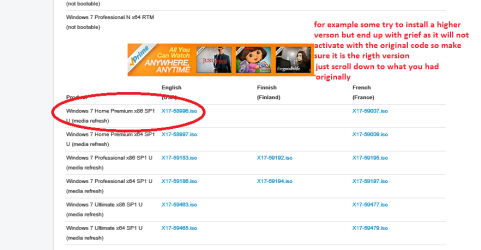
..... And no, its not a factory install its just a MS copy I downloaded from their site with OEM drivers.
.....
... just a MS copy I downloaded from ??? their ??? site with OEM drivers ???

What site? Microsoft or Lenovo?

You have to be careful where you get your install media - the only trustworthy media is an original disc, media created by the OEM recovery utility, or the official Microsoft ISO.

Your specs say Win7 x64 Ultimate - what does the COA sticker say on the laptop? (bottom or battery compartment)

Please provide the following report, it might show corruption in Windows activation or other information that would prove useful in resolving the issue on your machine.
http://www.sevenforums.com/windows-...ne-activation-issue-posting-instructions.html

Thanks

+ edit
Full system specifications are also very useful when troubleshooting from afar.

Please add your SF Systems Specs by following this tutorial: http://www.sevenforums.com/tutorials/180324-system-info-see-your-system-specs.html
  • In the System Manufacturer/Model Number field, manually type Desktop or Laptop adding it to the information already in the field.
  • Specify Custom Build as the manufacturer if it is not an OEM machine.
  • The tool does not fill in this information but it is very important if someone has to research drivers or hardware for your machine.
Log on to Sevenforums (SF) and let the tool fill in you System specs on your SF profile.

Full instructions are in the tutorial. It's a simple process and it makes that information readily available on your posts. You don't have to retype the information in any thread.

Click here to view your system specs on SevenForums.

Click on My System Specs in the lower left of any post by any member to see what is presented about their machine.​
- edit
 
Last edited:

My Computer My Computer

Computer type
Laptop
Computer Manufacturer/Model Number
HP Pavilion dv6-6c10us
OS
x64 (6.3.9600) Win8.1 Pro & soon dual boot x64 (6.1.7601) Win7_SP1 HomePrem
CPU
AMD A6-3420M APU with Radeon(tm) HD Graphics
Motherboard
Hewlett-Packard 1805
Memory
6.00 GB
Graphics Card(s)
AMD Radeon(TM) HD 6520G
Sound Card
(1) AMD High Definition Audio Device (2) IDT High Definiti
Monitor(s) Displays
HP W2072a 20" LCD (1600 x 900) @ 60 Hz
Screen Resolution
1366 x 768 x 32 bits (4294967296 colors) @ 60 Hz
Hard Drives
ST640LM0 00 HM641JI SATA Disk Device
Keyboard
Logitech k520 wireless KB
Mouse
Logitech m320 wireless mouse (bundled with KB)
Internet Speed
15/5 | 54 MB Wireless 'n'
Antivirus
Realtime: Defender or Avast | On-demand: Malwarebytes, ESET
Browser
IE 11 on Win8, IE 10 on win 7
Other Info
Media: [Gimp, Audacity, VLC] || Comm: [WEmail 2012, Skype] || Productivity: [OpenOffice,| Textpad] || Utils: [Sysinternals, cCleaner, Speccy, Defraggler]

Attachments

  • ISO.PNG
    ISO.PNG
    22.9 KB · Views: 1

My Computer My Computer

Computer type
PC/Desktop
Computer Manufacturer/Model Number
Own build (new) Desk1 / Asus ROG Win 7 / Desk2 1st build
OS
Desk1 7 Home Prem / Desk2 10 Pro / Main lap Asus ROG 10 Pro 2 laptop Toshiba 7 Pro Asus P2520 7 & 10
CPU
Desk1 i5 3750K / Laptop i7 GTX 860M / Desk2 i5 2500
Motherboard
Desk1 Asus P877-V / Desk2 Gigabyte H67 UD3H / Laptop ?
Memory
Desk1 8GB (1866) / Desk2 16GB (1333) / Laptop 8Gb DDR3
Graphics Card(s)
Desk 1& 2NVidia GTX 650 & Laptops on board Intel
Sound Card
Desk 1 & 2 -XONAR DG Realtek High Def audio Laptop
Monitor(s) Displays
Desk 1 Benq HD 2450 / Desk2 Philips 24" / Laptop 17.5"
Screen Resolution
1920x1080 D1 & D2 & Laptop 1
Hard Drives
Desk1 Samsung 120GB 830 SSD
Asus ROG 256GB 850 Pro SSD
Desk2 Samsung 840 256 SSD
Toshiba 120GB EVO
PSU
Desk 1 Corsair HX 1050/ Laptop ? / Desk 2 Corsair HX 650
Case
Desk 1 Cooler HAF XM ? Toshiba laptop / Desk2 Coolermaster
Cooling
Fans on all Desk1 -2 Desk2 - all Coolermasters 5 Laptop ?
Keyboard
Desk 1 MS Sidewinder X6 Desk 2 MS Sidewinder X 4
Mouse
Desk 1&2 - Gigabyte MS 900 gamer - laptop - Logitec wireless
Internet Speed
ADSL2+
Other Info
One other Desktop (tester) and spare Toshba laptop both with SSD's
Running Kaspersky 2016 ISS on all machines config'd identically
Logitec audio stereo systems on each machine (x3)
Canon MG5250MFC
Router/modem TP-Link running WPA2SK
Back
Top