
How to Downgrade Windows Media Player 12 to WMP 11 on Windows 7

yogi365

Banned
Local time
11:24 PM
Messages
86
Location
india
Dear All
I found something interesting topic on google search.

how to change WMP 12 to WMP11

If you are one such user, unconformable with WMP 12 then here is the way to downgrade your Windows 7 WMP 12 to Window Media player 11. Thanks who has made Windows Media Player 11 installer for Windows 7.
How to Downgrade Windows Media Player 12 to Windows Media Player 11 on Windows 7

1. Download Windows Media Player 11 Installer for Windows 7

2. Now Type services.msc on windows 7 search bar

3. Stop Windows Media Player network Sharing Service.

4. Take Ownership of following files
All files in “Program Files\Windows Media Player\” folder
All files starting with “wmp” in System32 folder
wmploc.dll.mui in “Sytem32\en-us\” folder
5. Now Run Windows Media Player 11 Installer
6. Now type Regedit on Start Menu Search bar
7. Delete following Registry key
HKEY_LOCAL_MACHINE\Software\Microsoft\MediaPlayer\Setup\Installed Versions
(Don’t forget to take Backup of Registry before modifying/editing/deleting any registry key)
8. Reboot your Windows 7
Screenshot of Windows Media Player 11 in Widows 7 (Media Player Gadget)
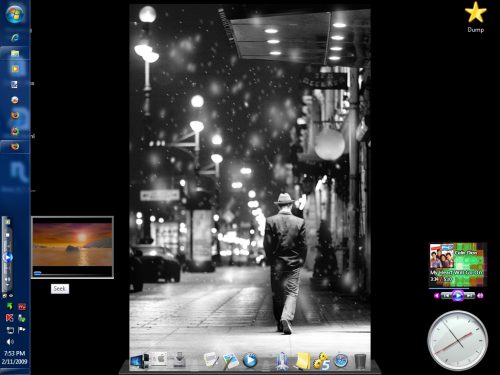
windows-media-player-11-for-windows-7.png

Please Note :I will not be responsible if you damage your Windows 7 with above information. Do it at your own risk. I have not created or nor host any files for download here. ( not tested by me ).


thank you .


(Note: If you found this stuff is useful or interesting dont forget to give me reputation)
 

My Computer My Computer

At a glance

windows7 build7100 64x,xpsp31500 Megabytes
Computer Manufacturer/Model Number
HP NX6115
OS
windows7 build7100 64x,xpsp3
Motherboard
Board: Hewlett-Packard 308E KBC Version 45.27
Memory
1500 Megabytes
Sound Card
Conexant AC-Link Audio
Monitor(s) Displays
ATI RADEON XPRESS 200M SERIES [Display adapter] Digital Flat
Hard Drives
160 gb
This thing worked for me. Thanks Yogi! Was happy to get rid of the disgusting WMP12.

Only Microsoft can downgrade in the name of upgrade. WMP12 doesn't have many useful features of WMP11. Like increase in playback speed.
 

My Computer My Computer

At a glance

Windows 7
OS
Windows 7
I really miss the mini player of WMP11 :cry:
"Now playing" panel is such a bad idea, and have no sens at all for me.

Maybe will I switch back to WMP11 thanks to you ;)
 

My Computer My Computer

At a glance

Vista H.P. SP1 x32 Seven RC x64Q6600 @ 3.4Ghz4Go PC2-64008500GT @ 700/500
OS
Vista H.P. SP1 x32 Seven RC x64
CPU
Q6600 @ 3.4Ghz
Motherboard
GA-EP45-DS3L
Memory
4Go PC2-6400
Graphics Card(s)
8500GT @ 700/500
Sound Card
Audigy Platinium
Monitor(s) Displays
Mitsubishi Diamond Pro 920 + Mitsubishi Diamond Pro 720
Screen Resolution
1600x1200 twice
Hard Drives
Hitachi 160Go
Maxtor 160Go (system drive)
Maxtor 200Go in Antec MX-1 EC external box (eSATA-USB2.0)
PSU
Corsair VX550W
Case
Thermaltake Xaser III
Cooling
Watercooling (CPU, GPU, HDD, NB)
Keyboard
MS Wireless Multimedia 6000 V2.0
Mouse
IntellEye Explorer 3.0
Internet Speed
ADSL 18Mbit/s/1Mbit/s
When I upgraded to 7077 I was severely annoyed WMP 12 decided to *automatically* record everything in my libraries. I don't even use WMP for video files, but need to keep it on hand for viewing DVD's and Windows streaming media files. Anyways, I had to resort to denying write access to CurrentDatabase_372.wmdb in the AppData folder to prevent it from cataloging my files (but not before I had spent an hour dorking around in the settings trying to find an option to manaually manage the library). By the time I had made the change, it had a 900 MB database file and 1.2 gigabytes of cover thumbnails (which I promptly deleted) -- talk about bloat! :sick:
 

My Computer My Computer

At a glance

Windows 7 x64 Ultimate Retail
OS
Windows 7 x64 Ultimate Retail
Thanks yogi :P I could use this to help a friend. I personally love WMP12 though, and think its leagues better than WMP11.

Only Microsoft can downgrade in the name of upgrade. WMP12 doesn't have many useful features of WMP11. Like increase in playback speed.

Huh? Of what do you speak good sir, 12 has everything 11 had and more from my observations. Play speed settings can be easily accessed by right clicking the now playing screen or simply pressing the alt button and navigating the menus towards the enhancements. I use play speed settings all the time.

I really miss the mini player of WMP11 :cry:
"Now playing" panel is such a bad idea, and have no sens at all for me.

Maybe will I switch back to WMP11 thanks to you ;)
The miniplayer would be nice to have back, but with aeropeek I find I hardly miss it personally. Still, it would be nice as an option.

The purpose of the now playing panel is that its much lighter than having everything in one window like before. Thats why WMP12 opens much quicker for us folk on slower hardware.

I prefer WMP12 because it is much more minimalist and stuffies. It's just "nicer" to me.
 

My Computer My Computer

At a glance

Windows 7 Build 7077 x64AMD Athlon Dual Core QL-60 - 1.9Ghz2GBNVIDIA GeForce 8200 M G
Computer Manufacturer/Model Number
Compaq CQ50-107NR
OS
Windows 7 Build 7077 x64
CPU
AMD Athlon Dual Core QL-60 - 1.9Ghz
Memory
2GB
Graphics Card(s)
NVIDIA GeForce 8200 M G
Screen Resolution
1280 x 800
Hard Drives
120GB, Not sure of RPM but prolly 5400 or lower.
This thing worked for me. Thanks Yogi! Was happy to get rid of the disgusting WMP12.

Only Microsoft can downgrade in the name of upgrade. WMP12 doesn't have many useful features of WMP11. Like increase in playback speed.

Thanks yogi :P I could use this to help a friend. I personally love WMP12 though, and think its leagues better than WMP11.

This thing worked for me. Thanks Yogi! Was happy to get rid of the disgusting WMP12.

Only Microsoft can downgrade in the name of upgrade. WMP12 doesn't have many useful features of WMP11. Like increase in playback speed.

Huh? Of what do you speak good sir, 12 has everything 11 had and more from my observations. Play speed settings can be easily accessed by right clicking the now playing screen or simply pressing the alt button and navigating the menus towards the enhancements. I use play speed settings all the time.

Agreed - CTRL + SHIFT + G is play fast, N is for normal, and (I think) B is for slow, if you don't want to use the slider....

The miniplayer would be nice to have back, but with aeropeek I find I hardly miss it personally. Still, it would be nice as an option.

The purpose of the now playing panel is that its much lighter than having everything in one window like before. Thats why WMP12 opens much quicker for us folk on slower hardware.

I prefer WMP12 because it is much more minimalist and stuffies. It's just "nicer" to me.

Again, agreed.
 

My Computers My Computers

  • At a glance

    Windows 11 21H2 Current buildAMD Ryzen 9 3950X4 * 32 GB - Corsair Vengeance 3600 MHzEVGA GeForce RTX 3080 Ti XC3 ULTRA GAMING (12...
    Computer type
    PC/Desktop
    Computer Manufacturer/Model Number
    The Beast Model A (homebrew)
    OS
    Windows 11 21H2 Current build
    CPU
    AMD Ryzen 9 3950X
    Motherboard
    MSI MEG X570 GODLIKE
    Memory
    4 * 32 GB - Corsair Vengeance 3600 MHz
    Graphics Card(s)
    EVGA GeForce RTX 3080 Ti XC3 ULTRA GAMING (12G-P5-3955-KR)
    Sound Card
    Realtek® ALC1220 Codec
    Monitor(s) Displays
    2x Eve Spectrum ES07D03 4K Gaming Monitor (Matte) | Eve Spec
    Screen Resolution
    3x 3840 x 2160
    Hard Drives
    3x Samsung 980 Pro NVMe PCIe 4 M.2 2 TB SSD (MZ-V8P2T0B/AM) } 3x Sabrent Rocket NVMe 4.0 1 TB SSD
    PSU
    PC Power & Cooling’s Silencer Series 1050 Watt, 80 Plus Plat
    Case
    Fractal Design Define 7 XL Dark ATX Full Tower Case
    Cooling
    SteelSeries Apex Pro Wired Gaming Keyboard
    Keyboard
    SteelSeries Apex Pro
    Mouse
    Logitech MX Master 3S | MX Master 3 for business
    Internet Speed
    AT&T LightSpeed Gigabit Duplex Ftth
    Antivirus
    Windows Defender + MB 3
    Browser
    Nightly (default) + Firefox (stable),Chrome, Edge
  • At a glance

    ChromeOS Flex Dev Channel (current)Intel(R) Core(TM) i5-6300U CPU @ 2.40GHz, 250...16 GBIntel(R) HD Graphics 520
    Computer type
    PC/Desktop
    System Manufacturer/Model Number
    Dell Latitude E5470
    OS
    ChromeOS Flex Dev Channel (current)
    CPU
    Intel(R) Core(TM) i5-6300U CPU @ 2.40GHz, 2501 Mhz, 2 Core(s), 4 Logical Processor(s)
    Motherboard
    Dell
    Memory
    16 GB
    Graphics Card(s)
    Intel(R) HD Graphics 520
    Sound Card
    Intel(R) HD Graphics 520 + RealTek Audio
    Monitor(s) Displays
    Dell laptop display 15"
    Screen Resolution
    1920 * 1080
    Hard Drives
    Toshiba 128GB M.2 22300 drive
    INTEL Cherryville 520 Series SSDSC2CW180A 180 GB SATA III SSD
    PSU
    Dell
    Case
    Dell
    Cooling
    Dell
    Keyboard
    Dell
    Mouse
    Logitech MX Master 3S (shared w. Sys 1) | Dell TouchPad
    Internet Speed
    AT&T LightSpeed Gigabit Duplex Ftth
Thank you very much, man. WMP12 was good at first, because I didnt have that annoying store button but after some time i realized its ability to find music was horrible and didnt work over network.
 

My Computer My Computer

At a glance

Dual boot, Windows 7 x64, WinX86, XP ProAsus-SLI/Nvida4gb KingstonNvida - 8600 GT
Computer Manufacturer/Model Number
Asus - Self Made
OS
Dual boot, Windows 7 x64, WinX86, XP Pro
CPU
Asus-SLI/Nvida
Motherboard
A8N-SLI
Memory
4gb Kingston
Graphics Card(s)
Nvida - 8600 GT
Sound Card
On Board - Realtek 97'
Monitor(s) Displays
Dell 1907FP(DIGITAL), NEC LCD 1760NX, Generic - NON - pnp M
Hard Drives
4 hard drives
400gb
Keyboard
Logitech Trackball, and Mouse, Keyboard
Mouse
Logitech
hey i have done what u said. and i would like to say thank you. everything that you said worked perfectly.

now that being said. i need to know how to undo it. yes i know but why. well i have recently upgraded another computer on the network, and i would like to start streaming media.
(this option is taken out of the wmp 11 version for windows 7)

so if you can .please let me know how to undo the downgrade. if this is not possible then i will have to reformat.
 
Last edited:

My Computer My Computer

At a glance

Dual boot, Windows 7 x64, WinX86, XP ProAsus-SLI/Nvida4gb KingstonNvida - 8600 GT
Computer Manufacturer/Model Number
Asus - Self Made
OS
Dual boot, Windows 7 x64, WinX86, XP Pro
CPU
Asus-SLI/Nvida
Motherboard
A8N-SLI
Memory
4gb Kingston
Graphics Card(s)
Nvida - 8600 GT
Sound Card
On Board - Realtek 97'
Monitor(s) Displays
Dell 1907FP(DIGITAL), NEC LCD 1760NX, Generic - NON - pnp M
Hard Drives
4 hard drives
400gb
Keyboard
Logitech Trackball, and Mouse, Keyboard
Mouse
Logitech
Didin't work for me. I tried multiple ways of taking control of the files (which i've done before) and it just gave errors when trying to install. Now i don't have 11 or 12. I have no media player :(
 

My Computer My Computer

At a glance

W7 RC1
OS
W7 RC1
not working for you

Didin't work for me. I tried multiple ways of taking control of the files (which i've done before) and it just gave errors when trying to install. Now i don't have 11 or 12. I have no media player :(
what version of windows 7 are you running.

computer properties should tell you. if not go to

start menu>access ores>system tools>

click the system information button and it will tell you the exact OS that you have please post it.
I would very much like to figure out why its not working for you. :mad:
 

My Computer My Computer

At a glance

Dual boot, Windows 7 x64, WinX86, XP ProAsus-SLI/Nvida4gb KingstonNvida - 8600 GT
Computer Manufacturer/Model Number
Asus - Self Made
OS
Dual boot, Windows 7 x64, WinX86, XP Pro
CPU
Asus-SLI/Nvida
Motherboard
A8N-SLI
Memory
4gb Kingston
Graphics Card(s)
Nvida - 8600 GT
Sound Card
On Board - Realtek 97'
Monitor(s) Displays
Dell 1907FP(DIGITAL), NEC LCD 1760NX, Generic - NON - pnp M
Hard Drives
4 hard drives
400gb
Keyboard
Logitech Trackball, and Mouse, Keyboard
Mouse
Logitech
I'm using the RC1. And i just get an error saying server execution failed if i double click a .mp3. I can drag and drop a file into WMP11 and it works now but not if i double click. I tried changing the associations but no luck. Don't want to have to do a clean install :(
 

My Computer My Computer

At a glance

W7 RC1
OS
W7 RC1
fixit now

I'm using the RC1. And i just get an error saying server execution failed if i double click a .mp3. I can drag and drop a file into WMP11 and it works now but not if i double click. I tried changing the associations but no luck. Don't want to have to do a clean install :(

A quick fix for that problem would be to add all the music you would like to play to a monitor folder, so that the music and mp3 files would already be in your WM11 library.

If you are not a quick fix guy:
(this is assuming that you did everything that was in the org instruction.txt file for example: the take owner ship step, and registry entry deletion steps.)

1) Control Penal> Programs and features
2) Uninstall the copy of WM11
a) select the "Windows Media Player 11 for Windows 7" and click uninstall
3)reboot the computer.
4) Control Penal> Programs and features
5)In the upper left hand corner you will see the "file menu" right under neath that you will see "control panel home" , "view installed updates", and last "turn windows features on or off"
6) Click that "turn windows features on or off" button
7) look down the list and expand the media feature folder
8) the only box with a check inside of it should be the first one "windows dvd maker" , the rest "media center" and "media player" uncheck.
(if you use windows media center then reinstall it after wm11 is working up to your standards, insuring that , that is not the cause)
9) restart computer.

now re-install the application, and again before it restarts your computer, delete the registry entry that is in the org instruction.txt, you must have it.

restart, and let me know what happens :mad:
 

My Computer My Computer

At a glance

Dual boot, Windows 7 x64, WinX86, XP ProAsus-SLI/Nvida4gb KingstonNvida - 8600 GT
Computer Manufacturer/Model Number
Asus - Self Made
OS
Dual boot, Windows 7 x64, WinX86, XP Pro
CPU
Asus-SLI/Nvida
Motherboard
A8N-SLI
Memory
4gb Kingston
Graphics Card(s)
Nvida - 8600 GT
Sound Card
On Board - Realtek 97'
Monitor(s) Displays
Dell 1907FP(DIGITAL), NEC LCD 1760NX, Generic - NON - pnp M
Hard Drives
4 hard drives
400gb
Keyboard
Logitech Trackball, and Mouse, Keyboard
Mouse
Logitech
I did follow the instructions to the letter and i have done all the take ownership stuff before. I will give your thing a try when i have time but i think the ideal situation would be an option to reinstall 12.

I appreciate the time you took to reply :)
 

My Computer My Computer

At a glance

W7 RC1
OS
W7 RC1
Get access

I made a batch script to take control of the WMP12 files in Win32 and Win32/en-US folders, it then moves on to delete them automatically for you!

Take the code below and copy/paste it into a New Text Document, then save it as;
Filename : WMP12Remover.BAT
Save As Type: All Files

Hope this helps :).

Code:
takeown /f c:\windows\system32\wmp.dll /A
icacls c:\windows\system32\wmp.dll /grant Administrators:F
del c:\windows\system32\wmp.dll

takeown /f c:\windows\system32\wmpcm.dll /A
icacls c:\windows\system32\wmpcm.dll /grant Administrators:F
del c:\windows\system32\wmpcm.dll

takeown /f c:\windows\system32\WmpDui.dll /A
icacls c:\windows\system32\WmpDui.dll /grant Administrators:F
del c:\windows\system32\WmpDui.dll

takeown /f c:\windows\system32\wmpdxm.dll /A
icacls c:\windows\system32\wmpdxm.dll /grant Administrators:F
del c:\windows\system32\wmpdxm.dll

takeown /f c:\windows\system32\wmpeffects.dll /A
icacls c:\windows\system32\wmpeffects.dll /grant Administrators:F
del c:\windows\system32\wmpeffects.dll

takeown /f c:\windows\system32\WMPEncEn.dll /A
icacls c:\windows\system32\WMPEncEn.dll /grant Administrators:F
del c:\windows\system32\WMPEncEn.dll

takeown /f c:\windows\system32\WMPhoto.dll /A
icacls c:\windows\system32\WMPhoto.dll /grant Administrators:F
del c:\windows\system32\WMPhoto.dll

takeown /f c:\windows\system32\wmploc.dll /A
icacls c:\windows\system32\wmploc.dll /grant Administrators:F
del c:\windows\system32\wmploc.dll

takeown /f c:\windows\system32\wmpmde.dll /A
icacls c:\windows\system32\wmpmde.dll /grant Administrators:F
del c:\windows\system32\wmpmde.dll
 
takeown /f c:\windows\system32\wmpps.dll /A
icacls c:\windows\system32\wmpps.dll /grant Administrators:F
del c:\windows\system32\wmpps.dll

takeown /f c:\windows\system32\wmpshell.dll /A
icacls c:\windows\system32\wmpshell.dll /grant Administrators:F
del c:\windows\system32\wmpshell.dll
 
takeown /f c:\windows\system32\wmpsrcwp.dll /A
icacls c:\windows\system32\wmpsrcwp.dll /grant Administrators:F
del c:\windows\system32\wmpsrcwp.dll

takeown /f C:\Windows\System32\en-US\wmploc.DLL.mui /A
icacls C:\Windows\System32\en-US\wmploc.DLL.mui /grant Administrators:F
del C:\Windows\System32\en-US\wmploc.DLL.mui
 

My Computer My Computer

At a glance

Windows 7 RC 7100
OS
Windows 7 RC 7100
In the end it seemed to fix itself...not sure if it was the system file check thing but i'm back to WMP12 :)

I'll save your thing incase i need to try again though. :)
 

My Computer My Computer

At a glance

W7 RC1
OS
W7 RC1
The system file checker will usually fix things like this b/c it performs a complete check on your system for files that are supposed to be there that are not as well as files that are corrupted, broken, etc.
 

My Computers My Computers

  • At a glance

    Windows 11 21H2 Current buildAMD Ryzen 9 3950X4 * 32 GB - Corsair Vengeance 3600 MHzEVGA GeForce RTX 3080 Ti XC3 ULTRA GAMING (12...
    Computer type
    PC/Desktop
    Computer Manufacturer/Model Number
    The Beast Model A (homebrew)
    OS
    Windows 11 21H2 Current build
    CPU
    AMD Ryzen 9 3950X
    Motherboard
    MSI MEG X570 GODLIKE
    Memory
    4 * 32 GB - Corsair Vengeance 3600 MHz
    Graphics Card(s)
    EVGA GeForce RTX 3080 Ti XC3 ULTRA GAMING (12G-P5-3955-KR)
    Sound Card
    Realtek® ALC1220 Codec
    Monitor(s) Displays
    2x Eve Spectrum ES07D03 4K Gaming Monitor (Matte) | Eve Spec
    Screen Resolution
    3x 3840 x 2160
    Hard Drives
    3x Samsung 980 Pro NVMe PCIe 4 M.2 2 TB SSD (MZ-V8P2T0B/AM) } 3x Sabrent Rocket NVMe 4.0 1 TB SSD
    PSU
    PC Power & Cooling’s Silencer Series 1050 Watt, 80 Plus Plat
    Case
    Fractal Design Define 7 XL Dark ATX Full Tower Case
    Cooling
    SteelSeries Apex Pro Wired Gaming Keyboard
    Keyboard
    SteelSeries Apex Pro
    Mouse
    Logitech MX Master 3S | MX Master 3 for business
    Internet Speed
    AT&T LightSpeed Gigabit Duplex Ftth
    Antivirus
    Windows Defender + MB 3
    Browser
    Nightly (default) + Firefox (stable),Chrome, Edge
  • At a glance

    ChromeOS Flex Dev Channel (current)Intel(R) Core(TM) i5-6300U CPU @ 2.40GHz, 250...16 GBIntel(R) HD Graphics 520
    Computer type
    PC/Desktop
    System Manufacturer/Model Number
    Dell Latitude E5470
    OS
    ChromeOS Flex Dev Channel (current)
    CPU
    Intel(R) Core(TM) i5-6300U CPU @ 2.40GHz, 2501 Mhz, 2 Core(s), 4 Logical Processor(s)
    Motherboard
    Dell
    Memory
    16 GB
    Graphics Card(s)
    Intel(R) HD Graphics 520
    Sound Card
    Intel(R) HD Graphics 520 + RealTek Audio
    Monitor(s) Displays
    Dell laptop display 15"
    Screen Resolution
    1920 * 1080
    Hard Drives
    Toshiba 128GB M.2 22300 drive
    INTEL Cherryville 520 Series SSDSC2CW180A 180 GB SATA III SSD
    PSU
    Dell
    Case
    Dell
    Cooling
    Dell
    Keyboard
    Dell
    Mouse
    Logitech MX Master 3S (shared w. Sys 1) | Dell TouchPad
    Internet Speed
    AT&T LightSpeed Gigabit Duplex Ftth
I'm on the verge of giving up here.

I have tried several ways to downgrade to WMP 11. My main reason being Compatibility issues. Many websites etc. does not have support for WMP 12. I have some online Pay Per View TV but even they do not support WMP12. Too bad i paid for a whole year :(

I run the 64bit version of Windows 7. I even found a "self downgrader". Even this doesnt work. It tells me i need to run it with administrator rights. But even if i do that it still tells me i don't have administrator rights.

I did every step by step guide i could find without success. The WMP 11 for win7 installer still comes up with some errors...

What do i do? Any specific fixes for 64-bit users out there??
 

My Computer My Computer

At a glance

Win7
OS
Win7
This thing worked for me. Thanks Yogi! Was happy to get rid of the disgusting WMP12.

Only Microsoft can downgrade in the name of upgrade. WMP12 doesn't have many useful features of WMP11. Like increase in playback speed.

Thats the way I think too!
 

My Computer My Computer

At a glance

Windows 7 Professional 32-bitIntel(R) Pentium(R) D CPU 3.00 GHzKingston DDR2 3 gigs total Dual channels Symm...NVIDIA GeForce 8600 GT
Computer Manufacturer/Model Number
Custom
OS
Windows 7 Professional 32-bit
CPU
Intel(R) Pentium(R) D CPU 3.00 GHz
Motherboard
Asus P5B-VM
Memory
Kingston DDR2 3 gigs total Dual channels Symmetric
Graphics Card(s)
NVIDIA GeForce 8600 GT
Sound Card
Hi defonition Sound max
Monitor(s) Displays
CisNet
Screen Resolution
1280*1024
Hard Drives
WDC WD16000AA-00L7A0 SATA DRIVE
WDC IDE Drive 80 gigs.
PSU
Raidmax 380 watt
Case
Generic brand
Cooling
Standard fan
Keyboard
Logitech Cordless desktop EX100
Mouse
Logitech Cordless desktop EX100
Internet Speed
5.0 mbs
Other Info
MSE anti-virus
i followed all of the instructions too for installing WMP 11.

I've also had the problem that i cant double click my MP3s and have them open in WMP, instead i get the "Server execution failed" error.

Another thing that has happened is now when i have Task Manager open i cant see all of the processes, but when i click the "All processes from all users" button, i get a UAC box appear to which i select Yes, after this a small DOS window flicks on the screen for 1 second, and task manager never opens again. This is annoying as something is taking 50% of my CPU and i'm unable to see which program it is.

Does anyone have a fix for this?
 

My Computer My Computer

At a glance

Windows 7 RC
OS
Windows 7 RC
Unfortunately this doesn't work for me either. Running x64 Build 7600.16385 so most of the DLL files i find don't work. I even tried finding a full installer for Build 7000 and using a resource editor to change version numbers, nothing seems to work. :/
 

My Computer My Computer

At a glance

Windows 7 Ultimate 64 bit
OS
Windows 7 Ultimate 64 bit
Back
Top