I joined this forum just so I could reply in this thread. There is still seems to be some confusion about what the situation is, so I thought I would join in and make it clear as mud. I dual boot back and forth from XP Pro to 7 Pro because of my job, so I've got some first hand experience on this issue.
First, let's start with how you accomplish this with XP on the log on screen. With some simple registry edits, you can have your log on wallpaper match your desktop wallpaper:
hkey_users\.default\control panel\desktop
tilewallpaper = 1
wallpaper = whatever.bmp
I have 2 19" 4x3 monitors, so I use 2560x1024 wallpaper and set it to tile. If I take the same wallpaper file and copy it to the system32 folder, the above registry edits go into effect. The only restriction I know of is that the file has to be bmp, it will not work with jpg. The lock screen just works. There is nothing to edit for that to happen. So, in XP Pro, my lock screen, my log on screen, and my desktop wallpaper can all match, and span both monitors at any given time. Here are some pics:
Here you can see my log on screen on XP. This is a corporate environment using a Windows 2003 domain. Purty huh? It's my back yard btw.
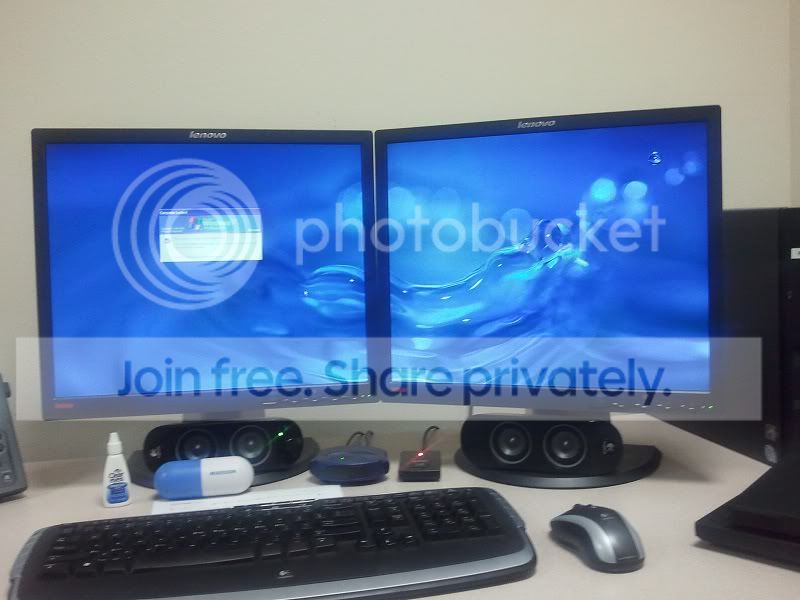
Here is the lock screen on XP. As you can see the wallpapers are different. I did this on purpose to make the point that the registry looks to a different place for the log on wallpaper. The lock screen just uses whatever wallpaper you have selected for your desktop. If you want your log on wallpaper to match your desktop wallpaper, you have to use the registry settings above.
So the only question is how can you accomplish this in Windows 7? The lock screen and the log on screen can be changed, but there looks to be no way to span 2 monitors with a dual screen wallpaper, so it's pointless for dual screen users. This was so easy to do in XP. It really doesn't surprise that Microsoft dropped the ball on this. I'm assuming it has something to with Windows 7 not using GINA anymore, rather it uses credential providers now for authentication. Here is a screenshot of how Windows 7 looks in the same scenario.
Here is the Windows 7 log on screen. You can clearly see my mouse on the secondary monitor. The lock screen looks and acts identical.
So there you have it. I hope this helps clear things up. I doubt there is a resolution to this issue, but at least we can understand it. It's not that big of a deal, but I like to customize things to my liking, and not having that ability in this scenario is a little annoying, considering how easy it was to do in XP.