
Dual monitor display issue

Smgmoose

New member
Local time
1:56 PM
Messages
2
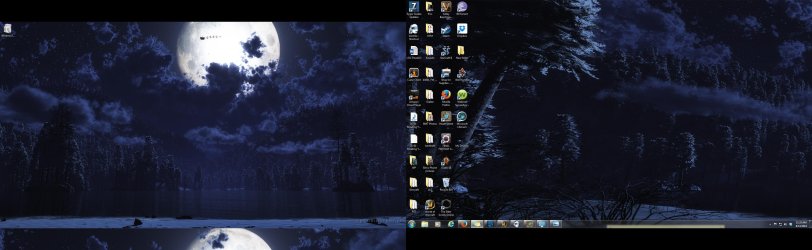
I currently have 2 monitors (on an Asus and the other an Acer) they are both 22in monitors and have 1920x1080 display. I have been attempting to use a dual monitor sized background image but my Acer monitor isnt displaying the image as full screen like it should. The image I am using for my background is 3840x1080 so I would think it would be full screen on both monitors. I tried manually adjust the display of the monitor vertically via the monitor's internal menu but the option to move it is not selectable and acer tech-support was unable to pin-point the problem. I have attached a picture so you can see exactly what I see. (Its the left side monitor that is the issue) (Note** The black bars that are in the picture [on the bottom on the right side and on the top on left] I dont actually see on my monitors. Any suggestions would be greatly appreciated!
 

Attachments
  • My Desktop 2.jpg
    My Desktop 2.jpg
    389.4 KB · Views: 3

My Computer My Computer

At a glance

Windows 7 home 64 bit3rd Gen i512 gigs DDR3GeForce 760
Computer type
PC/Desktop
Computer Manufacturer/Model Number
Custom Build
OS
Windows 7 home 64 bit
CPU
3rd Gen i5
Memory
12 gigs DDR3
Graphics Card(s)
GeForce 760
Antivirus
Web root
Browser
FireFox
It only took me posting this message to finally figure out what I had done. In my Nvidea control center under "Set up Multiple displays" the two screen were not aligned perfectly resulting in my mess of a desktop. Figured it would take me admitting defeat and going to posting my own thread to finally figure out what I had done myself.
 

My Computer My Computer

At a glance

Windows 7 home 64 bit3rd Gen i512 gigs DDR3GeForce 760
Computer type
PC/Desktop
Computer Manufacturer/Model Number
Custom Build
OS
Windows 7 home 64 bit
CPU
3rd Gen i5
Memory
12 gigs DDR3
Graphics Card(s)
GeForce 760
Antivirus
Web root
Browser
FireFox
Welcome to Seven Forums Smgmoose. Thanks for sharing the fix. Sorry I am busy during the week, and can only look on weekends. I have seen others with your issue as well ;)

A Guy
 

My Computer My Computer

At a glance

Windows 10 Home x64INTEL Core i5-750 Quad-Core 3.37GHzHyperX Fury Black Series 8GB (2 x 4GB) 1866MhzEVGA GeForce GTX 750 Superclocked 1GB 128-Bit...
Computer type
PC/Desktop
OS
Windows 10 Home x64
CPU
INTEL Core i5-750 Quad-Core 3.37GHz
Motherboard
ASUS P7P55D
Memory
HyperX Fury Black Series 8GB (2 x 4GB) 1866Mhz
Graphics Card(s)
EVGA GeForce GTX 750 Superclocked 1GB 128-Bit GDDR5
Monitor(s) Displays
LG 32MA68HY 32" IPS
Screen Resolution
1920 x 1080
Hard Drives
Samsung 840 Evo 120GB, SEAGATE 500GB Barracuda® 7200.12, SATA 3 Gb/s, 7200 RPM, 16MB cache
PSU
ANTEC TruePower New TP-550, 80 PLUS, 550W
Case
ANTEC Three Hundred Illusion
Cooling
COOLER MASTER Hyper 212 Plus, 4 x 120mm 1 x 140mm Noctua's
Internet Speed
85 + Mbps
Antivirus
Avast
Browser
Vivaldi
Back
Top