[Guide] Xbox 360 Gaming Receiver Windows 7 Connection/Driver Problems

Nathan401

Banned
Local time
4:46 PM
Messages
17
Location
Pembrokeshire, Wales, U.K
This Thread is to show how to get your Xbox 360 wireless receiver working in 10 steps if Windows 7 does not recognise it or you cant see the drivers that are needed.
This is my first post but have discovered all this information by having all the problems myself.

1.Plug in your Xbox 360 Receiver to your computer
2.Turn on your Xbox 360 Controller and and link it to your Xbox 360 Receiver by pressing both connection buttons on both devices.
3.If controller does not connect properly open Device Manager.
4.Click on Other Devices. An unknown device should appear with a yellow triangle.
5.Double click on unknown device and then update driver.
6.Select Browse my computer.
7.Select Let me pick from a list of device drivers on my computer.
8.Go down the list and select Microsoft Common Controller for Windows Class by double clicking.
9.Select Xbox 360 controller for windows version 2.1.0.1349 [13/08/2009] and press Next to install. (If this driver isn't an option plug your Xbox 360 Controller into your computer using the Plug & play USB Charge Kit. This should download the driver automatically. After it has downloaded and installed go back into device manager and start process again from step 3.)
10.After This process your Xbox 360 Controller should connect straight away. If this isn't the case unplug the Xbox 360 Receiver and turn your Xbox 360 Controller off. Plug Xbox 360 Receiver back in and turn Xbox 360 Controller on and if necessary press the two connection buttons again.

If this Thread helped at all please let me know or contact me for more help if needed.
 

My Computer My Computer

OS
Windows 7 Ultimate
CPU
Intel Core 2 Duo T5750 2.00GHz
Memory
4 GB

My Computer My Computer

Computer Manufacturer/Model Number
Self Built
OS
Windows 7 ultimate 64 bit / XP Home sp3
CPU
intel Core 2 Duo E8400 3.0ghz
Motherboard
Asus P5ND bios 1401
Memory
8 gigs 1066 OCZ Fata1ty
Graphics Card(s)
EVGA GTX 580 Call of Duty Black Ops Edition
Sound Card
Creative Soundblaster Audigy 2zs
Monitor(s) Displays
Asus 24in LCD's 2MS X2
Screen Resolution
1920x1080p @60Hz
Hard Drives
WD Caviar 500 Black/ WD Caviar 200 Blue
PSU
OCZ 700W GameXtreme
Case
NZXT Apollo
Cooling
Corsair H50 CPU/120mm x3 /60mm x2 /Corsair Dominator Ram
Keyboard
Logitech Bluetooth Wireless MX5000
Mouse
Logitech Bluetooth Wireless MX1000
Internet Speed
Download 19.83 Upload 0.97
Other Info
Logitech Z2300 Speakers/ Bose Noise Cancelling Headphones/Avermedia PCI-e Hybrid TV Bravo/Epson NX415 all in one/ 4 Port Powered USB Hub/ LG 10x Bluray Burner /TSST Corp DVDRW External
Help plz! :(

I went out and bought the Plug and Play USB Charge Kit, because the Windows Common Controller wasn't showing up, and when I plugged it in I wasn't redirected into any download or anything, any help?
 

My Computer My Computer

OS
Windows XP 32 bit
What have you done so far with the receiver?
Make sure your windows update is turned on...and check your device manager to make sure it hasnt downloaded in the background.
it is windows 7 your running right?
:)
 

My Computer My Computer

OS
Windows 7 Ultimate
CPU
Intel Core 2 Duo T5750 2.00GHz
Memory
4 GB
I have the receiver plugged in, I have the driver needed installed, my windows update is turned on, but I'm using Windows XP 32bit.
 

My Computer My Computer

OS
Windows XP 32 bit
Can you give me the name of the driver you have installed?
Have you pushed the connection buttons on the receiver and the controller to try and connect them like on the xbox?
 

My Computer My Computer

OS
Windows 7 Ultimate
CPU
Intel Core 2 Duo T5750 2.00GHz
Memory
4 GB
The driver is called, Microsoft Xbox 360 Accessories 1.2, when I try to sync the controller and wireless receiver the controller just has all four of the lights blinking and not connecting.
 

My Computer My Computer

OS
Windows XP 32 bit
i know how to open that, but my wireless receiver can't be detected, and when i try to manually install the driver, their is no windows common class controller, even though I have downloaded the necessary driver.
 

My Computer My Computer

OS
Windows XP 32 bit
After selecting "let me pick drivers from a list" click on "select all devices" instead of looking for windows common controller.
Then scroll down until you find microsoft and look for Xbox 360 controller for windows version 2.1.0.1349 [13/08/2009].
see if that works.
 

My Computer My Computer

OS
Windows 7 Ultimate
CPU
Intel Core 2 Duo T5750 2.00GHz
Memory
4 GB
That's not even showing up, I can't seem to find anyone else with this problem, I feel like I'm missing an important step or something.
 

My Computer My Computer

OS
Windows XP 32 bit
Same Problem

I've been trying to figure this out for a while now. I'm starting to think that my particular wireless receiver has more hardware problems than the rest.

I'm using Windows 7 x64. I've downloaded the software from the Microsoft website, but it doesn't seem to do much (tried 1.0, 1.1 and 1.2). I've gone through the steps in Device Manager, and I'm not sure if Microsoft recently updated it- because from reading the forums, what I'm seeing is different.

1. I go to Device Manager
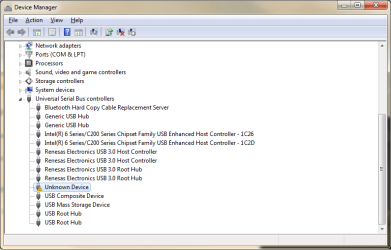
2. Right click on "Unknown Device" (Listed under Universal Serial Bus controllers)
3. Click "Update Driver Software..."
4. Click "Browse my computer for driver software"
5. Click "Let me pick from a list of device drivers on my computer"
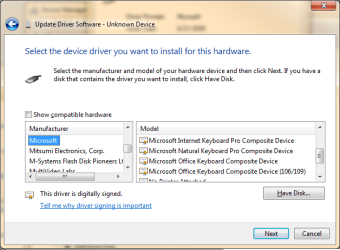
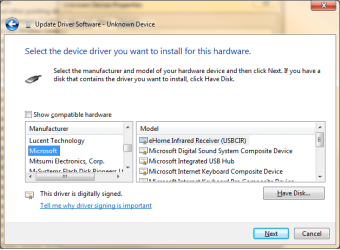
6. The only thing listed here is "Unknown Device". So I remove the check from "Show compatible hardware" and now have two separate columns, "Manufacturer" and "Model"
7. I then choose Microsoft under the Manufacturer column, but do not see the "Common Controller for Window Class" or anything Xbox/controller related. It mostly lists printer and keyboard stuff.

I tried the same steps on a different PC with Windows 7 x64 and had the same problem. So I'm not sure if I have a bad wireless receiver or what. It's definitely bootleg. The package had a lot of misspelled words in the description.

Has anyone recently been able to install the drivers recently with Windows 7? Did they recently update Device Manager? I just installed Windows 7 last week. So I'm not sure. :huh:

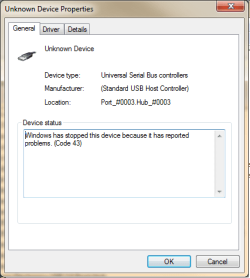
This is what I'm seeing:
DeviceManager1.png

DeviceManager2.png

DeviceManager3.png
 

My Computer My Computer

OS
Windows 7 Enterprise x64
CPU
Intel Core i5 2500K
Motherboard
ASUS P8P67
Memory
G.SKILL Ripjaws Series 8GB DDR3
Graphics Card(s)
EVGA GeForce GTX460 SE
Hard Drives
Crucial RealSSD C300 64GB
Samsung Spinpoint F3 1TB
If it says the same thing on 2 different computers then its probably the device itself. Does a light come on on the device when you plug it in? I bought the wireless device for £6 on ebay....may be worth getting the real one.
But from your print screens it looks like your almost there...if you cant find the right xbox driver in that Microsoft list, plug in your controller to the computer using the plug and play charge kit and it should download the right drivers automatically through windows update. Worked for me.

THE RIGHT DRIVER IS LISTED IN MY ORIGINAL POST
 

My Computer My Computer

OS
Windows 7 Ultimate
CPU
Intel Core 2 Duo T5750 2.00GHz
Memory
4 GB
Reply

Thank you for the reply, Nathan.

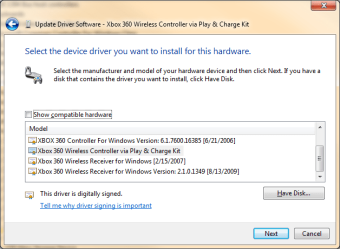
When I plug in the Play & Charge kit it shows up under "Microsoft Common Controller for Windows Class"

DeviceManager4.png

So the driver is definitely on the computer. I right click on "Xbox 360 Wireless Controller via Play & Charge Kit," select Update Driver Software, Browse My Computer..., Let Me Pick..., remove the check from "Show Compatible Hardware," and all of the drivers are there.
DeviceManager5.png

My problem is that Windows will not allow me to select the right driver for the wireless receiver. I go through the same steps to choose the driver, and I only have the options that Windows thinks will work for generic USB devices. I have no choice to pick "Microsoft Common Controller for Windows Class" as a category. If there was a way I could move my Unknown Device to the correct driver category, then I would be able to select other drivers. Is that a possibility?

This is what I see going through the same steps on "Unknown Device"
DeviceManager6.png

Any suggestions?
 

My Computer My Computer

OS
Windows 7 Enterprise x64
CPU
Intel Core i5 2500K
Motherboard
ASUS P8P67
Memory
G.SKILL Ripjaws Series 8GB DDR3
Graphics Card(s)
EVGA GeForce GTX460 SE
Hard Drives
Crucial RealSSD C300 64GB
Samsung Spinpoint F3 1TB
Try finding the driver when the controller isn't connected with the plug and play charge kit. We know the drivers are there now. Plug the wireless receiver in and make sure you press both of the connection buttons to try and connect the controller first. Then go to device manager and select the unknown device and look for the Xbox 360 controller for windows version 2.1.0.1349 [13/08/2009]. It should be under Microsoft Common Controller for Windows Class but if not when the list comes up to select which device, select "show all devices" and look for Microsoft in the left hand box and the drivers for xbox should be in the right hand box somewhere.
Hope this helps :)
 

My Computer My Computer

OS
Windows 7 Ultimate
CPU
Intel Core 2 Duo T5750 2.00GHz
Memory
4 GB
Thanks for the suggestion, Nathan.

I unplugged the Play & Charge kit, turned on my 360 controller and pressed the button on the wireless adapter, then in device manager.. "Browse My Computer...", "Let Me Pick...", showed all devices, and I'm still not seeing Microsoft Common Controller for Windows Class or the Xbox drivers. The
only devices listed under Microsoft are the following:

eHome Infrared Receiver
Microsoft Digital Sound System Composite Device
Microsoft Integrated USB Hub
Microsoft Internet Keyboard Composite Device
Microsoft Internet Keyboard Composite Device (106/109)
No Printer Attached
USB Printing support

Just to try it, I tried installing a few of these drivers onto the wireless receiver and they installed successfully (It still didn't work obviously.) So I'm able to install any drivers listed under the USB device category. Windows will only give me the options to install the drivers listed under the hardware type it thinks the hardware is. For instance, if I look at the drivers I can install under the "Mouse" category with Microsoft selected as the manufacturer, I have different options: HID-compliant mouse, Microsoft PS/2 Mouse, etc.

Windows is just categorizing the device in the wrong device type. If there was a way to make it realize it should be under "Microsoft Common Controller for Windows Class" instead, then it allow me to select the correct drivers. I looked for a way to move my "Unknown Device" to a different hardware category of Device Manager, but I'm not sure if that's possible.
 

My Computer My Computer

OS
Windows 7 Enterprise x64
CPU
Intel Core i5 2500K
Motherboard
ASUS P8P67
Memory
G.SKILL Ripjaws Series 8GB DDR3
Graphics Card(s)
EVGA GeForce GTX460 SE
Hard Drives
Crucial RealSSD C300 64GB
Samsung Spinpoint F3 1TB
Haha...

So, tonight I found out that my brother had purchased one of these wireless adapters a year ago. It was still in his closet unopened. :confused:

I plugged it in, installed the drivers, and it works FLAWLESSLY. So I'm sorry for wasting your time. It was bad hardware the whole time. :sick:

Looking at the device IDs in Device Manager, his adapter says something legit, "USB\VID_045E&PID_0291&REV_0114". Mine says, "USB\UNKNOWN". The products look identical on the outside, same packaging (a lot of misspelled words, no brand name), but his works and mine doesn't.

So if you hook one of these up and you see USB\UNKNOWN for the hardware ID, stop right there and get a new one. I've spent hours trying to find a work around, and I'm convinced that there is not one. :p
 

My Computer My Computer

OS
Windows 7 Enterprise x64
CPU
Intel Core i5 2500K
Motherboard
ASUS P8P67
Memory
G.SKILL Ripjaws Series 8GB DDR3
Graphics Card(s)
EVGA GeForce GTX460 SE
Hard Drives
Crucial RealSSD C300 64GB
Samsung Spinpoint F3 1TB
All drivers installed, still not working

I have followed all the instructions and I now have the drivers for the plug and charge kit and the wireless receiver installed, as you can see in the screenshot below. However, they still won't sync. :( Also, the guide light (the ring) on the controller constantly blinks while it is plugged in to the pnc kit, I don't know if that's normal or not. Anyone have any more ideas?

i3X8qhLusvFtC.PNG
 

My Computer My Computer

OS
Windows 7 64 bit
HI Nathan

I have an x360 wireless receiver that has taken me ages to figure out to get to work. I followed ur initial post comments and got it working (yey!) Howerver, it only worked a couple of times and now I cannot get it work any more - I have redone all the steps u listed, restarted the laptop, with no joy! The light is on the receiver when plugged it and it shows up in devices as xbox 360 controller for windows. The 'ding-dong' sound when a USB device disconnects is continuously going off , every few seconds, even though is visible in my devices. The Xbox controller is working! I have pressed the reconnection buttons about 7 million times!

Any ideas???

:mad: I'm going to throw it into the pond......
 

My Computer My Computer

OS
windows 7 64bit
xbox 360 wireless control adapter

hi i have one of the fake ones every 1 keeps saying it should work but it dont, windows dosent even detect it nothing on device manager i have windows 7 i downloaded the drivers from Microsoft, the drivers on the disk it came with arent even on the disk and iv spent 2 hours plus reading forms and post on the internet im runing out of things to try dosse any 1 have any ideas wot to do or should i just send it bak?
 

My Computer My Computer

OS
windows 7
Back
Top