win 7 doesn't recognize NEC usb 3.0 driver

drtim

New member
Hi! New to this forum and hope someone can help.

Just installed WD My Book 3.0 (usb 2/3). Followed user guide, installed NEC usb 3.0 driver v.1.0.18 first from cd, then NEC usb 3.0 pci-e card in empty pci-e slot on Rampage Formula mobo - yes, I know this is not a usb 3.0 mobo, but according to multiple sources a usb 3 pci-e card should work ok with the correct driver. Connected to ext. drive using supplied 3.0 cable and booted. Win 7 x64 recognized ext. drive but installed its generic ms usb 2.0 driver (dated 6/21/06, vers. 6.1.7600.16385) without giving me an opportunity to select/load the 3.0 driver I had installed from cd. Checked, and the cd installation did correctly install 2 driver files (nusb3hub.sys & nusb3xhc.sys) to windows\system 32\drivers folder. Moreover, there is usb 3.0 hub controller showing in start menu. But according to usb properties window, the above ms usb 2.0 driver is the one being used. If I try to update driver and point win to usb 3 driver, it tells me the current driver (i.e. usb 2.0) is best driver and won't let me go further. If I try to uninstall this driver then when I reboot win again installs the same usb 2.0 driver without giving me option of selecting the 3.0 driver from cd. Tech support at WD really couldn't help, told me to "ignore" the info about generic ms driver installed, and that my ext. drive was operating at 3.0 speed. I did a check, copying 13 GB file from int. hd to ext. drive. Took 4 min, 20 secs. If I did the math correctly, this is approx. 400 Mbps, which is 2.0 speed and not anywhere close to "theoretical" 3.0 speed of 5 Gbps. I have tried reinstalling the NEC 3.0 driver, with same results. By the way, the ext. drive otherwise works just fine!
So, basically, the ext. drive and the usb 3.0 pci-e card are recognized, but for some reason win 7 doesn't recognize/allow loading the usb 3.0 driver and I'm still at usb 2.0 speed.
Anybody had a similar problem, or can suggest a solution?

Just checked again in device mgr. Under "disk drives" > My Book 3.0 > driver, it is showing the generic ms usb 2.0 driver. But under "USB Controllers" > NEC USB 3.0 Host Controller and also under NEC USB 3.0 Root Hub both locations show the NEC USB 3.0 driver. So was the WD techie correct? Do I just ignore the usb 2.0 driver listed under the disk drive itself, and is this the best speed (400 Mbps) I can expect under 3.0 (I know the 5 Gbps 3.0 spec is just theoretical)? Or should the drive itself in device mgr also be showing the usb 3.0 driver?
 
Last edited:

My Computer

Computer Manufacturer/Model Number
Custom
OS
Windows 7 Professional x64
CPU
Intel Core 2 Quad Q9450 @ 2.66 GHz
Motherboard
ASUS Rampage Formula
Memory
8 GB DDR2
Graphics Card(s)
EVGA GTX460
Monitor(s) Displays
LaCie 320
PSU
750 watts
Case
Cosmos
Hi! New to this forum and hope someone can help.

Just installed WD My Book 3.0 (usb 2/3). Followed user guide, installed NEC usb 3.0 driver v.1.0.18 first from cd, then NEC usb 3.0 pci-e card in empty pci-e slot on Rampage Formula mobo - yes, I know this is not a usb 3.0 mobo, but according to multiple sources a usb 3 pci-e card should work ok with the correct driver. Connected to ext. drive using supplied 3.0 cable and booted. Win 7 x64 recognized ext. drive but installed its generic ms usb 2.0 driver (dated 6/21/06, vers. 6.1.7600.16385) without giving me an opportunity to select/load the 3.0 driver I had installed from cd. Checked, and the cd installation did correctly install 2 driver files (nusb3hub.sys & nusb3xhc.sys) to windows\system 32\drivers folder. Moreover, there is usb 3.0 hub controller showing in start menu. But according to usb properties window, the above ms usb 2.0 driver is the one being used. If I try to update driver and point win to usb 3 driver, it tells me the current driver (i.e. usb 2.0) is best driver and won't let me go further. If I try to uninstall this driver then when I reboot win again installs the same usb 2.0 driver without giving me option of selecting the 3.0 driver from cd. Tech support at WD really couldn't help, told me to "ignore" the info about generic ms driver installed, and that my ext. drive was operating at 3.0 speed. I did a check, copying 13 GB file from int. hd to ext. drive. Took 4 min, 20 secs. If I did the math correctly, this is approx. 400 Mbps, which is 2.0 speed and not anywhere close to "theoretical" 3.0 speed of 5 Gbps. I have tried reinstalling the NEC 3.0 driver, with same results. By the way, the ext. drive otherwise works just fine!
So, basically, the ext. drive and the usb 3.0 pci-e card are recognized, but for some reason win 7 doesn't recognize/allow loading the usb 3.0 driver and I'm still at usb 2.0 speed.
Anybody had a similar problem, or can suggest a solution?

Just checked again in device mgr. Under "disk drives" > My Book 3.0 > driver, it is showing the generic ms usb 2.0 driver. But under "USB Controllers" > NEC USB 3.0 Host Controller and also under NEC USB 3.0 Root Hub both locations show the NEC USB 3.0 driver. So was the WD techie correct? Do I just ignore the usb 2.0 driver listed under the disk drive itself, and is this the best speed (400 Mbps) I can expect under 3.0 (I know the 5 Gbps 3.0 spec is just theoretical)? Or should the drive itself in device mgr also be showing the usb 3.0 driver?

Hi and welcome to SF! :)
Correct me if I'm wrong. You said to have used the pci-e connection to install your hdd. However, it seems weird that you mention "usb" driver in device manager?! I suppose you were to look under "System Devices", don't you?!
 

My Computer

Computer Manufacturer/Model Number
WALLONN7 / LIN BLACK SERIES II
OS
Windows 7 Ultimate x64 SP1
CPU
AMD PHENOM II X6 1090T 3.2GHz
Motherboard
GIGABYTE GA-890FXA-UD7
Memory
8GB G.SKILL RIPJAWS - F3-10666CL7D
Graphics Card(s)
SAPPHIRE ATI RADEON HD 5870 VAPOR X OC
Sound Card
REALTEK DOLBY HOME THEATER
Monitor(s) Displays
LED LG W2486L
Screen Resolution
1080p
Hard Drives
SEAGATE 1TB -ST31000528AS - AHCI MODE - AS SATA
PSU
ZALMAN ZM1000-HP 1000W
Case
THERMALTAKE XASER VI VG4000SWA
Cooling
140MM x3 / 120MM x1 AIR COOLING - THERMALTAKE
Keyboard
MICROSOFT DIGITAL MEDIA KEYBOARD 3000 - USB
Mouse
MICROSOFT BASIC OPTICAL MOUSE 2.0 - USB
Internet Speed
600KBPS
Other Info
MICROSOFT XBOX 360 CONTROLLER
Hi & thx for your reply, Wallonn 7. Sorry if what I posted confused you (I know it was long-winded, but tried to cover all the bases).:)

I installed a dual-port usb 3.0 card (which came bundled with the external WD My Book 3.0) in an empty pci-e slot, as per the requirements for this card. Even though it has to be installed in a pci-e slot, it shows up on dev. mgr. as a (external) hd under "Disk Drives", and when you go to properties under the My Book drive, then driver, it lists the generic ms usb 2.0 driver. But if you go down further in dev. mgr., under "USB Controllers", there are entries for the NEC USB 3.0 Host Controller and also for the NEC USB 3.0 Root Hub, and both of these entries (under properties>driver) show the NEC USB 3.0 driver (which is correct). But why doesn't the first entry, under disk drives>My Book>properties>driver, show the same usb 3.0 driver? Instead it's showing a 2.0 driver which it appears win 7 "defaulted to", and my file transfer speed to the external drive seems to confirm it's operating as a usb 2.0 drive. So win 7 seems to recognize there is something called a "NEC USB 3.0 driver", but it failed (won't let me) assign that driver to the external hd.
 

My Computer

Computer Manufacturer/Model Number
Custom
OS
Windows 7 Professional x64
CPU
Intel Core 2 Quad Q9450 @ 2.66 GHz
Motherboard
ASUS Rampage Formula
Memory
8 GB DDR2
Graphics Card(s)
EVGA GTX460
Monitor(s) Displays
LaCie 320
PSU
750 watts
Case
Cosmos
I know the 5 Gbps 3.0 spec is just theoretical?

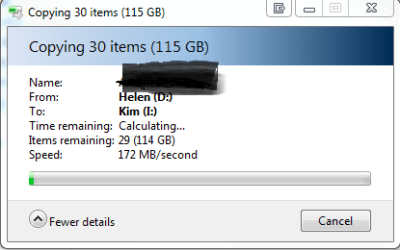
Hello drtim The actual speed you can expect from usb3 tends to be very similar to sata speeds.

See the attachment

Actual speeds will vary depending on type of data being transferred and types of HDD, SSD etc

It is however clearly faster than usb2 my set up rarely got over 25MB/Sec
I hope this helps
 

Attachments

  • Capture.PNG
    Capture.PNG
    26.3 KB · Views: 5

My Computer

Computer Manufacturer/Model Number
Something I threw together
OS
Windows 7 Ultimate x64
CPU
Intel Core i7-2600K
Motherboard
Asus P8P67
Memory
16 GB G Skill F3-10666 CL9D-4GBRL
Graphics Card(s)
ATI Radeon HD 6870
Sound Card
ATI Radeon HDMI / Realtek ALC892
Monitor(s) Displays
2 x 22" standard monitors / LG32LC56v TV to watch films
Screen Resolution
1920 x1080
Hard Drives
2 x OCZ Vertex2 111.79GB
3 x Samsung103SJ
1 x Samsung103UJ
1 x WD3200BEVT
1 x Hitachi5K320-160
PSU
Thermaltake Toughpower Cable Management 750W
Case
Antec 300
Cooling
Noctua NH-U12P SE2 and 5 120mm Case fans
Keyboard
Microsoft Comfort Curve Keyboard 2000
Mouse
Hama M3110 / Logitech M305
Internet Speed
16000
Other Info
I have also used Fedora, Suse, Ubuntu Linux
And all other Windows from 95 to date except ME
Hey Pooch -

Thx for your comments. Yeah, I know a lot of factors can affect usb 3/2 speed, and my current est. speed of 400 Mbps is definitely faster that I was getting with an older, usb 2.0 drive. But my internal drive that I was copying from in the test referenced has a transfer rate of 3 Gbps, and the nec usb 3.0 card by definition has a theoretical limit of 5 Gbps -- plus I'm using AHCI interface. It just bugs me that in device mgr. the driver for the external hd appears to be a ms legacy usb 2.0. Maybe I'm being stupid, but it still seems to me that win 7 should have used/accepted the usb 3.0 driver I "supplied" for this drive.
 

My Computer

Computer Manufacturer/Model Number
Custom
OS
Windows 7 Professional x64
CPU
Intel Core 2 Quad Q9450 @ 2.66 GHz
Motherboard
ASUS Rampage Formula
Memory
8 GB DDR2
Graphics Card(s)
EVGA GTX460
Monitor(s) Displays
LaCie 320
PSU
750 watts
Case
Cosmos
Hey Pooch -

Thx for your comments. Yeah, I know a lot of factors can affect usb 3/2 speed, and my current est. speed of 400 Mbps is definitely faster that I was getting with an older, usb 2.0 drive. But my internal drive that I was copying from in the test referenced has a transfer rate of 3 Gbps, and the nec usb 3.0 card by definition has a theoretical limit of 5 Gbps -- plus I'm using AHCI interface. It just bugs me that in device mgr. the driver for the external hd appears to be a ms legacy usb 2.0. Maybe I'm being stupid, but it still seems to me that win 7 should have used/accepted the usb 3.0 driver I "supplied" for this drive.

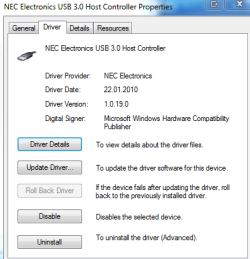
Could you post an attachment from Device manager showing the driver?

Edit it should look something like this one
 

Attachments

  • Capture.PNG
    Capture.PNG
    32.6 KB · Views: 5
Last edited:

My Computer

Computer Manufacturer/Model Number
Something I threw together
OS
Windows 7 Ultimate x64
CPU
Intel Core i7-2600K
Motherboard
Asus P8P67
Memory
16 GB G Skill F3-10666 CL9D-4GBRL
Graphics Card(s)
ATI Radeon HD 6870
Sound Card
ATI Radeon HDMI / Realtek ALC892
Monitor(s) Displays
2 x 22" standard monitors / LG32LC56v TV to watch films
Screen Resolution
1920 x1080
Hard Drives
2 x OCZ Vertex2 111.79GB
3 x Samsung103SJ
1 x Samsung103UJ
1 x WD3200BEVT
1 x Hitachi5K320-160
PSU
Thermaltake Toughpower Cable Management 750W
Case
Antec 300
Cooling
Noctua NH-U12P SE2 and 5 120mm Case fans
Keyboard
Microsoft Comfort Curve Keyboard 2000
Mouse
Hama M3110 / Logitech M305
Internet Speed
16000
Other Info
I have also used Fedora, Suse, Ubuntu Linux
And all other Windows from 95 to date except ME
Pooch -

I attached a shot of device mgr. open to disk drives > My Book 3.0 > properties > driver, showing what I believe is a legacy ms usb 2.0 driver.

Let me know what you think. Gotta go now, but I'll check back on the thread tomorrow. Thx.

View attachment 145350
 

My Computer

Computer Manufacturer/Model Number
Custom
OS
Windows 7 Professional x64
CPU
Intel Core 2 Quad Q9450 @ 2.66 GHz
Motherboard
ASUS Rampage Formula
Memory
8 GB DDR2
Graphics Card(s)
EVGA GTX460
Monitor(s) Displays
LaCie 320
PSU
750 watts
Case
Cosmos
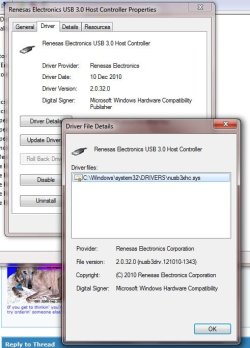
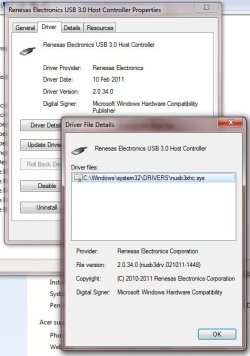
renesas took over from nec, i have a similar nec based usb3 pci-e card, works fine in win7 x64.
Capture001.jpg


you can download the latest win7 x86/x64 drivers at:

Code:
http://www.station-drivers.com/page/nec.htm
my 8gb usb flash drive runs at almost 3x what it does in a usb2 port.

edited: noted 2.0.34 is latest, i also just updated mine to that from 2.0.32 within the last few minutes. added new screen shot...:)
 

Attachments

  • Capture 001.jpg
    Capture 001.jpg
    81.2 KB · Views: 26
  • Capture 000.jpg
    Capture 000.jpg
    74.4 KB · Views: 25

My Computer

Computer type
PC/Desktop
Computer Manufacturer/Model Number
Custom build Nanu by 3SX
OS
Win 7 ultimate x64 sp1
CPU
Intel i7 4 core 3770k ivy bridge o/c to 4.2ghz
Motherboard
Asus p8z77-i Deluxe
Memory
16 GB
Graphics Card(s)
Nvidia geforce GTX650
Sound Card
Realtek on mb
Monitor(s) Displays
24in. lcd/led
Screen Resolution
1920x1080
Hard Drives
128GB Kingston SSD
500GB seagate maximus xt hybrid
500GB hitachi HD
500GB external WD Passport usb3
PSU
Silverstone 450 watt
Case
Silverstone FT03 Black Fortress
Cooling
Water cooler
Keyboard
Logitech wireless kbd/mouse mk300
Mouse
Logitech wireless kbd/mouse mk300
Internet Speed
8mb adsl (actuall speed is around 6mb)
Other Info
Asus DSL-N55U wireless router
SONY BC-5850H 6X BLURAY writer
OUTPOST Security Suite
Here are the latest drivers for NEC USB 3.0 chipset compatible with Windows 7 32/64-bit:

NEC USB 3.0 Host Controller | Catalog - News, articles, free drivers and firmware catalog: X-DRIVERS.COM

I should uninstall the old USB 3.0 drivers first either via Windows Unistall Manager (Control Panel > Programs and Features) or manually (Control Panel > Device Manager) select and device and right click uninstall and remove driver from computer. Then proceed to install the new driver once your sure you've completely uninstalled the old one.

:p
 

My Computer

OS
Windows 7 Professional
CPU
Intel Core i7-2670QM
Memory
Samsung 8GB
Graphics Card(s)
NVIDIA GT 555M
Hard Drives
Intel 525 120GB | HGST Travelstar 1TB
Mouse
CM Storm Xornet | Microsoft Sculpt Comfort
Internet Speed
25 Mbps | 600 Kbps
Other Info
Centrino 6205 | Seagate Backup Plus 1TB
same drivers as in my post ;) mine also has the latest firmware update to build 3027. see release notes (generated when you run the exe - an archive self extracter)
 

My Computer

Computer type
PC/Desktop
Computer Manufacturer/Model Number
Custom build Nanu by 3SX
OS
Win 7 ultimate x64 sp1
CPU
Intel i7 4 core 3770k ivy bridge o/c to 4.2ghz
Motherboard
Asus p8z77-i Deluxe
Memory
16 GB
Graphics Card(s)
Nvidia geforce GTX650
Sound Card
Realtek on mb
Monitor(s) Displays
24in. lcd/led
Screen Resolution
1920x1080
Hard Drives
128GB Kingston SSD
500GB seagate maximus xt hybrid
500GB hitachi HD
500GB external WD Passport usb3
PSU
Silverstone 450 watt
Case
Silverstone FT03 Black Fortress
Cooling
Water cooler
Keyboard
Logitech wireless kbd/mouse mk300
Mouse
Logitech wireless kbd/mouse mk300
Internet Speed
8mb adsl (actuall speed is around 6mb)
Other Info
Asus DSL-N55U wireless router
SONY BC-5850H 6X BLURAY writer
OUTPOST Security Suite
Pooch -

I attached a shot of device mgr. open to disk drives > My Book 3.0 > properties > driver, showing what I believe is a legacy ms usb 2.0 driver.

Let me know what you think. Gotta go now, but I'll check back on the thread tomorrow. Thx.

View attachment 145350
The attachment doesn't work :( but from your descriptions I think you are maybe a little muddled up, You are talking about 2 devices one the USB 3 adaptor which sits in a PCI slot this will show as an USB device very similar to the attachment I posted, this device will have the USB 3 drivers The other Device is the HDD this is a standard disk drive and will have normal windows drivers.
You said yourself that the file transfer speed is fast (at least faster than USB 2) So I think we can take it that the USB drivers are loaded and working.

Feel free to write back and add any further comments or questions you might have
 

My Computer

Computer Manufacturer/Model Number
Something I threw together
OS
Windows 7 Ultimate x64
CPU
Intel Core i7-2600K
Motherboard
Asus P8P67
Memory
16 GB G Skill F3-10666 CL9D-4GBRL
Graphics Card(s)
ATI Radeon HD 6870
Sound Card
ATI Radeon HDMI / Realtek ALC892
Monitor(s) Displays
2 x 22" standard monitors / LG32LC56v TV to watch films
Screen Resolution
1920 x1080
Hard Drives
2 x OCZ Vertex2 111.79GB
3 x Samsung103SJ
1 x Samsung103UJ
1 x WD3200BEVT
1 x Hitachi5K320-160
PSU
Thermaltake Toughpower Cable Management 750W
Case
Antec 300
Cooling
Noctua NH-U12P SE2 and 5 120mm Case fans
Keyboard
Microsoft Comfort Curve Keyboard 2000
Mouse
Hama M3110 / Logitech M305
Internet Speed
16000
Other Info
I have also used Fedora, Suse, Ubuntu Linux
And all other Windows from 95 to date except ME
Thanks guys for the above!
OK - I guess for some reason my attachment showing device driver for the external drive didn't load into this thread. In any case, as stated previously it shows a legacy ms driver. However, as Pooch pointed out, the driver for the usb 3.0 controller and 3.0 hub does correctly show up as a nec driver (which I already knew). Just still unclear why the driver listed for the external drive doesn't show this. But in any case, I think I'm flogging a dead horse because I did two things subsequently. 1) Enabled write-caching for the external drive. This makes it a "safely remove hw device", but I don't care because My Book 3.0 has the usb 3.0 power management (turns off with computer), and otherwise is always on. This simple step (should have thought of it earlier) increased my throughput from 400 mbps to 612 mbps -- so I can no longer say this is usb 2.0 speed, and the usb 3.0 driver must be working! 2) I followed the advice of kronckew and nemix77, and downloaded the latest renesas driver (2.0.34). As you said, had to uninstall the old driver before the new one would load. This step further increased my speed to 650 mbps (yeah!). So I consider this is probably the best I can expect, and not too shabby.
Thanks to all for your help. Call it techie curiousity, but I guess I still don't get why you don't also see the usb 3.0 driver lister for the drive itself in device manager. Oh well! :D
 

My Computer

Computer Manufacturer/Model Number
Custom
OS
Windows 7 Professional x64
CPU
Intel Core 2 Quad Q9450 @ 2.66 GHz
Motherboard
ASUS Rampage Formula
Memory
8 GB DDR2
Graphics Card(s)
EVGA GTX460
Monitor(s) Displays
LaCie 320
PSU
750 watts
Case
Cosmos
Back
Top