Solved AHCI-mode on Marvell 9128 controller in Windows 7 Ultimate x64

kingmortz

New member
Local time
1:54 PM
Messages
10
Location
Aarhus, Denmark
I am having trouble installing Win 7 Ultimate x64 on my new Intel 510 SSD drive connected to the Marvell 9128 controller (on my Asus board) in AHCI mode.
Mind you, Windows installed fine on the 510 when Marvell was in IDE mode.
I am usually able to get to the HDD selection-screen, and here I see the Intel 510 drive just fine. Then, I load the Marvell 912x Controller Driver V1.0.0.1036 (downloaded from asus.com - where I made sure to select Win 7 64-bit). I also tried the 1.0.0.1051 version - downloaded from some other place.

During the subsequent installation, the setup crashes/hangs at various times. And nothing more happens.
One time I managed to get into Windows after the installation but after one more reboot, that was the last I saw of the Desktop.

I read a guide on how to switch to AHCI controller-mode after having done the installation in IDE mode.
The guide (How to enable AHCI in Windows 7 RC after installation | iThinkDifferent), along with several other guides, talks about modifying the "msahci" entry to value "0" under
HKEY_LOCAL_MACHINE\System\CurrentControlSet\Services\

This results in the same hang-situation during boot-up - after the switch to AHCI has been done in the BIOS.

Side-notes: Have run Memtest on the RAM for over 12 hours with no errors (also, the system has run stable as heck the past six months on a regular HDD on the exact same Marvell port).

I sooo need your suggestions! I find it so frustrating that I cannot enjoy my new and blazing fast hardware with the optimal settings.
 

My Computer My Computer

At a glance

Windows 7 Ultimate x64Intel Core i7 930 @ stock=2.8 GhzCorsair DDR3 PC1600 3x2GB kit (CMP6GX3M3A1600C7)Asus Radeon PCI-E HD4350
OS
Windows 7 Ultimate x64
CPU
Intel Core i7 930 @ stock=2.8 Ghz
Motherboard
Asus P6X58D-E, BIOS: 0502
Memory
Corsair DDR3 PC1600 3x2GB kit (CMP6GX3M3A1600C7)
Graphics Card(s)
Asus Radeon PCI-E HD4350
Sound Card
On-board
Monitor(s) Displays
Samsung 17" TFT
Hard Drives
1 x Intel 510 SSD Sata III (SSDSC2MH120A2K5) 120 GB,
1 x WD HDD Sata II 1 TB,
1 x WD HDD Sata II 2 TB,
1 x External: Samsung S2 Portable USB 3.0 640 GB
PSU
Chill Innovation 450 W
Case
Antec Solo
Cooling
CPU: Scythe Ninja 2 Rev. B
Internet Speed
50 Mbit/s
Why are you the marvell controller port?
Connect it to the normal Intel controller ports.
 

My Computer My Computer

At a glance

Windows 7 Pro x64i5 76016GBNvidia GTS450
Computer Manufacturer/Model Number
Built be Me
OS
Windows 7 Pro x64
CPU
i5 760
Motherboard
Asus P7P55D-E Pro
Memory
16GB
Graphics Card(s)
Nvidia GTS450
Sound Card
On board
Monitor(s) Displays
Dell 2007WFP Dell 1800FP
Screen Resolution
1680x1050 1280x1024
Hard Drives
Seagate 250GB & 750GB
WD 1TB
PSU
Antec 750
Case
In Win
Cooling
Cooler Master Hyper 212+
Keyboard
IBM
Mouse
MS
Hello Kingmortz, welcome to the forum,

You have been in the BIOS enabled the Marvel ports, selected AHCI and proceeded to install windows and you get as far as the partitioning screen where you choose which drive to install to and you can see your SSD, maybe I am reading this wrong but why are you loading a driver? If you can see your SSD you should be good to install windows.
Correct me if I am wrong
 

My Computer My Computer

At a glance

Windows 7 Ultimate x64Intel Core i7-2600K16 GB G Skill F3-10666 CL9D-4GBRLATI Radeon HD 6870
Computer Manufacturer/Model Number
Something I threw together
OS
Windows 7 Ultimate x64
CPU
Intel Core i7-2600K
Motherboard
Asus P8P67
Memory
16 GB G Skill F3-10666 CL9D-4GBRL
Graphics Card(s)
ATI Radeon HD 6870
Sound Card
ATI Radeon HDMI / Realtek ALC892
Monitor(s) Displays
2 x 22" standard monitors / LG32LC56v TV to watch films
Screen Resolution
1920 x1080
Hard Drives
2 x OCZ Vertex2 111.79GB
3 x Samsung103SJ
1 x Samsung103UJ
1 x WD3200BEVT
1 x Hitachi5K320-160
PSU
Thermaltake Toughpower Cable Management 750W
Case
Antec 300
Cooling
Noctua NH-U12P SE2 and 5 120mm Case fans
Keyboard
Microsoft Comfort Curve Keyboard 2000
Mouse
Hama M3110 / Logitech M305
Internet Speed
16000
Other Info
I have also used Fedora, Suse, Ubuntu Linux
And all other Windows from 95 to date except ME
Hello Kingmortz, welcome to the forum,

You have been in the BIOS enabled the Marvel ports, selected AHCI and proceeded to install windows and you get as far as the partitioning screen where you choose which drive to install to and you can see your SSD, maybe I am reading this wrong but why are you loading a driver? If you can see your SSD you should be good to install windows.
Correct me if I am wrong

That is what I would think.
 

My Computer My Computer

At a glance

Windows 7 Pro x64i5 76016GBNvidia GTS450
Computer Manufacturer/Model Number
Built be Me
OS
Windows 7 Pro x64
CPU
i5 760
Motherboard
Asus P7P55D-E Pro
Memory
16GB
Graphics Card(s)
Nvidia GTS450
Sound Card
On board
Monitor(s) Displays
Dell 2007WFP Dell 1800FP
Screen Resolution
1680x1050 1280x1024
Hard Drives
Seagate 250GB & 750GB
WD 1TB
PSU
Antec 750
Case
In Win
Cooling
Cooler Master Hyper 212+
Keyboard
IBM
Mouse
MS
Hello Kingmortz, welcome to the forum,

You have been in the BIOS enabled the Marvel ports, selected AHCI and proceeded to install windows and you get as far as the partitioning screen where you choose which drive to install to and you can see your SSD, maybe I am reading this wrong but why are you loading a driver? If you can see your SSD you should be good to install windows.
Correct me if I am wrong

Thank you pooch.

I see that I wasn't too clear on that one. To begin with, I didn't even expect Windows to need any additional drivers, so yes, I have also tried simply switching to AHCI and then install Windows with no added drivers. I always see the drive in the partitioning sceen, which is also why I initially didn't think that any extra drivers were needed.

Shootist> The reason why I am not using the Intel ports is, of course, that I want the 6 Gbit/s bandwidth of the Marvell ports (well, disappointingly, 5 Gbit/s - according to the Marvell BIOS during boot-up) for my 6 Gbit/s SSD-drive. Quite a significant difference in read/write speeds from Sata II.
 

My Computer My Computer

At a glance

Windows 7 Ultimate x64Intel Core i7 930 @ stock=2.8 GhzCorsair DDR3 PC1600 3x2GB kit (CMP6GX3M3A1600C7)Asus Radeon PCI-E HD4350
OS
Windows 7 Ultimate x64
CPU
Intel Core i7 930 @ stock=2.8 Ghz
Motherboard
Asus P6X58D-E, BIOS: 0502
Memory
Corsair DDR3 PC1600 3x2GB kit (CMP6GX3M3A1600C7)
Graphics Card(s)
Asus Radeon PCI-E HD4350
Sound Card
On-board
Monitor(s) Displays
Samsung 17" TFT
Hard Drives
1 x Intel 510 SSD Sata III (SSDSC2MH120A2K5) 120 GB,
1 x WD HDD Sata II 1 TB,
1 x WD HDD Sata II 2 TB,
1 x External: Samsung S2 Portable USB 3.0 640 GB
PSU
Chill Innovation 450 W
Case
Antec Solo
Cooling
CPU: Scythe Ninja 2 Rev. B
Internet Speed
50 Mbit/s
I see that I wasn't too clear on that one. To begin with, I didn't even expect Windows to need any additional drivers, so yes, I have also tried simply switching to AHCI and then install Windows with no added drivers. I always see the drive in the partitioning sceen, which is also why I initially didn't think that any extra drivers were needed.

But??
Have you tried the drivers on the CD that came with the motherboard?
Is your DVD ROM/writer connected to the Marvel controller? If so move it to the Intel controller

Have you tried updating the BIOS? there are several stability fixes included
ASUSTeK Computer Inc. -Support- Technical Documents P6X58D-E

Let us know how you get on
 

My Computer My Computer

At a glance

Windows 7 Ultimate x64Intel Core i7-2600K16 GB G Skill F3-10666 CL9D-4GBRLATI Radeon HD 6870
Computer Manufacturer/Model Number
Something I threw together
OS
Windows 7 Ultimate x64
CPU
Intel Core i7-2600K
Motherboard
Asus P8P67
Memory
16 GB G Skill F3-10666 CL9D-4GBRL
Graphics Card(s)
ATI Radeon HD 6870
Sound Card
ATI Radeon HDMI / Realtek ALC892
Monitor(s) Displays
2 x 22" standard monitors / LG32LC56v TV to watch films
Screen Resolution
1920 x1080
Hard Drives
2 x OCZ Vertex2 111.79GB
3 x Samsung103SJ
1 x Samsung103UJ
1 x WD3200BEVT
1 x Hitachi5K320-160
PSU
Thermaltake Toughpower Cable Management 750W
Case
Antec 300
Cooling
Noctua NH-U12P SE2 and 5 120mm Case fans
Keyboard
Microsoft Comfort Curve Keyboard 2000
Mouse
Hama M3110 / Logitech M305
Internet Speed
16000
Other Info
I have also used Fedora, Suse, Ubuntu Linux
And all other Windows from 95 to date except ME
But??
Have you tried the drivers on the CD that came with the motherboard?
Is your DVD ROM/writer connected to the Marvel controller? If so move it to the Intel controller

Have you tried updating the BIOS? there are several stability fixes included
ASUSTeK Computer Inc. -Support- Technical Documents P6X58D-E

Let us know how you get on

Thanks for a quick and good response.

The drivers on the CD (V1.0.0.1036) are the exact same as the latest you can find on Asus' website for my mobo. However, I have ripped the CD to a different harddrive (connected to the Intel controller) from which I always load the drivers in the partition screen. And again, I have also tried the entire installation in AHCI mode without any added drivers.
The BIOS (v0502, hence my System Specs info) is the latest available.
 

My Computer My Computer

At a glance

Windows 7 Ultimate x64Intel Core i7 930 @ stock=2.8 GhzCorsair DDR3 PC1600 3x2GB kit (CMP6GX3M3A1600C7)Asus Radeon PCI-E HD4350
OS
Windows 7 Ultimate x64
CPU
Intel Core i7 930 @ stock=2.8 Ghz
Motherboard
Asus P6X58D-E, BIOS: 0502
Memory
Corsair DDR3 PC1600 3x2GB kit (CMP6GX3M3A1600C7)
Graphics Card(s)
Asus Radeon PCI-E HD4350
Sound Card
On-board
Monitor(s) Displays
Samsung 17" TFT
Hard Drives
1 x Intel 510 SSD Sata III (SSDSC2MH120A2K5) 120 GB,
1 x WD HDD Sata II 1 TB,
1 x WD HDD Sata II 2 TB,
1 x External: Samsung S2 Portable USB 3.0 640 GB
PSU
Chill Innovation 450 W
Case
Antec Solo
Cooling
CPU: Scythe Ninja 2 Rev. B
Internet Speed
50 Mbit/s
I am at a loss to explain it :( as far as I can see it should work.
Have you tried the other port?
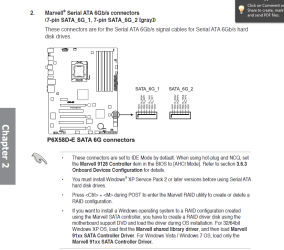
The manual only mentions the marvel drivers for raid and then it mentions two drivers of which only one is to be used with windows seven.

The BIOS (v0502, hence my System Specs info) is the latest available.
Sorry I overlooked this :)
 

Attachments

  • Capture.PNG
    Capture.PNG
    39.4 KB · Views: 2,212
Last edited:

My Computer My Computer

At a glance

Windows 7 Ultimate x64Intel Core i7-2600K16 GB G Skill F3-10666 CL9D-4GBRLATI Radeon HD 6870
Computer Manufacturer/Model Number
Something I threw together
OS
Windows 7 Ultimate x64
CPU
Intel Core i7-2600K
Motherboard
Asus P8P67
Memory
16 GB G Skill F3-10666 CL9D-4GBRL
Graphics Card(s)
ATI Radeon HD 6870
Sound Card
ATI Radeon HDMI / Realtek ALC892
Monitor(s) Displays
2 x 22" standard monitors / LG32LC56v TV to watch films
Screen Resolution
1920 x1080
Hard Drives
2 x OCZ Vertex2 111.79GB
3 x Samsung103SJ
1 x Samsung103UJ
1 x WD3200BEVT
1 x Hitachi5K320-160
PSU
Thermaltake Toughpower Cable Management 750W
Case
Antec 300
Cooling
Noctua NH-U12P SE2 and 5 120mm Case fans
Keyboard
Microsoft Comfort Curve Keyboard 2000
Mouse
Hama M3110 / Logitech M305
Internet Speed
16000
Other Info
I have also used Fedora, Suse, Ubuntu Linux
And all other Windows from 95 to date except ME
And again, I have also tried the entire installation in AHCI mode without any added drivers.

As pooch showed in his last post with the diagram you're going to have to install the AHCI/SATA drivers during the installation of Windows. I'm fairly sure Windows doesn't have the Marvell drivers for the board. So since you're using the Marvell controller you need to install the drivers.

Also, as noted, make sure the controller is in AHCI mode through the BIOS.
 

My Computer My Computer

At a glance

Windows 10 ProIntel Core i7-4770K (3.5Ghz)32 gig Corsair Dominator Platinum (4x8Gig)Sapphire Tri-X R9 Fury
Computer type
PC/Desktop
Computer Manufacturer/Model Number
Custom built by me.
OS
Windows 10 Pro
CPU
Intel Core i7-4770K (3.5Ghz)
Motherboard
Gigabyte G1 Sniper 5 (F10 Bios)
Memory
32 gig Corsair Dominator Platinum (4x8Gig)
Graphics Card(s)
Sapphire Tri-X R9 Fury
Sound Card
Soundblaster ZXR
Monitor(s) Displays
NEC PA242W 24" LCD Monitor
Screen Resolution
1920 x 1200
Hard Drives
Primary - Samsung 850 Pro (512gig), Samsung 840 Pro (256gig), 2TB WD Caviar Black.
PSU
EVGA Supernova 1000 G2
Case
Cooler Master HAF X
Cooling
Corsair H100i with Corsair Air Series SP120 Quiet Fans
Keyboard
Logitech Wireless Wave
Mouse
Logitech Performance MX
Internet Speed
High Speed Cable
Antivirus
Norton Security
Browser
IE11
Other Info
Memory Timings - 1866MHz @ 9-9-9-27-1T @ 1.5 volts
Thank you so much for your patience guys - especially you, pooch. I must admit, I actually haven't tried the other Marvell port :o. Also pooch, I forgot the old (but very true) saying: RTFM... Very good paste of the manual. Will try all of it out straight away and get back to you.
 

My Computer My Computer

At a glance

Windows 7 Ultimate x64Intel Core i7 930 @ stock=2.8 GhzCorsair DDR3 PC1600 3x2GB kit (CMP6GX3M3A1600C7)Asus Radeon PCI-E HD4350
OS
Windows 7 Ultimate x64
CPU
Intel Core i7 930 @ stock=2.8 Ghz
Motherboard
Asus P6X58D-E, BIOS: 0502
Memory
Corsair DDR3 PC1600 3x2GB kit (CMP6GX3M3A1600C7)
Graphics Card(s)
Asus Radeon PCI-E HD4350
Sound Card
On-board
Monitor(s) Displays
Samsung 17" TFT
Hard Drives
1 x Intel 510 SSD Sata III (SSDSC2MH120A2K5) 120 GB,
1 x WD HDD Sata II 1 TB,
1 x WD HDD Sata II 2 TB,
1 x External: Samsung S2 Portable USB 3.0 640 GB
PSU
Chill Innovation 450 W
Case
Antec Solo
Cooling
CPU: Scythe Ninja 2 Rev. B
Internet Speed
50 Mbit/s
ALRIGHT!!! Problem solved!! I did exactly as you suggested pooch. I switched to the other Marvell port, activated AHCI, and at the partition screen during Windows 7 setup I added only the mv91xx.inf file from the "floppy64" folder on the Asus CD.
Thank you for quick answers and very constructive thinking, pooch! Now I can lean back and just browse around on this cool forum to learn more about Win 7.
 

My Computer My Computer

At a glance

Windows 7 Ultimate x64Intel Core i7 930 @ stock=2.8 GhzCorsair DDR3 PC1600 3x2GB kit (CMP6GX3M3A1600C7)Asus Radeon PCI-E HD4350
OS
Windows 7 Ultimate x64
CPU
Intel Core i7 930 @ stock=2.8 Ghz
Motherboard
Asus P6X58D-E, BIOS: 0502
Memory
Corsair DDR3 PC1600 3x2GB kit (CMP6GX3M3A1600C7)
Graphics Card(s)
Asus Radeon PCI-E HD4350
Sound Card
On-board
Monitor(s) Displays
Samsung 17" TFT
Hard Drives
1 x Intel 510 SSD Sata III (SSDSC2MH120A2K5) 120 GB,
1 x WD HDD Sata II 1 TB,
1 x WD HDD Sata II 2 TB,
1 x External: Samsung S2 Portable USB 3.0 640 GB
PSU
Chill Innovation 450 W
Case
Antec Solo
Cooling
CPU: Scythe Ninja 2 Rev. B
Internet Speed
50 Mbit/s
Hi

I had alike probs building my rig.

During your install of windows do not use the marvel ports- use 1 of the normal sata ports. The marvel ports will not work until the os and or drivers for them are installed.

First connect a hdd to other port not marvel- set your bios for ahci support- install os and chip set drivers and drivers on with mobo disc or from asus site and install the marvel drivers- check your disc well it may have multi marvel drivers and the actual drivers you may need might be listed under utilities and or marvel tray drivers- it is like that for my msi mobo anyway.

After drivers are installed reboot your system and let windows load everything and then calm down- then turn off your system and move your I guess sataIII 6gig drive to the proper marvel 6gig sata port and reboot your system. It should work..

Or you can use the first part of these instructions if you have already installed w7 and do the reg tweak and then shut off your system and then move your hdd to the proper marvel 6gig port and reboot and it should work..

If you have installed w7 in ide mode and then change the bios to ahci it will not boot or work it will say boot something or another is messed up or can not see the drive what ever- It will not work at all if using the marvel ports and before installing the drivers for it..

It is no probs putting your sataIII on a normal sataII port until you can get the drivers installed for marvel and sataIII- sataIII hard drives are back compatible- infact if set up in ide mode it was running no faster than 133. As soon as the marvel drivers are installed and you shut down and change the hdd to the marvel port and reboot all should be fine.

It is said and if you know exactly which drivers are what you can install the marvel drivers during w7 install by pressing I think F6- For me is more a pain in the butt.. I just did it like I said above and after all drivers was installed then moved my sataIII 6 gig drive to my sata7 sataIII port all is good..

I had to figure mine out on my own reading general hdd probs and or installing ssd drives.. None of your sata drives will run at proper speeds or have full features unless using ahci support- if in ide mode not a one of them runs any faster than 133- an actual raid might be another story- but most folks do not know these things and let the mobos stay at defaults and think windows makes these changes when they install the os- it does not- the mobo bios defaults are ide mode- and only vista had native ahci support- but it still had to be turned on in the bios or even vista would skip it and install the os and hdd in ide mode..

Your mobo instructions are better than mine- my manual did not have such instructions and msi site [forums] was no help- they moderators could only complain about my poor grammar and spelling and my long or walls of text- I almost returned my msi mobos because of them- but I could not find better and for the price- but I do not think I will ever buy msi again. Ha ha the stupid lil girl like mods was even pm me with the stupid stuff and said they was not going to help me because of said reasons- they flipping suck.. Ha ha they was pm me telling me- I am from va I should be able to speak perfect english etc- and one of the mods had worst grammar or spelling than even I and some things in the manual was translated bad too- it was comical to a degree- other than I needed help and could not get my system running right. It is ok- I figured it out on my own.. MSI can go under for all I care.. It was a nice fella here that tried to help me [my first thread here maybe?]- but was not what I needed. He did his best tho- I was grateful for that.. I have liked this site a lot because of him and most folks here are very nice and will try and help with anything..

Good luck see ya..
 
Last edited:

My Computer My Computer

At a glance

w7
OS
w7
Ops my bad- I missed your last post- you already fixed it. It is ok- maybe it will help others down the road with like probs.

Take care..
 

My Computer My Computer

At a glance

w7
OS
w7
ALRIGHT!!! Problem solved!! I did exactly as you suggested pooch. I switched to the other Marvell port, activated AHCI, and at the partition screen during Windows 7 setup I added only the mv91xx.inf file from the "floppy64" folder on the Asus CD.
Thank you for quick answers and very constructive thinking, pooch! Now I can lean back and just browse around on this cool forum to learn more about Win 7.
Yaaaaaaaaaaaaaaaay!! and enjoy your high speed SSD :D
 

My Computer My Computer

At a glance

Windows 7 Ultimate x64Intel Core i7-2600K16 GB G Skill F3-10666 CL9D-4GBRLATI Radeon HD 6870
Computer Manufacturer/Model Number
Something I threw together
OS
Windows 7 Ultimate x64
CPU
Intel Core i7-2600K
Motherboard
Asus P8P67
Memory
16 GB G Skill F3-10666 CL9D-4GBRL
Graphics Card(s)
ATI Radeon HD 6870
Sound Card
ATI Radeon HDMI / Realtek ALC892
Monitor(s) Displays
2 x 22" standard monitors / LG32LC56v TV to watch films
Screen Resolution
1920 x1080
Hard Drives
2 x OCZ Vertex2 111.79GB
3 x Samsung103SJ
1 x Samsung103UJ
1 x WD3200BEVT
1 x Hitachi5K320-160
PSU
Thermaltake Toughpower Cable Management 750W
Case
Antec 300
Cooling
Noctua NH-U12P SE2 and 5 120mm Case fans
Keyboard
Microsoft Comfort Curve Keyboard 2000
Mouse
Hama M3110 / Logitech M305
Internet Speed
16000
Other Info
I have also used Fedora, Suse, Ubuntu Linux
And all other Windows from 95 to date except ME
Wow ezeht! I don't see what MSI are talking about when they complain about your walls of text he he ;-). Anyway, lots of thanks for your effort. I'm sure it's going to help some people who's stuck with this kind of problem.
I'm stunned to hear how unprofessionally MSI employees carry on.
If you can't do proper support on your products, you shouldn't really be making those products.

Side-note: IDE mode doesn't cut down the transfer speeds a much as you say - at least not on my mobo. The first couple of weeks I ran my Intel SSD in IDE mode on the Marvell controller and I still had seq. read/write speeds of approx 350 MB/210 MB. Also, when I ran the SSD in IDE mode on the Intel controller (Sata II), I still got speeds at around 280 MB/198 MB. These numbers are from Chrystal Disk Mark v3.0.1a x64.
 

My Computer My Computer

At a glance

Windows 7 Ultimate x64Intel Core i7 930 @ stock=2.8 GhzCorsair DDR3 PC1600 3x2GB kit (CMP6GX3M3A1600C7)Asus Radeon PCI-E HD4350
OS
Windows 7 Ultimate x64
CPU
Intel Core i7 930 @ stock=2.8 Ghz
Motherboard
Asus P6X58D-E, BIOS: 0502
Memory
Corsair DDR3 PC1600 3x2GB kit (CMP6GX3M3A1600C7)
Graphics Card(s)
Asus Radeon PCI-E HD4350
Sound Card
On-board
Monitor(s) Displays
Samsung 17" TFT
Hard Drives
1 x Intel 510 SSD Sata III (SSDSC2MH120A2K5) 120 GB,
1 x WD HDD Sata II 1 TB,
1 x WD HDD Sata II 2 TB,
1 x External: Samsung S2 Portable USB 3.0 640 GB
PSU
Chill Innovation 450 W
Case
Antec Solo
Cooling
CPU: Scythe Ninja 2 Rev. B
Internet Speed
50 Mbit/s
king- its cool. I am no expert. Best I know ide is ide and its fastest is 133. I can be wrong tho. I was trying to help and had to fix my own probs. I am retarded with lil education and teach my self how to build and use my systems- gaming mostly.

As for msi forums- I do not think it is official few are- and few really get any official support either. Them folks at msi forums are lil girls or butt holes maybe- I am over it.. Ha ha..

Any way Bud- I am glad you have it working- sorry I did not get a chance to help ya- as we both say tho- the next person with such probs might not have it so hard. I hope so any way.

I plan to get a ssd someday and a better video card and then over clock my system some. Well the ssd can wait- but a better vid card and oc- maybe a nv 570 or 560ti I will be happy- or more so. OC is a lil over my head but I hope to get 4gigs or so out of my cpu- my set up should do 4.2 pretty easy on air. I will be happy @ 3.8 to 4.0 tho- If 4 or above then I can be in the 4 and above crew..

Folks here at 7 forums are great- I see you are kind of new here- WELCOME. If you play pc games- maybe I will see ya in the gaming threads sometime.

See ya..
 
Last edited:

My Computer My Computer

At a glance

w7
OS
w7
Side-note: IDE mode doesn't cut down the transfer speeds a much as you say - at least not on my mobo. The first couple of weeks I ran my Intel SSD in IDE mode on the Marvell controller and I still had seq. read/write speeds of approx 350 MB/210 MB. Also, when I ran the SSD in IDE mode on the Intel controller (Sata II), I still got speeds at around 280 MB/198 MB. These numbers are from Chrystal Disk Mark v3.0.1a x64.
Just out of interest what speeds do you get now in AHCI mode
 

My Computer My Computer

At a glance

Windows 7 Ultimate x64Intel Core i7-2600K16 GB G Skill F3-10666 CL9D-4GBRLATI Radeon HD 6870
Computer Manufacturer/Model Number
Something I threw together
OS
Windows 7 Ultimate x64
CPU
Intel Core i7-2600K
Motherboard
Asus P8P67
Memory
16 GB G Skill F3-10666 CL9D-4GBRL
Graphics Card(s)
ATI Radeon HD 6870
Sound Card
ATI Radeon HDMI / Realtek ALC892
Monitor(s) Displays
2 x 22" standard monitors / LG32LC56v TV to watch films
Screen Resolution
1920 x1080
Hard Drives
2 x OCZ Vertex2 111.79GB
3 x Samsung103SJ
1 x Samsung103UJ
1 x WD3200BEVT
1 x Hitachi5K320-160
PSU
Thermaltake Toughpower Cable Management 750W
Case
Antec 300
Cooling
Noctua NH-U12P SE2 and 5 120mm Case fans
Keyboard
Microsoft Comfort Curve Keyboard 2000
Mouse
Hama M3110 / Logitech M305
Internet Speed
16000
Other Info
I have also used Fedora, Suse, Ubuntu Linux
And all other Windows from 95 to date except ME
ezeht> Thank you for the welcome :-) And dude, don't be so hard on yourself. Education and being able to write well has nothing to do with your intelligence, wits, or other skills.

Just out of interest what speeds do you get now in AHCI mode

Well chief... :-) That question was inevitable, I knew, and there's a reason why I haven't plastered this entire thread in juicy benchmark scores.
I haven't registered any significant improvement in speed performance. 334 MB/204 MB read/write in ChrystalDiskMark. Of course, this is for another thread but since you ask, I must say that I am puzzled by this result, cuz this guy on youtube:
YouTube - Intel SSD 510 Series 120GB PC Mark Vantage Performance on SATA2 SATA3 RAID0 Linus Tech Tips
seems to have it working with no problems close to specification speeds (He's using the 250 GB edition, Intel 510 SSD, Read/write: 500/315 mb)

I am approx 66 MB/s from the specified read speed of my SSD (400 mb/s). Is this due to the 5 Gbit/s Marvell controller or just the usual over-stated performance numbers from the manufacturer?

My CDM scores:

CDM.jpg
 
Last edited:

My Computer My Computer

At a glance

Windows 7 Ultimate x64Intel Core i7 930 @ stock=2.8 GhzCorsair DDR3 PC1600 3x2GB kit (CMP6GX3M3A1600C7)Asus Radeon PCI-E HD4350
OS
Windows 7 Ultimate x64
CPU
Intel Core i7 930 @ stock=2.8 Ghz
Motherboard
Asus P6X58D-E, BIOS: 0502
Memory
Corsair DDR3 PC1600 3x2GB kit (CMP6GX3M3A1600C7)
Graphics Card(s)
Asus Radeon PCI-E HD4350
Sound Card
On-board
Monitor(s) Displays
Samsung 17" TFT
Hard Drives
1 x Intel 510 SSD Sata III (SSDSC2MH120A2K5) 120 GB,
1 x WD HDD Sata II 1 TB,
1 x WD HDD Sata II 2 TB,
1 x External: Samsung S2 Portable USB 3.0 640 GB
PSU
Chill Innovation 450 W
Case
Antec Solo
Cooling
CPU: Scythe Ninja 2 Rev. B
Internet Speed
50 Mbit/s
Ya king I know and thanks. I just stated the facts. I am retarded and mentally ill and under educated. But I am open about it and speak my mind etc.

Ha ha talk to much sometimes- more info than I should maybe. Ha ha maybe it is something like- if a retard like I can do it others should be able to too..

My computer is kind of like my pet. I have to care for it etc and it is my only loyal friend. I might be dead now if not for my computers. I learn with it and game too. Pretty sweet..
 
Last edited:

My Computer My Computer

At a glance

w7
OS
w7
King Best I remember from reading intel ich10 and the marvel get their number by different means. And the way the bench tests are set up can favor 1 over the other. As a fact in many/most bench tests they are set up to favor the intel over the marvel.

Marvel says it caps its at 5 or a true 5 or something like that. But I guess the answer is yes and is because marvel caps its at 5. I guess it is true with any bench marks you can run them over and over and each is different by some times 100's of points etc. Windows could be doing something in the back ground etc. I know it is true for vid card bench marks any way..

Best I know ich10 can do sataIII I am not sure why mobos have both it and marvel- or maybe it is another ich10 chip that can do sataIII and cost more or something and or cost more to have to run separate ports for the sataIII. You would think if the mobo has ich10 support- all of the sata ports should do both sata II or III but seems not?

Think I remember reading you only get top speeds using ssd and or running a raid- so they might not ever run top speeds.

If you google etc- it is lots of info on the topic or arguments etc..

Any way you got it all going good- I will not bug your thread any more.

Take care..
 
Last edited:

My Computer My Computer

At a glance

w7
OS
w7
Back
Top