
kingmortz
New member
I am having trouble installing Win 7 Ultimate x64 on my new Intel 510 SSD drive connected to the Marvell 9128 controller (on my Asus board) in AHCI mode.
Mind you, Windows installed fine on the 510 when Marvell was in IDE mode.
I am usually able to get to the HDD selection-screen, and here I see the Intel 510 drive just fine. Then, I load the Marvell 912x Controller Driver V1.0.0.1036 (downloaded from asus.com - where I made sure to select Win 7 64-bit). I also tried the 1.0.0.1051 version - downloaded from some other place.
During the subsequent installation, the setup crashes/hangs at various times. And nothing more happens.
One time I managed to get into Windows after the installation but after one more reboot, that was the last I saw of the Desktop.
I read a guide on how to switch to AHCI controller-mode after having done the installation in IDE mode.
The guide (How to enable AHCI in Windows 7 RC after installation | iThinkDifferent), along with several other guides, talks about modifying the "msahci" entry to value "0" under
HKEY_LOCAL_MACHINE\System\CurrentControlSet\Services\
This results in the same hang-situation during boot-up - after the switch to AHCI has been done in the BIOS.
Side-notes: Have run Memtest on the RAM for over 12 hours with no errors (also, the system has run stable as heck the past six months on a regular HDD on the exact same Marvell port).
I sooo need your suggestions! I find it so frustrating that I cannot enjoy my new and blazing fast hardware with the optimal settings.
Mind you, Windows installed fine on the 510 when Marvell was in IDE mode.
I am usually able to get to the HDD selection-screen, and here I see the Intel 510 drive just fine. Then, I load the Marvell 912x Controller Driver V1.0.0.1036 (downloaded from asus.com - where I made sure to select Win 7 64-bit). I also tried the 1.0.0.1051 version - downloaded from some other place.
During the subsequent installation, the setup crashes/hangs at various times. And nothing more happens.
One time I managed to get into Windows after the installation but after one more reboot, that was the last I saw of the Desktop.
I read a guide on how to switch to AHCI controller-mode after having done the installation in IDE mode.
The guide (How to enable AHCI in Windows 7 RC after installation | iThinkDifferent), along with several other guides, talks about modifying the "msahci" entry to value "0" under
HKEY_LOCAL_MACHINE\System\CurrentControlSet\Services\
This results in the same hang-situation during boot-up - after the switch to AHCI has been done in the BIOS.
Side-notes: Have run Memtest on the RAM for over 12 hours with no errors (also, the system has run stable as heck the past six months on a regular HDD on the exact same Marvell port).
I sooo need your suggestions! I find it so frustrating that I cannot enjoy my new and blazing fast hardware with the optimal settings.
My Computer
At a glance
Windows 7 Ultimate x64Intel Core i7 930 @ stock=2.8 GhzCorsair DDR3 PC1600 3x2GB kit (CMP6GX3M3A1600C7)Asus Radeon PCI-E HD4350
- OS
- Windows 7 Ultimate x64
- CPU
- Intel Core i7 930 @ stock=2.8 Ghz
- Motherboard
- Asus P6X58D-E, BIOS: 0502
- Memory
- Corsair DDR3 PC1600 3x2GB kit (CMP6GX3M3A1600C7)
- Graphics Card(s)
- Asus Radeon PCI-E HD4350
- Sound Card
- On-board
- Monitor(s) Displays
- Samsung 17" TFT
- Hard Drives
- 1 x Intel 510 SSD Sata III (SSDSC2MH120A2K5) 120 GB,
1 x WD HDD Sata II 1 TB,
1 x WD HDD Sata II 2 TB,
1 x External: Samsung S2 Portable USB 3.0 640 GB
- PSU
- Chill Innovation 450 W
- Case
- Antec Solo
- Cooling
- CPU: Scythe Ninja 2 Rev. B
- Internet Speed
- 50 Mbit/s

 as far as I can see it should work.
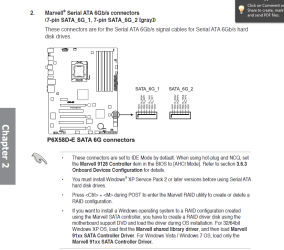

 . Also pooch, I forgot the old (but very true) saying: RTFM... Very good paste of the manual. Will try all of it out straight away and get back to you.
 . Anyway, lots of thanks for your effort. I'm sure it's going to help some people who's stuck with this kind of problem.