Wooo I made it!
I signed in to this forum just to give you the solution, hope google search will help more people on this matter.
The driver i downloaded is
http://s89934018.onlinehome.us/DRIVER/promise378.zip
which i found from another thread/forum can't remember..
THE TRICK IS TO TURN, AT BIOS, THE CONTROLLER TO RAID MODE AND NOT SATA or IDE MODE.
extract to a folder the 64bit folder of the zip, or the 32bit if you want windows 7 32bit(not tested ). and place that folder on a usb stick/ floppy or other.
1) At BIOS SETUP SCREENS, set the ide controller to RAID!!! (not SATA or IDE)
2) enter the raid controller setup at boot (ctrl F i think) and create an array with the only hard disk you have( raid 0 stripe)
then
3) boot to windows 7 64bit installation dvd
4) at the message "you have no drives, install a driver", browse and point to the folder 64b (or 32b)
after this, you will get the option to load the promise driver AND ALL WILL WORK FLAWLESSLY AFTER THAT!!
The trick was to set the controller at bios, to RAID MODE and not SATA/IDE Mode. Without doing so, you would load the driver at win7 setup but you still wouldnt see the hard disk, thats where i thought of this alteration in bios setup... Also, in case you want to have another hard disk in, i assume, by creating another array with just a single hard disk (the new one) will be fine.
Considering i installed win7 64bit to an old laptop that had this controller for the hard disks, which were ide...it will work for all you guys!
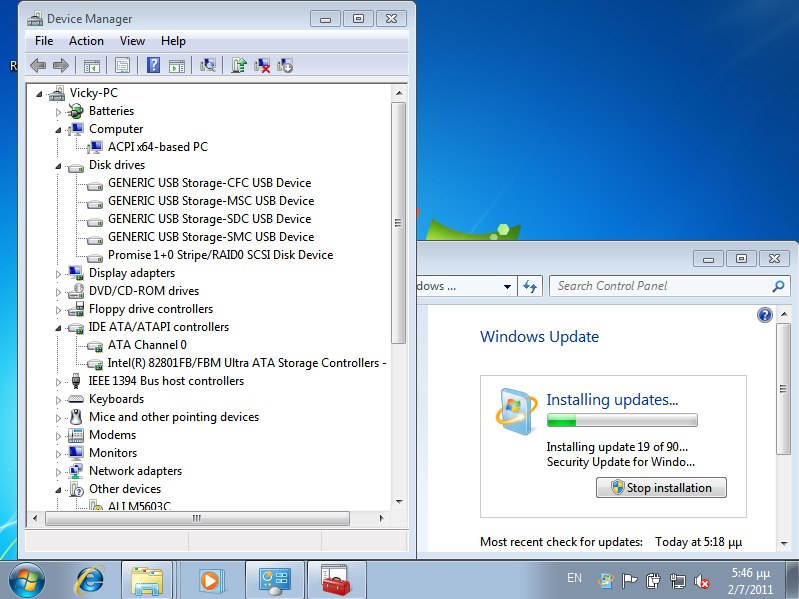
Uploaded with
ImageShack.us
Hi guys im looking for a windows 7 (RTM) driver for:
Promise Fasttrak 376/378 SATA controller
This is a sata built into my motherboard All drivers are XP 32/64bit and don't work during installation of Win7
latest i have found is:
http://www.station-drivers.com/page/promise.htm
http://www.station-drivers.com/telechargement/promise/promise 376-378-1.00.1.39-41.exe
However that doesn't work.
Any way to modify the drivers?

 Your problem is solved, simply install these drivers.


