I am looking for B660 chipset driver for WIN7

celjan34

New member
Local time
3:41 PM
Messages
35
Location
Slovenia
I am looking for B660 (GB B660M DS3H DDR4) chipset driver for WIN7

Or something similar ;)

Below is a description of two devices that have no driver on my WIN7 system


1. Unknown devices
ACPI\INTC1056
*INTC1056

and

2. PCI Simple Communications Controller

PCI\VEN_8086&DEV_7AE8&SUBSYS_1C3A1458&REV_11
PCI\VEN_8086&DEV_7AE8&SUBSYS_1C3A1458
PCI\VEN_8086&DEV_7AE8&CC_078000
PCI\VEN_8086&DEV_7AE8&CC_0780


Please help

Thank you
 

My Computer My Computer

OS
Windows 7
Of course you probably went to Gigabyte's website and saw this board is only Windows 10/11 supported? B660M DS3H DDR4 (rev. 1.0) Support | Motherboard - GIGABYTE Global


This is the device in question: PCI\VEN_8086&DEV_7AE8 - Alder Lake-S PCH HECI Controller | Device Hunt

Host Embedded Controller Interface - Wikipedia

Did some Google dorking for Github and only found this withen the 7 Google page results I looked at. GitHub - linuxhw/DevicePopulation: Population of PCI devices in the world

Did some other searches with the device ID and came up empty.

Solution? Look into Tiny10... It's all I got.
 

My Computer My Computer

Computer type
PC/Desktop
OS
Windows 7 Ultimate x64
Presumably everything works but there are just yellow bangs in device manager ?

There might be some inf files that will get rid of those if it bothers you.

The best place to ask is probably win raid forum
 

My Computers My Computers

System One System Two

  • Computer type
    PC/Desktop
    OS
    7 X64
    CPU
    i5 8400
    Motherboard
    gigabyte b365m ds3h
    Memory
    2x8gb 3200mhz
    Hard Drives
    various
    PSU
    pure power 11 400w cm
    Case
    Coolermaster
    Cooling
    cryorig m9i
  • Computer type
    PC/Desktop
    OS
    7x64
    CPU
    g5400
    Motherboard
    ga b365m ds3h
    Memory
    8gb ddr4 2400
    PSU
    xfx pro 450w
That's right. Everything works, only the yellow triangle is next to the device. But under the details it says that the driver is not installed. The computer works of course. The only thing I notice is that the processor does not go into TURBO MODE. I set up RAID in the BIOS and even the already installed WIN7 works in it. I don't think a clean install works. But that's not important to me. It's important to me that it bothers me, yes, that it's not a driver ;)

thanks to both of you
 

My Computer My Computer

OS
Windows 7
How did you install win7 ? Did you adjust the installation media first in any way?

what drivers have you added ?
 

My Computers My Computers

System One System Two

  • Computer type
    PC/Desktop
    OS
    7 X64
    CPU
    i5 8400
    Motherboard
    gigabyte b365m ds3h
    Memory
    2x8gb 3200mhz
    Hard Drives
    various
    PSU
    pure power 11 400w cm
    Case
    Coolermaster
    Cooling
    cryorig m9i
  • Computer type
    PC/Desktop
    OS
    7x64
    CPU
    g5400
    Motherboard
    ga b365m ds3h
    Memory
    8gb ddr4 2400
    PSU
    xfx pro 450w
I added the drivers to the USB.And also in Winre.wim so that I can boot and clean install via F8...Otherwise, I added for installing USB3 and nvme from SiMPLiX_AiO_ISO_Full_Tool_3_0_22.4.14.rar

When WIN7 is installed, I put the drivers straight from WIN10/11 and/or IObitDriverBooster
 

My Computer My Computer

OS
Windows 7

My Computers My Computers

System One System Two

  • Computer type
    PC/Desktop
    OS
    7 X64
    CPU
    i5 8400
    Motherboard
    gigabyte b365m ds3h
    Memory
    2x8gb 3200mhz
    Hard Drives
    various
    PSU
    pure power 11 400w cm
    Case
    Coolermaster
    Cooling
    cryorig m9i
  • Computer type
    PC/Desktop
    OS
    7x64
    CPU
    g5400
    Motherboard
    ga b365m ds3h
    Memory
    8gb ddr4 2400
    PSU
    xfx pro 450w
I will try your updater

I will also try the win-raid forum...

tnx ;)
 

My Computer My Computer

OS
Windows 7
I will try your updater

I dont think it will be much different from what you have tried already
 

My Computers My Computers

System One System Two

  • Computer type
    PC/Desktop
    OS
    7 X64
    CPU
    i5 8400
    Motherboard
    gigabyte b365m ds3h
    Memory
    2x8gb 3200mhz
    Hard Drives
    various
    PSU
    pure power 11 400w cm
    Case
    Coolermaster
    Cooling
    cryorig m9i
  • Computer type
    PC/Desktop
    OS
    7x64
    CPU
    g5400
    Motherboard
    ga b365m ds3h
    Memory
    8gb ddr4 2400
    PSU
    xfx pro 450w
I am looking for B660 (GB B660M DS3H DDR4) chipset driver for WIN7

Or something similar ;)

Below is a description of two devices that have no driver on my WIN7 system


1. Unknown devices
ACPI\INTC1056
*INTC1056

and

2. PCI Simple Communications Controller

PCI\VEN_8086&DEV_7AE8&SUBSYS_1C3A1458&REV_11
PCI\VEN_8086&DEV_7AE8&SUBSYS_1C3A1458
PCI\VEN_8086&DEV_7AE8&CC_078000
PCI\VEN_8086&DEV_7AE8&CC_0780


Please help

Thank you
By the way - this is not SOLVED yet ;)
 

My Computer My Computer

OS
Windows 7
Not to open a new post... in short, I need a driver for WIN7, namely for the Samsung 980 Pro. I do have DriverVer=01/21/2020,3.3.0.2003 from Samsung, it works, but it only works when win7 is already installed, namely, I can't perform a clean installation and for such a case I would need a suitable driver, if there is one. Thank you ;)
 

My Computer My Computer

OS
Windows 7
does your boot.wim have nvme support ?
 

My Computers My Computers

System One System Two

  • Computer type
    PC/Desktop
    OS
    7 X64
    CPU
    i5 8400
    Motherboard
    gigabyte b365m ds3h
    Memory
    2x8gb 3200mhz
    Hard Drives
    various
    PSU
    pure power 11 400w cm
    Case
    Coolermaster
    Cooling
    cryorig m9i
  • Computer type
    PC/Desktop
    OS
    7x64
    CPU
    g5400
    Motherboard
    ga b365m ds3h
    Memory
    8gb ddr4 2400
    PSU
    xfx pro 450w
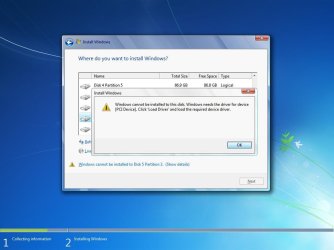
I'm supposed to have yes, but it still doesn't work. Today I made a new install disk and it's even worse, it doesn't show it here at all, the 980 PRO disk, while it shows it to me in the old install disk, only below is a note saying... that the PCI driver is missing. Maybe it's suffering from PCI gen3/4? 980 PRo may only work if PCIe Gen4 is installed, when win7 1x is already installed, it works, as far as I know. I won't deal with it anymore. I will simply, if there is a need for a clean install of win7, do it on a regular SSD drive and then clone the partition with win7 or something, I don't know yet ;)


Thanks anyway

- - - Updated - - -

It is certainly welcome and I will be very grateful if anyone has a concrete solution for this? Tnx
 

My Computer My Computer

OS
Windows 7
that the PCI driver is missing

Can you post a screenshot of that message?

You can borrow my win7 boot media and check if it sees the 980 disk.
17514x64v30.iso
 

My Computers My Computers

System One System Two

  • Computer type
    PC/Desktop
    OS
    7 X64
    CPU
    i5 8400
    Motherboard
    gigabyte b365m ds3h
    Memory
    2x8gb 3200mhz
    Hard Drives
    various
    PSU
    pure power 11 400w cm
    Case
    Coolermaster
    Cooling
    cryorig m9i
  • Computer type
    PC/Desktop
    OS
    7x64
    CPU
    g5400
    Motherboard
    ga b365m ds3h
    Memory
    8gb ddr4 2400
    PSU
    xfx pro 450w
pci.jpg

Same as mine - can see it, but can't install it

Any idea?
 

My Computer My Computer

OS
Windows 7
when win7 1x is already installed, it works

browse to your installed windows 7 windows\system32\driverstore\filerepositoy

see if it picks up a driver from there.

This works for win7 on 300 series.
View attachment ACPI TIME.zip

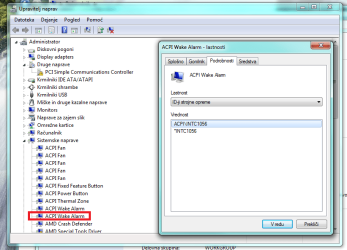
You could try adding the lines

%*INTC1056.DeviceDesc% = AcpiTime_Inst,ACPI\INTC1056
%*INTC1056.DeviceDesc% = AcpiTime_Inst,*INTC1056
 

My Computers My Computers

System One System Two

  • Computer type
    PC/Desktop
    OS
    7 X64
    CPU
    i5 8400
    Motherboard
    gigabyte b365m ds3h
    Memory
    2x8gb 3200mhz
    Hard Drives
    various
    PSU
    pure power 11 400w cm
    Case
    Coolermaster
    Cooling
    cryorig m9i
  • Computer type
    PC/Desktop
    OS
    7x64
    CPU
    g5400
    Motherboard
    ga b365m ds3h
    Memory
    8gb ddr4 2400
    PSU
    xfx pro 450w
Interesting! Adding these two lines makes the yellow triangle disappear on the 1056 device, whatever it is and if it otherwise works fine after installation, I know. It's important that there is no triangle ;) There is no change regarding NVME and 980 pro. Unless I should integrate this edited driver into the installation disk? Browse for drivers doesn't work so I would install it manually when installing.acpi.png
 

My Computer My Computer

OS
Windows 7

My Computers My Computers

System One System Two

  • Computer type
    PC/Desktop
    OS
    7 X64
    CPU
    i5 8400
    Motherboard
    gigabyte b365m ds3h
    Memory
    2x8gb 3200mhz
    Hard Drives
    various
    PSU
    pure power 11 400w cm
    Case
    Coolermaster
    Cooling
    cryorig m9i
  • Computer type
    PC/Desktop
    OS
    7x64
    CPU
    g5400
    Motherboard
    ga b365m ds3h
    Memory
    8gb ddr4 2400
    PSU
    xfx pro 450w
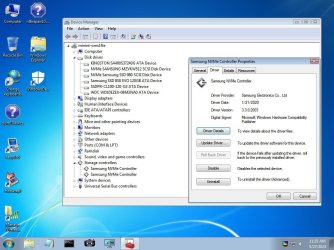
Weird! I ran your boot cd again today. In the device manager, I manually installed drivers that had a question mark or a yellow triangle. Interestingly, the samsung 3.3 nvme driver installed and works! I'm talking about your boot disk. So the drivers are there and working. Except I don't know which one exactly yet to install them in my boot.wim and winre.wim. In principle, I perform a clean installation via F8>repair your computer>CMD... or from USB. F8 is elegance ;)I need to find out which drivers I can install. Because I have all the drivers in one folder. So I don't know which one is installed exactly. Obviously, NVMe 3.3 alone is not enough.I'll let you know how and if I solve it. Thanks for now.

nvme.jpg

- - - Updated - - -

I found which driver is for 980 PR, basically samsung version 3.3 is modded in package AMD_AM4_X399_TRX40_Drivers_B9_Win7_8.1_SHA256but, as far as I can see, two lines have been added to the .ini file and the certificate is different.Well, I integrated this driver in boot.wim and winre.wim and it doesn't work. Apparently something is still missing, or it doesn't work in the boot version. It's true that I haven't searched yet from the USB. I do not want to do it anymore. As a last resort I will use your boot CD ;)thanks for the helpGreetings
 

My Computer My Computer

OS
Windows 7
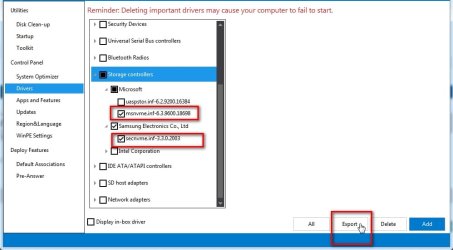
It is a generic entry nvme_inst, PCI\CC_010802 for the id in fernandos driver.

I would guess you need these

dism++-export-nvme-drivers.jpg
 

My Computers My Computers

System One System Two

  • Computer type
    PC/Desktop
    OS
    7 X64
    CPU
    i5 8400
    Motherboard
    gigabyte b365m ds3h
    Memory
    2x8gb 3200mhz
    Hard Drives
    various
    PSU
    pure power 11 400w cm
    Case
    Coolermaster
    Cooling
    cryorig m9i
  • Computer type
    PC/Desktop
    OS
    7x64
    CPU
    g5400
    Motherboard
    ga b365m ds3h
    Memory
    8gb ddr4 2400
    PSU
    xfx pro 450w
Back
Top