Sleep/suspend not working on new PC

BlueBonnett

New member
Pro User
VIP
Local time
3:28 AM
Messages
139
SIW2 worked a miracle helping me copy my Win7 OS to a modern PC and so far everything seems fine except that suspend does not work.

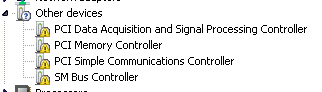
If I tell computer to sleep, it will power off instead. I'm assuming this is a driver error. I had quite a few unrecognized devices, but installing Intel(R) Chipset Devices Driver fixed all but two. I was told this thing I installed only provided INF files rather than any actual driver, so not sure if that means it only swept things under the rug.

So far I have PCI Simple Communications Controller Hardware ID: PCI\VEN_8086&DEV_A3BA&SUBSYS_09B41028&REV_00

And Unknown device with a hardware ID of ACPI\INT3451


Do either of these two affect the suspend function?
 

My Computer My Computer

At a glance

Windows 7 Ultimate 64-bitIntel(R) Core(TM) i5-7400 CPU8GB DDR4Intel HD Graphics 630
Computer type
PC/Desktop
Computer Manufacturer/Model Number
Acer
OS
Windows 7 Ultimate 64-bit
CPU
Intel(R) Core(TM) i5-7400 CPU
Motherboard
Aspire TC-780
Memory
8GB DDR4
Graphics Card(s)
Intel HD Graphics 630
Monitor(s) Displays
1
Screen Resolution
1920x1080
Hard Drives
One system SSD, one data SSD, one 2TB data HDD.
PSU
240w
Keyboard
Logitech USB wireless
Mouse
USB wireless
Browser
Firefox

My Computers My Computers

  • At a glance

    7 X64i5 84002x8gb 3200mhz
    Computer type
    PC/Desktop
    OS
    7 X64
    CPU
    i5 8400
    Motherboard
    gigabyte b365m ds3h
    Memory
    2x8gb 3200mhz
    Hard Drives
    various
    PSU
    pure power 11 400w cm
    Case
    Coolermaster
    Cooling
    cryorig m9i
  • At a glance

    7x64g54008gb ddr4 2400
    Computer type
    PC/Desktop
    OS
    7x64
    CPU
    g5400
    Motherboard
    ga b365m ds3h
    Memory
    8gb ddr4 2400
    PSU
    xfx pro 450w
Thanks, the second one installed but the first didn't. At least the unknown device is fixed!

Where do you find these, btw? A google search of the hardware IDs led me nowhere.

PCI\VEN_8086&DEV_A3B1&SUBSYS_09B41028&REV_00
PCI\VEN_8086&DEV_A3A1&SUBSYS_09B41028&REV_00
PCI\VEN_8086&DEV_A3BA&SUBSYS_09B41028&REV_00
PCI\VEN_8086&DEV_A3A3&SUBSYS_09B41028&REV_00

- - - Updated - - -

Huh, the attachment I uploaded didn't show up.
Pasteboard - Uploaded Image
HTHEpWtuWXAI.png
 

Attachments

  • other devices.png
    other devices.png
    1.6 KB · Views: 0

My Computer My Computer

At a glance

Windows 7 Ultimate 64-bitIntel(R) Core(TM) i5-7400 CPU8GB DDR4Intel HD Graphics 630
Computer type
PC/Desktop
Computer Manufacturer/Model Number
Acer
OS
Windows 7 Ultimate 64-bit
CPU
Intel(R) Core(TM) i5-7400 CPU
Motherboard
Aspire TC-780
Memory
8GB DDR4
Graphics Card(s)
Intel HD Graphics 630
Monitor(s) Displays
1
Screen Resolution
1920x1080
Hard Drives
One system SSD, one data SSD, one 2TB data HDD.
PSU
240w
Keyboard
Logitech USB wireless
Mouse
USB wireless
Browser
Firefox
So I got all the drivers from drivercollection.com, no idea if they legit installed because they were all for Win10 and some only had inf files.

Sleep/suspend still doesn't work, so I assume these were not the proper drivers?
 

My Computer My Computer

At a glance

Windows 7 Ultimate 64-bitIntel(R) Core(TM) i5-7400 CPU8GB DDR4Intel HD Graphics 630
Computer type
PC/Desktop
Computer Manufacturer/Model Number
Acer
OS
Windows 7 Ultimate 64-bit
CPU
Intel(R) Core(TM) i5-7400 CPU
Motherboard
Aspire TC-780
Memory
8GB DDR4
Graphics Card(s)
Intel HD Graphics 630
Monitor(s) Displays
1
Screen Resolution
1920x1080
Hard Drives
One system SSD, one data SSD, one 2TB data HDD.
PSU
240w
Keyboard
Logitech USB wireless
Mouse
USB wireless
Browser
Firefox
Although the Device Manager shows the information files as "drivers", the "Intel(R) Chipset Device Software" doesn’t contain any real driver (= .SYS file), but just textmode (= .INF) files, which
a) let the OS know, that for the related Intel Chipset Device a driver is neither needed nor available and
b) gives the user the information, that the related device is an Intel one.
None of the Windows Operating Systems needs the .INF files for a proper functionality.
The Intel Chipset "drivers" don’t have any impact on the performance of the related system.


Download links to the latest Intel(R) Chipset Device INF Files (often wrongly named “Drivers”)

Intel Chipset Device "Drivers" (= INF files) - Other Drivers - Win-Raid Forum

Try the infs from the above link. After that see if there are any yellow bangs in device manager
 

My Computers My Computers

  • At a glance

    7 X64i5 84002x8gb 3200mhz
    Computer type
    PC/Desktop
    OS
    7 X64
    CPU
    i5 8400
    Motherboard
    gigabyte b365m ds3h
    Memory
    2x8gb 3200mhz
    Hard Drives
    various
    PSU
    pure power 11 400w cm
    Case
    Coolermaster
    Cooling
    cryorig m9i
  • At a glance

    7x64g54008gb ddr4 2400
    Computer type
    PC/Desktop
    OS
    7x64
    CPU
    g5400
    Motherboard
    ga b365m ds3h
    Memory
    8gb ddr4 2400
    PSU
    xfx pro 450w
I already got rid of the yellow bangs with the random drivers I found on driverscollection, should I uninstall them and try your link?

Although the Device Manager shows the information files as "drivers", the "Intel(R) Chipset Device Software" doesn’t contain any real driver (= .SYS file), but just textmode (= .INF) files, which
a) let the OS know, that for the related Intel Chipset Device a driver is neither needed nor available


So do I gather from this that my sleep not working has nothing to do with this?
 

My Computer My Computer

At a glance

Windows 7 Ultimate 64-bitIntel(R) Core(TM) i5-7400 CPU8GB DDR4Intel HD Graphics 630
Computer type
PC/Desktop
Computer Manufacturer/Model Number
Acer
OS
Windows 7 Ultimate 64-bit
CPU
Intel(R) Core(TM) i5-7400 CPU
Motherboard
Aspire TC-780
Memory
8GB DDR4
Graphics Card(s)
Intel HD Graphics 630
Monitor(s) Displays
1
Screen Resolution
1920x1080
Hard Drives
One system SSD, one data SSD, one 2TB data HDD.
PSU
240w
Keyboard
Logitech USB wireless
Mouse
USB wireless
Browser
Firefox
Back
Top