Solved driver for unknown device, win 7 ultimaste, lenovo x230

sebigbos

New member
Local time
2:42 AM
Messages
6
Hi,

I use a lenovo x230 laptop with win 7 ultimate. The device manager is showing an unknown usb device. The automatic driver scan from the lenovo site doesn't work.

How can I identify the device and find the missing driver manually?
 

My Computers My Computers

  • At a glance

    Windows 7 Ultimate x64
    OS
    Windows 7 Ultimate x64
  • Computer type
    PC/Desktop
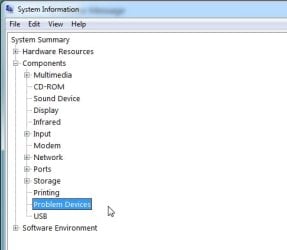
msinfo32>components>problem devices

msinfo32-problem-devices1.jpg

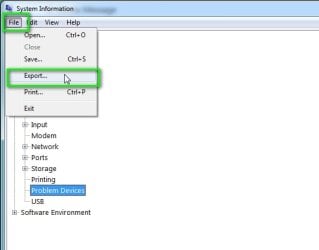
msinfo32-problem-devices2.jpg

export as .txt file

search tinternet for the pnp id which look like this PCI\VEN_8086&DEV_1E2D&SUBSYS_21FA17AA&REV_04

the first bit in bold will do
 

My Computers My Computers

  • At a glance

    7 X64i5 84002x8gb 3200mhz
    Computer type
    PC/Desktop
    OS
    7 X64
    CPU
    i5 8400
    Motherboard
    gigabyte b365m ds3h
    Memory
    2x8gb 3200mhz
    Hard Drives
    various
    PSU
    pure power 11 400w cm
    Case
    Coolermaster
    Cooling
    cryorig m9i
  • At a glance

    7x64g54008gb ddr4 2400
    Computer type
    PC/Desktop
    OS
    7x64
    CPU
    g5400
    Motherboard
    ga b365m ds3h
    Memory
    8gb ddr4 2400
    PSU
    xfx pro 450w
thanks for your answer. I already checked this out looking up the specs of the driver installed: The number I get is:

USB\VID_0000&PID_0000\6&259C322D&0&6

and I cannot find anything googling this number.
 

My Computers My Computers

  • At a glance

    Windows 7 Ultimate x64
    OS
    Windows 7 Ultimate x64
  • Computer type
    PC/Desktop
Seems windows cant identify it. Could be the device is faulty or something wrong with the cable/connection.
 

My Computers My Computers

  • At a glance

    7 X64i5 84002x8gb 3200mhz
    Computer type
    PC/Desktop
    OS
    7 X64
    CPU
    i5 8400
    Motherboard
    gigabyte b365m ds3h
    Memory
    2x8gb 3200mhz
    Hard Drives
    various
    PSU
    pure power 11 400w cm
    Case
    Coolermaster
    Cooling
    cryorig m9i
  • At a glance

    7x64g54008gb ddr4 2400
    Computer type
    PC/Desktop
    OS
    7x64
    CPU
    g5400
    Motherboard
    ga b365m ds3h
    Memory
    8gb ddr4 2400
    PSU
    xfx pro 450w
Is there any component of the computer that fails or isn't working as expected?
Say, like the camera not working or a wifi having problems connecting or the like.

Besides what device manager says, do you have any concrete problems with it?
 

My Computer My Computer

At a glance

Windows 7 Ultimate x64Intel Core i7-740QM8 GB DDR3NVIDIA GeForce 330GT
Computer type
Laptop
Computer Manufacturer/Model Number
Toshiba Sattelite A665-S6092
OS
Windows 7 Ultimate x64
CPU
Intel Core i7-740QM
Memory
8 GB DDR3
Graphics Card(s)
NVIDIA GeForce 330GT
Screen Resolution
1366x768
Hard Drives
Samsung 840 SSD 500GB
1TB USB3 external HD
Cooling
Coolermaster Notepal U3 notebook cooling pad
Internet Speed
3mbps ASDL
Antivirus
ClamWin 0.98.7
Browser
Opera 12.17 x86 (main), Firefox 38 (sec), IE11 (last resort)
good question :-)

The integrated camera doesn't work or rather it doesn't show up. I tried to install the camera drivers from the lenovo support site. One of the two drivers aborts saying, there is no camera of this type, the other seems to install but doesn't give a confirmation message.
 

My Computers My Computers

  • At a glance

    Windows 7 Ultimate x64
    OS
    Windows 7 Ultimate x64
  • Computer type
    PC/Desktop

My Computers My Computers

  • At a glance

    7 X64i5 84002x8gb 3200mhz
    Computer type
    PC/Desktop
    OS
    7 X64
    CPU
    i5 8400
    Motherboard
    gigabyte b365m ds3h
    Memory
    2x8gb 3200mhz
    Hard Drives
    various
    PSU
    pure power 11 400w cm
    Case
    Coolermaster
    Cooling
    cryorig m9i
  • At a glance

    7x64g54008gb ddr4 2400
    Computer type
    PC/Desktop
    OS
    7x64
    CPU
    g5400
    Motherboard
    ga b365m ds3h
    Memory
    8gb ddr4 2400
    PSU
    xfx pro 450w
if the camera is dissabled in Bios it WONT show up
so it doesn't matter if you try to install the driver it just fails
 

My Computer My Computer

At a glance

W7 home premium 32bit/W7HP 64bit/w10 tp insid...E5300 dual core3gbNvidia Geforce 7100 Nforce 630i
Computer type
PC/Desktop
Computer Manufacturer/Model Number
medionl/Aspire 6930G/acer x55a
OS
W7 home premium 32bit/W7HP 64bit/w10 tp insider ring
CPU
E5300 dual core
Motherboard
medion MS7366
Memory
3gb
Graphics Card(s)
Nvidia Geforce 7100 Nforce 630i
Monitor(s) Displays
avixc
Internet Speed
n (isp resticted to 72)
Antivirus
mse/pands
Browser
palemoon
Other Info
Belkin Fd7050 n USB using Railink RT2870 drivers, more upto date
SIW2: cool program. But it shows unknown device also
torchwood: I cannot find a option in the bios to activate or deactivate the camera
 

My Computers My Computers

  • At a glance

    Windows 7 Ultimate x64
    OS
    Windows 7 Ultimate x64
  • Computer type
    PC/Desktop
see security menu i/o ports ---- camera--- enable/dissable
found at Manualslib (pdf download)
 

My Computer My Computer

At a glance

W7 home premium 32bit/W7HP 64bit/w10 tp insid...E5300 dual core3gbNvidia Geforce 7100 Nforce 630i
Computer type
PC/Desktop
Computer Manufacturer/Model Number
medionl/Aspire 6930G/acer x55a
OS
W7 home premium 32bit/W7HP 64bit/w10 tp insider ring
CPU
E5300 dual core
Motherboard
medion MS7366
Memory
3gb
Graphics Card(s)
Nvidia Geforce 7100 Nforce 630i
Monitor(s) Displays
avixc
Internet Speed
n (isp resticted to 72)
Antivirus
mse/pands
Browser
palemoon
Other Info
Belkin Fd7050 n USB using Railink RT2870 drivers, more upto date
see security menu i/o ports ---- camera--- enable/dissable
found at Manualslib (pdf download)

got it. The camera was enabled. When I disable it, the unknown device disappears. So it's clear that the unknown device is the camera. I think it' s broken.

thx.

- - - Updated - - -

okey, update, all new: I installed an old system-backup.

Now the camera is working. I still had an unknown device, but I could identify this as the realtek media card reader and install the driver from the lenovo site, so it is all fine now.

Problem solved and thanks for the help.
 

My Computers My Computers

  • At a glance

    Windows 7 Ultimate x64
    OS
    Windows 7 Ultimate x64
  • Computer type
    PC/Desktop
Back
Top