
Getting your Nikon Coolscan to work on W7 x64

sygnus21

New member
Guru
Gold Member
VIP
Local time
8:15 AM
Messages
7,684
Location
Hampton VA
   Note
This tutorial applies to the 4000, 5000, 8000, and 9000 series scanners as well as Windows 8/10 (will need to temporally disable Windows' Driver Signature Enforcement policy (option 1)). For those needing to use a FireWire card (IEEE 1394) see my post here. Yes! You can use one.

Lastly, Nikon is wanting people to sign into their site to get certain drivers only they provide; thus if you want the drivers you'll need to sign in or hunt for them elsewhere. Sorry.

   Warning
For best results insure the scanner has the latest firmware update. Please note you'll have to contact Nikon for any firmware updates for your scanner. See this post.

How to check firmware version: Firmware Updater for the SUPER COOLSCAN 4000 ED (PDF file).

   Tip
Before you get started: Remove Vuescan if installed. You can re-install it after these procedures.

 Now...

1- Download the Nikon Scan 4.0.3 scan software for Windows Vista 32-bit. Yes, Vista 32-bit.

2- Download the modified scanner driver here - View attachment scanners.zip


3- Extract and save the scanners.inf file to a location or folder of your choosing...

EXAMPLE: I created a folder called Nikon Files. After I install the Nikon Scan software, I'll then place the Nikon Files folder inside the NKScan4 folder located at...

C:\Program Files (x86)\Nikon\NkScan4 - Thus the NKScan4 folder now contains the Nikon Files folder and will look like this... C:\Program Files (x86)\Nikon\NkScan4\Nikon Files

4- Now install the Nikon Scan software you downloaded and after the installation, go to....

C:\Program Files (x86)\Common Files\Nikon\Driver\Scan1394 (see note) and copy this file NKScnUSD.dll to the same folder (Example: Nikon Files) that the scanners.inf file is in. The Nikon Files folder should now contain these two files... NKScnUSD.dll and scanners.inf

   Warning
If your scanner is USB than the folder will be ScanUSB instead of Scan1394.

 Once that’s done….

5- Power up the scanner and make sure the Firewire or USB cable is connected to the computer.

6- Cancel any dialogue boxes looking for drivers if they appear.

   Warning
For Step #7 - If you're running Windows 8/10, you'll need to disable the driver signature enforcement policy (option 1) prior to steps 7-9 or the scanners.inf driver will not install. After disabling, continue through 7-9

7- Go to Device Manager – Control Panel, Device Manager and look for the "Unknown Device" (your scanner) with the yellow triangle.

8- Right click on it and choose "Update Driver Software" then choose "Browse my computer for driver software"

9- Click "Browse" and find the location or folder where you put the scanners.inf file. Example: C:\Program Files (x86)\Nikon\NkScan4\Nikon Files and click "Next" This will/should install the driver (scanners.inf) you extracted from the zip file for your scanner.

10- That’s it – Your Nikon Scan software should now be fully functional.

Extra Info...

Good luck :)
 
Last edited:

My Computer

Computer type
PC/Desktop
Computer Manufacturer/Model Number
Custom built by me.
OS
Windows 10 Pro
CPU
Intel Core i7-4770K (3.5Ghz)
Motherboard
Gigabyte G1 Sniper 5 (F10 Bios)
Memory
32 gig Corsair Dominator Platinum (4x8Gig)
Graphics Card(s)
Sapphire Tri-X R9 Fury
Sound Card
Soundblaster ZXR
Monitor(s) Displays
NEC PA242W 24" LCD Monitor
Screen Resolution
1920 x 1200
Hard Drives
Primary - Samsung 850 Pro (512gig), Samsung 840 Pro (256gig), 2TB WD Caviar Black.
PSU
EVGA Supernova 1000 G2
Case
Cooler Master HAF X
Cooling
Corsair H100i with Corsair Air Series SP120 Quiet Fans
Keyboard
Logitech Wireless Wave
Mouse
Logitech Performance MX
Internet Speed
High Speed Cable
Antivirus
Norton Security
Browser
IE11
Other Info
Memory Timings - 1866MHz @ 9-9-9-27-1T @ 1.5 volts
Try as I might, I can't get this to work...

I've followed your fix to the letter (three times now) and W7 stubbornly shows the scanner as "Unknown USB Device" (two of them actually) and either says there is no appropriate driver or says that it has the latest driver when I point the Update Driver dialog at the right folder.

Any ideas?

Win 7 Ultimate, Asus P7P55D
 

My Computer

OS
Win 7 Ultimate (64 bit)
CPU
Intel Core i7 860 @ 2.8Ghz
Motherboard
P7P55D LE
Memory
4Gb DDR3
Graphics Card(s)
HIS ATI Radion HD5700
Monitor(s) Displays
2 x Viewsonic 1912w
Hard Drives
1 x WD 1Tb SATA
2 x Seagate 320Gb SATA
1 x 250Gb IDE
PSU
Coolermaster 600w
Case
Coolermaster
Cooling
wonderfully quiet!
What "Nikon" scanner do you have? If you have the 5000, there's a mod that needs to be done to the inf file.

Let me know.

Thanks
 

My Computer

Computer type
PC/Desktop
Computer Manufacturer/Model Number
Custom built by me.
OS
Windows 10 Pro
CPU
Intel Core i7-4770K (3.5Ghz)
Motherboard
Gigabyte G1 Sniper 5 (F10 Bios)
Memory
32 gig Corsair Dominator Platinum (4x8Gig)
Graphics Card(s)
Sapphire Tri-X R9 Fury
Sound Card
Soundblaster ZXR
Monitor(s) Displays
NEC PA242W 24" LCD Monitor
Screen Resolution
1920 x 1200
Hard Drives
Primary - Samsung 850 Pro (512gig), Samsung 840 Pro (256gig), 2TB WD Caviar Black.
PSU
EVGA Supernova 1000 G2
Case
Cooler Master HAF X
Cooling
Corsair H100i with Corsair Air Series SP120 Quiet Fans
Keyboard
Logitech Wireless Wave
Mouse
Logitech Performance MX
Internet Speed
High Speed Cable
Antivirus
Norton Security
Browser
IE11
Other Info
Memory Timings - 1866MHz @ 9-9-9-27-1T @ 1.5 volts
Thanks for your quick reply.

It's a Coolscan 4000ED which was running on a Mac so it only has a Firewire connection (I imagine that PC versions came with a USB port). I had it running on an XP machine yesterday so I know the scanner works OK.

I tried loading XP Virtual Machine yesterday to see if I could get the device recognised but no luck there either.
 

My Computer

OS
Win 7 Ultimate (64 bit)
CPU
Intel Core i7 860 @ 2.8Ghz
Motherboard
P7P55D LE
Memory
4Gb DDR3
Graphics Card(s)
HIS ATI Radion HD5700
Monitor(s) Displays
2 x Viewsonic 1912w
Hard Drives
1 x WD 1Tb SATA
2 x Seagate 320Gb SATA
1 x 250Gb IDE
PSU
Coolermaster 600w
Case
Coolermaster
Cooling
wonderfully quiet!
I have the 4000 as well, and it is Firewire only, so if you have the same thing, it should work per instructions under Windows.

Also PC's do have Firewire connections as well. And "if" the PC didn't have a Firewire connection, the scanner did ship with a Firewire card, mine did.

So, what exactly is the issue?

Thanks
 

My Computer

Computer type
PC/Desktop
Computer Manufacturer/Model Number
Custom built by me.
OS
Windows 10 Pro
CPU
Intel Core i7-4770K (3.5Ghz)
Motherboard
Gigabyte G1 Sniper 5 (F10 Bios)
Memory
32 gig Corsair Dominator Platinum (4x8Gig)
Graphics Card(s)
Sapphire Tri-X R9 Fury
Sound Card
Soundblaster ZXR
Monitor(s) Displays
NEC PA242W 24" LCD Monitor
Screen Resolution
1920 x 1200
Hard Drives
Primary - Samsung 850 Pro (512gig), Samsung 840 Pro (256gig), 2TB WD Caviar Black.
PSU
EVGA Supernova 1000 G2
Case
Cooler Master HAF X
Cooling
Corsair H100i with Corsair Air Series SP120 Quiet Fans
Keyboard
Logitech Wireless Wave
Mouse
Logitech Performance MX
Internet Speed
High Speed Cable
Antivirus
Norton Security
Browser
IE11
Other Info
Memory Timings - 1866MHz @ 9-9-9-27-1T @ 1.5 volts
The PC has a FW connection but is only a few days old so it did cross my mind that showing up as a USB device might be unusual in some way.

The problem is that despite following your instructions to the letter, the fix doesn't work (see my first post) and I was hoping you might shed some light on the issue. I've tried uninstalling everything (the scanner, Vuescan, Nikon Scan) but the result's the same and I can't understand what I could be doing wrong.

I get the theory of the driver fix but the system just says no. :(
 

My Computer

OS
Win 7 Ultimate (64 bit)
CPU
Intel Core i7 860 @ 2.8Ghz
Motherboard
P7P55D LE
Memory
4Gb DDR3
Graphics Card(s)
HIS ATI Radion HD5700
Monitor(s) Displays
2 x Viewsonic 1912w
Hard Drives
1 x WD 1Tb SATA
2 x Seagate 320Gb SATA
1 x 250Gb IDE
PSU
Coolermaster 600w
Case
Coolermaster
Cooling
wonderfully quiet!
OK, your Scanner should show up under Firewire, not USB. It is a Firewire scanner; if that isn't the case, well...???

I've attached a zip of the inf file. After you download the file make sure you do this...

1- Save the file (inf) to a location (folder) of your choosing...

Example: I created a folder called "Nikon Files" and placed it inside inside the "NKScan4" folder located at C:\Program Files (x86)\Nikon\NkScan4 - Thus the folder now looks like this...

C:\Program Files (x86)\Nikon\NkScan4\Nikon Files

2- "After" you install the Nikon Scan software go to C:\Program Files (x86)\Common Files\Nikon\Driver\Scan1394 and copy this file "NKScnUSD.dll" to the same folder (Nikon Files) that the inf file is in.

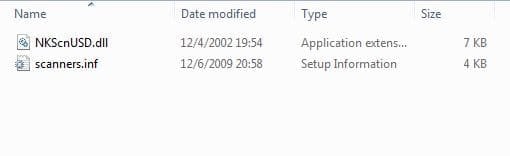
The Nikon Files folder should now contain these two files... NKScnUSD.dll and the Scanners.inf

Nikon inf Folder.JPG
C:\Program Files (x86)\Nikon\NkScan4\Nikon Files

After that....

6- Go to Device Manager – Control Panel, Device Manager and look for the "Unknown Device" (your scanner) with the yellow triangle.
7- Right click on it and choose "Update Driver Software" and choose "Browse my computer for driver software"
8- Click "Browse" and find the folder/location where you put your created inf file, EX: C:\Program Files (x86)\Nikon\NkScan4\Nikon Files and click "Next" this will install the inf driver for the scanner.
9- That’s it – Your Nikon Scan software should now be fully functional.

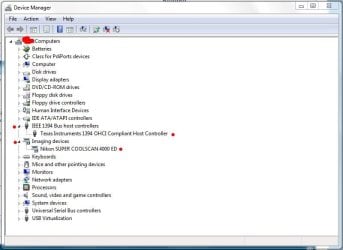
Once that's done your device manager should look something like this...

DM - Nikon.JPG

Let me know if this worked.
 
Last edited:

My Computer

Computer type
PC/Desktop
Computer Manufacturer/Model Number
Custom built by me.
OS
Windows 10 Pro
CPU
Intel Core i7-4770K (3.5Ghz)
Motherboard
Gigabyte G1 Sniper 5 (F10 Bios)
Memory
32 gig Corsair Dominator Platinum (4x8Gig)
Graphics Card(s)
Sapphire Tri-X R9 Fury
Sound Card
Soundblaster ZXR
Monitor(s) Displays
NEC PA242W 24" LCD Monitor
Screen Resolution
1920 x 1200
Hard Drives
Primary - Samsung 850 Pro (512gig), Samsung 840 Pro (256gig), 2TB WD Caviar Black.
PSU
EVGA Supernova 1000 G2
Case
Cooler Master HAF X
Cooling
Corsair H100i with Corsair Air Series SP120 Quiet Fans
Keyboard
Logitech Wireless Wave
Mouse
Logitech Performance MX
Internet Speed
High Speed Cable
Antivirus
Norton Security
Browser
IE11
Other Info
Memory Timings - 1866MHz @ 9-9-9-27-1T @ 1.5 volts
I'm trying to get my coolscan 5000 to work on Windows 7 and haven't been able to get it to work. You said earlier there is a slight modification that needs to be made. What else do I need to do? I've done the entire instructions word for word, but it still lists that it is unable to find or install a driver when I click on the folder with the appropriate files. Let me know what you can so that I can fix this problem and get this scanner up and running on my computer. Thanks so much!
 

My Computer

OS
Windows 7
Yeah, the 5000 is USB and won't work with the current inf file here. I'll upload a fixed one in my next post which will be in about an hour or so.

Peace.
 

My Computer

Computer type
PC/Desktop
Computer Manufacturer/Model Number
Custom built by me.
OS
Windows 10 Pro
CPU
Intel Core i7-4770K (3.5Ghz)
Motherboard
Gigabyte G1 Sniper 5 (F10 Bios)
Memory
32 gig Corsair Dominator Platinum (4x8Gig)
Graphics Card(s)
Sapphire Tri-X R9 Fury
Sound Card
Soundblaster ZXR
Monitor(s) Displays
NEC PA242W 24" LCD Monitor
Screen Resolution
1920 x 1200
Hard Drives
Primary - Samsung 850 Pro (512gig), Samsung 840 Pro (256gig), 2TB WD Caviar Black.
PSU
EVGA Supernova 1000 G2
Case
Cooler Master HAF X
Cooling
Corsair H100i with Corsair Air Series SP120 Quiet Fans
Keyboard
Logitech Wireless Wave
Mouse
Logitech Performance MX
Internet Speed
High Speed Cable
Antivirus
Norton Security
Browser
IE11
Other Info
Memory Timings - 1866MHz @ 9-9-9-27-1T @ 1.5 volts
I'm trying to get my coolscan 5000 to work on Windows 7 and haven't been able to get it to work. You said earlier there is a slight modification that needs to be made. What else do I need to do? I've done the entire instructions word for word, but it still lists that it is unable to find or install a driver when I click on the folder with the appropriate files. Let me know what you can so that I can fix this problem and get this scanner up and running on my computer. Thanks so much!

Yeah, the 5000 is USB and won't work with the current inf file here. I'll upload a fixed one in my next post which will be in about an hour or so.

Peace.

PM me for your answer.
 

My Computer

Computer type
PC/Desktop
Computer Manufacturer/Model Number
Custom built by me.
OS
Windows 10 Pro
CPU
Intel Core i7-4770K (3.5Ghz)
Motherboard
Gigabyte G1 Sniper 5 (F10 Bios)
Memory
32 gig Corsair Dominator Platinum (4x8Gig)
Graphics Card(s)
Sapphire Tri-X R9 Fury
Sound Card
Soundblaster ZXR
Monitor(s) Displays
NEC PA242W 24" LCD Monitor
Screen Resolution
1920 x 1200
Hard Drives
Primary - Samsung 850 Pro (512gig), Samsung 840 Pro (256gig), 2TB WD Caviar Black.
PSU
EVGA Supernova 1000 G2
Case
Cooler Master HAF X
Cooling
Corsair H100i with Corsair Air Series SP120 Quiet Fans
Keyboard
Logitech Wireless Wave
Mouse
Logitech Performance MX
Internet Speed
High Speed Cable
Antivirus
Norton Security
Browser
IE11
Other Info
Memory Timings - 1866MHz @ 9-9-9-27-1T @ 1.5 volts
Think I'll Ensure The Firewire Port is working

Sygnus, thanks for all your time and trouble on this. Before I try your fix I think I'll fit a FW card in the machine since it sounds a bit suspicious that the scanner is showing up as a USB device rather than Firewire or 1394. I'll buy one tomorrow, give it a go and report back.
 

My Computer

OS
Win 7 Ultimate (64 bit)
CPU
Intel Core i7 860 @ 2.8Ghz
Motherboard
P7P55D LE
Memory
4Gb DDR3
Graphics Card(s)
HIS ATI Radion HD5700
Monitor(s) Displays
2 x Viewsonic 1912w
Hard Drives
1 x WD 1Tb SATA
2 x Seagate 320Gb SATA
1 x 250Gb IDE
PSU
Coolermaster 600w
Case
Coolermaster
Cooling
wonderfully quiet!
I have a CoolScan V and am also having problems with your patch. I have a USB connection. What changes are required to the inf file? Thanks for the help.
 

My Computer

OS
Windows 7 64bit
Hi Mike, you'll have to go here Unoffical Vista X64 driver of LS-8000ED/9000ED for Nikon Scan 4.03 - Photo.net Digital Darkroom Forum scroll down a bit and read Shaun Merrigan's Aug 21, 2009; 08:20 p.m post on adding a scanner to the inf file. He had to add the 5000 to the file I include, however I can't say the V will work so I won't add it for now. However if you do try it and find it works and want to share, I add it to my inf for download.

I just don’t want to start adding scanners to a proven file that works and then have someone blast me for pushing something that doesn’t work.

All I'm basically doing is compiling the work of others and making it easily available here and on my website.

Sorry.
 

My Computer

Computer type
PC/Desktop
Computer Manufacturer/Model Number
Custom built by me.
OS
Windows 10 Pro
CPU
Intel Core i7-4770K (3.5Ghz)
Motherboard
Gigabyte G1 Sniper 5 (F10 Bios)
Memory
32 gig Corsair Dominator Platinum (4x8Gig)
Graphics Card(s)
Sapphire Tri-X R9 Fury
Sound Card
Soundblaster ZXR
Monitor(s) Displays
NEC PA242W 24" LCD Monitor
Screen Resolution
1920 x 1200
Hard Drives
Primary - Samsung 850 Pro (512gig), Samsung 840 Pro (256gig), 2TB WD Caviar Black.
PSU
EVGA Supernova 1000 G2
Case
Cooler Master HAF X
Cooling
Corsair H100i with Corsair Air Series SP120 Quiet Fans
Keyboard
Logitech Wireless Wave
Mouse
Logitech Performance MX
Internet Speed
High Speed Cable
Antivirus
Norton Security
Browser
IE11
Other Info
Memory Timings - 1866MHz @ 9-9-9-27-1T @ 1.5 volts
CoolScan V

The addition of the line of text for a CoolScan V worked for me so It can be adjusted in the "inf" file you are developing. Thanks for the prompt reply. You saved me a ton of time!
 

My Computer

OS
Windows 7 64bit
Can you PM me the line of text you used. Thanks.
 

My Computer

Computer type
PC/Desktop
Computer Manufacturer/Model Number
Custom built by me.
OS
Windows 10 Pro
CPU
Intel Core i7-4770K (3.5Ghz)
Motherboard
Gigabyte G1 Sniper 5 (F10 Bios)
Memory
32 gig Corsair Dominator Platinum (4x8Gig)
Graphics Card(s)
Sapphire Tri-X R9 Fury
Sound Card
Soundblaster ZXR
Monitor(s) Displays
NEC PA242W 24" LCD Monitor
Screen Resolution
1920 x 1200
Hard Drives
Primary - Samsung 850 Pro (512gig), Samsung 840 Pro (256gig), 2TB WD Caviar Black.
PSU
EVGA Supernova 1000 G2
Case
Cooler Master HAF X
Cooling
Corsair H100i with Corsair Air Series SP120 Quiet Fans
Keyboard
Logitech Wireless Wave
Mouse
Logitech Performance MX
Internet Speed
High Speed Cable
Antivirus
Norton Security
Browser
IE11
Other Info
Memory Timings - 1866MHz @ 9-9-9-27-1T @ 1.5 volts
Thanks Sygnus for posting this fix. I also have the Nikon Coolscan 4000, and I want to use it on my Windows 7 x64 laptop. Your fix has taken me almost all the way, but I still have a gap somewhere, hope you can help me resolve it.

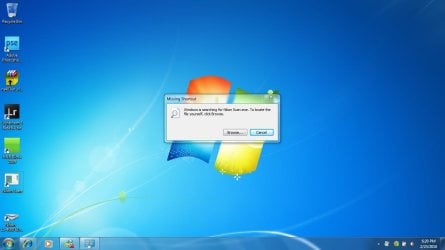
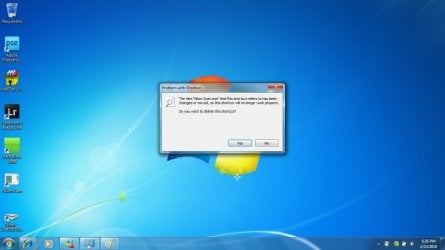
The driver install went perfectly, the scanner shows up in Devices and Drivers, and diagnostic there is that the driver is working correctly. Problem is that I can't run Nikon Scan. I get an error message when I try to open it, that there is a Missing Shortcut and that Windows is searching for Nikon Scan .exe. Will include a screenshot of the error messages. Can you coach me on how to fix this?
 

Attachments

  • missing shortcut nikon scan.jpg
    missing shortcut nikon scan.jpg
    55.8 KB · Views: 241
  • missing shortcut changed or deleted.jpg
    missing shortcut changed or deleted.jpg
    56.8 KB · Views: 192

My Computer

OS
Windows 7
Hi snow,

Since you have Windows 7 x64 the main Nikon Folder should be C:\Program Files (x86)\Nikon\NkScan4. If so, click the exe and see if the program works?

If it does, create a shortcut of it and place it where you want it, then try it out.

Let me know
 

My Computer

Computer type
PC/Desktop
Computer Manufacturer/Model Number
Custom built by me.
OS
Windows 10 Pro
CPU
Intel Core i7-4770K (3.5Ghz)
Motherboard
Gigabyte G1 Sniper 5 (F10 Bios)
Memory
32 gig Corsair Dominator Platinum (4x8Gig)
Graphics Card(s)
Sapphire Tri-X R9 Fury
Sound Card
Soundblaster ZXR
Monitor(s) Displays
NEC PA242W 24" LCD Monitor
Screen Resolution
1920 x 1200
Hard Drives
Primary - Samsung 850 Pro (512gig), Samsung 840 Pro (256gig), 2TB WD Caviar Black.
PSU
EVGA Supernova 1000 G2
Case
Cooler Master HAF X
Cooling
Corsair H100i with Corsair Air Series SP120 Quiet Fans
Keyboard
Logitech Wireless Wave
Mouse
Logitech Performance MX
Internet Speed
High Speed Cable
Antivirus
Norton Security
Browser
IE11
Other Info
Memory Timings - 1866MHz @ 9-9-9-27-1T @ 1.5 volts
Thanks Sygnus for the advice. Windows cannot find the .exe file, and neither can I. Is it possible that the Nikon Scan didn't install, even though, somehow, the driver for the scanner did?
Nikon folder is C:\Program Files(86)\Common Files\Nikon\Driver

but there is no NkScan4, and so there is no .exe file.

Any suggestions for what to try next?
 

My Computer

OS
Windows 7
Anything is possible I suppose. Did you by chance remove or delete any folders? If the program installed it should be at C:\Program Files (x86)\Nikon\NkScan4.

Try reinstalling the program again and see what happens.
 

My Computer

Computer type
PC/Desktop
Computer Manufacturer/Model Number
Custom built by me.
OS
Windows 10 Pro
CPU
Intel Core i7-4770K (3.5Ghz)
Motherboard
Gigabyte G1 Sniper 5 (F10 Bios)
Memory
32 gig Corsair Dominator Platinum (4x8Gig)
Graphics Card(s)
Sapphire Tri-X R9 Fury
Sound Card
Soundblaster ZXR
Monitor(s) Displays
NEC PA242W 24" LCD Monitor
Screen Resolution
1920 x 1200
Hard Drives
Primary - Samsung 850 Pro (512gig), Samsung 840 Pro (256gig), 2TB WD Caviar Black.
PSU
EVGA Supernova 1000 G2
Case
Cooler Master HAF X
Cooling
Corsair H100i with Corsair Air Series SP120 Quiet Fans
Keyboard
Logitech Wireless Wave
Mouse
Logitech Performance MX
Internet Speed
High Speed Cable
Antivirus
Norton Security
Browser
IE11
Other Info
Memory Timings - 1866MHz @ 9-9-9-27-1T @ 1.5 volts
You know, I just thought about this...you didn't by chance move the "entire" NkScan4 folder when I used this example, did you? :o

EXAMPLE: I created a folder called Nikon Files and placed that folder inside the NKScan4 folder located at C:\Program Files (x86)\Nikon\NkScan4 - Thus the NKScan4 folder now contains the Nikon Files folder and looks like this...

C:\Program Files (x86)\Nikon\NkScan4\Nikon Files
That folder (NkScan4) doesn't get moved, the folder you created (Nikon Files) gets moved (into the NkScan4 folder).
 

My Computer

Computer type
PC/Desktop
Computer Manufacturer/Model Number
Custom built by me.
OS
Windows 10 Pro
CPU
Intel Core i7-4770K (3.5Ghz)
Motherboard
Gigabyte G1 Sniper 5 (F10 Bios)
Memory
32 gig Corsair Dominator Platinum (4x8Gig)
Graphics Card(s)
Sapphire Tri-X R9 Fury
Sound Card
Soundblaster ZXR
Monitor(s) Displays
NEC PA242W 24" LCD Monitor
Screen Resolution
1920 x 1200
Hard Drives
Primary - Samsung 850 Pro (512gig), Samsung 840 Pro (256gig), 2TB WD Caviar Black.
PSU
EVGA Supernova 1000 G2
Case
Cooler Master HAF X
Cooling
Corsair H100i with Corsair Air Series SP120 Quiet Fans
Keyboard
Logitech Wireless Wave
Mouse
Logitech Performance MX
Internet Speed
High Speed Cable
Antivirus
Norton Security
Browser
IE11
Other Info
Memory Timings - 1866MHz @ 9-9-9-27-1T @ 1.5 volts
Back
Top