
intel matrix storage manager and windows 7 64bit

chrysalis

New member
Power User
VIP
Local time
10:38 PM
Messages
529
Location
Leics, UK
Hi

I have windows 7 64bit running on my main desktop pc now. HDD's on the ich7 interface are running in AHCI mode.

I decided to install intel's ahci drivers and upon the first reboot there was around a 5 minutes pause of nothing on the windows 7 loading logo screen and then it finally booted, after logging in there was a very unresponsive desktop followed by a balloon popup telling me my drive is detected and to reboot. On the 2nd reboot the delay was back again at the loading logo but this time it was infinity and after 30 minutes I hit reset and booted using f8 last known good configuration, this gave me the 5 minute pause again but I was able to get to my desktop.

Looking at device manager showed that whilst using intel's drivers 2 of my 3 ich7 drives are detected properly but my boot drive simply shows as 'disk drive' rather than its actual name. I then uninstalled intel's ahci software and on reboot it was fast again using microsoft's ahci driver.

My laptop I did the exact same procedure, installed windows using ahci and its integrated ahci driver, then installed intel's ahci driver on top and that has no such problems booting.

I will update my specs so people have the info needed to help.
 

My Computer

Computer type
PC/Desktop
Computer Manufacturer/Model Number
home built
OS
windows 8.1 Pro x64
CPU
intel i5 4670k @ 4.3ghz
Motherboard
asus z87-plus
Memory
16 gig ram ddr3 @ 1600 corsair vengeance
Graphics Card(s)
evga 970 GTX 4 GIG FTW ACX 2.0
Sound Card
asus xonar D2X
Monitor(s) Displays
benq gw2765ht
Screen Resolution
2560x1440
Hard Drives
Samsung 850 pro SSD 512gig - boot device wooosh
WD black cavalier 640gig WD6401AALS
Seagate 500gig ST3500630AS
WD 2TB Green WDC20EARS
2 x WD Red 3TB WD30EFRX
Samsung 750gig HD753LG - on asmedia controller
PSU
coolermaster silent pro 600watt modular
Case
fractal define R4
Cooling
artic freezer i30, 3 case fans
Keyboard
microsoft business ps2 keyboard
Mouse
microsoft optical black mouse
Internet Speed
80/20 FTTC SkyBB
Antivirus
Nod32 AV v8, HitmanProAlert, SRP, System Hardening
Browser
Chrome x64
Other Info
Intel controller is in AHCI mode currently using IaSTOR 12.8.0.1016 drivers
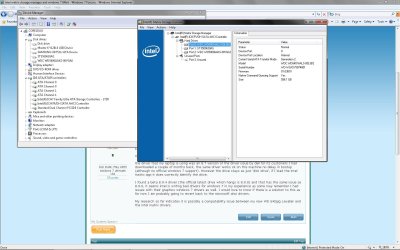
ok did a bit of googling etc.

the driver that my laptop is using was an 8.7 version of the driver issue by dell for its customers I had downloaded a couple of months back, the same driver works ok on this machine no delay in bootup (although no official windows 7 support). However the drive stays as just 'disk drive', if I load the intel matrix app it does correctly identify the drive.

I found a beta 8.9.4 driver (the official latest drive which hangs is 8.9.0) and that has the same issue as 8.9.0, it seems intel is writing bad drivers for windows 7 in my experience as some may remember I had issues with their graphics windows 7 drivers as well. I would love to know if there is a solution to this as for now I am probably going to revert back to the microsoft ahci drivers.

My research so far indicates it is possibly a compatability issue between my new WD 640gig cavalier and the intel matrix drivers.

So 8.7 no pause
8.8 not tried as cant find it anywhere I expect be same as 8.7
8.9.0 first driver to officially support windows 7 pause on 1st boot, 2nd boot does not finish
8.9.4 beta driver same behaviour as 8.9.0 but pause is a bit shorter

8.7 and 8.9.4 do not recognise the drive by its name in device manager, 8.9.0 did recognise it after some unresponsiveness in the OS but the reboot after did not finish.
 

Attachments

  • intelahciwin7.jpg
    intelahciwin7.jpg
    165 KB · Views: 672

My Computer

Computer type
PC/Desktop
Computer Manufacturer/Model Number
home built
OS
windows 8.1 Pro x64
CPU
intel i5 4670k @ 4.3ghz
Motherboard
asus z87-plus
Memory
16 gig ram ddr3 @ 1600 corsair vengeance
Graphics Card(s)
evga 970 GTX 4 GIG FTW ACX 2.0
Sound Card
asus xonar D2X
Monitor(s) Displays
benq gw2765ht
Screen Resolution
2560x1440
Hard Drives
Samsung 850 pro SSD 512gig - boot device wooosh
WD black cavalier 640gig WD6401AALS
Seagate 500gig ST3500630AS
WD 2TB Green WDC20EARS
2 x WD Red 3TB WD30EFRX
Samsung 750gig HD753LG - on asmedia controller
PSU
coolermaster silent pro 600watt modular
Case
fractal define R4
Cooling
artic freezer i30, 3 case fans
Keyboard
microsoft business ps2 keyboard
Mouse
microsoft optical black mouse
Internet Speed
80/20 FTTC SkyBB
Antivirus
Nod32 AV v8, HitmanProAlert, SRP, System Hardening
Browser
Chrome x64
Other Info
Intel controller is in AHCI mode currently using IaSTOR 12.8.0.1016 drivers
I not sure what the point of your post is but I have an Intel Extreme motherboard 975XBX2 with the ICH7 controller and I'm running in ACHI mode with no issues using the Intel Matrix Storage manager. I have no slow startups or shutdowns. I also have 3 Western Digital HD's on this system.

Intel Matrix Storage Manager - 8.9.JPG

Intel Matrix Storage version number.9.JPG

Don't know how you came up with the ideal that Intel is writing bad drivers. You may want to check your BIOS settings or elsewhere.

I'm not saying you don't have a problem, but the 8.9 Intel matrix storage manager works fine on my Windows 7 (64-bit) install.

As a side note - When I installed Windows 7 my MB was already set to use AHCI so Windows was installed with it already enabled in the BIOS. There we're no install issues nor any now.

Just my two cents
 

My Computer

Computer type
PC/Desktop
Computer Manufacturer/Model Number
Custom built by me.
OS
Windows 10 Pro
CPU
Intel Core i7-4770K (3.5Ghz)
Motherboard
Gigabyte G1 Sniper 5 (F10 Bios)
Memory
32 gig Corsair Dominator Platinum (4x8Gig)
Graphics Card(s)
Sapphire Tri-X R9 Fury
Sound Card
Soundblaster ZXR
Monitor(s) Displays
NEC PA242W 24" LCD Monitor
Screen Resolution
1920 x 1200
Hard Drives
Primary - Samsung 850 Pro (512gig), Samsung 840 Pro (256gig), 2TB WD Caviar Black.
PSU
EVGA Supernova 1000 G2
Case
Cooler Master HAF X
Cooling
Corsair H100i with Corsair Air Series SP120 Quiet Fans
Keyboard
Logitech Wireless Wave
Mouse
Logitech Performance MX
Internet Speed
High Speed Cable
Antivirus
Norton Security
Browser
IE11
Other Info
Memory Timings - 1866MHz @ 9-9-9-27-1T @ 1.5 volts
Arrgh I had a longer reply but was lost when I viewed your screenshot so shortened retype.

The point of my post is that I am wondering if anyone else had the 5 minute (or so) pause on bootup on these 8.9 drivers and if they did how did they resolve it, I hope that makes things clear.

I did very basic diagnosis to confirm it is driver related, I tested multiple versions of the driver and they all exhibited different behaviour, 8.7 (ironically the non windows 7 driver) boots the system normally and I notice no ill affects, I would be curious to see a screenshot of your device manager. 8.9.0 (the so called stable driver) actually left my system in a unbootable state, the newer 8.9.x releases dont stop it booting but do have a lengthy delay.

You have western digital drives but they not the model that others have indicated is not fully compatible with the drivers the black 640gig cavalier drive or one of the new raptors.

There is really no bios settings to adjust, I can turn it on or off and thats about it, AHCI was on in the bios when I installed windows 7 hence I had the microsoft ahci drivers in place and running.
 

My Computer

Computer type
PC/Desktop
Computer Manufacturer/Model Number
home built
OS
windows 8.1 Pro x64
CPU
intel i5 4670k @ 4.3ghz
Motherboard
asus z87-plus
Memory
16 gig ram ddr3 @ 1600 corsair vengeance
Graphics Card(s)
evga 970 GTX 4 GIG FTW ACX 2.0
Sound Card
asus xonar D2X
Monitor(s) Displays
benq gw2765ht
Screen Resolution
2560x1440
Hard Drives
Samsung 850 pro SSD 512gig - boot device wooosh
WD black cavalier 640gig WD6401AALS
Seagate 500gig ST3500630AS
WD 2TB Green WDC20EARS
2 x WD Red 3TB WD30EFRX
Samsung 750gig HD753LG - on asmedia controller
PSU
coolermaster silent pro 600watt modular
Case
fractal define R4
Cooling
artic freezer i30, 3 case fans
Keyboard
microsoft business ps2 keyboard
Mouse
microsoft optical black mouse
Internet Speed
80/20 FTTC SkyBB
Antivirus
Nod32 AV v8, HitmanProAlert, SRP, System Hardening
Browser
Chrome x64
Other Info
Intel controller is in AHCI mode currently using IaSTOR 12.8.0.1016 drivers
You have western digital drives but they not the model that others have indicated is not fully compatible with the drivers the black 640gig cavalier drive or one of the new raptors.

If you looked at my system specs, which is posted, you'll notice all my Weston Digital HD's are Caviar Blacks ;)

As for my Device manager, it's clear, ie no yellow marks or anything else.

My Device Manager.JPG

As stated before, I myself do not have any "slow" bootup times or any other issues with this version of the software installed.

And did you install the driver as well? RAID: Intel® Matrix Storage Manager Driver for Intel Desktop Boards
 

My Computer

Computer type
PC/Desktop
Computer Manufacturer/Model Number
Custom built by me.
OS
Windows 10 Pro
CPU
Intel Core i7-4770K (3.5Ghz)
Motherboard
Gigabyte G1 Sniper 5 (F10 Bios)
Memory
32 gig Corsair Dominator Platinum (4x8Gig)
Graphics Card(s)
Sapphire Tri-X R9 Fury
Sound Card
Soundblaster ZXR
Monitor(s) Displays
NEC PA242W 24" LCD Monitor
Screen Resolution
1920 x 1200
Hard Drives
Primary - Samsung 850 Pro (512gig), Samsung 840 Pro (256gig), 2TB WD Caviar Black.
PSU
EVGA Supernova 1000 G2
Case
Cooler Master HAF X
Cooling
Corsair H100i with Corsair Air Series SP120 Quiet Fans
Keyboard
Logitech Wireless Wave
Mouse
Logitech Performance MX
Internet Speed
High Speed Cable
Antivirus
Norton Security
Browser
IE11
Other Info
Memory Timings - 1866MHz @ 9-9-9-27-1T @ 1.5 volts
yes the driver installs, thanks for confirming the device manager. So the issue is probably not related to drive compatability then.

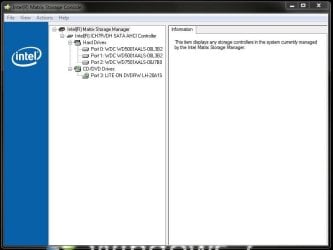
My device manager doesnt have yellow marks but you see in my screenshot my first drive is marked as 'disk drive' instead of its real name.
 

My Computer

Computer type
PC/Desktop
Computer Manufacturer/Model Number
home built
OS
windows 8.1 Pro x64
CPU
intel i5 4670k @ 4.3ghz
Motherboard
asus z87-plus
Memory
16 gig ram ddr3 @ 1600 corsair vengeance
Graphics Card(s)
evga 970 GTX 4 GIG FTW ACX 2.0
Sound Card
asus xonar D2X
Monitor(s) Displays
benq gw2765ht
Screen Resolution
2560x1440
Hard Drives
Samsung 850 pro SSD 512gig - boot device wooosh
WD black cavalier 640gig WD6401AALS
Seagate 500gig ST3500630AS
WD 2TB Green WDC20EARS
2 x WD Red 3TB WD30EFRX
Samsung 750gig HD753LG - on asmedia controller
PSU
coolermaster silent pro 600watt modular
Case
fractal define R4
Cooling
artic freezer i30, 3 case fans
Keyboard
microsoft business ps2 keyboard
Mouse
microsoft optical black mouse
Internet Speed
80/20 FTTC SkyBB
Antivirus
Nod32 AV v8, HitmanProAlert, SRP, System Hardening
Browser
Chrome x64
Other Info
Intel controller is in AHCI mode currently using IaSTOR 12.8.0.1016 drivers
The drive marked "disk drive" what is it and have you checked disk management? Does it work? Could it be a format problem?
 

My Computer

Computer type
PC/Desktop
Computer Manufacturer/Model Number
Custom built by me.
OS
Windows 10 Pro
CPU
Intel Core i7-4770K (3.5Ghz)
Motherboard
Gigabyte G1 Sniper 5 (F10 Bios)
Memory
32 gig Corsair Dominator Platinum (4x8Gig)
Graphics Card(s)
Sapphire Tri-X R9 Fury
Sound Card
Soundblaster ZXR
Monitor(s) Displays
NEC PA242W 24" LCD Monitor
Screen Resolution
1920 x 1200
Hard Drives
Primary - Samsung 850 Pro (512gig), Samsung 840 Pro (256gig), 2TB WD Caviar Black.
PSU
EVGA Supernova 1000 G2
Case
Cooler Master HAF X
Cooling
Corsair H100i with Corsair Air Series SP120 Quiet Fans
Keyboard
Logitech Wireless Wave
Mouse
Logitech Performance MX
Internet Speed
High Speed Cable
Antivirus
Norton Security
Browser
IE11
Other Info
Memory Timings - 1866MHz @ 9-9-9-27-1T @ 1.5 volts
Since you have both chipsets on the board intel + jmcron you can disable the jmicro chip.
Ok when windows 7 INSTALLS if you have AHCI enabled in the bios under sata configuration or drive configuration - w7 automatically installs the intel driver, however, for full functionality you need to download the intel matrix storage manager software. You don't need to install anything during installation, but check to make sure AHCI is enabled in the bios. If it isn't you can still fix it, but you will need to go here and follow the instructions, Error message when you start a Windows 7 or Windows Vista-based computer after you change the SATA mode of the boot drive: "STOP 0x0000007B INACCESSABLE_BOOT_DEVICE" otherwise, download the matrix software from below link :

You will find it at the intel site - http://downloadcenter.intel.com/default.aspx
Select chipsets - chipset software - intel(R) matrix storage manager - Select Operating System - select Windows 7 (64bit OR 32 bit) - select drivers - select intel(R) matrix storage manager 8.9.0.1023 - download and install.
(make sure you don't download the floppy configuration utility by mistake) - it will show up if you select utilities.

With the microsoft fix it if you find you havnt AHCI enabled in the bios prior to installing W7 you dont need to install the matrix software the microsoft driver works fine.
 

My Computer

OS
XP, Vista, W7 64bit Home Premium
CPU
Intel Core Duo 6850 3.0 ghz @ 3.7 ghz
Motherboard
Asus P5E
Memory
4GB Corsair DDR 2 PC-6400
Graphics Card(s)
Ati 4870 1ghz
Sound Card
Supreme FX 11
Monitor(s) Displays
View Sonic VX1962wm
Screen Resolution
1680 X1050
Hard Drives
3 Seagate Sata Drives 160gb 250gb 500gb
PSU
Thermaltake 600 watt
Case
NZXT Alpha
Cooling
3X120cm Fans
Keyboard
Microsoft Digital Media Pro Keyboard
Mouse
Microsoft Wheel Mouse Optical
Internet Speed
1.5Mb to 8Mb/384k
For what it's worth, Intel looks likely to move to a new "Rapid Storage Technology" offering instead of the Matrix Storage Manager.

If you're comfortable trying something that's not yet formally out there, version 9.5.0.1037 has been circulating a couple months now, is supposedly WHQL'd, and can be readily found on the web.

A newer 9.5.4.1001 version just turned up, too, but lacks a traditional installer (and is relatively untested).

If you're having issues with the Matrix Storage Manager, I don't know that giving it a go could hurt.
 

My Computer

OS
Windows7
Guys, if you read this entire thread, you'd see he has installed Windows 7 with AHCI turned on. You'd also see that his issue may not be with the Intel Matrix storage software, but another issue.


yes the driver installs, thanks for confirming the device manager. So the issue is probably not related to drive compatability then.

My device manager doesnt have yellow marks but you see in my screenshot my first drive is marked as 'disk drive' instead of its real name.


Thanks
 

My Computer

Computer type
PC/Desktop
Computer Manufacturer/Model Number
Custom built by me.
OS
Windows 10 Pro
CPU
Intel Core i7-4770K (3.5Ghz)
Motherboard
Gigabyte G1 Sniper 5 (F10 Bios)
Memory
32 gig Corsair Dominator Platinum (4x8Gig)
Graphics Card(s)
Sapphire Tri-X R9 Fury
Sound Card
Soundblaster ZXR
Monitor(s) Displays
NEC PA242W 24" LCD Monitor
Screen Resolution
1920 x 1200
Hard Drives
Primary - Samsung 850 Pro (512gig), Samsung 840 Pro (256gig), 2TB WD Caviar Black.
PSU
EVGA Supernova 1000 G2
Case
Cooler Master HAF X
Cooling
Corsair H100i with Corsair Air Series SP120 Quiet Fans
Keyboard
Logitech Wireless Wave
Mouse
Logitech Performance MX
Internet Speed
High Speed Cable
Antivirus
Norton Security
Browser
IE11
Other Info
Memory Timings - 1866MHz @ 9-9-9-27-1T @ 1.5 volts
My only other suggestion would be to uninstall the matrix console if thats the case and install the latest intel chipset drivers then reinstall the latest matrix console.
ps SORRY FOR NOT READING THE THREAD THRU im having a bad day here sygnus & chrysallis

Latest intel chipset drivers can be found here http://downloads.guru3d.com/Mainboard-drivers---Intel_c17.html

Also read in your mobo manual your system can become unstable without the JMIC enabled :(.
 
Last edited:

My Computer

OS
XP, Vista, W7 64bit Home Premium
CPU
Intel Core Duo 6850 3.0 ghz @ 3.7 ghz
Motherboard
Asus P5E
Memory
4GB Corsair DDR 2 PC-6400
Graphics Card(s)
Ati 4870 1ghz
Sound Card
Supreme FX 11
Monitor(s) Displays
View Sonic VX1962wm
Screen Resolution
1680 X1050
Hard Drives
3 Seagate Sata Drives 160gb 250gb 500gb
PSU
Thermaltake 600 watt
Case
NZXT Alpha
Cooling
3X120cm Fans
Keyboard
Microsoft Digital Media Pro Keyboard
Mouse
Microsoft Wheel Mouse Optical
Internet Speed
1.5Mb to 8Mb/384k
I will try the 9.5 drivers soon, the disk drive is my boot drive the black 640 WD cavalier. I highlighted the same drive in the same screenshot inside the matrix console window to show which drive it was.

The drive appears to function ok (on version 8.7) but the fact it never completed its plug and play recognition made me wary of using it like that.

To the guy saying turn of jmicron please read my post, jmicron is on for a reason in that I deliberatly use it for 1 drive that isnt very compatible with AHCI, however I did disable the jmicron boot bios as it isnt needed for boot if thats what you meant.

The only 9.5 drivers I can find dont include any console they are just the barebone driver without an installer, I assume these are the only ones that are known to exist? so installation via device manager.
 

My Computer

Computer type
PC/Desktop
Computer Manufacturer/Model Number
home built
OS
windows 8.1 Pro x64
CPU
intel i5 4670k @ 4.3ghz
Motherboard
asus z87-plus
Memory
16 gig ram ddr3 @ 1600 corsair vengeance
Graphics Card(s)
evga 970 GTX 4 GIG FTW ACX 2.0
Sound Card
asus xonar D2X
Monitor(s) Displays
benq gw2765ht
Screen Resolution
2560x1440
Hard Drives
Samsung 850 pro SSD 512gig - boot device wooosh
WD black cavalier 640gig WD6401AALS
Seagate 500gig ST3500630AS
WD 2TB Green WDC20EARS
2 x WD Red 3TB WD30EFRX
Samsung 750gig HD753LG - on asmedia controller
PSU
coolermaster silent pro 600watt modular
Case
fractal define R4
Cooling
artic freezer i30, 3 case fans
Keyboard
microsoft business ps2 keyboard
Mouse
microsoft optical black mouse
Internet Speed
80/20 FTTC SkyBB
Antivirus
Nod32 AV v8, HitmanProAlert, SRP, System Hardening
Browser
Chrome x64
Other Info
Intel controller is in AHCI mode currently using IaSTOR 12.8.0.1016 drivers
The drive appears to function ok (on version 8.7) but the fact it never completed its plug and play recognition made me wary of using it like that.

You might want to take a good hard look at that HD. It "may" have an issue. However, it is curious that you have no issues(?) using 8.7 so... :confused:

If it's possible, swap drives and see what happens?
 

My Computer

Computer type
PC/Desktop
Computer Manufacturer/Model Number
Custom built by me.
OS
Windows 10 Pro
CPU
Intel Core i7-4770K (3.5Ghz)
Motherboard
Gigabyte G1 Sniper 5 (F10 Bios)
Memory
32 gig Corsair Dominator Platinum (4x8Gig)
Graphics Card(s)
Sapphire Tri-X R9 Fury
Sound Card
Soundblaster ZXR
Monitor(s) Displays
NEC PA242W 24" LCD Monitor
Screen Resolution
1920 x 1200
Hard Drives
Primary - Samsung 850 Pro (512gig), Samsung 840 Pro (256gig), 2TB WD Caviar Black.
PSU
EVGA Supernova 1000 G2
Case
Cooler Master HAF X
Cooling
Corsair H100i with Corsair Air Series SP120 Quiet Fans
Keyboard
Logitech Wireless Wave
Mouse
Logitech Performance MX
Internet Speed
High Speed Cable
Antivirus
Norton Security
Browser
IE11
Other Info
Memory Timings - 1866MHz @ 9-9-9-27-1T @ 1.5 volts
its a brand new hdd and is recognised by microsoft ahci so I am inclined to say its an issue between the drive and intel ahci. Bear in mind googling shows that alot of WD's newer models have problems with the drivers. 8.9 version in particular has a lot of complaints, I googled some very long threads on intels own website from users using the raid part of the driver getting random drive failures which stopped again when they downgraded back to 8.8 or 8.7.

velicraptor
wd64001als 640gig (not 500 gig which is older).
 

My Computer

Computer type
PC/Desktop
Computer Manufacturer/Model Number
home built
OS
windows 8.1 Pro x64
CPU
intel i5 4670k @ 4.3ghz
Motherboard
asus z87-plus
Memory
16 gig ram ddr3 @ 1600 corsair vengeance
Graphics Card(s)
evga 970 GTX 4 GIG FTW ACX 2.0
Sound Card
asus xonar D2X
Monitor(s) Displays
benq gw2765ht
Screen Resolution
2560x1440
Hard Drives
Samsung 850 pro SSD 512gig - boot device wooosh
WD black cavalier 640gig WD6401AALS
Seagate 500gig ST3500630AS
WD 2TB Green WDC20EARS
2 x WD Red 3TB WD30EFRX
Samsung 750gig HD753LG - on asmedia controller
PSU
coolermaster silent pro 600watt modular
Case
fractal define R4
Cooling
artic freezer i30, 3 case fans
Keyboard
microsoft business ps2 keyboard
Mouse
microsoft optical black mouse
Internet Speed
80/20 FTTC SkyBB
Antivirus
Nod32 AV v8, HitmanProAlert, SRP, System Hardening
Browser
Chrome x64
Other Info
Intel controller is in AHCI mode currently using IaSTOR 12.8.0.1016 drivers
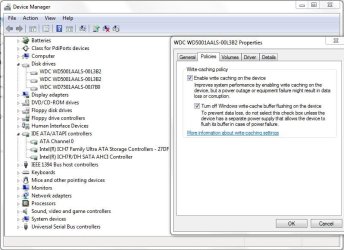
I been running the pc with the dell 8.7 drivers for a few days and right now copying lots of data between drives, seen no ill affects. Of course the drive still not properly detected in device manager tho.

I am now curious if it is 8.7 working or if dell modified these drivers and their mod stops the slow boot on my machine.
 

My Computer

Computer type
PC/Desktop
Computer Manufacturer/Model Number
home built
OS
windows 8.1 Pro x64
CPU
intel i5 4670k @ 4.3ghz
Motherboard
asus z87-plus
Memory
16 gig ram ddr3 @ 1600 corsair vengeance
Graphics Card(s)
evga 970 GTX 4 GIG FTW ACX 2.0
Sound Card
asus xonar D2X
Monitor(s) Displays
benq gw2765ht
Screen Resolution
2560x1440
Hard Drives
Samsung 850 pro SSD 512gig - boot device wooosh
WD black cavalier 640gig WD6401AALS
Seagate 500gig ST3500630AS
WD 2TB Green WDC20EARS
2 x WD Red 3TB WD30EFRX
Samsung 750gig HD753LG - on asmedia controller
PSU
coolermaster silent pro 600watt modular
Case
fractal define R4
Cooling
artic freezer i30, 3 case fans
Keyboard
microsoft business ps2 keyboard
Mouse
microsoft optical black mouse
Internet Speed
80/20 FTTC SkyBB
Antivirus
Nod32 AV v8, HitmanProAlert, SRP, System Hardening
Browser
Chrome x64
Other Info
Intel controller is in AHCI mode currently using IaSTOR 12.8.0.1016 drivers
Well more fun and games.

I decided to try raid mode instead of ahci (not using raid but the raid mode in bios). Results were something like this.

The default windows driver behaves like the intel win7 ahci drivers, pause on bootup but no pause once booted. Drive is recognised in device manager.

Intel drivers 8.8,8.9 and 9.4 all pause on bootup but unlike the ahci driver they do recognise the drive in device manager, 2nd boot onwards the boot pause is extremely long nearly 10 minutes. In addition at every boot the hdd pauses again after login but once that pause is out of the way it runs normally. When it pauses this error is generated in the windows logs.

"iaStor0, did not respond within the timeout period"

When I googled the error there was a few people complaining about it happening on new western digital drives, in particular the new raptors and the black cavalier 640gig. One person mentioned his cdrom tho.
So with it paused on the desktop I decided to eject my dvd burner, it did nothing for about 5 seconds but when it ejected the system immediatly came to life. However at this point I decided to try the dell 8.7 drivers since the newer drivers were causing corruption errors. TWO different drives connected to my ich7 ran chkdsk on a bootup.

Like with AHCI these dell 8.7 drivers boot fast no pauses and no timeout errors, but unlike AHCI I now also have the drive recognised in device manager, however doing all this I have somehow managed to delete the stock windows raid driver from the system (I hope not also the stock AHCI) and it seems no system restore points were made at the points I was changing drivers. So if I ever decide to revert that driver is no longer available to me, it does exist in the driverstore directory but when attempting to use it there is a "system cannot find file" error.

Intel also replied to me apologising saying there is a few drives not compatible with their drivers in vista and windows 7, to do with LPM mode, they said they cannot disclose the list as they dont have permission of the hdd vendors. They wouldnt even confirm if my drive was one of them. They just said its a known issue. They wouldnt give me an answer as to why 8.7 boots normally and the newer drivers dont, they also wouldnt tell me if dell modified the driver inf file or not.

I found a page showing a supposed workaround for the pause on boot problem, but the workaround did not work for me. It involved deleting/renaming the paramaters key for iastor. Intel's own site suggests using port 3 on the ich7 to fix the problem, this I may attempt at a future date to see if it helps, as well as unplugging my dvd burner (which is plugged into ich7 PATA port).
 

My Computer

Computer type
PC/Desktop
Computer Manufacturer/Model Number
home built
OS
windows 8.1 Pro x64
CPU
intel i5 4670k @ 4.3ghz
Motherboard
asus z87-plus
Memory
16 gig ram ddr3 @ 1600 corsair vengeance
Graphics Card(s)
evga 970 GTX 4 GIG FTW ACX 2.0
Sound Card
asus xonar D2X
Monitor(s) Displays
benq gw2765ht
Screen Resolution
2560x1440
Hard Drives
Samsung 850 pro SSD 512gig - boot device wooosh
WD black cavalier 640gig WD6401AALS
Seagate 500gig ST3500630AS
WD 2TB Green WDC20EARS
2 x WD Red 3TB WD30EFRX
Samsung 750gig HD753LG - on asmedia controller
PSU
coolermaster silent pro 600watt modular
Case
fractal define R4
Cooling
artic freezer i30, 3 case fans
Keyboard
microsoft business ps2 keyboard
Mouse
microsoft optical black mouse
Internet Speed
80/20 FTTC SkyBB
Antivirus
Nod32 AV v8, HitmanProAlert, SRP, System Hardening
Browser
Chrome x64
Other Info
Intel controller is in AHCI mode currently using IaSTOR 12.8.0.1016 drivers
ok an update since I never updated before.

I have now been running the windows ahci (msahci.sys) driver for a few months since the last post. The final decision came after I did benchmarks.

I did what I considered a basic benchmark emulating real life activity and to test what ncq is supposed to improve, I ran 2 hdtune's side by side on my boot drive.

On the intel drivers cpu usage was higher, burst was a bit lower and the random access went crazy high.

On the msahci driver, cpu usage and burst were a little better but random access was the same as if I was only running one benchmark on its own, so the dual access wasnt affecting the random access (which is what I think ncq is supposed to achieve).

As a comparison I repeated the same test on the drive that was on the jmicron in ide mode and this beat both my other drivers for burst speed.

Here is full test results.

Code:
test involved 2 hdtune pro's running at once on drive.

on ahci mode using intel drivers on my 640 gig black cavalier drive.

average speed 1.5meg/sec
access time 36ms
burst speed 106meg/sec

on raid mode using intel drivers same drive

average speed 1.2meg/sec
access time 45ms
burst speed 102meg/sec

on ahci mode using default msachi.sys

average speed 4.4 meg/sec
access time 12.5ms O_o
burst speed 106 meg/sec

and comparison samsung drive on jmicron in ide mode

average speed 4.7 meg/sec
access time 48ms
burst speed 112 meg/sec

notice also the average speed takes a nose dive on the intel drivers.
 

My Computer

Computer type
PC/Desktop
Computer Manufacturer/Model Number
home built
OS
windows 8.1 Pro x64
CPU
intel i5 4670k @ 4.3ghz
Motherboard
asus z87-plus
Memory
16 gig ram ddr3 @ 1600 corsair vengeance
Graphics Card(s)
evga 970 GTX 4 GIG FTW ACX 2.0
Sound Card
asus xonar D2X
Monitor(s) Displays
benq gw2765ht
Screen Resolution
2560x1440
Hard Drives
Samsung 850 pro SSD 512gig - boot device wooosh
WD black cavalier 640gig WD6401AALS
Seagate 500gig ST3500630AS
WD 2TB Green WDC20EARS
2 x WD Red 3TB WD30EFRX
Samsung 750gig HD753LG - on asmedia controller
PSU
coolermaster silent pro 600watt modular
Case
fractal define R4
Cooling
artic freezer i30, 3 case fans
Keyboard
microsoft business ps2 keyboard
Mouse
microsoft optical black mouse
Internet Speed
80/20 FTTC SkyBB
Antivirus
Nod32 AV v8, HitmanProAlert, SRP, System Hardening
Browser
Chrome x64
Other Info
Intel controller is in AHCI mode currently using IaSTOR 12.8.0.1016 drivers
an update on this.

I have the same drives in a new system, basically new motherboard and processor. On the P55 chipset I have none of the problems I reproted in this thread, so I am assuming the issue was the old ICH7 and especially the old ICH7 bios asus put on the board probably was incompatible with my newest drive.

In addition whilst on the ICH7 I seen performance drop from MS achi drivers to intel achi drivers, on the P55 the intel drivers have the same performance as MS ahci but with half the cpu usage. The only issue I am finding questionable is all of my drives only seem to be running at sata150 spec not sata300 as I get about 130meg/sec burst. But otherwise fine.
 

My Computer

Computer type
PC/Desktop
Computer Manufacturer/Model Number
home built
OS
windows 8.1 Pro x64
CPU
intel i5 4670k @ 4.3ghz
Motherboard
asus z87-plus
Memory
16 gig ram ddr3 @ 1600 corsair vengeance
Graphics Card(s)
evga 970 GTX 4 GIG FTW ACX 2.0
Sound Card
asus xonar D2X
Monitor(s) Displays
benq gw2765ht
Screen Resolution
2560x1440
Hard Drives
Samsung 850 pro SSD 512gig - boot device wooosh
WD black cavalier 640gig WD6401AALS
Seagate 500gig ST3500630AS
WD 2TB Green WDC20EARS
2 x WD Red 3TB WD30EFRX
Samsung 750gig HD753LG - on asmedia controller
PSU
coolermaster silent pro 600watt modular
Case
fractal define R4
Cooling
artic freezer i30, 3 case fans
Keyboard
microsoft business ps2 keyboard
Mouse
microsoft optical black mouse
Internet Speed
80/20 FTTC SkyBB
Antivirus
Nod32 AV v8, HitmanProAlert, SRP, System Hardening
Browser
Chrome x64
Other Info
Intel controller is in AHCI mode currently using IaSTOR 12.8.0.1016 drivers
I just did a clean W7 x64 install on my Dell 1545 Inspiron. I received the Intel Family Chipset Driver from Windows update, as well as my Ethernet and Dell LAN drivers too. I have been running without the Intel Matrix Storage that came already installed on my machine and it seems to run fine. I have the Dell drivers disc that came with my machine, and I can reinstall the Matrix Storage manager if I need to.

I have been absolutely scouring Google and I have no idea if I really need the Matrix Storage software/driver on my machine. Do I really need this, as I can't tell any difference with, or without it?
 

My Computer

OS
Windows 7 Home Premium x64 SP1
Back
Top