Solved Intel 82852/82855 GM/GME Graphics Driver for Windows 7 -FINAL SOLUTION

coderiu

New member
Local time
10:32 AM
Messages
9
Hey guys,

I was struggling with the issue of installing the graphic driver of "Intel 82852/82855 GM/GME Graphics Controller Driver" for windows 7.

I search a lot through Google and one of the websites I came across is this cool website -- To be exact, I came across this thread :

Windows 7 - Intel 82852/82855 GM/GME Graphics Controller Driver Issues

And, unfortunately, what was mentioned did not work for me -- I did not go through all the pages though, so if what I am going to share with you is repeated for some/all of you, then I apologize for wasting your time :).

I also tried DriverMax. I made a backup of the driver from windows vista -- it was the previous operating system on my laptop. And I tried "painfully" to recover the backup, but I always get the blue screen!!! So, I have to go to the "Safe Mode" and delete the driver in order to make windows work again.

By the way, my laptop is and old Asus (one of the A6 series). -- I am not sure if that's important to know anyway.

To make a long story shorter, my case was the common case that I usually read from users who are suffering "like me" and others from this issue which is the automatic roll back to the standard VGA driver from windows 7 after the first restart. So, when I install the driver after long hours of different attempts using different ways, I get to a point where I get it work but with a restart requirement. Once windows 7 restarts, it rolls back to the standard VGA just like I did nothing!!

Now, the good news is: YOU get to end your journey of suffering just like me :cool:

Here is the BEST way that worked for me like a ***charm***, you just need to follow it carefully and it is sooooo easy to do. Thanks to "Lexxion" who wrote this great solution.

Here are the steps:

Problem

When installing 855GM Series video driver Windows 7 reverts back to Standard VGA adapter after restart. The problem is that 855GM Series video driver is not native for Windows 7 and it will always choose Standard VGA Adapter as native video driver. A lot of older laptops have this video chipset. I read a lot of tutorials on the net and nothing worked for me. So I figured out a UNIVERSAL way to get it to work, I think :)

Solution

The only driver that worked for me is: Intel(R) Graphics Controller 6.14.10.3722 . The reason why is that Standard VGA Adapter (Win7 native) is the same version (6.14.10.3722) but it has newer release date. Newest Intel driver 14.19.50 did NOT work. So get yourself the working video driver below. After Windows 7 install you will see that Standard VGA Adapter is installed and there is an exclamation mark on the "video controller". In order to install the driver we need to get exclamation mark on "video controller (vga compatible)". This spot is occupied by Standard VGA Adapter. Even when you unistall Standard VGA Adapter and install new driver after the reboot Standard VGA Adapter comes back. We need to disrupt Standard VGA Adapter from being installed. My way of disabling the adapter is to edit the driver file for it "c:\windows\system32\drivers\vgapnp.sys". There might be another way for letting Windows stop installing Standard VGA Adapter but I did not find it.

[I did NOT use these two links; I prefer you download # 2] :

[1] Intel(R) Graphics Controller 6.14.10.3722 (Windows)

Download 1
Download 2

[2] Intel(R) Graphics Controller 6.14.10.3732 (Windows)(Sleep Mode Fixed)(Thx to pc84)

Download 1 [ << download this one ]

Instructions

STEP 1

Make sure you unistall video drivers that do not work. If you see exclamation marks on your previous drivers in Device Manager, unistall them. Your Device Manager should say that you have Standard VGA Driver installed under Display category and exclamation mark on "video controller". Make sure you restart PC when asked.

STEP 2

We will need to edit "c:\windows\system32\drivers\vgapnp.sys" file now, but there is a problem. Windows Vista and Windows 7 will NOT allow you to edit system files even when you are the admin. Changing security attributes of that file did not work either. The file is owned by "TrustedInstaller" service. We will need to own the file and give ourselves the full control to edit it.
Click 'Start' and in 'Search' type 'cmd'. The result will show on top. Right-click on 'cmd' and choose "Run as Administrator". If your account does not have admin rights you might be prompted to enter username and password. I used account that already has administrator priviledges. You should have a command prompt with administrator priviledges.

STEP 3

Lets say my logged in username is peter

First command you do is:

takeown /f c:\windows\system32\drivers\vgapnp.sys

This will give ownship to the current user. You should see a message saying SUCCESS etc..

Second command you do is:

cacls c:\windows\system32\drivers\vgapnp.sys /G peter:F

There will be a confirmation message so type 'y'. This will change the security attributes to give you ONLY all the permissions for the file. If you are paranoid as me and want original permissions restored, I will show you how to restore the permissions to the previous step later on in this tutorial :). If 'cacls' command does not work you can try using 'icacls'. If you cannot edit this file try to boot to "Save Mode" and try it again (Thx to Giuseppe Chill).

STEP 4

Open c:\windows\system32\drivers\vgapnp.sys in any text editor. Just add any character to the begining of the text. Let's say we will add character x . So the text should start with xMZ and the rest of stuff. Save the file. This edit will render that file unusable.

STEP 5

In Device Manager uninstall Standard VGA Adapter. It will prompt you to restart so do it. After install you will see a message saying that certain devices did NOT installed successfuly, which is GOOD :). Go to Device Manager and you should see the exclamation point next to "video controller" and "video controller (vga compatible)". Right-click on "video controller (vga compatible)" and do update driver. Choose "Browse for the Driver" (or something like it :) ). Point to the driver directory that you downloaded and extracted (win2000). Click "OK". Wait for the driver to be installed. It might hang for a little (It will say that window is "not responding"). Do not worry as this is still installing the driver. It will prompt you to restart so do it. (If it does not prompt click anywhere and wait for message). After restart it will finish installing the driver.

Congratulations!!! You should have a working video driver!!! :)

STEP 6

Open c:\windows\system32\drivers\vgapnp.sys in any text editor. Remove the first character you put there which was x. Save the file. Your file will be usuable again :). You can stop here if you want, but if you want to restore the permissions for the file to original state go to next step.

STEP 7

Right-click on any other file in the c:\windows\system32\drivers. Choose "Properties". Go to "Security" tab. Now compare that security tab with the security tab of c:\windows\system32\drivers\vgapnp.sys. Just make sure the security tabs of those two files look the same (all tabs and advanced options). In order to add "TrustedInstaller" it is not the same as regular usernames because it is a service.
You will need to type "NT SERVICE\TrustedInstaller" (without quotes) when adding it to own the file and to have all permissions. Once you done editing you can delete your account from c:\windows\system32\drivers\vgapnp.sys, because it was not there from the beginning. We took control over and the previous commands added it by default.


Source : Install 855GM Series Video Driver on Windows 7 - Tutorial


Good luck for you all guys. I just thought it might be helpful to share what worked for me with those who are struggling with it till now.


Share your good news with us :)


:: COdErIU
 
Last edited:

My Computer My Computer

At a glance

Windows 7
Computer Manufacturer/Model Number
Asus
OS
Windows 7
82852/82855 .exe file

Great post as this describes the problem I am having. Just one question, the recommended link for the driver to be used points at a self-installing .exe file which won't work. How do I get the driver only? Sorry if its a stupid question.

Many Thanks

Matt
 

My Computer My Computer

At a glance

Win 7 Pro
OS
Win 7 Pro
Hey Matt,

I am not sure why the .exe file did not work with you. It is good to scan your computer for viruses, preferably, by Kaspersky.

Anyways, you can extract the file using winrar. You can Google "winrar" and you can get a trail version -- unless you have it, of course.

Right click on the file and select Extract to win2k_xp1361 -- or whatever the file name is.
Inside the extracted folder, you're gonna see the driver itself (win2000 folder) and the setup file as well (.exe).


Good luck
 

My Computer My Computer

At a glance

Windows 7
Computer Manufacturer/Model Number
Asus
OS
Windows 7
Hi Coderiu,

Got the file extracted OK. Fix did not work for me. I followed all of the steps and the PC still tried to install drivers itself. I was able to point the card at the Win2k folder but I got a message saying that I already had the latest drivers (I did un-install the drivers first) The PC is a Panasonic CF-29 Toughbook and before I upgraded all of the hardware passed the Win 7 check. I will try again at the week-end. Is it worth doing the whole process in safe mode, and what stops windows doing the self-install as I suspect that may be the problem.

Many Thanks

Matt
 

My Computer My Computer

At a glance

Win 7 Pro
OS
Win 7 Pro
Hello Matt,

Remember that you should be an Administrator in order to do that. << just in case you are not
Make sure that you do especially these steps:
STEP 3

Lets say my logged in username is peter

First command you do is:

takeown /f c:\windows\system32\drivers\vgapnp.sys

This will give ownship to the current user. You should see a message saying SUCCESS etc..

Second command you do is:

cacls c:\windows\system32\drivers\vgapnp.sys /G peter:F

There will be a confirmation message so type 'y'. This will change the security attributes to give you ONLY all the permissions for the file. If you are paranoid as me and want original permissions restored, I will show you how to restore the permissions to the previous step later on in this tutorial . If 'cacls' command does not work you can try using 'icacls'. If you cannot edit this file try to boot to "Save Mode" and try it again (Thx to Giuseppe Chill).

STEP 4

Open c:\windows\system32\drivers\vgapnp.sys in any text editor. Just add any character to the begining of the text. Let's say we will add character x . So the text should start with xMZ and the rest of stuff. Save the file. This edit will render that file unusable.

The steps above are the key. So, make sure that you do them correctly. The point is to make the file vgapnp.sys useless so the OS won't be able to use it. Pay special attention to the STEP 3 where you are changing the privileges and permissions because they can be tricky. When you type a command, make sure you check the feedback to make sure the command was processed; an empty line means done as well for most of the time.

Do not uninstall before you do STEP 3 & 4 because that's STEP 5.


Try again and let me know. It should work for you :)


Good Luck
 

My Computer My Computer

At a glance

Windows 7
Computer Manufacturer/Model Number
Asus
OS
Windows 7
Worked for me, sleep and hibernate appeared. However computer freezes when it trries to come out of sleep or hibernate. The only difference from the standard VGA controller is the brightness control. Hope there would be a better driver for this.
 

My Computer My Computer

At a glance

windows 7
OS
windows 7
Hey Majed,

I am glad it works for you although not completely. Different hardware set might have different outcome. I guess that has something to do with the ACPI function/driver in your laptop. Check the BIOS settings and see if you can find something relevant. Also, check the display driver you just installed [Make sure you downloaded # 2 in my post because the problem should be fixed in it] to see if it was installed correctly or not.

Those are not REALLY solutions, and I am sorry that I couldn't help more, but play around with it and see what happen. There is no way Intel is going to issue a new version of the driver for this model. It is already considered a discontinued product.


--
 

My Computer My Computer

At a glance

Windows 7
Computer Manufacturer/Model Number
Asus
OS
Windows 7
A thousand and one thanks to coderiu!

Your phenomenally indirect fix worked like a charm on this impossibly old HP Pavillion dv1000 (to be precise, it's a dv1010us) that I've got Win7 running on quite nicely.

The only glitch I encountered in the whole process came when it was time to enter the second command into the administrator-level dos box. For whatever reason, it would not recognize my own username, and I finally just went to system32 and changed the file permissions to include myself full permission via the right click and go to security settings method. Once that hurdle was jumped, things fell smartly into place and I've got the good graphics up and running, even as I type these words.

I was so pleased with the results, that I immediately stopped and created this account on this forum for the express purpose of thanking you for coming up with such a wonderfully tricky and effective fix.

So it's thanks to all the people who make this forum possible in general, and thanks to coderiu in particular!

Great work, everyone!
 

My Computer My Computer

At a glance

Win7
Computer Manufacturer/Model Number
HP dv1010us
OS
Win7
A thousand and one thanks to coderiu!

Your phenomenally indirect fix worked like a charm on this impossibly old HP Pavillion dv1000 (to be precise, it's a dv1010us) that I've got Win7 running on quite nicely.

The only glitch I encountered in the whole process came when it was time to enter the second command into the administrator-level dos box. For whatever reason, it would not recognize my own username, and I finally just went to system32 and changed the file permissions to include myself full permission via the right click and go to security settings method. Once that hurdle was jumped, things fell smartly into place and I've got the good graphics up and running, even as I type these words.

I was so pleased with the results, that I immediately stopped and created this account on this forum for the express purpose of thanking you for coming up with such a wonderfully tricky and effective fix.

So it's thanks to all the people who make this forum possible in general, and thanks to coderiu in particular!

Great work, everyone!


I am very glad that this way works for you. Thanks for your nice words, and you are very welcome :).

Hope you enjoy the new resolution

Nice name, by the way ;)

---
 

My Computer My Computer

At a glance

Windows 7
Computer Manufacturer/Model Number
Asus
OS
Windows 7
[2] Intel(R) Graphics Controller 6.14.10.3732 (Windows)(Sleep Mode Fixed)(Thx to pc84)

Download 1 [ << download this one ]


Hello, the driver lins is broken, where i can find this modifyed driver?
I have 82852 Intel graphic card.

With best regards,

Juri
 

My Computer My Computer

At a glance

win 7
OS
win 7
[2] Intel(R) Graphics Controller 6.14.10.3732 (Windows)(Sleep Mode Fixed)(Thx to pc84)

Download 1 [ << download this one ]


Hello, the driver lins is broken, where i can find this modifyed driver?
I have 82852 Intel graphic card.

With best regards,

Juri
Just checked the links in coderiu's original post, and the link in your post, cotkas, and they're both the same (as well they should be) and they're both working. So maybe something on your end is causing a problem. Just so as you know what to expect, the link will take you to a CNET download page for win2k_xp1361.exe 6.14.10.3732.

Hope this helps some.
 

My Computer My Computer

At a glance

Win7
Computer Manufacturer/Model Number
HP dv1010us
OS
Win7
Still no go!!

Hi Coderiu, still no joy but what I have found out is that the changes I make to the vgapnp.sys file don't remain even though it saves fine. No matter what I put in front of the MZ it gets lost. The file saves OK. I had to grant permissions in windows using the security tab and that gets lost too as I could not do it from the command prompt. Very confused:huh:
 

My Computer My Computer

At a glance

Win 7 Pro
OS
Win 7 Pro
Hey audrinabo,

The first thing you need to make sure of is that you are editing the right file. So, to be certain that you are dealing with the right windows folder (because for different reasons, you might have more than one windows folder), use this generic way to reach exact/right file: %WINDIR%\System32\drivers\vgapnp.sys
So to go to the folder just type: %WINDIR%\System32\drivers\ (You can copy it and paste in the run dialog box for example or through the windows explorer's address bar)

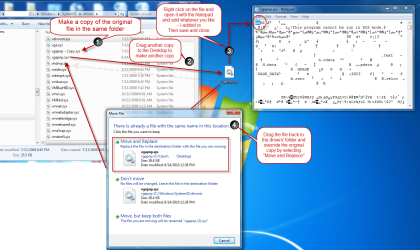
then go to the file vgapnp.sys and do the following (the attach picture shows the steps as well):

1- Make a copy of the file vgapnp.sys in the same folder. So just copy and paste in the same folder. This will save you sometimes later since you do not have to modify it back to its original state.
2- Make another copy -say on the desktop-
3- Right click on the file -the one on the desktop- and open it with the Notepad. Add whatever you want at the beginning - I added xx- then save -> close. (You can open it again to make sure your changes have been saved)
4- Drag it back or copy it and paste it back to the original location (%WINDIR%\System32\drivers\) and select Move and Replace when Windows prompts with options.

Then just do the same steps in my original post and that should work. Then when you are done, go delete (vgapnp.sys) and rename (vgapnp - copy.sys) to the original file name (vgapnp.sys) -- you got the idea.


You can, as well, do the command line way if you want using the path I gave you (%WINDIR%\System32\drivers\vgapnp.sys) instead of (c:\windows\System32\drivers\vgapnp.sys)


Hope that helps .. Share the good news with us :)


::Coderiu
 

Attachments

  • vgapnp.png
    vgapnp.png
    173.7 KB · Views: 1,171

My Computer My Computer

At a glance

Windows 7
Computer Manufacturer/Model Number
Asus
OS
Windows 7
Thank you all, this driver works - win2k_xp1361.exe 6.14.10.3732
It can be downloaded from Intel website.
Only thing that i have wide LCD panel but this driver supports only 1024*768 maximum resolution. But i will try to modify driver and this fact that driver works is better than nothing! :)
 

My Computer My Computer

At a glance

win 7
OS
win 7
It works!!

Hi Coderiu,

It works, thank you very much for the help and support. I have my sleep, hibernate, twin head, multi-resolution machine working the way it was. Thanks to you and everyone else who contributed to this very useful thread. Now back to work......:party:
 

My Computer My Computer

At a glance

Win 7 Pro
OS
Win 7 Pro
Hi guys

I'm absolutely over the moon - I have just got it to work. After a day of trying to figure it out, Coderiu and Lexxion's method worked perfectly. Thanks a whole lot!!!!

BTW I found it is crucial to use the 2nd download mentioned above.

AWESOME
WoodyWoodsta
 

My Computer My Computer

At a glance

Windows 7 Ultimate X86Mobile Intel Celeron M 380, 1600 MHz (16 x 100)1472 MB (DDR SDRAM)SiS 330 Mirage IGP
Computer Manufacturer/Model Number
Sahara LE1N
OS
Windows 7 Ultimate X86
CPU
Mobile Intel Celeron M 380, 1600 MHz (16 x 100)
Motherboard
SiS M661MX
Memory
1472 MB (DDR SDRAM)
Graphics Card(s)
SiS 330 Mirage IGP
Sound Card
Realtek ALC203 @ SiS 7012 Audio Device
Screen Resolution
1024 X 768
Hard Drives
HTS421240H9AT00 ATA Device (40 GB, 4200 RPM, Ultra-ATA/100)
Case
Plastic ;)
Keyboard
Laptop
Mouse
ISAT 3D 1000DPI
Internet Speed
4Mb/sec
Grt Work Dude, working fine for my dell latitude d400 laptop
 

My Computer My Computer

At a glance

windows 7CORE 2 DUO 3.20 GHZ4048
Computer Manufacturer/Model Number
ACER VERITON
OS
windows 7
CPU
CORE 2 DUO 3.20 GHZ
Motherboard
intel Q45
Memory
4048
Monitor(s) Displays
ACER
Screen Resolution
1280*1024
Hard Drives
250+500+500
Keyboard
ACER
Mouse
ACER
Internet Speed
2 MBPS
In case this is useful for anyone:

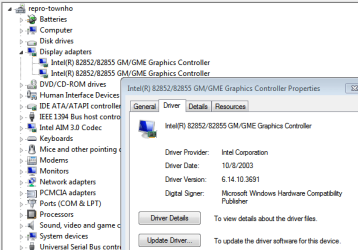
My old tablet laptop system-Gateway M275 with Pentium3 2.0 Ghz and 1Gb memory with 82855 etc. Chipset. Installed Windows 7 enterprise 32-bit. Drivers for everything installed except video. I tried many solutions but was not willing to try too many extreme measures. I could only get the standard VGA drive to install. Other attempts always reverted to that after restart. I found the old gateway win2K/XP driver 6.14.10.3691. I downloaded it, extracted it but used the manual install method. The Driver stuck and I have snap, shake, Dual output and extended desktop via driver and keyboard and multiple resolutions. No Aero, but I didn't expect that.

Overall I lost tablet button compatability and I cannot rotate screen. Am also running Office 2010 nicely. I was shocked this all worked and I was just testing this out of curiosity. I might keep it as it runs very nicely this way. This is an older driver than noted by others but seems to work well.
 

Attachments

  • Capture.PNG
    Capture.PNG
    17.4 KB · Views: 226

My Computer My Computer

At a glance

Windows 7 EnterpriseAMDX2 56004 GbATI Radeon 3650
Computer Manufacturer/Model Number
Gigabyte
OS
Windows 7 Enterprise
CPU
AMDX2 5600
Motherboard
Gigabyte
Memory
4 Gb
Graphics Card(s)
ATI Radeon 3650
Sound Card
Realtek
Monitor(s) Displays
HP2335
Hard Drives
WD 250 SATA II Raid 0
PSU
Antec Earthwatts 380
Case
Antec
Cooling
Stock
cottkas, audrinabo -> yeea finally ;) , WoodyWoodsta, and Babu R ... I am happy for you guys. Enjoy it.

iamstubb .. thanks for sharing your experience with us. I haven't thought about trying an older version. Thanks for adding an additional method. Hope this can help those who are still seeking solutions.


cheers
 

My Computer My Computer

At a glance

Windows 7
Computer Manufacturer/Model Number
Asus
OS
Windows 7
coderiu, from your screenshot above, you got Aero working on 82855GME?! What?!
 

My Computer My Computer

At a glance

Windows 7 Home Premium 64-bitIntel Core i7-720QM [1.6Ghz - 2.8Ghz]6GBNVIDIA GeForce 310M
Computer type
Laptop
Computer Manufacturer/Model Number
Toshiba Satellite A505-S6033
OS
Windows 7 Home Premium 64-bit
CPU
Intel Core i7-720QM [1.6Ghz - 2.8Ghz]
Motherboard
Intel HM57
Memory
6GB
Graphics Card(s)
NVIDIA GeForce 310M
Sound Card
Realtek HD
Screen Resolution
1366 x 768
Hard Drives
Internal: Seagate 750GB SATA [7200RPM]
||
External: Western Digital My Book Essential 1TB [5400RPM]
Internet Speed
10Mbps Download / 768Kbps Upload
Antivirus
avast!
Browser
Mozilla Firefox
Back
Top