Can someone please help me with searching for files???

faa77

New member
Local time
5:19 AM
Messages
1
Someone should be shot for this search facility on windows 7!!

I've been trying to search for all pdf files on my external hard drive and its not finding them. I did this on XP32 and there's approximately 6,000. However, i need to copy all the PDFs to a folder and its not able to cope with that on 32bit so i tried doing it on Win 7. Win 7 wont find any of them. I tried to add an index to the external hard drive to no avail.

Could someone please help me?
 

My Computer My Computer

At a glance

Win 7 64
OS
Win 7 64

My Computer My Computer

At a glance

Windows 7x64 Home Premium SP1Intel i7 2600kG.Skill Ripjaws (DDR3-1600) 2x4GBNvidia GeForce GTS 450; Intel HD Graphics 300...
Computer type
PC/Desktop
Computer Manufacturer/Model Number
Own build
OS
Windows 7x64 Home Premium SP1
CPU
Intel i7 2600k
Motherboard
ASUS P8Z68 Deluxe
Memory
G.Skill Ripjaws (DDR3-1600) 2x4GB
Graphics Card(s)
Nvidia GeForce GTS 450; Intel HD Graphics 3000(GT2+)
Monitor(s) Displays
Dell Ultrasharp IPS panel U2311H, Samsung SyncMaster P2350
Screen Resolution
1920x1080
Hard Drives
Samsung 850 Pro SSD 256GB, Samsung SSD 840 120GB, Seagates 1TB Barracuda ST31000528AS x2
PSU
Seasonic M12II 520W
Case
Lian Li Lancool PC-K60
Cooling
Case: 1x120mm, 3x140mm CPU: Hyper 212+
Keyboard
Logitech MK520 (wireless)
Mouse
Logitech MK520
Internet Speed
6-7 Mbps
Antivirus
Norton Security Premium, Malwarebytes on 2 (MSE on 3rd PC)
Browser
FireFox
Other Info
Audio: Logitech Z523 2.1
click the start button. type "search" in the search box. select "change how windows searches" from the list. click "modify" button and add your external drive to the list of places to search.
 

My Computer My Computer

At a glance

windows 7 ultimate 64bitIntel Core2 Extreme x9000 2.8GHZ4Gig2 NVidia GeForce 8800M GTX (SLi)
Computer Manufacturer/Model Number
Alienware AREA-51 M17x
OS
windows 7 ultimate 64bit
CPU
Intel Core2 Extreme x9000 2.8GHZ
Motherboard
Asus P965 Intel chipset
Memory
4Gig
Graphics Card(s)
2 NVidia GeForce 8800M GTX (SLi)
Sound Card
onboard
Monitor(s) Displays
17in. built-in, 47in JVC LCD
Screen Resolution
1080p
Hard Drives
2 250Gig Hitachi (RAID 0) @ 7200RPM
Case
17in. laptop
Mouse
touchpad, Logitech Anywhere Mouse cordless laser
Internet Speed
cable
You're external drive isn't automatically indexed. Just go to the drive in Explorer, and search within the Explore window (top right) for *.pdf. It's actually easier than XP.
 

My Computer My Computer

At a glance

Windows 7 Ultimate x64 SP1Intel Core i7-260012 GB Patriot Extreme DDR3-1333Nvidia GTX 470
OS
Windows 7 Ultimate x64 SP1
CPU
Intel Core i7-2600
Motherboard
Gigabyte GA-P67A-UD3P-B3
Memory
12 GB Patriot Extreme DDR3-1333
Graphics Card(s)
Nvidia GTX 470
Monitor(s) Displays
Dell UltraSharp 2209WA
Hard Drives
OCZ Agility3 240 GB, WD5001AALS, WD7501AALS
PSU
OCZ ModStream 700W
Case
CoolerMaster HAF 912 Advanced
Cooling
CoolerMaster Hyper 212 Plus

My Computer My Computer

At a glance

Windows 7 Professional 32-bit SP1AMD A4/A63.00GB EDOVMware SVGA 3D
Computer type
PC/Desktop
Computer Manufacturer/Model Number
Virtual Machine
OS
Windows 7 Professional 32-bit SP1
CPU
AMD A4/A6
Motherboard
Intel Corporation 440BX Desktop Reference Platform
Memory
3.00GB EDO
Graphics Card(s)
VMware SVGA 3D
Sound Card
High Definition Audio Device
Monitor(s) Displays
Generic Non-PnP Monitor on VMware SVGA 3D
Screen Resolution
1440x900
Hard Drives
1 x 60GB VMware Virtual SATA Hard Drive ATA Device
Antivirus
Kaspersky Total Security
You're external drive isn't automatically indexed. Just go to the drive in Explorer, and search within the Explore window (top right) for *.pdf. It's actually easier than XP.
This is how I would do it! :D
 

My Computer My Computer

At a glance

Windows 7 Pro/32 Academic. Build 7600Intel 2.3 Duo core4 GB DDRNvidia GeForce 9500 GT
Computer Manufacturer/Model Number
Custom Build
OS
Windows 7 Pro/32 Academic. Build 7600
CPU
Intel 2.3 Duo core
Motherboard
EliteGroup G31T-M
Memory
4 GB DDR
Graphics Card(s)
Nvidia GeForce 9500 GT
Sound Card
Built in
Monitor(s) Displays
Viewsonic 15" 4:3
Screen Resolution
1280 x 1024
Hard Drives
WD Caviar Black 750 GB
WD 250 GB External
PSU
Antec 450w
Keyboard
Standard windows
Mouse
Logitech USB
Internet Speed
Bellsouth DSL 6.0
You're external drive isn't automatically indexed. Just go to the drive in Explorer, and search within the Explore window (top right) for *.pdf. It's actually easier than XP.
This is how I would do it! :D
Yes indeed.
Now can you show me how to find files of the form *.pdf containing a specific string..... let's say 12x13 . Again on the external non indexed disk.
 

My Computer My Computer

At a glance

Windows 7x64 Home Premium SP1Intel i7 2600kG.Skill Ripjaws (DDR3-1600) 2x4GBNvidia GeForce GTS 450; Intel HD Graphics 300...
Computer type
PC/Desktop
Computer Manufacturer/Model Number
Own build
OS
Windows 7x64 Home Premium SP1
CPU
Intel i7 2600k
Motherboard
ASUS P8Z68 Deluxe
Memory
G.Skill Ripjaws (DDR3-1600) 2x4GB
Graphics Card(s)
Nvidia GeForce GTS 450; Intel HD Graphics 3000(GT2+)
Monitor(s) Displays
Dell Ultrasharp IPS panel U2311H, Samsung SyncMaster P2350
Screen Resolution
1920x1080
Hard Drives
Samsung 850 Pro SSD 256GB, Samsung SSD 840 120GB, Seagates 1TB Barracuda ST31000528AS x2
PSU
Seasonic M12II 520W
Case
Lian Li Lancool PC-K60
Cooling
Case: 1x120mm, 3x140mm CPU: Hyper 212+
Keyboard
Logitech MK520 (wireless)
Mouse
Logitech MK520
Internet Speed
6-7 Mbps
Antivirus
Norton Security Premium, Malwarebytes on 2 (MSE on 3rd PC)
Browser
FireFox
Other Info
Audio: Logitech Z523 2.1
Now can you show me how to find files of the form *.pdf containing a specific string..... let's say 12x13 . Again on the external non indexed disk.
This isn't targeted just at you, but why are so many people having difficulty using the search? Aren't people trying it before they complain?

In your example, you would search the same way I suggested. You'd go to the drive, and then enter your search terms in the upper right. If I did a search for Seven.pdf, it would find documents called Seven.pdf, WindowsSeven.pdf, and Windows Seven.pdf. It works the very same way the search box does on the Start Menu. Honestly, I rarely search from the Start Menu. I do most of my searching from the specific locations in Explorer. Maybe that's why I'm so surprised when people struggle with non-indexed locations.
 

My Computer My Computer

At a glance

Windows 7 Ultimate x64 SP1Intel Core i7-260012 GB Patriot Extreme DDR3-1333Nvidia GTX 470
OS
Windows 7 Ultimate x64 SP1
CPU
Intel Core i7-2600
Motherboard
Gigabyte GA-P67A-UD3P-B3
Memory
12 GB Patriot Extreme DDR3-1333
Graphics Card(s)
Nvidia GTX 470
Monitor(s) Displays
Dell UltraSharp 2209WA
Hard Drives
OCZ Agility3 240 GB, WD5001AALS, WD7501AALS
PSU
OCZ ModStream 700W
Case
CoolerMaster HAF 912 Advanced
Cooling
CoolerMaster Hyper 212 Plus
Now can you show me how to find files of the form *.pdf containing a specific string..... let's say 12x13 . Again on the external non indexed disk.
This isn't targeted just at you, but why are so many people having difficulty using the search? Aren't people trying it before they complain?

In your example, you would search the same way I suggested. You'd go to the drive, and then enter your search terms in the upper right. If I did a search for Seven.pdf, it would find documents called Seven.pdf, WindowsSeven.pdf, and Windows Seven.pdf. It works the very same way the search box does on the Start Menu. Honestly, I rarely search from the Start Menu. I do most of my searching from the specific locations in Explorer. Maybe that's why I'm so surprised when people struggle with non-indexed locations.
I think you misunderstand what I was asking (maybe?)
On my unindexed drive. I have multiple .pdf files (~ 900MB worth). One file refers to the string 12x13 within it. What is the syntax in the search bar finding the file containing the string and it's location in the pdf file. This is for non indexed files/disk.
 

My Computer My Computer

At a glance

Windows 7x64 Home Premium SP1Intel i7 2600kG.Skill Ripjaws (DDR3-1600) 2x4GBNvidia GeForce GTS 450; Intel HD Graphics 300...
Computer type
PC/Desktop
Computer Manufacturer/Model Number
Own build
OS
Windows 7x64 Home Premium SP1
CPU
Intel i7 2600k
Motherboard
ASUS P8Z68 Deluxe
Memory
G.Skill Ripjaws (DDR3-1600) 2x4GB
Graphics Card(s)
Nvidia GeForce GTS 450; Intel HD Graphics 3000(GT2+)
Monitor(s) Displays
Dell Ultrasharp IPS panel U2311H, Samsung SyncMaster P2350
Screen Resolution
1920x1080
Hard Drives
Samsung 850 Pro SSD 256GB, Samsung SSD 840 120GB, Seagates 1TB Barracuda ST31000528AS x2
PSU
Seasonic M12II 520W
Case
Lian Li Lancool PC-K60
Cooling
Case: 1x120mm, 3x140mm CPU: Hyper 212+
Keyboard
Logitech MK520 (wireless)
Mouse
Logitech MK520
Internet Speed
6-7 Mbps
Antivirus
Norton Security Premium, Malwarebytes on 2 (MSE on 3rd PC)
Browser
FireFox
Other Info
Audio: Logitech Z523 2.1
post removed due to stupidity
 

My Computer My Computer

At a glance

windows 7 32Intel i7 4770KCorsair Vengeance 8gb DDR3 2133(PC3 17000)nVidia GTX 660 2gb
Computer type
PC/Desktop
Computer Manufacturer/Model Number
Homebuilt
OS
windows 7 32
CPU
Intel i7 4770K
Motherboard
Asus Z97-A
Memory
Corsair Vengeance 8gb DDR3 2133(PC3 17000)
Graphics Card(s)
nVidia GTX 660 2gb
Sound Card
Asus Xonar D1
Monitor(s) Displays
Dell Ultrasharp UM2913WM
Screen Resolution
2560x1080 32
Hard Drives
PNY 240gb SSD
Seagate 500gb SSD
PSU
Corsair CXM 600
Case
Fractal Design Define R4
Cooling
Arctic Freezer Xtreme rev 2
Keyboard
Logitech K800 Wireless Illuminated
Mouse
MicroSoft 5000
Internet Speed
Cable
Antivirus
MSE
Browser
IE 11 and Chrome
Other Info
Samsung DVD-RW
Cambridge 4.1 speakers
Hauppauge HVR-950 USB Tuner
Asus Optimized Overclock to 4.4ghz
I think you misunderstand what I was asking (maybe?)

On my unindexed drive. I have multiple .pdf files (~ 900MB worth). One file refers to the string 12x13 within it. What is the syntax in the search bar finding the file containing the string and it's location in the pdf file. This is for non indexed files/disk.
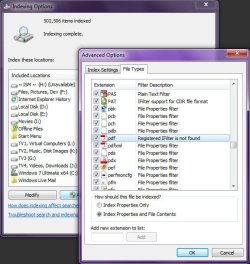
  1. Open "Indexing Options"
  2. Click "Advanced"
  3. Click the "File Types" tab in "Advanced Options"
  4. Scroll the list of file types to show PDF, and select it. What options are selected for the PDF file type?
If, like me, PDF says "Registered IFilter is not found", then that explains why you cannot search the contents of PDF files. I never noticed this myself until now, because I only use PDF files when I need to print a Word or Excel document for emailing, and once that is done, I delete the PDF docment, so it never occured to me that there might be a problem.

I suppose I'll get around to fixing this at somepoint. Perhaps downloading and installing an updated version of Acrobat Reader will do the trick. Or perhaps the IFilter is there, except it's not working, because it's 32-bit, and I'm using 64-bit Windows 7. It's not an issue for me, but perhaps for you it may work.

Image1.jpg

EDIT:

If all you're looking for is the ability to search within PDF files, try this:
Adobe PDF iFilter 9 for 64-bit platforms
Adobe PDF IFilter v6.0
 
Last edited:

My Computer My Computer

At a glance

Windows 7 Professional 32-bit SP1AMD A4/A63.00GB EDOVMware SVGA 3D
Computer type
PC/Desktop
Computer Manufacturer/Model Number
Virtual Machine
OS
Windows 7 Professional 32-bit SP1
CPU
AMD A4/A6
Motherboard
Intel Corporation 440BX Desktop Reference Platform
Memory
3.00GB EDO
Graphics Card(s)
VMware SVGA 3D
Sound Card
High Definition Audio Device
Monitor(s) Displays
Generic Non-PnP Monitor on VMware SVGA 3D
Screen Resolution
1440x900
Hard Drives
1 x 60GB VMware Virtual SATA Hard Drive ATA Device
Antivirus
Kaspersky Total Security
Now can you show me how to find files of the form *.pdf containing a specific string..... let's say 12x13 . Again on the external non indexed disk.
This isn't targeted just at you, but why are so many people having difficulty using the search? Aren't people trying it before they complain?

In your example, you would search the same way I suggested. You'd go to the drive, and then enter your search terms in the upper right. If I did a search for Seven.pdf, it would find documents called Seven.pdf, WindowsSeven.pdf, and Windows Seven.pdf. It works the very same way the search box does on the Start Menu. Honestly, I rarely search from the Start Menu. I do most of my searching from the specific locations in Explorer. Maybe that's why I'm so surprised when people struggle with non-indexed locations.
I think you misunderstand what I was asking (maybe?)
On my unindexed drive. I have multiple .pdf files (~ 900MB worth). One file refers to the string 12x13 within it. What is the syntax in the search bar finding the file containing the string and it's location in the pdf file. This is for non indexed files/disk.
mjf, will this help you?
Windows Search Advanced Query Syntax
 

My Computer My Computer

At a glance

Windows 7 Pro/32 Academic. Build 7600Intel 2.3 Duo core4 GB DDRNvidia GeForce 9500 GT
Computer Manufacturer/Model Number
Custom Build
OS
Windows 7 Pro/32 Academic. Build 7600
CPU
Intel 2.3 Duo core
Motherboard
EliteGroup G31T-M
Memory
4 GB DDR
Graphics Card(s)
Nvidia GeForce 9500 GT
Sound Card
Built in
Monitor(s) Displays
Viewsonic 15" 4:3
Screen Resolution
1280 x 1024
Hard Drives
WD Caviar Black 750 GB
WD 250 GB External
PSU
Antec 450w
Keyboard
Standard windows
Mouse
Logitech USB
Internet Speed
Bellsouth DSL 6.0
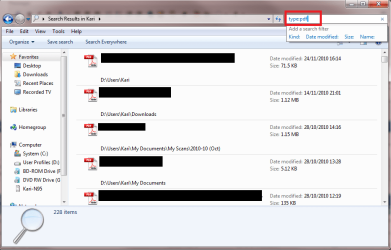
Typing this:
Code:
type:pdf
on search field of Explorer window finds all PDF-files on that folder and its subfolders.

Search_PDF.png

Using type parameter you can easily search about everything. Some examples:
  • type:image finds all images
  • type:jpg finds all JPG images
  • type:video finds all video files
  • type:avi finds all AVI video files
  • type:mp3 finds all MP3 files
  • type:document finds all document files (doc, txt, PDF and so on)
  • type:XYZ finds all files with extension XYZ
Kari
 

My Computer My Computer

At a glance

Windows 10 Pro x64 EN-GB1.6 GHz Intel Core i7-720QM Processor6 GBATI Mobility Radeon HD 5850 Graphics
Computer type
Laptop
Computer Manufacturer/Model Number
HP ENVY 17-1150eg
OS
Windows 10 Pro x64 EN-GB
CPU
1.6 GHz Intel Core i7-720QM Processor
Memory
6 GB
Graphics Card(s)
ATI Mobility Radeon HD 5850 Graphics
Sound Card
Beats sound system with integrated subwoofer
Monitor(s) Displays
17" laptop display, 22" LED and 32" Full HD TV through HDMI
Screen Resolution
1600*900 (1), 1920*1080 (2&3)
Hard Drives
Internal: 2 x 500 GB SATA Hard Disk Drive 7200 rpm
External: 2TB for backups, 3TB USB3 network drive for media
Cooling
As Envy runs a bit warm, I have it on a Cooler Master pad
Keyboard
Logitech diNovo Media Desktop Laser (bluetooth)
Mouse
Logitech Performance Mouse MX
Internet Speed
50/10 Mbps VDSL
Antivirus
Windows Defender 4.3.9431.0
Browser
Maxthon 3.5.2., IE11
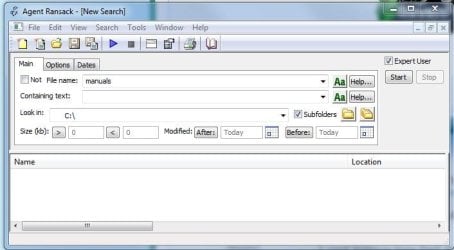
Or you might like to try "Agent Ransack", a very fast 64 bit File Search utility. You can look at it here Agent Ransack - Free File Searching Utility

And you can also see it offered in the "Free 64 Bit Native Software" Post in the Software Section on SevenForums here.

Capture.JPG

I cant believe how fast it is !!!!! And it works just like XP's search (but better - more options) You can quickly check any drive in your system for specific Files (not the File Contents). I find it so useful it has a permanent place pinned to my Taskbar.
 
Last edited:

My Computer My Computer

At a glance

Win 7 Ultimate x64Core I7 980X O.C. to 4.0 Ghz12GB 1600 mhz triple channel DDR3 - KingstonATI Radeon HD 5970 2GB Video Card
Computer Manufacturer/Model Number
Alienware Aurora
OS
Win 7 Ultimate x64
CPU
Core I7 980X O.C. to 4.0 Ghz
Motherboard
Custom Intel mATX (Bios ver A10)
Memory
12GB 1600 mhz triple channel DDR3 - Kingston
Graphics Card(s)
ATI Radeon HD 5970 2GB Video Card
Sound Card
Creative Labs Titanium sound blaster
Monitor(s) Displays
30" Dell LCD
Screen Resolution
2560 x 1600
Hard Drives
240 GB OCZ Vertex 2 SSD
256 GB Samsung V2 SSD
2TB WD Black Caviar 7200 rpm SATA3
600GB WD Velociraptor 10,000 rpm SATA3
3TB WD MyBook Essential USB 3.0 7200 rpm External
PSU
850 Watt
Case
Alienware Aurora
Cooling
Water
Keyboard
Logitech G15 (original version)
Mouse
Logitech MX1000 Laser - Wireless
Internet Speed
Cable 22 Mb/sec download
Other Info
USB 3.0,
Blue Ray DVD Read/Writer
Bose Companion 3 Speakers
WRT54G Wireless Router

My Computer My Computer

At a glance

Windows 10 Pro x64 EN-GB1.6 GHz Intel Core i7-720QM Processor6 GBATI Mobility Radeon HD 5850 Graphics
Computer type
Laptop
Computer Manufacturer/Model Number
HP ENVY 17-1150eg
OS
Windows 10 Pro x64 EN-GB
CPU
1.6 GHz Intel Core i7-720QM Processor
Memory
6 GB
Graphics Card(s)
ATI Mobility Radeon HD 5850 Graphics
Sound Card
Beats sound system with integrated subwoofer
Monitor(s) Displays
17" laptop display, 22" LED and 32" Full HD TV through HDMI
Screen Resolution
1600*900 (1), 1920*1080 (2&3)
Hard Drives
Internal: 2 x 500 GB SATA Hard Disk Drive 7200 rpm
External: 2TB for backups, 3TB USB3 network drive for media
Cooling
As Envy runs a bit warm, I have it on a Cooler Master pad
Keyboard
Logitech diNovo Media Desktop Laser (bluetooth)
Mouse
Logitech Performance Mouse MX
Internet Speed
50/10 Mbps VDSL
Antivirus
Windows Defender 4.3.9431.0
Browser
Maxthon 3.5.2., IE11
Or you might like to try "Agent Ransack", a very fast 64 bit File Search utility. You can look at it here Agent Ransack - Free File Searching Utility

And you can also see it offered in the "Free 64 Bit Native Software" Post in the Software Section on SevenForums here.

View attachment 118896

I cant believe how fast it is !!!!! And it works just like XP's search (but better - more options) You can quickly check any drive in your system for specific Files (not the File Contents). I find it so useful it has a permanent place pinned to my Taskbar.
thehappyman,
I've been using Agent Ransack (now called FileLocator Lite) for some time. In my testing it is fast, for a reliable Non indexed search program with a very good user interface.
All I do now is point people in it's direction, suggest they try it and they may be very pleasantly surprised.
 

My Computer My Computer

At a glance

Windows 7x64 Home Premium SP1Intel i7 2600kG.Skill Ripjaws (DDR3-1600) 2x4GBNvidia GeForce GTS 450; Intel HD Graphics 300...
Computer type
PC/Desktop
Computer Manufacturer/Model Number
Own build
OS
Windows 7x64 Home Premium SP1
CPU
Intel i7 2600k
Motherboard
ASUS P8Z68 Deluxe
Memory
G.Skill Ripjaws (DDR3-1600) 2x4GB
Graphics Card(s)
Nvidia GeForce GTS 450; Intel HD Graphics 3000(GT2+)
Monitor(s) Displays
Dell Ultrasharp IPS panel U2311H, Samsung SyncMaster P2350
Screen Resolution
1920x1080
Hard Drives
Samsung 850 Pro SSD 256GB, Samsung SSD 840 120GB, Seagates 1TB Barracuda ST31000528AS x2
PSU
Seasonic M12II 520W
Case
Lian Li Lancool PC-K60
Cooling
Case: 1x120mm, 3x140mm CPU: Hyper 212+
Keyboard
Logitech MK520 (wireless)
Mouse
Logitech MK520
Internet Speed
6-7 Mbps
Antivirus
Norton Security Premium, Malwarebytes on 2 (MSE on 3rd PC)
Browser
FireFox
Other Info
Audio: Logitech Z523 2.1
I think you misunderstand what I was asking (maybe?)

On my unindexed drive. I have multiple .pdf files (~ 900MB worth). One file refers to the string 12x13 within it. What is the syntax in the search bar finding the file containing the string and it's location in the pdf file. This is for non indexed files/disk.
  1. Open "Indexing Options"
  2. Click "Advanced"
  3. Click the "File Types" tab in "Advanced Options"
  4. Scroll the list of file types to show PDF, and select it. What options are selected for the PDF file type?
If, like me, PDF says "Registered IFilter is not found", then that explains why you cannot search the contents of PDF files. I never noticed this myself until now, because I only use PDF files when I need to print a Word or Excel document for emailing, and once that is done, I delete the PDF docment, so it never occured to me that there might be a problem.

I suppose I'll get around to fixing this at somepoint. Perhaps downloading and installing an updated version of Acrobat Reader will do the trick. Or perhaps the IFilter is there, except it's not working, because it's 32-bit, and I'm using 64-bit Windows 7. It's not an issue for me, but perhaps for you it may work.

View attachment 118857

EDIT:

If all you're looking for is the ability to search within PDF files, try this:
Adobe PDF iFilter 9 for 64-bit platforms
Adobe PDF IFilter v6.0
With the program I now use Agent Ransack (now FileLocator Lite) it does everything I need.

I'm from a technical background and an AQS type search is a concept I can grasp.
What I've been asking is:
Consider the scenario
(1) A friend brings over an external HDD full of say .PDF or program source files .f95.
(2) The HDD is not indexed. I do not want to index it.
(3) I want to search all files that contain inside them say "modified by Bill"
(4) How can I do that immediately with Windows.

I think the answer is I cannot.

Finally if because of my problems with indexing I choose not to index user locations, the above scenario applies.
 

My Computer My Computer

At a glance

Windows 7x64 Home Premium SP1Intel i7 2600kG.Skill Ripjaws (DDR3-1600) 2x4GBNvidia GeForce GTS 450; Intel HD Graphics 300...
Computer type
PC/Desktop
Computer Manufacturer/Model Number
Own build
OS
Windows 7x64 Home Premium SP1
CPU
Intel i7 2600k
Motherboard
ASUS P8Z68 Deluxe
Memory
G.Skill Ripjaws (DDR3-1600) 2x4GB
Graphics Card(s)
Nvidia GeForce GTS 450; Intel HD Graphics 3000(GT2+)
Monitor(s) Displays
Dell Ultrasharp IPS panel U2311H, Samsung SyncMaster P2350
Screen Resolution
1920x1080
Hard Drives
Samsung 850 Pro SSD 256GB, Samsung SSD 840 120GB, Seagates 1TB Barracuda ST31000528AS x2
PSU
Seasonic M12II 520W
Case
Lian Li Lancool PC-K60
Cooling
Case: 1x120mm, 3x140mm CPU: Hyper 212+
Keyboard
Logitech MK520 (wireless)
Mouse
Logitech MK520
Internet Speed
6-7 Mbps
Antivirus
Norton Security Premium, Malwarebytes on 2 (MSE on 3rd PC)
Browser
FireFox
Other Info
Audio: Logitech Z523 2.1
Consider the scenario
(1) A friend brings over an external HDD full of say .PDF or program source files .f95.
(2) The HDD is not indexed. I do not want to index it.
(3) I want to search all files that contain inside them say "modified by Bill"
(4) How can I do that immediately with Windows.

I think the answer is I cannot.
I'm getting a bit tired continuously correcting the disinformation spread regarding Windows Search, but OK, let's do it one more time ;)

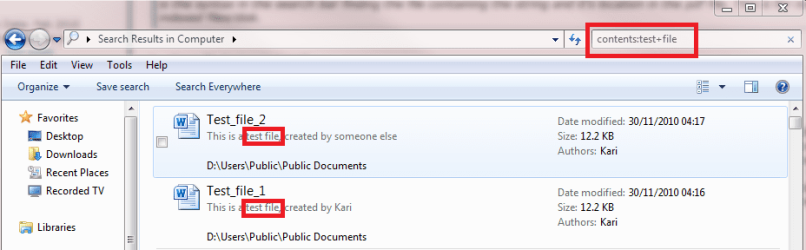
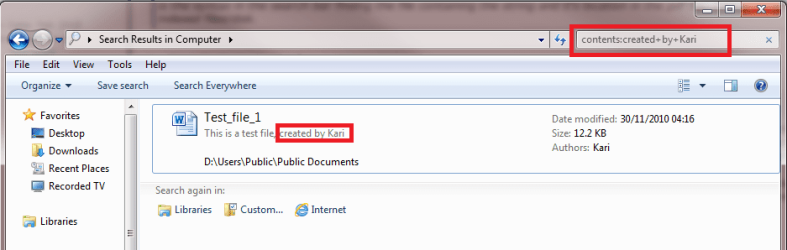
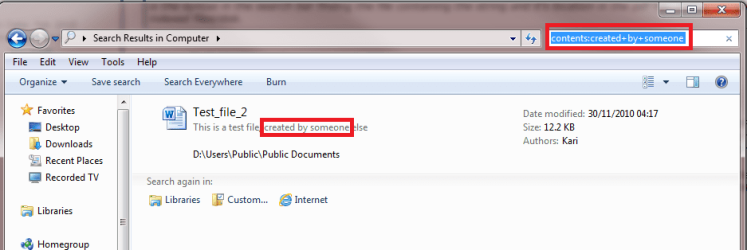
To demonstrate my point, I created two Word documents. The file Test_File_1 has a line saying "This is a test file, created by Kari", and the file Test_File_2 has a line saying "This is a test file, created by someone else".

First I search file contents only for words test + file, the search syntax beeing contents:test+file. Both test files are found:

Test_file_1.png

Then I search words created + by + Kari, syntax is contents:created+by+Kari. Only one file, the correct one, of those test files is found:

Test_file_3.png

Finally I search words created + by + someone, syntax is contents:created+by+someone. Again only one file, the correct one, of those test files is found:

Test_file_2.png

Nothing more to say.

Kari
 
Last edited:

My Computer My Computer

At a glance

Windows 10 Pro x64 EN-GB1.6 GHz Intel Core i7-720QM Processor6 GBATI Mobility Radeon HD 5850 Graphics
Computer type
Laptop
Computer Manufacturer/Model Number
HP ENVY 17-1150eg
OS
Windows 10 Pro x64 EN-GB
CPU
1.6 GHz Intel Core i7-720QM Processor
Memory
6 GB
Graphics Card(s)
ATI Mobility Radeon HD 5850 Graphics
Sound Card
Beats sound system with integrated subwoofer
Monitor(s) Displays
17" laptop display, 22" LED and 32" Full HD TV through HDMI
Screen Resolution
1600*900 (1), 1920*1080 (2&3)
Hard Drives
Internal: 2 x 500 GB SATA Hard Disk Drive 7200 rpm
External: 2TB for backups, 3TB USB3 network drive for media
Cooling
As Envy runs a bit warm, I have it on a Cooler Master pad
Keyboard
Logitech diNovo Media Desktop Laser (bluetooth)
Mouse
Logitech Performance Mouse MX
Internet Speed
50/10 Mbps VDSL
Antivirus
Windows Defender 4.3.9431.0
Browser
Maxthon 3.5.2., IE11
Back
Top