Solved Lost abilty to use typed instruction in start box

artinusa

New member
Member
VIP
Local time
5:04 AM
Messages
229
inability to search via start also VBS script problem Solved:
My last resort on the problem blow was to use a 250gb image of my system made a few months ago..but in frustration and by chance I found an old registry backup from ERUNT for the 30th Dec 2010..I thought oh well all or nothing..so I restored it via ERUNT and by gum all was well..I had all facilities that I had before including VBS reset to read scripts. So it looks like it was a registry error for sure..or maybe more than one?

I want to thank you all for scratching your heads for me..I appreciate your time and effort..and professionalism


All of a sudden I have lost the ability to use typed instructions into the start box . Like for instance I used to be able to type services.msc and away it would go..now I have to use the run facility then type in the instruction..same for reg edit etc....anyone know how I can get the facility back. not sure how I lost it..no new software

The second pic is when I type say regedit into the search box.. I get the white panel showing programs etc as you can see..depending on what I type gives me more or less option to choose from in the panel..sometime all options like picture documents etc...

When I select and click to any of the panel options heading (say programs) open to see what happens I get the first pic the orange error pic.. Hope this helps...

As an aside ..how does one use the 'snipping tool' for this sort of capture..when I select tool and an option say rectangle..OK I am fine but when I open start search type in... I lose the typing tool facility to capture..anyone help here......is there a hot key..I use the 'windows' key but to open start but then what..as soon as I type I lose snipping use..

I had to use the old fashioned print screen ..it worked tho
 

Attachments

  • File can not be opend pic -09_205806.jpg
    File can not be opend pic -09_205806.jpg
    10.4 KB · Views: 7
  • Search result .png
    Search result .png
    738 bytes · Views: 6
Last edited:

My Computer My Computer

At a glance

Windows 7 64 bit
Computer type
PC/Desktop
Computer Manufacturer/Model Number
Compaq Presario
OS
Windows 7 64 bit

My Computer My Computer

At a glance

Windows 7 Ultimate (SP1)AMD Sempron 3600+ATI Radeon Xpress 1150
Computer Manufacturer/Model Number
Vostro
OS
Windows 7 Ultimate (SP1)
CPU
AMD Sempron 3600+
Graphics Card(s)
ATI Radeon Xpress 1150
Screen Resolution
1200 x 800
Hard Drives
WD Scorpio Blue 500 GB
Thanks for the response when I type in index into start box I get a panel with :

programs
Control Panel
Documents etc

all at top of screen when I click on any one of them..I get an orange headed box ....UAC ...maybe saying internet security settings prevented one or more from from being opened..


if I knew how to upload to show an image .. I would as I have one .
 

My Computer My Computer

At a glance

Windows 7 64 bit
Computer type
PC/Desktop
Computer Manufacturer/Model Number
Compaq Presario
OS
Windows 7 64 bit

My Computer My Computer

At a glance

Windows 7 Ultimate (SP1)AMD Sempron 3600+ATI Radeon Xpress 1150
Computer Manufacturer/Model Number
Vostro
OS
Windows 7 Ultimate (SP1)
CPU
AMD Sempron 3600+
Graphics Card(s)
ATI Radeon Xpress 1150
Screen Resolution
1200 x 800
Hard Drives
WD Scorpio Blue 500 GB
Here's another way.:
  1. Open Indexing Options by clicking the Start button
    4f6cbd09-148c-4dd8-b1f2-48f232a2fd33.jpg
    , and then clicking Control Panel. In the search box, type indexing options, and then click Indexing Options.
  2. Click Advanced.
    18abb370-ac1e-4b6b-b663-e028a75bf05b.jpg
    If you're prompted for an administrator password or confirmation, type the password or provide confirmation.
  3. In the Advanced Options dialog box, click the Index Settings tab, and then click Rebuild.
    18abb370-ac1e-4b6b-b663-e028a75bf05b.jpg
    If you're prompted for an administrator password or confirmation, type the password or provide confirmation.
 
Last edited by a moderator:

My Computer My Computer

At a glance

Windows 7 Ultimate (SP1)AMD Sempron 3600+ATI Radeon Xpress 1150
Computer Manufacturer/Model Number
Vostro
OS
Windows 7 Ultimate (SP1)
CPU
AMD Sempron 3600+
Graphics Card(s)
ATI Radeon Xpress 1150
Screen Resolution
1200 x 800
Hard Drives
WD Scorpio Blue 500 GB
Anyone ?

Unsure why this post was classed as solved it is not.....thanks for the help..no matter
 
Last edited:

My Computer My Computer

At a glance

Windows 7 64 bit
Computer type
PC/Desktop
Computer Manufacturer/Model Number
Compaq Presario
OS
Windows 7 64 bit
Anyone ?

Unsure why this post was classed as solved it is not.....thanks for the help..no matter

The reason it was marked solved is because you said thank you and it seemed like it was fixed because you no longer asked for help until you posted this comment a few hours later
 

My Computer My Computer

At a glance

Windows 7 Ultimate (SP1)AMD Sempron 3600+ATI Radeon Xpress 1150
Computer Manufacturer/Model Number
Vostro
OS
Windows 7 Ultimate (SP1)
CPU
AMD Sempron 3600+
Graphics Card(s)
ATI Radeon Xpress 1150
Screen Resolution
1200 x 800
Hard Drives
WD Scorpio Blue 500 GB
All of a sudden I have lost the ability to use typed instructions into the start box . Like for instance I used to be able to type services.msc and away it would go..now I have to use the run facility then type in the instruction..same for reg edit etc....anyone know how I can get the facility back. not sure how I lost it..no new software

Can you show us a screenshot fo the Start Menu search results? Here is how you can capture the screen with the start menu and results showing:

Snip Menus.JPG

This is the link to the page where the image was snipped...more info there.

Edit:
Sorry, forgot to post link:

http://windows.microsoft.com/en-us/windows-vista/Use-Snipping-Tool-to-capture-screen-shots

Here also is a link to a tut on how to post a screenshot (although you seem to have figured it out):

http://www.sevenforums.com/tutorials/9733-screenshots-files-upload-post-seven-forums.html

Thanks,
James
 
Last edited:

My Computer My Computer

At a glance

Win7U 64 RTMQ95508GB GskillASUS|EAH4850/HTDI/1GD3/A
OS
Win7U 64 RTM
CPU
Q9550
Motherboard
GA-EP45-UD3R
Memory
8GB Gskill
Graphics Card(s)
ASUS|EAH4850/HTDI/1GD3/A
Sound Card
xfi Plat
Monitor(s) Displays
Dell 2405fpw
Screen Resolution
1920x1200
Hard Drives
Seagate & WD sata Drives
PSU
Antec
Case
Antec
Keyboard
MS Natural Ergonomic 4000
Mouse
Logitech MX610 USB Cordless
Does anyone have any idea whats up with my system..please I uploaded the picture of problem error details..
 

My Computer My Computer

At a glance

Windows 7 64 bit
Computer type
PC/Desktop
Computer Manufacturer/Model Number
Compaq Presario
OS
Windows 7 64 bit
Did you try a System Restore? http://www.sevenforums.com/tutorials/700-system-restore.html

If the problem started say three days ago. Then pick a restore point 4-6 days ago.

When this window below comes up put a check mark in "Show other restore points" that gives you more options to pick from.

No guarantee but easy and worth a shot if you haven't tried it.
Mike
 

My Computer My Computer

At a glance

Windows7 Pro 64bit SP-1; Windows XP Pro 32bitIntel Core i7-870 Lynnfield 2.93GHz LGA 1156 ...8GB@1400MHz Crucial Ballistix DDR3-1600 4x2GBASUS ENGTX460 DirectCU/2DI/1GD5 1GB 256-bit G...
Computer Manufacturer/Model Number
Hopalong/ Godzilla
OS
Windows7 Pro 64bit SP-1; Windows XP Pro 32bit
CPU
Intel Core i7-870 Lynnfield 2.93GHz LGA 1156 95W Quad-Core
Motherboard
ASUS P7P55D-E PRO
Memory
8GB@1400MHz Crucial Ballistix DDR3-1600 4x2GB
Graphics Card(s)
ASUS ENGTX460 DirectCU/2DI/1GD5 1GB 256-bit GDDR5
Sound Card
VIA Onboard
Monitor(s) Displays
Asus VS248H-P 24"; Samsung SyncMaster 941BW 19"ws
Screen Resolution
1920x1080; 1440x900
Hard Drives
Samsung 830 120GB SSD
Intel 320 120GB SSD
Western Digital Caviar Black WD7501AALS 750GB 7200 RPM SATA 3.0Gb/s
Western Digital Caviar Black WD6401AALS 640GB 7200 RPM SATA 3.0Gb/s
PSU
COOLER MASTER Silent Pro RS850-AMBAJ3-US 850W Modular
Case
COOLER MASTER HAF 932 RC-932-KKN5-GP Black
Cooling
Scythe "Mugen-2 Rev.B" (2 ScytheKaze-Jyuni PWM fans)
Keyboard
Logitech K-320
Mouse
Kensington
Antivirus
Avast Inernet Suite
Browser
IE 9 ; Chrome
Yep tried system restore..no effect..thanks for the suggestion..
 

My Computer My Computer

At a glance

Windows 7 64 bit
Computer type
PC/Desktop
Computer Manufacturer/Model Number
Compaq Presario
OS
Windows 7 64 bit
Hi artinusa,

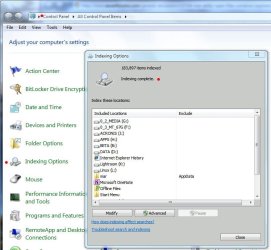
I think I asked you in another thread if the index was showing as either running or completed, but can't recall your response:

Index Complete.JPG

That out of the way, the 'Internet Security' error...I'm not sure why internet security would be an issue for a local search. Are you running a 3rd party Internet Security program (i.e., Norton, etc)?


James
 

My Computer My Computer

At a glance

Win7U 64 RTMQ95508GB GskillASUS|EAH4850/HTDI/1GD3/A
OS
Win7U 64 RTM
CPU
Q9550
Motherboard
GA-EP45-UD3R
Memory
8GB Gskill
Graphics Card(s)
ASUS|EAH4850/HTDI/1GD3/A
Sound Card
xfi Plat
Monitor(s) Displays
Dell 2405fpw
Screen Resolution
1920x1200
Hard Drives
Seagate & WD sata Drives
PSU
Antec
Case
Antec
Keyboard
MS Natural Ergonomic 4000
Mouse
Logitech MX610 USB Cordless

My Computer My Computer

At a glance

Microsoft Windows 7 Home Premium 64-bit 7601 ...Intel(R) Core(TM) i7-3770 CPU @ 3.40GHz8.00 GBIntel(R) HD Graphics 4000
Computer type
PC/Desktop
OS
Microsoft Windows 7 Home Premium 64-bit 7601 Multiprocessor Free Service Pack 1
CPU
Intel(R) Core(TM) i7-3770 CPU @ 3.40GHz
Motherboard
ASUSTeK COMPUTER INC. P8H77-M
Memory
8.00 GB
Graphics Card(s)
Intel(R) HD Graphics 4000
Sound Card
On Board
Monitor(s) Displays
Dell 24"
Screen Resolution
1920 x 1080
Hard Drives
(1) INTEL SSDSC2CT180A3 ATA Device (2) ST500DM002-1BD142 ATA Device (3) WDC WD3200AAKS-75L9A0 ATA Device (4) Generic- Compact Flash USB Device (5) Generic- MS/MS-Pro USB Device (6) Generic- SD/MMC USB Device (7) Generic- SM/xD-Picture USB
PSU
500w Corsair
Case
Cooler Master
Cooling
3 Fans
Keyboard
Logitech MK300
Mouse
Logitech WOM
Internet Speed
75Mb
Antivirus
Norton 360
Browser
Firefox, Opera, IE
When you click on "Show Details" in that first pic what does it say? Do you use a firewall that monitors the local actions of programs? It looks like something is being blocked that way.
 

My Computer My Computer

At a glance

Linux Lite 3.2 x64; Windows 7, 8.1Core2Duo 2.46GB ddr2nVidia
Computer type
PC/Desktop
Computer Manufacturer/Model Number
dell precision t3400 tower
OS
Linux Lite 3.2 x64; Windows 7, 8.1
CPU
Core2Duo 2.4
Memory
6GB ddr2
Graphics Card(s)
nVidia
Hard Drives
120gb SSD, 1TB HD, 2TB HD; sata II
Internet Speed
12/2
Browser
Vivaldi, Slimjet (Chromium) x64
Inability to search via start

Solved:
My last resort was to use a 250gb image of my system made a few months ago..but in frustration and by chance I found an old registry backup from ERUNT for the 30th Dec 2010..I thought oh well all or nothing..so I restored it via ERUNT and by gum all was well..I had all facilities that I had before including VBS reset to read scripts. So it looks like it was a registry error for sure..or maybe more than one?

I want to thank you all for scratching your heads for me..I appreciate your time and effort..and professionalism
 

My Computer My Computer

At a glance

Windows 7 64 bit
Computer type
PC/Desktop
Computer Manufacturer/Model Number
Compaq Presario
OS
Windows 7 64 bit
Good job in sticking with it, artinusa, and thanks for reporting back! I'm curious to know what caused your issues, but some things we may never know. :geek:

James
 

My Computer My Computer

At a glance

Win7U 64 RTMQ95508GB GskillASUS|EAH4850/HTDI/1GD3/A
OS
Win7U 64 RTM
CPU
Q9550
Motherboard
GA-EP45-UD3R
Memory
8GB Gskill
Graphics Card(s)
ASUS|EAH4850/HTDI/1GD3/A
Sound Card
xfi Plat
Monitor(s) Displays
Dell 2405fpw
Screen Resolution
1920x1200
Hard Drives
Seagate & WD sata Drives
PSU
Antec
Case
Antec
Keyboard
MS Natural Ergonomic 4000
Mouse
Logitech MX610 USB Cordless
This fixed mine (not my good word just passing it on)
HKEY_CURRENT_USER\Software\Microsoft\Windows\CurrentVersion\Explorer\FolderTypes\{ef87b4cb-f2ce-4785-8658-4ca6c63e38c6}\TopViews\{00000000-0000-0000-0000-000000000000}

In the left side of the window right-click GroupBy and click Modify
Change the value to System.StartMenu.Group and click OK, then close the registry editor
Reboot your computer for this change to take effect
 

My Computer My Computer

At a glance

Windows 7 Ultimate x64
OS
Windows 7 Ultimate x64
Back
Top