Solved Lost abilty to open files with windows explorer

artinusa

New member
Member
VIP
Local time
2:56 AM
Messages
229
Something weird is going on..no malware or virus according to ESET and Malwarebytes.

Windows 7- I have lost the ability to open 'vanilla' file folders with explorer I have also lost the ability to search in the start box..this was posted but was not resolved although thread show it was....anyone any ideas
 

My Computer My Computer

Computer type
PC/Desktop
Computer Manufacturer/Model Number
Compaq Presario
OS
Windows 7 64 bit
Why is this solved no-one has answerd the post yet..?

I seem to have my posts solved as I post them..the last two have been designated as solved but in fact they were not and one, the last one was only up as a post an hour and then designated as solved without any response at all....help please .. Brink?
 

My Computer My Computer

Computer type
PC/Desktop
Computer Manufacturer/Model Number
Compaq Presario
OS
Windows 7 64 bit
I seem to have my posts solved as I post them..the last two have been designated as solved but in fact they were not and one, the last one was only up as a post an hour and then designated as solved without any response at all....help please .. Brink?

Within that thread you said thank you and didn't ask for further assistance until hours later (after it was marked solved).

I'm sure you'll get the help you need in this thread if you just wait a little. I'll try and help you out and I'm sure others will respond. Let me look into your issue and I'll be back :)
 

My Computer My Computer

Computer Manufacturer/Model Number
Vostro
OS
Windows 7 Ultimate (SP1)
CPU
AMD Sempron 3600+
Graphics Card(s)
ATI Radeon Xpress 1150
Screen Resolution
1200 x 800
Hard Drives
WD Scorpio Blue 500 GB
Not sure what you mean by 'vanilla' file folders. Could you be more specific? A screenshot would be helpful also.

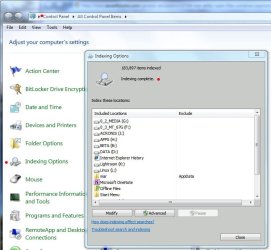
As for your Start menu search issues, have you checked to see if the index is running or complete, or is it paused or stopped? You can check via Control Panel/Indexing Options, as per the screenshot (note the red dots):

Index Complete.JPG

I would advise starting a new thread with the resulting info so that we can focus on the Explorer issue here.

James
 

My Computer My Computer

OS
Win7U 64 RTM
CPU
Q9550
Motherboard
GA-EP45-UD3R
Memory
8GB Gskill
Graphics Card(s)
ASUS|EAH4850/HTDI/1GD3/A
Sound Card
xfi Plat
Monitor(s) Displays
Dell 2405fpw
Screen Resolution
1920x1200
Hard Drives
Seagate & WD sata Drives
PSU
Antec
Case
Antec
Keyboard
MS Natural Ergonomic 4000
Mouse
Logitech MX610 USB Cordless
Thanks for the response...I was saying thank you to 'Joules'..on on doing what he suggested it was set correctly as he dictated...which left me back to square one..

I still can not use the search facility in the start box...that's a more accurate description of what happening and my screen shot give the message as I posted.. If I say say type in regedit I get a plain white screen panle with programs and documents only in the panel ..if I then click on any one of them I get the screen I posted..
 

My Computer My Computer

Computer type
PC/Desktop
Computer Manufacturer/Model Number
Compaq Presario
OS
Windows 7 64 bit
I did check that issue earlier today all was fine.....when I just checked it it tell me index is not running..I went to advanced and checked rebuild and will wait..


EDIT: Amazing..after typing the message just above I went back to indexing and it was back on..with start menu and user as files shown..nothing else...I selected start and then advanced and rebuild..will wait
 
Last edited:

My Computer My Computer

Computer type
PC/Desktop
Computer Manufacturer/Model Number
Compaq Presario
OS
Windows 7 64 bit
Also make sure Windows Search service is running and set to Automatic.

Click on the Start button, Control Panel, Administrative Tools, Services.
Locate the Windows Search service, and double click on it.
On the General tab locate Startup type: and select Automatic.
Click Apply then the Start button and then the OK button.

Ignore this if those are the current settings.
 

My Computer My Computer

Computer type
PC/Desktop
Computer Manufacturer/Model Number
Lenovo IdeaCenter 450
OS
Windows 10 Pro X64
CPU
Intel Quad Core i7-4770 @ 3.4Ghz
Memory
16.0GB PC3-12800 DDR3 SDRAM 1600 MHz
Graphics Card(s)
Intel Integrated HD Graphics
Sound Card
Realtek HD Audio
Monitor(s) Displays
HP 22" LCD
Screen Resolution
1680 x 1050
Hard Drives
250GB Samsung EVO SATA-3 SSD
2TB Seagate ST2000DM001 SATA-2
1.5TB Seagate ST3150041AS SATA
Keyboard
Dell USB
Mouse
Lenovo USB
Internet Speed
Cable via Road Runner 3MB Upload, 30MB Download
Antivirus
Windows Defender, MBAM Pro, MBAE
Browser
Seamonkey
Other Info
UEFI/GPT
PLDS DVD-RW DH16AERSH
Ability to search

Thank you Ztruker

I have the setting as you and Joules suggested..
 

My Computer My Computer

Computer type
PC/Desktop
Computer Manufacturer/Model Number
Compaq Presario
OS
Windows 7 64 bit
Artinusa,

Are you able to open folders in Windows Explorer yet?
 

My Computer My Computer

Computer type
PC/Desktop
Computer Manufacturer/Model Number
Self built custom
OS
64-bit Windows 11 Pro for Workstations
CPU
Intel i7-8700K OC'd to 5 GHz
Motherboard
ASUS ROG Maximus XI Formula Z390
Memory
64 GB (4x16GB) G.SKILL TridentZ RGB DDR4 3600 MHz
Graphics Card(s)
ASUS ROG-STRIX-GTX1080TI-O11G-GAMING
Sound Card
Integrated
Monitor(s) Displays
2 x Samsung Odyssey G7 27"
Screen Resolution
2560x1440
Hard Drives
1TB Samsung 990 PRO M.2,
4TB Samsung 990 PRO PRO M.2,
TerraMaster F8 SSD Plus NAS
PSU
Seasonic Prime Titanium 850W
Case
Thermaltake Core P3
Cooling
Corsair Hydro H115i
Keyboard
Logitech wireless K800
Mouse
Logitech MX Master 4
Internet Speed
2 Gb/s Download and 100 Mb/s Upload
Antivirus
Malwarebyte Anti-Malware Premium
Browser
Google Chrome
Other Info
Logitech Z625 speaker system,
Logitech BRIO 4K Pro webcam,
HP Color LaserJet Pro MFP M477fdn,
APC SMART-UPS RT 1000 XL - SURT1000XLI,
Galaxy S23 Plus phone
ability to search

The situation is that when I type a search string into the start search box like regedit or services.msc .it does not search 'per se'..its gives me a blank white panel with the types of folder headings at the top in vertical form ..eg. programs - documents etc..if I then choose any one of these I get the picture I uploaded and refuses to load and suggesting that my internet is preventing the opening..I do not understand this..as per picture If I use the 'run' facility I am fine.. seems like there is something stopping the system search I have run the windows series of diagnostics packs without really understanding what I was looking for..but I did see a problem with the system search area..shown in one of the diagnostic runs..out of my depth I am afraid I am able to use the open with facility now thanks to your tutorial I have checked that the windows search is active- it is I have set the index active - it is indexing Thank you for you time http://www.sevenforums.com/general-...t-abilty-use-typed-instruction-start-box.html
 
Last edited:

My Computer My Computer

Computer type
PC/Desktop
Computer Manufacturer/Model Number
Compaq Presario
OS
Windows 7 64 bit
Hi artinusa,

Still waiting for a response regarding your explorer issues. I asked:

"Not sure what you mean by 'vanilla' file folders. Could you be more specific? A screenshot would be helpful also."

Also, have you tried IE9's suggestion to run SFC (see link to tutorial in his post, this thread)?

Finally, it might be less confusing were we to confine this thread to your explorer issues, unless you feel they are somehow related. To that end, I have posted a response to your search thread here:

http://www.sevenforums.com/general-...-typed-instruction-start-box.html#post1182624


James
 

My Computer My Computer

OS
Win7U 64 RTM
CPU
Q9550
Motherboard
GA-EP45-UD3R
Memory
8GB Gskill
Graphics Card(s)
ASUS|EAH4850/HTDI/1GD3/A
Sound Card
xfi Plat
Monitor(s) Displays
Dell 2405fpw
Screen Resolution
1920x1200
Hard Drives
Seagate & WD sata Drives
PSU
Antec
Case
Antec
Keyboard
MS Natural Ergonomic 4000
Mouse
Logitech MX610 USB Cordless
Sorry for delay.. by vanilla I mean the normal folder icon orange/yellow ....from some tutorial by Brink that has been fixed I now have open with also My main issue now is that when I type into the start search box I do not get the expected search as I describe several times .... and get the posted picture error in the link supplied above. I ran sfc and nothing came up...I ran index and made sure the windows search was auto and on.. I still can not use the search facility ..even typing in regedit I get no result and end up with posted pic erorr Frustrated sorry..thanks for standing by me
 

My Computer My Computer

Computer type
PC/Desktop
Computer Manufacturer/Model Number
Compaq Presario
OS
Windows 7 64 bit

My Computer My Computer

Computer type
PC/Desktop
Computer Manufacturer/Model Number
Self built custom
OS
64-bit Windows 11 Pro for Workstations
CPU
Intel i7-8700K OC'd to 5 GHz
Motherboard
ASUS ROG Maximus XI Formula Z390
Memory
64 GB (4x16GB) G.SKILL TridentZ RGB DDR4 3600 MHz
Graphics Card(s)
ASUS ROG-STRIX-GTX1080TI-O11G-GAMING
Sound Card
Integrated
Monitor(s) Displays
2 x Samsung Odyssey G7 27"
Screen Resolution
2560x1440
Hard Drives
1TB Samsung 990 PRO M.2,
4TB Samsung 990 PRO PRO M.2,
TerraMaster F8 SSD Plus NAS
PSU
Seasonic Prime Titanium 850W
Case
Thermaltake Core P3
Cooling
Corsair Hydro H115i
Keyboard
Logitech wireless K800
Mouse
Logitech MX Master 4
Internet Speed
2 Gb/s Download and 100 Mb/s Upload
Antivirus
Malwarebyte Anti-Malware Premium
Browser
Google Chrome
Other Info
Logitech Z625 speaker system,
Logitech BRIO 4K Pro webcam,
HP Color LaserJet Pro MFP M477fdn,
APC SMART-UPS RT 1000 XL - SURT1000XLI,
Galaxy S23 Plus phone
Back
Top