Resource image number for light blue selection bar

I have never got Anolis to change images you may need to look for a resource editor that will.
Sorry
Jerry
Not a problem, software is inherently an education.
 

My Computer My Computer

At a glance

Windows 7 Home Premium 64Pentium Duo 2.544GB
Computer Manufacturer/Model Number
Dell 17-1750 Laptop
OS
Windows 7 Home Premium 64
CPU
Pentium Duo 2.54
Memory
4GB
Screen Resolution
1920 x 1080
Hard Drives
1 500GB
Mouse
Dell Optical
Internet Speed
768KB
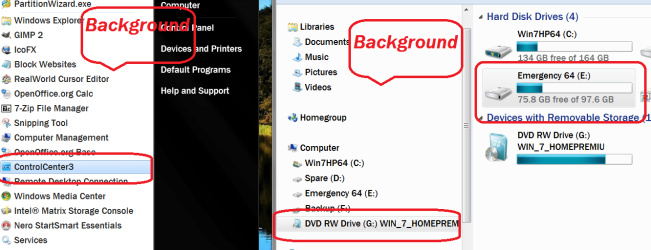
Jerry, can you give me the resource for the selection bars and the backgrounds I have shown in this image? Thanks....
 

Attachments

  • Resource.png
    Resource.png
    56.8 KB · Views: 12

My Computer My Computer

At a glance

Windows 7 Home Premium 64Pentium Duo 2.544GB
Computer Manufacturer/Model Number
Dell 17-1750 Laptop
OS
Windows 7 Home Premium 64
CPU
Pentium Duo 2.54
Memory
4GB
Screen Resolution
1920 x 1080
Hard Drives
1 500GB
Mouse
Dell Optical
Internet Speed
768KB
Jerry, can you give me the resource for the selection bars and the backgrounds I have shown in this image? Thanks....

Give me a few min. & I will get it
Jerry
 

My Computer My Computer

At a glance

Win 7 Pro x64 / Win 10 ProIntel(R) Core(TM) i7-3630QM CPU @ 2.40GHz12 GB(1) Intel(R) HD Graphics 4000 (2) NVIDIA GeFo...
Computer type
Laptop
Computer Manufacturer/Model Number
Sager NP9170
OS
Win 7 Pro x64 / Win 10 Pro
CPU
Intel(R) Core(TM) i7-3630QM CPU @ 2.40GHz
Motherboard
CLEVO P170EM
Memory
12 GB
Graphics Card(s)
(1) Intel(R) HD Graphics 4000 (2) NVIDIA GeForce GTX 675M
Sound Card
(1) Realtek High Definition Audio (2) Intel(R) Display Aud
Monitor(s) Displays
17.3
Screen Resolution
1920x1080
Hard Drives
(1) Samsung 860 EVO 500GB(OS) (1) Samsung 860 EVO 500GB(Data)
Keyboard
Backlite
Antivirus
MSE, Malwarebytes Pro
Browser
Firefox
Other Info
DESKTOP: Custom-built.
OS: Win 10 Pro x64.
CASE: Rosewill R5.
CPU: Intel I5 4670K CPU @ 3.40GHz.
CPU COOLER: Cool Master Hyper 212 EVO.
MOTHERBOARD: Asus Z87-A.
MEMORY: Kingston HyperX 2x4 GB.
GPU: Nvidia Geforce 650 TI.
PSU: Corsair TX750.
DRIVES: (1) Samsung 840 120 GB SSD (2) Western Digital blue 500 GB 7200 RPM.
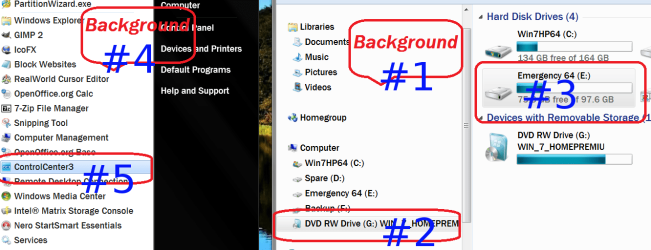
Here you go try this. I numbered your screenshot.
#1 is not a image it's a fillcolor with WSB sorry can't help on this.

#2 602 is hot/hoover, 601 is selected, 604 is selected not focus, 603 is hot selected.

#3 630 is hot/hoover, 632 is hot selected, 629 is selected this shows up in the start menu search menu doing a search (630 & 632 show up in all explorer windows My Doc, My music. etc.) there is # 631 for selected not focus to if you need it.


#4 811 & 815

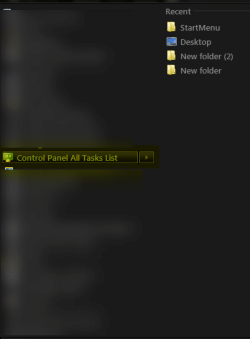
#5 796, 795, 797, 798 it uses a different image if you have a jump list with arrow or not (Screenshot)
the arrow is 775 or 776
Jerry
 

Attachments

  • Resource.png
    Resource.png
    59.6 KB · Views: 4
  • start.png
    start.png
    15.2 KB · Views: 6

My Computer My Computer

At a glance

Win 7 Pro x64 / Win 10 ProIntel(R) Core(TM) i7-3630QM CPU @ 2.40GHz12 GB(1) Intel(R) HD Graphics 4000 (2) NVIDIA GeFo...
Computer type
Laptop
Computer Manufacturer/Model Number
Sager NP9170
OS
Win 7 Pro x64 / Win 10 Pro
CPU
Intel(R) Core(TM) i7-3630QM CPU @ 2.40GHz
Motherboard
CLEVO P170EM
Memory
12 GB
Graphics Card(s)
(1) Intel(R) HD Graphics 4000 (2) NVIDIA GeForce GTX 675M
Sound Card
(1) Realtek High Definition Audio (2) Intel(R) Display Aud
Monitor(s) Displays
17.3
Screen Resolution
1920x1080
Hard Drives
(1) Samsung 860 EVO 500GB(OS) (1) Samsung 860 EVO 500GB(Data)
Keyboard
Backlite
Antivirus
MSE, Malwarebytes Pro
Browser
Firefox
Other Info
DESKTOP: Custom-built.
OS: Win 10 Pro x64.
CASE: Rosewill R5.
CPU: Intel I5 4670K CPU @ 3.40GHz.
CPU COOLER: Cool Master Hyper 212 EVO.
MOTHERBOARD: Asus Z87-A.
MEMORY: Kingston HyperX 2x4 GB.
GPU: Nvidia Geforce 650 TI.
PSU: Corsair TX750.
DRIVES: (1) Samsung 840 120 GB SSD (2) Western Digital blue 500 GB 7200 RPM.
Jerry, (Didn't want to fill the server up with the previous bitmaps) this will keep me busy for a little while. I installed Restorator and found out that it will allow me to paste the images so I am on my way. Somewhere along the line I will have to get into the Styleshell.dll UI. Thanks for your help.
 

My Computer My Computer

At a glance

Windows 7 Home Premium 64Pentium Duo 2.544GB
Computer Manufacturer/Model Number
Dell 17-1750 Laptop
OS
Windows 7 Home Premium 64
CPU
Pentium Duo 2.54
Memory
4GB
Screen Resolution
1920 x 1080
Hard Drives
1 500GB
Mouse
Dell Optical
Internet Speed
768KB
Jerry, (Didn't want to fill the server up with the previous bitmaps) this will keep me busy for a little while. I installed Restorator and found out that it will allow me to paste the images so I am on my way. Somewhere along the line I will have to get into the Styleshell.dll UI. Thanks for your help.
Your very welcome. My hat is off to you using Restorator & trying to edit .dll I only do msstyles with WSB. Good luck
Jerry
 

My Computer My Computer

At a glance

Win 7 Pro x64 / Win 10 ProIntel(R) Core(TM) i7-3630QM CPU @ 2.40GHz12 GB(1) Intel(R) HD Graphics 4000 (2) NVIDIA GeFo...
Computer type
Laptop
Computer Manufacturer/Model Number
Sager NP9170
OS
Win 7 Pro x64 / Win 10 Pro
CPU
Intel(R) Core(TM) i7-3630QM CPU @ 2.40GHz
Motherboard
CLEVO P170EM
Memory
12 GB
Graphics Card(s)
(1) Intel(R) HD Graphics 4000 (2) NVIDIA GeForce GTX 675M
Sound Card
(1) Realtek High Definition Audio (2) Intel(R) Display Aud
Monitor(s) Displays
17.3
Screen Resolution
1920x1080
Hard Drives
(1) Samsung 860 EVO 500GB(OS) (1) Samsung 860 EVO 500GB(Data)
Keyboard
Backlite
Antivirus
MSE, Malwarebytes Pro
Browser
Firefox
Other Info
DESKTOP: Custom-built.
OS: Win 10 Pro x64.
CASE: Rosewill R5.
CPU: Intel I5 4670K CPU @ 3.40GHz.
CPU COOLER: Cool Master Hyper 212 EVO.
MOTHERBOARD: Asus Z87-A.
MEMORY: Kingston HyperX 2x4 GB.
GPU: Nvidia Geforce 650 TI.
PSU: Corsair TX750.
DRIVES: (1) Samsung 840 120 GB SSD (2) Western Digital blue 500 GB 7200 RPM.
HELP! I ran into a problem with images and transparency. When I copy out the image from Restorator, edit it (maintaining the transparency) and paste it back, the transparency is gone. I have used Gimp2 and IcoFX for the editors.
 

My Computer My Computer

At a glance

Windows 7 Home Premium 64Pentium Duo 2.544GB
Computer Manufacturer/Model Number
Dell 17-1750 Laptop
OS
Windows 7 Home Premium 64
CPU
Pentium Duo 2.54
Memory
4GB
Screen Resolution
1920 x 1080
Hard Drives
1 500GB
Mouse
Dell Optical
Internet Speed
768KB
HELP! I ran into a problem with images and transparency. When I copy out the image from Restorator, edit it (maintaining the transparency) and paste it back, the transparency is gone. I have used Gimp2 and IcoFX for the editors.

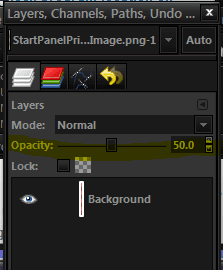
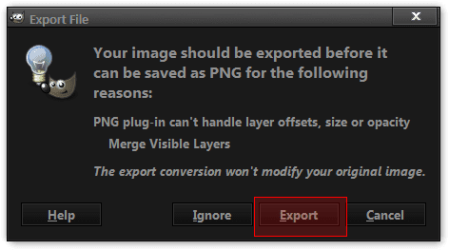
I do not know to use Restorator so I cannot help sorry. I use Gimp2 to edit images did you adjust the Opacity in Layers, Channels, Paths (screenshot)
Capture.PNG
& did you export it when trying to save it (screenshot)?
Export File.png
The images for 2,3,5 in that screenshot back a few posts can be transparent but #4 cannot if that helps any.
Jerry
 

My Computer My Computer

At a glance

Win 7 Pro x64 / Win 10 ProIntel(R) Core(TM) i7-3630QM CPU @ 2.40GHz12 GB(1) Intel(R) HD Graphics 4000 (2) NVIDIA GeFo...
Computer type
Laptop
Computer Manufacturer/Model Number
Sager NP9170
OS
Win 7 Pro x64 / Win 10 Pro
CPU
Intel(R) Core(TM) i7-3630QM CPU @ 2.40GHz
Motherboard
CLEVO P170EM
Memory
12 GB
Graphics Card(s)
(1) Intel(R) HD Graphics 4000 (2) NVIDIA GeForce GTX 675M
Sound Card
(1) Realtek High Definition Audio (2) Intel(R) Display Aud
Monitor(s) Displays
17.3
Screen Resolution
1920x1080
Hard Drives
(1) Samsung 860 EVO 500GB(OS) (1) Samsung 860 EVO 500GB(Data)
Keyboard
Backlite
Antivirus
MSE, Malwarebytes Pro
Browser
Firefox
Other Info
DESKTOP: Custom-built.
OS: Win 10 Pro x64.
CASE: Rosewill R5.
CPU: Intel I5 4670K CPU @ 3.40GHz.
CPU COOLER: Cool Master Hyper 212 EVO.
MOTHERBOARD: Asus Z87-A.
MEMORY: Kingston HyperX 2x4 GB.
GPU: Nvidia Geforce 650 TI.
PSU: Corsair TX750.
DRIVES: (1) Samsung 840 120 GB SSD (2) Western Digital blue 500 GB 7200 RPM.
I am giving it some uninterrupted attention right now. For some reason, I am able to get Resorcer (Anolis) to work on a different install of the OS, it make be something I have loaded on my normal one. I think MS is still a little unstable. I will let you know if I get some solid info.
 

My Computer My Computer

At a glance

Windows 7 Home Premium 64Pentium Duo 2.544GB
Computer Manufacturer/Model Number
Dell 17-1750 Laptop
OS
Windows 7 Home Premium 64
CPU
Pentium Duo 2.54
Memory
4GB
Screen Resolution
1920 x 1080
Hard Drives
1 500GB
Mouse
Dell Optical
Internet Speed
768KB
I was exporting images from .msstyles and Gimp2 was not recognizing the opacity of the image; if I adjusted opacity using Gimp2, it would change the color depth. I am now using IcoFx because it recognizes opacity. I then open the new image in MS Photo editor and copy it into Restorator. So far so good, but still having some problems understanding MS's concept of how they handle graphics.
 

My Computer My Computer

At a glance

Windows 7 Home Premium 64Pentium Duo 2.544GB
Computer Manufacturer/Model Number
Dell 17-1750 Laptop
OS
Windows 7 Home Premium 64
CPU
Pentium Duo 2.54
Memory
4GB
Screen Resolution
1920 x 1080
Hard Drives
1 500GB
Mouse
Dell Optical
Internet Speed
768KB
Jerry, after creating an image and exporting it as a .png the image icon for the file shows on the desktop as a transparency, but when pasted into Restorator the transparency is gone - what am I missing? Thanks...
 

My Computer My Computer

At a glance

Windows 7 Home Premium 64Pentium Duo 2.544GB
Computer Manufacturer/Model Number
Dell 17-1750 Laptop
OS
Windows 7 Home Premium 64
CPU
Pentium Duo 2.54
Memory
4GB
Screen Resolution
1920 x 1080
Hard Drives
1 500GB
Mouse
Dell Optical
Internet Speed
768KB
Jerry, after creating an image and exporting it as a .png the image icon for the file shows on the desktop as a transparency, but when pasted into Restorator the transparency is gone - what am I missing? Thanks...
I don't know. I do not have or used Restorator
Sorry
Jerry
 

My Computer My Computer

At a glance

Win 7 Pro x64 / Win 10 ProIntel(R) Core(TM) i7-3630QM CPU @ 2.40GHz12 GB(1) Intel(R) HD Graphics 4000 (2) NVIDIA GeFo...
Computer type
Laptop
Computer Manufacturer/Model Number
Sager NP9170
OS
Win 7 Pro x64 / Win 10 Pro
CPU
Intel(R) Core(TM) i7-3630QM CPU @ 2.40GHz
Motherboard
CLEVO P170EM
Memory
12 GB
Graphics Card(s)
(1) Intel(R) HD Graphics 4000 (2) NVIDIA GeForce GTX 675M
Sound Card
(1) Realtek High Definition Audio (2) Intel(R) Display Aud
Monitor(s) Displays
17.3
Screen Resolution
1920x1080
Hard Drives
(1) Samsung 860 EVO 500GB(OS) (1) Samsung 860 EVO 500GB(Data)
Keyboard
Backlite
Antivirus
MSE, Malwarebytes Pro
Browser
Firefox
Other Info
DESKTOP: Custom-built.
OS: Win 10 Pro x64.
CASE: Rosewill R5.
CPU: Intel I5 4670K CPU @ 3.40GHz.
CPU COOLER: Cool Master Hyper 212 EVO.
MOTHERBOARD: Asus Z87-A.
MEMORY: Kingston HyperX 2x4 GB.
GPU: Nvidia Geforce 650 TI.
PSU: Corsair TX750.
DRIVES: (1) Samsung 840 120 GB SSD (2) Western Digital blue 500 GB 7200 RPM.
Jerry, may I ask how you are locating the resource image definition? It seems that each build of Win 7 may have some minor changes, i.e. 629 should be selected in the detail pane of Explorer, but it isn't. Thanks, Roger....
 

My Computer My Computer

At a glance

Windows 7 Home Premium 64Pentium Duo 2.544GB
Computer Manufacturer/Model Number
Dell 17-1750 Laptop
OS
Windows 7 Home Premium 64
CPU
Pentium Duo 2.54
Memory
4GB
Screen Resolution
1920 x 1080
Hard Drives
1 500GB
Mouse
Dell Optical
Internet Speed
768KB
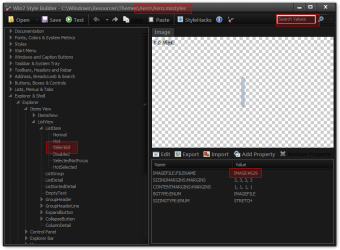
I use Ave's Windows7 Style Builder it's a great program about $22 US. so to find the # I look at default aero.msstyle & get the # if it's a custom theme I have to go to the location in WSB
When a theme is made with WSB the # get changed
Here is a screenshot of the same image 1 default & 1 custom
Jerry

Default # 629
Win7 Style Builder - CWindowsResourcesThemesAeroAero.msstyles.png

Custom the # is 655 now
Win7 Style Builder - CWindowsResourcesThemesHDHD.msstyles.png
 

My Computer My Computer

At a glance

Win 7 Pro x64 / Win 10 ProIntel(R) Core(TM) i7-3630QM CPU @ 2.40GHz12 GB(1) Intel(R) HD Graphics 4000 (2) NVIDIA GeFo...
Computer type
Laptop
Computer Manufacturer/Model Number
Sager NP9170
OS
Win 7 Pro x64 / Win 10 Pro
CPU
Intel(R) Core(TM) i7-3630QM CPU @ 2.40GHz
Motherboard
CLEVO P170EM
Memory
12 GB
Graphics Card(s)
(1) Intel(R) HD Graphics 4000 (2) NVIDIA GeForce GTX 675M
Sound Card
(1) Realtek High Definition Audio (2) Intel(R) Display Aud
Monitor(s) Displays
17.3
Screen Resolution
1920x1080
Hard Drives
(1) Samsung 860 EVO 500GB(OS) (1) Samsung 860 EVO 500GB(Data)
Keyboard
Backlite
Antivirus
MSE, Malwarebytes Pro
Browser
Firefox
Other Info
DESKTOP: Custom-built.
OS: Win 10 Pro x64.
CASE: Rosewill R5.
CPU: Intel I5 4670K CPU @ 3.40GHz.
CPU COOLER: Cool Master Hyper 212 EVO.
MOTHERBOARD: Asus Z87-A.
MEMORY: Kingston HyperX 2x4 GB.
GPU: Nvidia Geforce 650 TI.
PSU: Corsair TX750.
DRIVES: (1) Samsung 840 120 GB SSD (2) Western Digital blue 500 GB 7200 RPM.
Thanks Jerry, I am going to take a look at this, what I am trying to do is use a sledgehammer.
 

My Computer My Computer

At a glance

Windows 7 Home Premium 64Pentium Duo 2.544GB
Computer Manufacturer/Model Number
Dell 17-1750 Laptop
OS
Windows 7 Home Premium 64
CPU
Pentium Duo 2.54
Memory
4GB
Screen Resolution
1920 x 1080
Hard Drives
1 500GB
Mouse
Dell Optical
Internet Speed
768KB
Back
Top