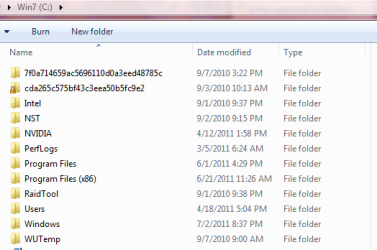
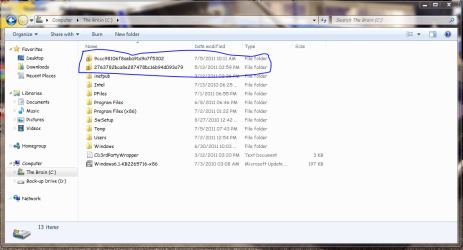
I was looking in my C: Drive Area And I See These Two Locked Folders.. If you ask me I think they are some sort of viruses. Windows will not let me delete them.
My Computer
- Computer Manufacturer/Model Number
- Compaq Presario CQ60
- OS
- Windows 7 Home Premium 64 bit SP1
- CPU
- [01]: Intel64 GenuineIntel 2.20 GHz
- Motherboard
- Hewlett-Packard 3612 (CPU)
- Memory
- 2.0GB Dual-Channel DDR2 @ 332MHz (5-5-5-14)
- Graphics Card(s)
- Mobile Intel(R) GMA 4500M (797MB Memory)(64 Dedicated)
- Sound Card
- Conexant Pebble High Definition SmartAudio
- Screen Resolution
- 1366x768 HD Intel 4 Series Express
- Hard Drives
- 245GB High Speed TOSHIBA Disk Drive ATA Device (SATA) (Primary)
- Cooling
- Stock, w/ High Quality Cooling Pad.
- Mouse
- Synaptics Touchpad V 7.0
- Internet Speed
- Around 10 to 20 MB Per Sec. Comcast Internet.