
You are using an out of date browser. It may not display this or other websites correctly.
You should upgrade or use an alternative browser.
You should upgrade or use an alternative browser.
how can i get notepad to open the full page
- Thread starter jturk
- Start date

JMH
Banned
- Local time
- 11:19 AM
- Messages
- 6,448
Open Notepad > maximize it > close it.
Wind 7 remembers the size and position of all Windows Explorer windows when closed.
Wind 7 remembers the size and position of all Windows Explorer windows when closed.
My Computer
At a glance
Win 7 Ultimate 64-bit. SP1.Intel i7 -720QM.[1.6GHz Turbo Boost 2.8GHz. 6...8 DDR 3 RAM. 1066MHZATI 1024 MB. DDR3. Radeon HD5650
- Computer Manufacturer/Model Number
- LAPTOP. HP Pavilion dv7-4010TX .
- OS
- Win 7 Ultimate 64-bit. SP1.
- CPU
- Intel i7 -720QM.[1.6GHz Turbo Boost 2.8GHz. 6MB Cache.]
- Memory
- 8 DDR 3 RAM. 1066MHZ
- Graphics Card(s)
- ATI 1024 MB. DDR3. Radeon HD5650
- Monitor(s) Displays
- 17.3" High Definition Brightview LCD. LED Backlit.
- Screen Resolution
- 1600 x 900.
- Hard Drives
- 640GB
- Case
- Laptop / notebook.
- Mouse
- Logitech Anywhere mouse. MX.
- Internet Speed
- ADSL [ but too slow ]

Just Maximize it,and Close it,as JMH said. Another time when you'll open it it should be maximized.
My Computer
At a glance
Windows 10 Pro x64Intel Core i5 4440 @Stock4 x 4GB HyperX Fury DDR3Gigabyte GTX 1050Ti O4G
- Computer type
- PC/Desktop
- Computer Manufacturer/Model Number
- Custom Build
- OS
- Windows 10 Pro x64
- CPU
- Intel Core i5 4440 @Stock
- Motherboard
- Gigabyte Z97 D3H
- Memory
- 4 x 4GB HyperX Fury DDR3
- Graphics Card(s)
- Gigabyte GTX 1050Ti O4G
- Sound Card
- Integrated
- Monitor(s) Displays
- Dell P2417H
- Screen Resolution
- 1920 x 1080
- Hard Drives
- Samsung EVO 850 120GB / Toshiba DT01ACA050 1TB 7200prm 32MB
- PSU
- Riotoro Onyx 750W
- Case
- NZXT H500 Black-Red
- Cooling
- Stock CPU + NZXT 120mm + 2x120mm red fans
- Keyboard
- Modecom Volcano Lanparty
- Mouse
- Asus ROG Gladius / DeepCool E-Pad Plus
- Internet Speed
- DOCSIS 50/3 Mbit
- Browser
- Google Chrome
- Other Info
- Asus K55VJ(i5 3210M, GT635M / 2GB, 8GB DDR3, 500GB HDD)

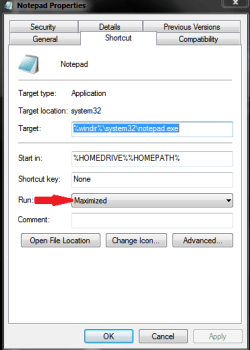
If whats mentioned above doesnt sort it right click on the notepad shortcut\link, click properties and scroll the "run" box to maximised and save as below.That should do the trick.
Danny
Danny
My Computer
At a glance
Windows 7 Home Premium x64 SP1intel(R)core(TM)2 duo CPU T6600 @ 2.20GHz3 gb ddr3ati radeon hd4570/512mb
- Computer Manufacturer/Model Number
- acer aspire 5935g
- OS
- Windows 7 Home Premium x64 SP1
- CPU
- intel(R)core(TM)2 duo CPU T6600 @ 2.20GHz
- Motherboard
- intel gm45/gm47 revision 07
- Memory
- 3 gb ddr3
- Graphics Card(s)
- ati radeon hd4570/512mb
- Monitor(s) Displays
- lop156wh2-tle1 15.3 flat
- Screen Resolution
- 1366x768
- Hard Drives
- OCZ-Agility3 60gig ssd
320gig external hdd
500gig external hdd
- Mouse
- Optical
- Internet Speed
- 30Mbps Down/30Mbps Up
Open Notepad > maximize it > close it.
Wind 7 remembers the size and position of all Windows Explorer windows when closed.
Just Maximize it,and Close it,as JMH said. Another time when you'll open it it should be maximized.
I know that should work but it doesn't on my system.Is it remembering the configuration automatically on yours.
Danny
My Computer
At a glance
Windows 7 Home Premium x64 SP1intel(R)core(TM)2 duo CPU T6600 @ 2.20GHz3 gb ddr3ati radeon hd4570/512mb
- Computer Manufacturer/Model Number
- acer aspire 5935g
- OS
- Windows 7 Home Premium x64 SP1
- CPU
- intel(R)core(TM)2 duo CPU T6600 @ 2.20GHz
- Motherboard
- intel gm45/gm47 revision 07
- Memory
- 3 gb ddr3
- Graphics Card(s)
- ati radeon hd4570/512mb
- Monitor(s) Displays
- lop156wh2-tle1 15.3 flat
- Screen Resolution
- 1366x768
- Hard Drives
- OCZ-Agility3 60gig ssd
320gig external hdd
500gig external hdd
- Mouse
- Optical
- Internet Speed
- 30Mbps Down/30Mbps Up

Danny's way works for me not the othersIf whats mentioned above doesnt sort it right click on the notepad shortcut\link, click properties and scroll the "run" box to maximised and save as below.That should do the trick.
View attachment 170191
Danny
Jerry
My Computer
At a glance
Win 7 Pro x64 / Win 10 ProIntel(R) Core(TM) i7-3630QM CPU @ 2.40GHz12 GB(1) Intel(R) HD Graphics 4000 (2) NVIDIA GeFo...
- Computer type
- Laptop
- Computer Manufacturer/Model Number
- Sager NP9170
- OS
- Win 7 Pro x64 / Win 10 Pro
- CPU
- Intel(R) Core(TM) i7-3630QM CPU @ 2.40GHz
- Motherboard
- CLEVO P170EM
- Memory
- 12 GB
- Graphics Card(s)
- (1) Intel(R) HD Graphics 4000 (2) NVIDIA GeForce GTX 675M
- Sound Card
- (1) Realtek High Definition Audio (2) Intel(R) Display Aud
- Monitor(s) Displays
- 17.3
- Screen Resolution
- 1920x1080
- Hard Drives
- (1) Samsung 860 EVO 500GB(OS) (1) Samsung 860 EVO 500GB(Data)
- Keyboard
- Backlite
- Antivirus
- MSE, Malwarebytes Pro
- Browser
- Firefox
- Other Info
- DESKTOP: Custom-built.
OS: Win 10 Pro x64.
CASE: Rosewill R5.
CPU: Intel I5 4670K CPU @ 3.40GHz.
CPU COOLER: Cool Master Hyper 212 EVO.
MOTHERBOARD: Asus Z87-A.
MEMORY: Kingston HyperX 2x4 GB.
GPU: Nvidia Geforce 650 TI.
PSU: Corsair TX750.
DRIVES: (1) Samsung 840 120 GB SSD (2) Western Digital blue 500 GB 7200 RPM.
I know that Danny's way works,but the method from me and JMH works to me.
My Computer
At a glance
Windows 10 Pro x64Intel Core i5 4440 @Stock4 x 4GB HyperX Fury DDR3Gigabyte GTX 1050Ti O4G
- Computer type
- PC/Desktop
- Computer Manufacturer/Model Number
- Custom Build
- OS
- Windows 10 Pro x64
- CPU
- Intel Core i5 4440 @Stock
- Motherboard
- Gigabyte Z97 D3H
- Memory
- 4 x 4GB HyperX Fury DDR3
- Graphics Card(s)
- Gigabyte GTX 1050Ti O4G
- Sound Card
- Integrated
- Monitor(s) Displays
- Dell P2417H
- Screen Resolution
- 1920 x 1080
- Hard Drives
- Samsung EVO 850 120GB / Toshiba DT01ACA050 1TB 7200prm 32MB
- PSU
- Riotoro Onyx 750W
- Case
- NZXT H500 Black-Red
- Cooling
- Stock CPU + NZXT 120mm + 2x120mm red fans
- Keyboard
- Modecom Volcano Lanparty
- Mouse
- Asus ROG Gladius / DeepCool E-Pad Plus
- Internet Speed
- DOCSIS 50/3 Mbit
- Browser
- Google Chrome
- Other Info
- Asus K55VJ(i5 3210M, GT635M / 2GB, 8GB DDR3, 500GB HDD)
Not for me weirdI know that Danny's way works,but the method from me and JMH works to me.

My Computer
At a glance
Win 7 Pro x64 / Win 10 ProIntel(R) Core(TM) i7-3630QM CPU @ 2.40GHz12 GB(1) Intel(R) HD Graphics 4000 (2) NVIDIA GeFo...
- Computer type
- Laptop
- Computer Manufacturer/Model Number
- Sager NP9170
- OS
- Win 7 Pro x64 / Win 10 Pro
- CPU
- Intel(R) Core(TM) i7-3630QM CPU @ 2.40GHz
- Motherboard
- CLEVO P170EM
- Memory
- 12 GB
- Graphics Card(s)
- (1) Intel(R) HD Graphics 4000 (2) NVIDIA GeForce GTX 675M
- Sound Card
- (1) Realtek High Definition Audio (2) Intel(R) Display Aud
- Monitor(s) Displays
- 17.3
- Screen Resolution
- 1920x1080
- Hard Drives
- (1) Samsung 860 EVO 500GB(OS) (1) Samsung 860 EVO 500GB(Data)
- Keyboard
- Backlite
- Antivirus
- MSE, Malwarebytes Pro
- Browser
- Firefox
- Other Info
- DESKTOP: Custom-built.
OS: Win 10 Pro x64.
CASE: Rosewill R5.
CPU: Intel I5 4670K CPU @ 3.40GHz.
CPU COOLER: Cool Master Hyper 212 EVO.
MOTHERBOARD: Asus Z87-A.
MEMORY: Kingston HyperX 2x4 GB.
GPU: Nvidia Geforce 650 TI.
PSU: Corsair TX750.
DRIVES: (1) Samsung 840 120 GB SSD (2) Western Digital blue 500 GB 7200 RPM.
Maximize Notepad when double clicking a .txt file in Explorer.
Apart from the above solutions there are other ways to do it, and to do it for all txt files in one go.
To maximize Notepad when double clicking a text file, in explorer:-
1) select 'Tools' > 'Folder Options' > 'File Types'.
2) Click the Files Types folder and look down alphabetically for "TXT Text Document".
3) Select it, click Advanced > open > Edit and replace the "application used to perform action" box with:-
cmd.exe /c start /max C:\Windows\notepad.exe %1
For Start > Run you can use this:-
cmd.exe /c start /max C:\Windows\notepad.exe "C:\your dir\yourFile.txt"
Information about all this is here cmd - Command Shell
I have XP Professional SP3, 32 bit.
Apart from the above solutions there are other ways to do it, and to do it for all txt files in one go.
To maximize Notepad when double clicking a text file, in explorer:-
1) select 'Tools' > 'Folder Options' > 'File Types'.
2) Click the Files Types folder and look down alphabetically for "TXT Text Document".
3) Select it, click Advanced > open > Edit and replace the "application used to perform action" box with:-
cmd.exe /c start /max C:\Windows\notepad.exe %1
For Start > Run you can use this:-
cmd.exe /c start /max C:\Windows\notepad.exe "C:\your dir\yourFile.txt"
Information about all this is here cmd - Command Shell
I have XP Professional SP3, 32 bit.
My Computer
At a glance
XP Professsional SP3 32 bit
- OS
- XP Professsional SP3 32 bit
Similar threads
- Replies
- 0
- Views
- 2K

- Replies
- 8
- Views
- 10K
- Replies
- 11
- Views
- 3K

- Replies
- 13
- Views
- 4K