Missing icon on windows explorer system folder on my taskbar?

There is a fix, certainly. But that involves some manual work.

You save a copy of your explorer.exe on the desktop, zip it and upload the zip here. Either me or Jerry will put the default icon back there, and guide you how to replace the changed system file properly.

As I am at work now, I dont have the necessary tools with me. I will do it within 7 hours.
 

My Computer

Computer type
PC/Desktop
Computer Manufacturer/Model Number
Self Assembled
OS
Microsoft Windows 10 Pro Insider Preview 64-bit
CPU
Intel(R) Core(TM) i3-4130 CPU @ 3.40GHz
Motherboard
Gigabyte Technology Co., Ltd. B85M-D3H
Memory
Corsair Vengence 4GB x2 (8.00GB Dual-Channel DDR3 @ 798MHz)
Graphics Card(s)
2047MB GeForce GTS 450 (ZOTAC International)
Sound Card
Onboard (Realtek High Definition Audio)
Monitor(s) Displays
LG Flatron E2040T
Screen Resolution
1600x900
Hard Drives
Western Digital 1 TB
Seagate 500 GB
PSU
Corsair VS550
Case
Cooler Master K380
Cooling
Cooler Master Seidon 120V Plus
Keyboard
Logitech MK260r
Mouse
Logitech MK260r
Internet Speed
PMPL Broadband
Antivirus
Windows Defender + MBAM
Browser
Firefox
Other Info
Dell Studio 15" Laptop
Thank you, here is the explorer zip. Out of curiosity, how are you going to fix this?

EDIT: Oh, and I installed a 3rd party theme a couple years ago where I had to patch a few system files first to get it to work, will this new explorer still allow for custom themes?
 

Attachments

My Computer

OS
Windows 7 Home Premium 32bit

My Computer

Computer type
PC/Desktop
Computer Manufacturer/Model Number
Self Assembled
OS
Microsoft Windows 10 Pro Insider Preview 64-bit
CPU
Intel(R) Core(TM) i3-4130 CPU @ 3.40GHz
Motherboard
Gigabyte Technology Co., Ltd. B85M-D3H
Memory
Corsair Vengence 4GB x2 (8.00GB Dual-Channel DDR3 @ 798MHz)
Graphics Card(s)
2047MB GeForce GTS 450 (ZOTAC International)
Sound Card
Onboard (Realtek High Definition Audio)
Monitor(s) Displays
LG Flatron E2040T
Screen Resolution
1600x900
Hard Drives
Western Digital 1 TB
Seagate 500 GB
PSU
Corsair VS550
Case
Cooler Master K380
Cooling
Cooler Master Seidon 120V Plus
Keyboard
Logitech MK260r
Mouse
Logitech MK260r
Internet Speed
PMPL Broadband
Antivirus
Windows Defender + MBAM
Browser
Firefox
Other Info
Dell Studio 15" Laptop
Ah, ok, thank you. Is that in reference to my patching the ux.dll for custom themes or in reference to hacking the explorer.exe to get the icon back? And what kind of losses?
 

My Computer

OS
Windows 7 Home Premium 32bit
The loss is that kind that you are suffering.

And if you have another copy of explorer.exe, and if that is essentially od the same as your installed version and service pack, you may try it. Though it might change your start button.
 

My Computer

Computer type
PC/Desktop
Computer Manufacturer/Model Number
Self Assembled
OS
Microsoft Windows 10 Pro Insider Preview 64-bit
CPU
Intel(R) Core(TM) i3-4130 CPU @ 3.40GHz
Motherboard
Gigabyte Technology Co., Ltd. B85M-D3H
Memory
Corsair Vengence 4GB x2 (8.00GB Dual-Channel DDR3 @ 798MHz)
Graphics Card(s)
2047MB GeForce GTS 450 (ZOTAC International)
Sound Card
Onboard (Realtek High Definition Audio)
Monitor(s) Displays
LG Flatron E2040T
Screen Resolution
1600x900
Hard Drives
Western Digital 1 TB
Seagate 500 GB
PSU
Corsair VS550
Case
Cooler Master K380
Cooling
Cooler Master Seidon 120V Plus
Keyboard
Logitech MK260r
Mouse
Logitech MK260r
Internet Speed
PMPL Broadband
Antivirus
Windows Defender + MBAM
Browser
Firefox
Other Info
Dell Studio 15" Laptop
Use it .... View attachment explorer.zip

Download the zip on your desktop and extract it.
Go to C:\Windows\Explorer.exe, rename it as explorer.old.
Copy the explorer.exe from desktop (the downloaded one) and paste it in C:\Windows.

Let us know if it is working now, or not. Apparently it should work .....
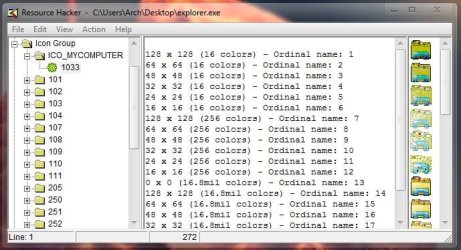
Capture.JPG
 

My Computer

Computer type
PC/Desktop
Computer Manufacturer/Model Number
Self Assembled
OS
Microsoft Windows 10 Pro Insider Preview 64-bit
CPU
Intel(R) Core(TM) i3-4130 CPU @ 3.40GHz
Motherboard
Gigabyte Technology Co., Ltd. B85M-D3H
Memory
Corsair Vengence 4GB x2 (8.00GB Dual-Channel DDR3 @ 798MHz)
Graphics Card(s)
2047MB GeForce GTS 450 (ZOTAC International)
Sound Card
Onboard (Realtek High Definition Audio)
Monitor(s) Displays
LG Flatron E2040T
Screen Resolution
1600x900
Hard Drives
Western Digital 1 TB
Seagate 500 GB
PSU
Corsair VS550
Case
Cooler Master K380
Cooling
Cooler Master Seidon 120V Plus
Keyboard
Logitech MK260r
Mouse
Logitech MK260r
Internet Speed
PMPL Broadband
Antivirus
Windows Defender + MBAM
Browser
Firefox
Other Info
Dell Studio 15" Laptop
I tried it, but I am having the same issue.

EDIT: I managed to fix it. I'll document my steps here in words and pics just in case someone has the issue in the future (this works if you don't keep explorer pinned, but it should even if it is pinned):

1. Open Windows Explorer (I did it by opening My Documents from the Start Menu)

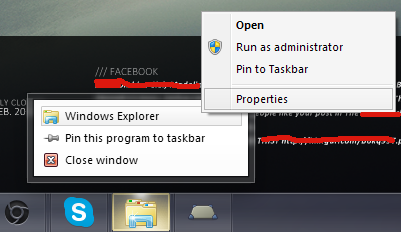
2. Right-Click it to bring up the jumplist:
5alYIBG.png


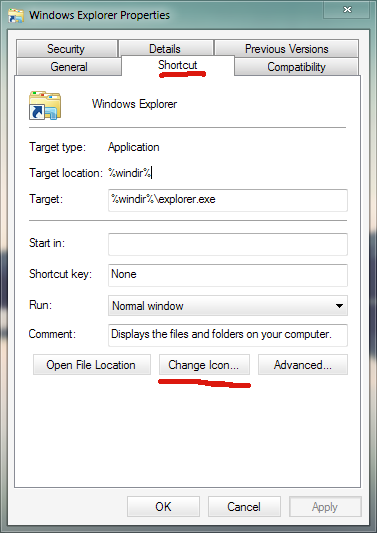
3. Right-Click the "Windows Explorer" option in the jump list and choose "Properties".
aHFybWQ.png


4. Go to the "Shortcut" tab and choose "Change Icon".
QDFI4CU.png


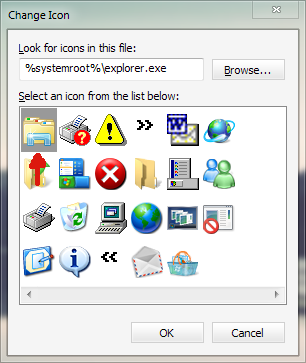
5. When you press this you should get some form of "Icon not found" error and you'll be redirected here (the red arrow shows the icon which Windows defaults to when it can't find an icon, which is why explorer is like this):
oz9VIMv.png


6. Click Browse and navigate to "C:\Windows\explorer.exe" then click Open

7. Choose the icon the red arrow is pointing to and click Ok and then Ok again:
xoKchvl.png


8. Close all explorer windows and reopen it and you should have the old icon back.

I'm guessing the reason this happened is that the program 7CONIFIER changes the path of the Explorer shortcut that appears on the taskbar whenever Explorer is open to it's own directory. Then, when you delete the icon in that directory or move it (for me this happened when I updated the program), Windows doesn't know where to find the icon, and so defaults to the "No Icon" icon in SHELL32.dll. Anyway, Arc, thank you so much for all the help you've given me, I really appreciate it and I'm glad this issue was resolved.
 
Last edited:

My Computer

OS
Windows 7 Home Premium 32bit

My Computer

Computer type
PC/Desktop
Computer Manufacturer/Model Number
Self Assembled
OS
Microsoft Windows 10 Pro Insider Preview 64-bit
CPU
Intel(R) Core(TM) i3-4130 CPU @ 3.40GHz
Motherboard
Gigabyte Technology Co., Ltd. B85M-D3H
Memory
Corsair Vengence 4GB x2 (8.00GB Dual-Channel DDR3 @ 798MHz)
Graphics Card(s)
2047MB GeForce GTS 450 (ZOTAC International)
Sound Card
Onboard (Realtek High Definition Audio)
Monitor(s) Displays
LG Flatron E2040T
Screen Resolution
1600x900
Hard Drives
Western Digital 1 TB
Seagate 500 GB
PSU
Corsair VS550
Case
Cooler Master K380
Cooling
Cooler Master Seidon 120V Plus
Keyboard
Logitech MK260r
Mouse
Logitech MK260r
Internet Speed
PMPL Broadband
Antivirus
Windows Defender + MBAM
Browser
Firefox
Other Info
Dell Studio 15" Laptop
Back
Top