Solved Convert dynamic disk of a laptop to basic disk w/o reinstalling win

aabfattah

New member
Local time
6:05 PM
Messages
3
Hello ,

I have a Dell laptop which came with Windows 7 installed and disk type was dynamic. I need to install Linux(not on a virtual machine) so I have to convert the disk from dynamic to basic .

The problem is that all methods require that I delete all volumes and re install Windows . I have a lot of tools and applications installed that will require a week to re install .

So , Is there a way to change the dynamic disk of my current laptop I am working on to basic disk without having to remove windows and re installing it ?

Or is there way to convert a single volume to basic so that I can install Ubuntu on it ?
 

My Computer My Computer

OS
Windows 7
According to this tutorial, no:

Before you convert a dynamic disk to a basic disk, be sure to backup anything that you do not want to lose on that dynamic disk. Converting the dynamic disk back to a basic disk requires that all dynamic volumes are deleted on the disk first.

How to Convert a Dynamic Disk to a Basic Disk
 

My Computer My Computer

Computer type
PC/Desktop
Computer Manufacturer/Model Number
Lenovo IdeaCenter 450
OS
Windows 10 Pro X64
CPU
Intel Quad Core i7-4770 @ 3.4Ghz
Memory
16.0GB PC3-12800 DDR3 SDRAM 1600 MHz
Graphics Card(s)
Intel Integrated HD Graphics
Sound Card
Realtek HD Audio
Monitor(s) Displays
HP 22" LCD
Screen Resolution
1680 x 1050
Hard Drives
250GB Samsung EVO SATA-3 SSD
2TB Seagate ST2000DM001 SATA-2
1.5TB Seagate ST3150041AS SATA
Keyboard
Dell USB
Mouse
Lenovo USB
Internet Speed
Cable via Road Runner 3MB Upload, 30MB Download
Antivirus
Windows Defender, MBAM Pro, MBAE
Browser
Seamonkey
Other Info
UEFI/GPT
PLDS DVD-RW DH16AERSH
You can do this non-destructively with the free Home version of Easeus Partition manager, or v.4.2 of Partition Wizard which is the last version which offered it as a free feature.

Back up your files as there is some risk in partitioning operations. To be absolutely safest and have rescue capability, I would burn the v.4.2 PW boot disk: pw422.zip ISO - Windows Live.

If there are more than 4 Primary partitions you'll need to delete one or convert it first to Logical before it will convert. If you need advice on this post back a screenshot of your maximized Disk Management drive map using the Snipping Tool in Start Menu.

You can have four Primary partitions, or three Primary and one Logical extended within which you can add as many Logical partitions as you want. As Dynamic disks are meant to allow partitions to span multiple HD's it is unlikely you laptop came this way, but a warning that it was about to convert must have been disregarded during partitioning operations.
 
In any case you must not have more than 4 dynamics before you start the conversion to primaries. And when you have 4 primaries back, you need to convert one primary to logical first before you can create additional partitions. That can be done with PW that Greg recommended. The controls are in the Partition tab > Modify..
 

My Computer My Computer

Computer Manufacturer/Model Number
HP, Dell, Gateway, Toshiba - 4 laptops and 2 desktops
OS
Vista, Windows7, Mint Mate, Zorin, Windows 8
CPU
from 1.6GHz Duo to i7
Monitor(s) Displays
2x HP w2207
Hard Drives
5x HDD, 7x SSD, 12x Externals
Keyboard
with trackball - no mices
Mouse
Trackball mice
Internet Speed
DSL 6000
Thanks for the replies.

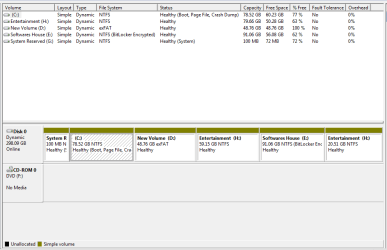
Here is a screenshot of my disk :

2a7g9pc.png


Put please can you give me a more detailed description of what will I do

1 - I downloaded the CD .
2 - I will backup my data .
3 - I will burn it and boot from it .

4 - Will then I will be able to convert the partitions easily to basic partitions and create a new partition for linux easily without losing data or windows installation ?
 

My Computer My Computer

OS
Windows 7
This video will show you how to Convert what you have now to Basic after booting into PW CD: How to convert dynamic disk to basic disk with Partition Wizard?

As you have four partitions you don't need to make any changes before converting.

Once you convert take notice of how many Primary vs. Logical partitions you have. You can have a) 4 Primary, or b) 3 Primary and as many Logical partitions as you want.

In the future I would first convert one data partition to Logical if you want to add any more partitions. This will avoid having another accidental conversion to Dynamic. Use PW CD to do the conversion to Logical when needed.
 
You are lucky. You have only 4 partitions. I wonder how those became dynamic anyhow.

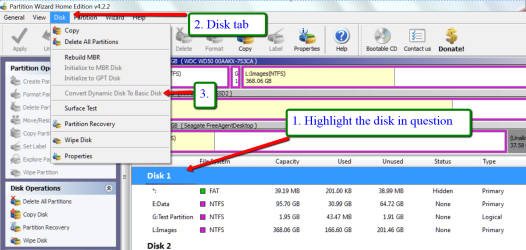
For the operation of PW, see picture. This is a picture of a later release, but 4.2.2. is similar. When you are done with 1., 2., 3., do not forget "Apply" which is on the bottom left of the window.
 

Attachments

  • 2012-03-13_1205.png
    2012-03-13_1205.png
    114.8 KB · Views: 539

My Computer My Computer

Computer Manufacturer/Model Number
HP, Dell, Gateway, Toshiba - 4 laptops and 2 desktops
OS
Vista, Windows7, Mint Mate, Zorin, Windows 8
CPU
from 1.6GHz Duo to i7
Monitor(s) Displays
2x HP w2207
Hard Drives
5x HDD, 7x SSD, 12x Externals
Keyboard
with trackball - no mices
Mouse
Trackball mice
Internet Speed
DSL 6000
Nice video Greg. I did not know that this existed. Did you make that?
 

My Computer My Computer

Computer Manufacturer/Model Number
HP, Dell, Gateway, Toshiba - 4 laptops and 2 desktops
OS
Vista, Windows7, Mint Mate, Zorin, Windows 8
CPU
from 1.6GHz Duo to i7
Monitor(s) Displays
2x HP w2207
Hard Drives
5x HDD, 7x SSD, 12x Externals
Keyboard
with trackball - no mices
Mouse
Trackball mice
Internet Speed
DSL 6000
This time I went with the picture. I think it tells the story too. Now the OP has plenty of referral material.
 

My Computer My Computer

Computer Manufacturer/Model Number
HP, Dell, Gateway, Toshiba - 4 laptops and 2 desktops
OS
Vista, Windows7, Mint Mate, Zorin, Windows 8
CPU
from 1.6GHz Duo to i7
Monitor(s) Displays
2x HP w2207
Hard Drives
5x HDD, 7x SSD, 12x Externals
Keyboard
with trackball - no mices
Mouse
Trackball mice
Internet Speed
DSL 6000
Thanks for the replies.

Here is a screenshot of my disk :

2a7g9pc.png


Put please can you give me a more detailed description of what will I do

1 - I downloaded the CD .
2 - I will backup my data .
3 - I will burn it and boot from it .

4 - Will then I will be able to convert the partitions easily to basic partitions and create a new partition for linux easily without losing data or windows installation ?
•Truly speaking same happened with me, and the same Gurus helped me a lot..
yes surely u will be able to convert the dynamic disk to basic disk with the help of partition wizard bootable cd/dvd.. the main thing is that u must convert the partition to basic(primary) where ur original or primary operating system(windows) is installed( by default C drive).
•also u can convert three more partition to primary.. but as u wished u want to create one more partition , then u should have three primary partition(including the C drive) and one or more logical partition, so u can dedicate one partition to ur linux..
•to create a partition u must shrink the space from the drives and at last there will be unallocated space, u can do so easily with the help of Easeus application linked here. and create the logical partition with the same..
 

My Computer My Computer

Computer Manufacturer/Model Number
HP Pavilion g7-1219wm
OS
Windows 7 Home Premium (x64) Service Pack 1 (build 7601)
CPU
1.65 gigahertz AMD E-450 APU with Radeon HD Graphics
Motherboard
Hewlett-Packard 3562 07.27
Memory
4 GB DDR3 RAM
Graphics Card(s)
AMD Radeon HD 6320 Graphics
Sound Card
AMD High Definition Audio Device & IDT HD
Monitor(s) Displays
Generic PnP Monitor (17.1"vis)
Hard Drives
Hitachi HTS547550A9E384 [Hard drive] (500.11 GB) -- drive 0
Thanks a lot :) The conversion worked flawlessly and fast.
The only problem was driver D and E switched their letters but I was able to change them back from Windows .
 

My Computer My Computer

OS
Windows 7
Hi,

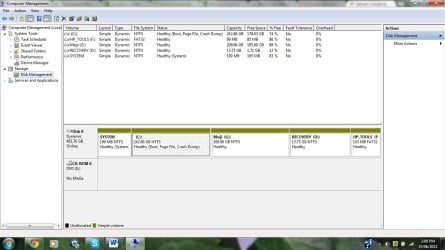
I have exactly the same issue as aabfattah. On my laptop I tried to make an additional partition using disk management since there was none for data storage. Apparently there were 4 primary partitions already and I ended up making all disks dynamic :(. Im gonna try out Partition Wizard to convert back to basic since I read dynamic disk types are no good for a laptop. I'm a bit of a novice here so the whole talk about making some disks primary and some logical got me confused. I am attaching a screen shot of my Disk Management Console. The drive G Meiji is the one I added by shrinking C drive. The question is which ones should I make primary and which ones logical since Im not aware of each ones purpose. There is Recovery D and SYSTEM, which im guessing needs to be primary. what about the HPTools? Can you anyone please guide me.... Thanks soooooooooooo much in advance.
 

Attachments

  • DiskMgm.jpg
    DiskMgm.jpg
    92.8 KB · Views: 58

My Computer My Computer

OS
Windows 7 Home Premium 64bit
You'll need to move the data off to delete G to get it to convert back to Basic as must be done in this case. You can only have four Primary or three Primary and unlimited Logical partitions.

Boot free Partition Wizard, rightclick G to Delete, click OK.

Then click on the Disk # to highlight it, from Disk tab choose Convert Dynamic to Basic, Apply both steps. How to convert dynamic disk to basic disk with Partition Wizard?

After conversion, rightclick C to Modify>Set to Logical, click OK. How to set partition as Primary or Logical.

Then rightclick the empty space where G was to create another Logical sub-partition, click OK, Apply. Partition Wizard Create Partition Video Help

This is the best arrangement for preinstalled HP's to preserved Tools and Recovery so Diagnostics and Factory Recovery will run from boot. Make your Recovery disks now as a backup.

Read over these resources to later deal with the industry's worst crapware load preinstalled on HP's: Clean Up Factory Bloatware.'
Clean Reinstall - Factory OEM Windows 7
 
convert a dynamic disk to basic

Hello,
i have read discussion on this here.
but i am still unable to do it.
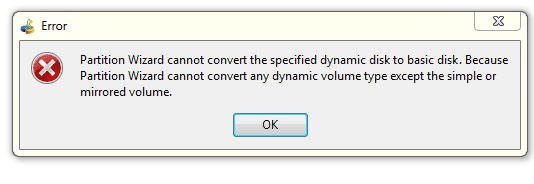
i have error shown in picture.Capture.PNG

Capture2.PNG
This is situation of my hdd..
Help me please.
Thanks.
 

My Computer My Computer

OS
Windows 7 Ultimate x64
You must back up the data to delete the partitions you created which caused the disk to convert to Dynamic. I stated this in my last post so please pay closer attention.

If you have any more than four Primary partitions or 3 Primary + unlimited Logical partitions then the disk will not convert back to Basic.

If you are unable to follow these instructions to do a non-destructive conversion with Partition Wizard boot disk version 4.1 then use one of the other methods given in Convert a Dynamic Disk to a Basic Disk
 
This type (dynamic) is harmful for my laptop or not?
With this type can i install windows in C drive or not ?
 

My Computer My Computer

OS
Windows 7 Ultimate x64
Back
Top