Solved Computer Context menu - Manage not working

JackDinn

New member
Member
Local time
1:40 PM
Messages
40
Hi,

I have just noticed an odd occurrence when i right click on Computer either on my desktop or the start menu & click Manage, it does nothing, just a timer circle for a sec and thats it. can run the Computer Management shortcut fine. I have had win 7 installed for a little while now and i know it was working fine up until yesterday.

I have seen others with the same or similar problem with running the manager from the computer context menus but the only answer iv seen is to do a repare install. There must be something better as how do i know it wont just happen again ? would any1 know what might have caused this? & if im really lucky how to fix it.

Thx All,
JackDinn.
 

My Computer

Computer Manufacturer/Model Number
Me
OS
Windows 7 Ultimate Media Center Edition
CPU
AMD x64 duel core 5200+ 2.69GHz
Motherboard
Nvidia ALiveNF7G-FullHD.
Memory
3G DDR2-SDRAM PC2-6400 (399 MHz) - [DDR2-800]
Graphics Card(s)
NVIDIA GeForce 9500 GT & onboard NVIDIA GeForce 7
Sound Card
On Board MCP67 High Definition Audio
Monitor(s) Displays
DELL E771p & COMPAQ MV540
Screen Resolution
1280 x 1024 @ 60 Hz
Hard Drives
MAXTOR STM3500320AS ATA Device 500GB
Maxtor 6Y080L0 ATA Device 80GB
PSU
500w
Internet Speed
8Mb/s 500Kb/s
Computer Management must be resident in Administrative Tools menu. Have you moved it?
 
no its there fine, runs fine from start-menu/Administrative-tools
 

My Computer

Computer Manufacturer/Model Number
Me
OS
Windows 7 Ultimate Media Center Edition
CPU
AMD x64 duel core 5200+ 2.69GHz
Motherboard
Nvidia ALiveNF7G-FullHD.
Memory
3G DDR2-SDRAM PC2-6400 (399 MHz) - [DDR2-800]
Graphics Card(s)
NVIDIA GeForce 9500 GT & onboard NVIDIA GeForce 7
Sound Card
On Board MCP67 High Definition Audio
Monitor(s) Displays
DELL E771p & COMPAQ MV540
Screen Resolution
1280 x 1024 @ 60 Hz
Hard Drives
MAXTOR STM3500320AS ATA Device 500GB
Maxtor 6Y080L0 ATA Device 80GB
PSU
500w
Internet Speed
8Mb/s 500Kb/s
well there are a few things added to the context menu but the only one iv added today is Kaspersky AV which is there new RC for win7 which added scan file/folder, as it would.

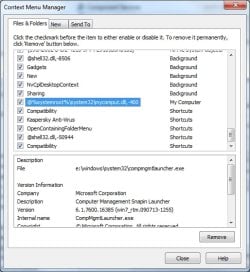
Iv had a look with the app you pointed to but im really not sure about what im looking for, Iv also had a look with Glary utility's and found this.
0827-06 50  59471.jpg

but i cant find a corresponding entry with the context menu manager. So im a bit confused. I would send a copy of the context menu managers data but i can only save it as html and i cant attach that.

Thx,
JackDinn
 

My Computer

Computer Manufacturer/Model Number
Me
OS
Windows 7 Ultimate Media Center Edition
CPU
AMD x64 duel core 5200+ 2.69GHz
Motherboard
Nvidia ALiveNF7G-FullHD.
Memory
3G DDR2-SDRAM PC2-6400 (399 MHz) - [DDR2-800]
Graphics Card(s)
NVIDIA GeForce 9500 GT & onboard NVIDIA GeForce 7
Sound Card
On Board MCP67 High Definition Audio
Monitor(s) Displays
DELL E771p & COMPAQ MV540
Screen Resolution
1280 x 1024 @ 60 Hz
Hard Drives
MAXTOR STM3500320AS ATA Device 500GB
Maxtor 6Y080L0 ATA Device 80GB
PSU
500w
Internet Speed
8Mb/s 500Kb/s
o dear , i decided to try unticking the tick next to this command in Glarys so it would deactivate it and then retick the box to reactivate it again in the hope that it might just sort it out but no, now when i click the context menu "manage" it says i dont have permision to access the specified file ? well now im getting in deep water as i dont know what file its talking about. iv checked CompMgmLauncher.exe & Mycomput.dll and acording to the security settings i should have execute file on both. I checked with "effective permissions" and yes it says i do have "Traverse folder / execute file" & "list folder / read data" on both files so either im not looking at the right file/s or its wanting to do something other than just execute it. Anyhow I took ownership of both these files and gave myself full access to both but still says i dont have permission to access the specified path ?


ekk :(

btw still runs fine from Admin tools shortcut or just running the compmgmt.msc

JackDinn.
 

My Computer

Computer Manufacturer/Model Number
Me
OS
Windows 7 Ultimate Media Center Edition
CPU
AMD x64 duel core 5200+ 2.69GHz
Motherboard
Nvidia ALiveNF7G-FullHD.
Memory
3G DDR2-SDRAM PC2-6400 (399 MHz) - [DDR2-800]
Graphics Card(s)
NVIDIA GeForce 9500 GT & onboard NVIDIA GeForce 7
Sound Card
On Board MCP67 High Definition Audio
Monitor(s) Displays
DELL E771p & COMPAQ MV540
Screen Resolution
1280 x 1024 @ 60 Hz
Hard Drives
MAXTOR STM3500320AS ATA Device 500GB
Maxtor 6Y080L0 ATA Device 80GB
PSU
500w
Internet Speed
8Mb/s 500Kb/s
I do not recall suggesting that you disable anything. Had I seen the screenshot you provided, I would have suggested alternately removing the check marks from nVidia and Kaspersky - two items known to cause issues on some systems.
 
On further thought - Glarys likely caused the original problem. There are reports that of compatibility issues. I am hesitant to address the matter further, as it pertains to Glary, as I do not use that software or any software like it.
 
well i removed glary utills but didn't make a difference, but its only one of a myriad of apps that i use that dont specifically say they work on win7, but i cant stop using all software thats does not say its for win7 as i would have almost nothing left. besides all the NerSoft apps are getting pretty old now but i still use a handfull of them.

what is the equivalent console command when clicking the manage option from the context menu?

What i really need to know is which file/s am i being refused access ?
 

My Computer

Computer Manufacturer/Model Number
Me
OS
Windows 7 Ultimate Media Center Edition
CPU
AMD x64 duel core 5200+ 2.69GHz
Motherboard
Nvidia ALiveNF7G-FullHD.
Memory
3G DDR2-SDRAM PC2-6400 (399 MHz) - [DDR2-800]
Graphics Card(s)
NVIDIA GeForce 9500 GT & onboard NVIDIA GeForce 7
Sound Card
On Board MCP67 High Definition Audio
Monitor(s) Displays
DELL E771p & COMPAQ MV540
Screen Resolution
1280 x 1024 @ 60 Hz
Hard Drives
MAXTOR STM3500320AS ATA Device 500GB
Maxtor 6Y080L0 ATA Device 80GB
PSU
500w
Internet Speed
8Mb/s 500Kb/s
compmgmt.msc

Something is intercepting the command. I suspect Glary because of the nature of the app suite. Could be wrong. Kaspersky and nvidia are known on this forum as for causing similar issues.
 
Uninstalling Glary may leave a "tweak" or mod enabled. It would have been prudent to use Glary to undo any Glary mods, then uninstall.
 
yea i did undo any changes i had made with glary before removal.

you mention Kaspersky, well it is the last thing i installed but it is supposed to be designed for win7 & could try taking KAV out but looks like whatever has changed (a permission, reg entry, something intercepting) is going to say as it is until i find it.

Appreciate all the help,
JackDinn.
 

My Computer

Computer Manufacturer/Model Number
Me
OS
Windows 7 Ultimate Media Center Edition
CPU
AMD x64 duel core 5200+ 2.69GHz
Motherboard
Nvidia ALiveNF7G-FullHD.
Memory
3G DDR2-SDRAM PC2-6400 (399 MHz) - [DDR2-800]
Graphics Card(s)
NVIDIA GeForce 9500 GT & onboard NVIDIA GeForce 7
Sound Card
On Board MCP67 High Definition Audio
Monitor(s) Displays
DELL E771p & COMPAQ MV540
Screen Resolution
1280 x 1024 @ 60 Hz
Hard Drives
MAXTOR STM3500320AS ATA Device 500GB
Maxtor 6Y080L0 ATA Device 80GB
PSU
500w
Internet Speed
8Mb/s 500Kb/s
I believe the issue with Glary was with the regdefrag module not working properly on 7. They have resolved that now - simply by announcing it doesn't need defragging.

Well. that's one way of resolving the issue.

I use Glary and have no problems - so I don't expect it is the problem in this case.

Are you using any other registry cleaning app. - or general cleaning app. ?

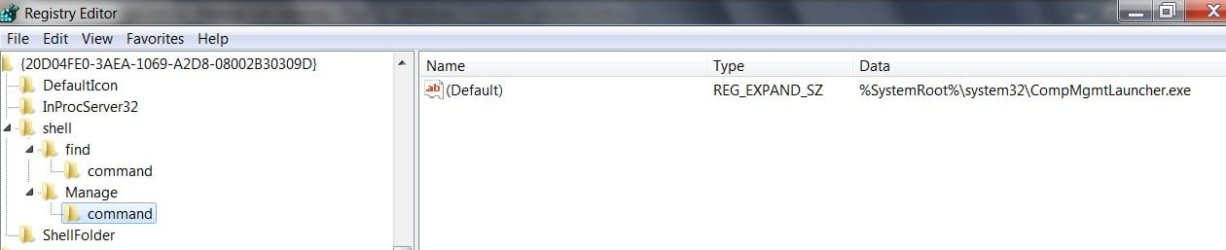
You might have a look in regedit for this ( paste the CLSID it into Edit>Find)

HKEY_CLASSES_ROOT\CLSID\{20D04FE0-3AEA-1069-A2D8-08002B30309D}

COMPMGMTLAUNCHER2009-08-27_200521.jpg

If it's missing, you could try merging this:

View attachment COMP-SHELL.reg
 

My Computers

System One System Two

  • Computer type
    PC/Desktop
    OS
    7 X64
    CPU
    i5 8400
    Motherboard
    gigabyte b365m ds3h
    Memory
    2x8gb 3200mhz
    Hard Drives
    various
    PSU
    pure power 11 400w cm
    Case
    Coolermaster
    Cooling
    cryorig m9i
  • Computer type
    PC/Desktop
    OS
    7x64
    CPU
    g5400
    Motherboard
    ga b365m ds3h
    Memory
    8gb ddr4 2400
    PSU
    xfx pro 450w
hi Siw2,

no iv not really had win7 going for so long and Glary was the only reg clean/defrag app i had installed.

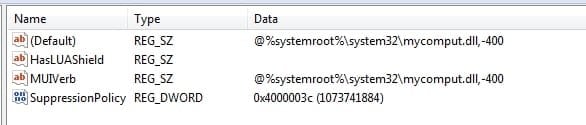
iv been messing with my reg, trying to figure this out. My "computer - context menu - manage" looks like this :-

HKEY_CLASSES_ROOT\CLSID\{20D04FE0-3AEA-1069-A2D8-08002B30309D}\shell\Manage

0827-20 04  50284.jpg

HKEY_CLASSES_ROOT\CLSID\{20D04FE0-3AEA-1069-A2D8-08002B30309D}\shell\Manage\command

0827-20 06  21226.jpg
can i ask if your is the same is is mine corrupt?

also i made another key called manage2, just for testing, with a subkey command which just had %systemroot%\system32\compmgmt.msc as default. It should have opened no problem but still it was blocked with a permission problem? its odd cos it runs fine if i just run the command %systemroot%\system32\compmgmt.msc

thx all.
 

My Computer

Computer Manufacturer/Model Number
Me
OS
Windows 7 Ultimate Media Center Edition
CPU
AMD x64 duel core 5200+ 2.69GHz
Motherboard
Nvidia ALiveNF7G-FullHD.
Memory
3G DDR2-SDRAM PC2-6400 (399 MHz) - [DDR2-800]
Graphics Card(s)
NVIDIA GeForce 9500 GT & onboard NVIDIA GeForce 7
Sound Card
On Board MCP67 High Definition Audio
Monitor(s) Displays
DELL E771p & COMPAQ MV540
Screen Resolution
1280 x 1024 @ 60 Hz
Hard Drives
MAXTOR STM3500320AS ATA Device 500GB
Maxtor 6Y080L0 ATA Device 80GB
PSU
500w
Internet Speed
8Mb/s 500Kb/s
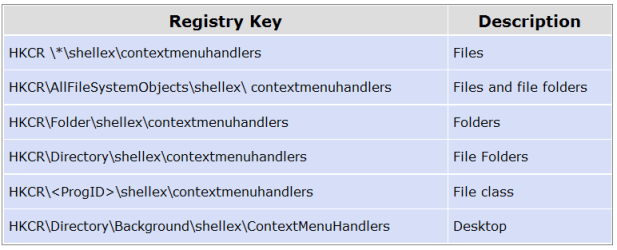
aye i have this on NameSpace handlers picked up from here Manage the context-menu entries for files, folders, drives and Namespace objects
Namespace objects

To remove the context-menu entries for Namespace icons (My Computer, Recycle Bin etc), check here:

  • [HKCR\Folder\Shell\]
  • [HKCR\Folder\ShellEx\ContextMenuHandlers\]
  • [HKCR\CLSID\{Namespace-CLSID}\shell\]
  • [HKCR\CLSID\{Namespace-CLSID}\ shellex \ ContextMenuHandlers\]
Example - For My Computer the key would be:

  • [HKCR\CLSID\{20D04FE0-3AEA-1069-A2D8-08002B30309D}\shellex\ContextMenuHandlers\]

but i shall check the ones you list there although i believe i have already had a look but you may have one there that i missed.

cheers ,

p.s. could you please just hae a quick look at

HKEY_CLASSES_ROOT\CLSID\{20D04FE0-3AEA-1069-A2D8-08002B30309D}\shell\Manage

and let me know if its the same as mine, above , thx.
 

My Computer

Computer Manufacturer/Model Number
Me
OS
Windows 7 Ultimate Media Center Edition
CPU
AMD x64 duel core 5200+ 2.69GHz
Motherboard
Nvidia ALiveNF7G-FullHD.
Memory
3G DDR2-SDRAM PC2-6400 (399 MHz) - [DDR2-800]
Graphics Card(s)
NVIDIA GeForce 9500 GT & onboard NVIDIA GeForce 7
Sound Card
On Board MCP67 High Definition Audio
Monitor(s) Displays
DELL E771p & COMPAQ MV540
Screen Resolution
1280 x 1024 @ 60 Hz
Hard Drives
MAXTOR STM3500320AS ATA Device 500GB
Maxtor 6Y080L0 ATA Device 80GB
PSU
500w
Internet Speed
8Mb/s 500Kb/s
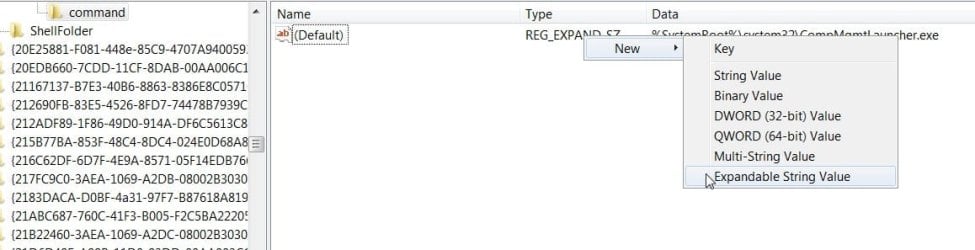
OK, I see it.

You have REG_SZ in command.

It needs to be REG_EXPAND_SZ to invoke the mmc.exe command line .

Antman was on the right track when he said something was intercepting the command.

Rt click it , select New , Expandable String Value, like this:

EXPANDABLE STRING VALUE.reg2009-08-27_204154.jpg

Copy the data entry, name it Default and delete the other one .

It's probably easier to merge this .reg file instead:

View attachment SHELL_MANAGE.REG
 

My Computers

System One System Two

  • Computer type
    PC/Desktop
    OS
    7 X64
    CPU
    i5 8400
    Motherboard
    gigabyte b365m ds3h
    Memory
    2x8gb 3200mhz
    Hard Drives
    various
    PSU
    pure power 11 400w cm
    Case
    Coolermaster
    Cooling
    cryorig m9i
  • Computer type
    PC/Desktop
    OS
    7x64
    CPU
    g5400
    Motherboard
    ga b365m ds3h
    Memory
    8gb ddr4 2400
    PSU
    xfx pro 450w
ok showing my noobness now but i cant figure out how to change the default to REG_EXPAND_SZ ? i can make a new expanded string but i cant make it default. I can see other keys with the default as REG_EXPAND_SZ but how do you do that?

sorry for being a pain chaps .
 

My Computer

Computer Manufacturer/Model Number
Me
OS
Windows 7 Ultimate Media Center Edition
CPU
AMD x64 duel core 5200+ 2.69GHz
Motherboard
Nvidia ALiveNF7G-FullHD.
Memory
3G DDR2-SDRAM PC2-6400 (399 MHz) - [DDR2-800]
Graphics Card(s)
NVIDIA GeForce 9500 GT & onboard NVIDIA GeForce 7
Sound Card
On Board MCP67 High Definition Audio
Monitor(s) Displays
DELL E771p & COMPAQ MV540
Screen Resolution
1280 x 1024 @ 60 Hz
Hard Drives
MAXTOR STM3500320AS ATA Device 500GB
Maxtor 6Y080L0 ATA Device 80GB
PSU
500w
Internet Speed
8Mb/s 500Kb/s
I think you need to delete the existing Default, before creating another with the same name. As it is the Default, you may need to delete the whole key command key in the left pane and recreate it with the correct values.

Just merge the .reg file in my previous post instead of any of that - it's easier.
 

My Computers

System One System Two

  • Computer type
    PC/Desktop
    OS
    7 X64
    CPU
    i5 8400
    Motherboard
    gigabyte b365m ds3h
    Memory
    2x8gb 3200mhz
    Hard Drives
    various
    PSU
    pure power 11 400w cm
    Case
    Coolermaster
    Cooling
    cryorig m9i
  • Computer type
    PC/Desktop
    OS
    7x64
    CPU
    g5400
    Motherboard
    ga b365m ds3h
    Memory
    8gb ddr4 2400
    PSU
    xfx pro 450w
aye tryied to delete it but you cant and when you make a new key it's REG_SZ by default.

Anyhow yep i merged your .reg file but you wont be pleased to know that it now stopped saying i dont have permission but its now back to how it was on my very first post (before i unticked/re-ticked it with Glary) I get the timer circle for half a sec and then nothing :(

It does the same thing if i navigate to the CompMgmtLauncher.exe file and click it, just a timer circle for half a sec then nothing.

Not good :( gone round in full circle, looks like Glary should be avoided as it must have put the wrong reg values back when it was re-ticked. I suppose thats one thing iv learned to avoid.

thx.
 

My Computer

Computer Manufacturer/Model Number
Me
OS
Windows 7 Ultimate Media Center Edition
CPU
AMD x64 duel core 5200+ 2.69GHz
Motherboard
Nvidia ALiveNF7G-FullHD.
Memory
3G DDR2-SDRAM PC2-6400 (399 MHz) - [DDR2-800]
Graphics Card(s)
NVIDIA GeForce 9500 GT & onboard NVIDIA GeForce 7
Sound Card
On Board MCP67 High Definition Audio
Monitor(s) Displays
DELL E771p & COMPAQ MV540
Screen Resolution
1280 x 1024 @ 60 Hz
Hard Drives
MAXTOR STM3500320AS ATA Device 500GB
Maxtor 6Y080L0 ATA Device 80GB
PSU
500w
Internet Speed
8Mb/s 500Kb/s
Back
Top