Solved Computer Context menu - Manage not working

If you merged the .reg files - the reg entries are correct.

I have no reason to suspect Glary as I can't replicate that on my system. I did exactly what you did - unticked, closed the app. , restarted Glary, then ticked it again . No problems.

I seem to remember I came across this before and don't recall having found the cause.

Check in System Environment variables and see if you have this entry ( yours will probably be C: instead of D: )

SYSTEM VARIABLES-2009-08-27_212428.jpg
 
Last edited:

My Computers

System One System Two

  • Computer type
    PC/Desktop
    OS
    7 X64
    CPU
    i5 8400
    Motherboard
    gigabyte b365m ds3h
    Memory
    2x8gb 3200mhz
    Hard Drives
    various
    PSU
    pure power 11 400w cm
    Case
    Coolermaster
    Cooling
    cryorig m9i
  • Computer type
    PC/Desktop
    OS
    7x64
    CPU
    g5400
    Motherboard
    ga b365m ds3h
    Memory
    8gb ddr4 2400
    PSU
    xfx pro 450w
If the enviromnmet variable is missing, click New and add it in. It is not unknown for that to do a vanishing act.

Otherwise, see if you have this :

Windows\System32\compmgmt.msc
 

My Computers

System One System Two

  • Computer type
    PC/Desktop
    OS
    7 X64
    CPU
    i5 8400
    Motherboard
    gigabyte b365m ds3h
    Memory
    2x8gb 3200mhz
    Hard Drives
    various
    PSU
    pure power 11 400w cm
    Case
    Coolermaster
    Cooling
    cryorig m9i
  • Computer type
    PC/Desktop
    OS
    7x64
    CPU
    g5400
    Motherboard
    ga b365m ds3h
    Memory
    8gb ddr4 2400
    PSU
    xfx pro 450w
well been googling around and have found the following :-

regedit32.exe program has no way to create a default value of REG_EXPAND_SZ datatype. You have to create a merge file and use "@=hex(2):00,00" to insert a empty string of that datatype. Note that you can created named values of the REG_EXPAND_SZ datatype, just not the default value.

Also found that a few of the reg clean/defrag prog about like Ccleaner, Glary utills, Registary machanic etc are not puting the correct entries into the reg in some instances !

Looks like when i did a reg Clean with Glary it must have messed something up somewhere else in the reg, and i have no chance of finding it. Unfortunately iv also found that because i use a duel boot xpp/win7 system it is causing me to loose my restore points on both xp and win7 because they are both using the same system restore volume, so no restore points for me to use :(

Well all this is darn annoying & other than putting a short cut up for compmgmt.msc i reckon i might have to do a repair install of win7 or maybe ill just forget about it as its such a minor thing but things like this do tend to drive me mad.

Anyhow thx for all your help chaps, if you have any more suggestions as to what i can do next to diagnose whats gone wrong they would be greatly appreciated.

Thx,
JackDinn.
 

My Computer

Computer Manufacturer/Model Number
Me
OS
Windows 7 Ultimate Media Center Edition
CPU
AMD x64 duel core 5200+ 2.69GHz
Motherboard
Nvidia ALiveNF7G-FullHD.
Memory
3G DDR2-SDRAM PC2-6400 (399 MHz) - [DDR2-800]
Graphics Card(s)
NVIDIA GeForce 9500 GT & onboard NVIDIA GeForce 7
Sound Card
On Board MCP67 High Definition Audio
Monitor(s) Displays
DELL E771p & COMPAQ MV540
Screen Resolution
1280 x 1024 @ 60 Hz
Hard Drives
MAXTOR STM3500320AS ATA Device 500GB
Maxtor 6Y080L0 ATA Device 80GB
PSU
500w
Internet Speed
8Mb/s 500Kb/s
sorry missed your replies above, but my Enviroment variables for windir is E:\Windows which is right in my case.

Also yes i have Windows\System32\compmgmt.msc as i said earlier i have tried clicking and it works fine
 

My Computer

Computer Manufacturer/Model Number
Me
OS
Windows 7 Ultimate Media Center Edition
CPU
AMD x64 duel core 5200+ 2.69GHz
Motherboard
Nvidia ALiveNF7G-FullHD.
Memory
3G DDR2-SDRAM PC2-6400 (399 MHz) - [DDR2-800]
Graphics Card(s)
NVIDIA GeForce 9500 GT & onboard NVIDIA GeForce 7
Sound Card
On Board MCP67 High Definition Audio
Monitor(s) Displays
DELL E771p & COMPAQ MV540
Screen Resolution
1280 x 1024 @ 60 Hz
Hard Drives
MAXTOR STM3500320AS ATA Device 500GB
Maxtor 6Y080L0 ATA Device 80GB
PSU
500w
Internet Speed
8Mb/s 500Kb/s
Thanks Jack,

That's interesting - I have never created a expandable string of Default type however , the .reg file I posted has that @=hex(2) value.

Try this and see if it helps:

View attachment Computer.reg
 

My Computers

System One System Two

  • Computer type
    PC/Desktop
    OS
    7 X64
    CPU
    i5 8400
    Motherboard
    gigabyte b365m ds3h
    Memory
    2x8gb 3200mhz
    Hard Drives
    various
    PSU
    pure power 11 400w cm
    Case
    Coolermaster
    Cooling
    cryorig m9i
  • Computer type
    PC/Desktop
    OS
    7x64
    CPU
    g5400
    Motherboard
    ga b365m ds3h
    Memory
    8gb ddr4 2400
    PSU
    xfx pro 450w
You may want to have a look here:

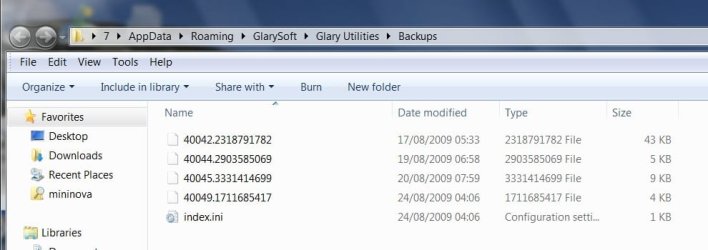
AppData\Roaming\GlarySoft\Glary Utilities\Backups

If it is there, add a .reg extension to the files without extensions and merge them.
 

My Computers

System One System Two

  • Computer type
    PC/Desktop
    OS
    7 X64
    CPU
    i5 8400
    Motherboard
    gigabyte b365m ds3h
    Memory
    2x8gb 3200mhz
    Hard Drives
    various
    PSU
    pure power 11 400w cm
    Case
    Coolermaster
    Cooling
    cryorig m9i
  • Computer type
    PC/Desktop
    OS
    7x64
    CPU
    g5400
    Motherboard
    ga b365m ds3h
    Memory
    8gb ddr4 2400
    PSU
    xfx pro 450w
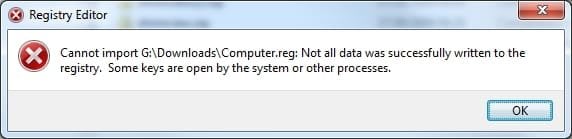
well not sure what that .reg was for but i tried it anyhow, but got

0827-22 51  30559.jpg

and i cant look AppData\Roaming\GlarySoft\Glary Utilities\Backups as iv removed glary.
 

My Computer

Computer Manufacturer/Model Number
Me
OS
Windows 7 Ultimate Media Center Edition
CPU
AMD x64 duel core 5200+ 2.69GHz
Motherboard
Nvidia ALiveNF7G-FullHD.
Memory
3G DDR2-SDRAM PC2-6400 (399 MHz) - [DDR2-800]
Graphics Card(s)
NVIDIA GeForce 9500 GT & onboard NVIDIA GeForce 7
Sound Card
On Board MCP67 High Definition Audio
Monitor(s) Displays
DELL E771p & COMPAQ MV540
Screen Resolution
1280 x 1024 @ 60 Hz
Hard Drives
MAXTOR STM3500320AS ATA Device 500GB
Maxtor 6Y080L0 ATA Device 80GB
PSU
500w
Internet Speed
8Mb/s 500Kb/s
That's odd, I uninstalled Glary too just now - it left the Backups behind, very sensibly.

They are still there on my system.

GUBACKUPS-2009-08-27_230132.jpg

Are you still having the same issue?
 

My Computers

System One System Two

  • Computer type
    PC/Desktop
    OS
    7 X64
    CPU
    i5 8400
    Motherboard
    gigabyte b365m ds3h
    Memory
    2x8gb 3200mhz
    Hard Drives
    various
    PSU
    pure power 11 400w cm
    Case
    Coolermaster
    Cooling
    cryorig m9i
  • Computer type
    PC/Desktop
    OS
    7x64
    CPU
    g5400
    Motherboard
    ga b365m ds3h
    Memory
    8gb ddr4 2400
    PSU
    xfx pro 450w
not in bin either just the short cut to glary from my desktop.
 

My Computer

Computer Manufacturer/Model Number
Me
OS
Windows 7 Ultimate Media Center Edition
CPU
AMD x64 duel core 5200+ 2.69GHz
Motherboard
Nvidia ALiveNF7G-FullHD.
Memory
3G DDR2-SDRAM PC2-6400 (399 MHz) - [DDR2-800]
Graphics Card(s)
NVIDIA GeForce 9500 GT & onboard NVIDIA GeForce 7
Sound Card
On Board MCP67 High Definition Audio
Monitor(s) Displays
DELL E771p & COMPAQ MV540
Screen Resolution
1280 x 1024 @ 60 Hz
Hard Drives
MAXTOR STM3500320AS ATA Device 500GB
Maxtor 6Y080L0 ATA Device 80GB
PSU
500w
Internet Speed
8Mb/s 500Kb/s
Very strange - Glary deliberately leaves them behind.
 

My Computers

System One System Two

  • Computer type
    PC/Desktop
    OS
    7 X64
    CPU
    i5 8400
    Motherboard
    gigabyte b365m ds3h
    Memory
    2x8gb 3200mhz
    Hard Drives
    various
    PSU
    pure power 11 400w cm
    Case
    Coolermaster
    Cooling
    cryorig m9i
  • Computer type
    PC/Desktop
    OS
    7x64
    CPU
    g5400
    Motherboard
    ga b365m ds3h
    Memory
    8gb ddr4 2400
    PSU
    xfx pro 450w
i'll try it again just for "fun" see if i can untick & retick without a problem (i know how to get it back if it does bugger up again) and then uninstall glary to c whats left this time.
 

My Computer

Computer Manufacturer/Model Number
Me
OS
Windows 7 Ultimate Media Center Edition
CPU
AMD x64 duel core 5200+ 2.69GHz
Motherboard
Nvidia ALiveNF7G-FullHD.
Memory
3G DDR2-SDRAM PC2-6400 (399 MHz) - [DDR2-800]
Graphics Card(s)
NVIDIA GeForce 9500 GT & onboard NVIDIA GeForce 7
Sound Card
On Board MCP67 High Definition Audio
Monitor(s) Displays
DELL E771p & COMPAQ MV540
Screen Resolution
1280 x 1024 @ 60 Hz
Hard Drives
MAXTOR STM3500320AS ATA Device 500GB
Maxtor 6Y080L0 ATA Device 80GB
PSU
500w
Internet Speed
8Mb/s 500Kb/s
well it all going t**'s up :( , installed glary run a disk clean but it didn't even make a backup folder & selecting restore centre it was empty so thats why i didn't have any backups ! it didn't make any.

Then checked the unticking of context menu then re-ticking it and it did exactly the same thing again so now i dont have permission again. can fix this but i think its gonna be a repair install tomorrow i think.

p.s. DL'ed a fresh copy of Glary just in case so wasn't an old copy.
 

My Computer

Computer Manufacturer/Model Number
Me
OS
Windows 7 Ultimate Media Center Edition
CPU
AMD x64 duel core 5200+ 2.69GHz
Motherboard
Nvidia ALiveNF7G-FullHD.
Memory
3G DDR2-SDRAM PC2-6400 (399 MHz) - [DDR2-800]
Graphics Card(s)
NVIDIA GeForce 9500 GT & onboard NVIDIA GeForce 7
Sound Card
On Board MCP67 High Definition Audio
Monitor(s) Displays
DELL E771p & COMPAQ MV540
Screen Resolution
1280 x 1024 @ 60 Hz
Hard Drives
MAXTOR STM3500320AS ATA Device 500GB
Maxtor 6Y080L0 ATA Device 80GB
PSU
500w
Internet Speed
8Mb/s 500Kb/s
I think you can choose under Settings>Options - maybe that's only with the Pro version.

Otherwise it may only backup registry changes.

Then checked the unticking of context menu then re-ticking it and it did exactly the same thing again so now i dont have permission again.

That's odd - works fine for me.

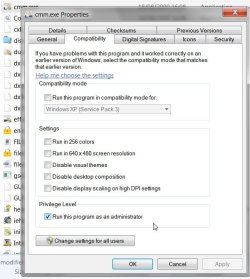
Perhaps you didn't give cmm.exe Run as Admin rights ?

GURUNASADMIN2009-08-28_010705.jpg
 
Last edited:

My Computers

System One System Two

  • Computer type
    PC/Desktop
    OS
    7 X64
    CPU
    i5 8400
    Motherboard
    gigabyte b365m ds3h
    Memory
    2x8gb 3200mhz
    Hard Drives
    various
    PSU
    pure power 11 400w cm
    Case
    Coolermaster
    Cooling
    cryorig m9i
  • Computer type
    PC/Desktop
    OS
    7x64
    CPU
    g5400
    Motherboard
    ga b365m ds3h
    Memory
    8gb ddr4 2400
    PSU
    xfx pro 450w
well what a fun last couple of hours :( , did an update install which is supposed to reinstall the reg amongst other things, and it did reset a few things & it did say it was re-installing the reg, but didn't fix my context menu problem.

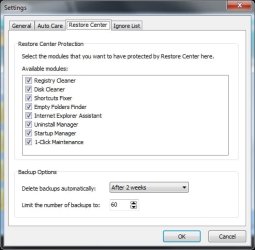
Glary utility should backup all the things you have ticked in its setting which is everything by default (yes i did try setting cmm.exe to run as Admin)

0828-01 34  41624.jpg

works fine on XP & does back up all.

I really dunno if i can be bothered to do a full install just because of this problem with the context menu ( Im making the assumption that glary has its own problems and is not my installation as you say yours does not back up certain things either, as it should unless you have unticked anything) Im gonna also assume that the reason that me unticking and reticking the context menu "manage" item in glary makes it bugger up is somehow related to whatever is wrong with my win7 installation and not Glary.

I think we might be getting a little sidetracked with all this talk of Glary Utilities. It looks like it might have some problems of its own but i dont think it was the cause of my problem as it was a while ago when i last used Glary.

The only thing i installed just before i noticed the problem was Kaspersky RC6 for win7, but iv already tried uninstaling that and it didn't fix it.

Thx.
 

My Computer

Computer Manufacturer/Model Number
Me
OS
Windows 7 Ultimate Media Center Edition
CPU
AMD x64 duel core 5200+ 2.69GHz
Motherboard
Nvidia ALiveNF7G-FullHD.
Memory
3G DDR2-SDRAM PC2-6400 (399 MHz) - [DDR2-800]
Graphics Card(s)
NVIDIA GeForce 9500 GT & onboard NVIDIA GeForce 7
Sound Card
On Board MCP67 High Definition Audio
Monitor(s) Displays
DELL E771p & COMPAQ MV540
Screen Resolution
1280 x 1024 @ 60 Hz
Hard Drives
MAXTOR STM3500320AS ATA Device 500GB
Maxtor 6Y080L0 ATA Device 80GB
PSU
500w
Internet Speed
8Mb/s 500Kb/s
Sorry to hear the repair install didn't repair everything.

I don't know anything about Kaspersky - so I can't say.
 

My Computers

System One System Two

  • Computer type
    PC/Desktop
    OS
    7 X64
    CPU
    i5 8400
    Motherboard
    gigabyte b365m ds3h
    Memory
    2x8gb 3200mhz
    Hard Drives
    various
    PSU
    pure power 11 400w cm
    Case
    Coolermaster
    Cooling
    cryorig m9i
  • Computer type
    PC/Desktop
    OS
    7x64
    CPU
    g5400
    Motherboard
    ga b365m ds3h
    Memory
    8gb ddr4 2400
    PSU
    xfx pro 450w
well looks like im not gonna get to the bottom of this one its gonna be that annoying little bug that i'll keep clicking on just to see if its somehow magically fixed itself.

But whatever the state of my win installation I am most appreciative of all the time & help i have received from yourselves.

So Thx Chaps,
JackDinn.
 

My Computer

Computer Manufacturer/Model Number
Me
OS
Windows 7 Ultimate Media Center Edition
CPU
AMD x64 duel core 5200+ 2.69GHz
Motherboard
Nvidia ALiveNF7G-FullHD.
Memory
3G DDR2-SDRAM PC2-6400 (399 MHz) - [DDR2-800]
Graphics Card(s)
NVIDIA GeForce 9500 GT & onboard NVIDIA GeForce 7
Sound Card
On Board MCP67 High Definition Audio
Monitor(s) Displays
DELL E771p & COMPAQ MV540
Screen Resolution
1280 x 1024 @ 60 Hz
Hard Drives
MAXTOR STM3500320AS ATA Device 500GB
Maxtor 6Y080L0 ATA Device 80GB
PSU
500w
Internet Speed
8Mb/s 500Kb/s
When SIW2 stepped in, I thought this issue was as good as solved. For what it is worth, I did enjoy the analysis. Be good.
 
aye and thx to you to.

If any out there gets a brain storm or maybe hears of similar problems please drop a post in here, i dont think my problem is going anywhere fast.

Thx again all.
 

My Computer

Computer Manufacturer/Model Number
Me
OS
Windows 7 Ultimate Media Center Edition
CPU
AMD x64 duel core 5200+ 2.69GHz
Motherboard
Nvidia ALiveNF7G-FullHD.
Memory
3G DDR2-SDRAM PC2-6400 (399 MHz) - [DDR2-800]
Graphics Card(s)
NVIDIA GeForce 9500 GT & onboard NVIDIA GeForce 7
Sound Card
On Board MCP67 High Definition Audio
Monitor(s) Displays
DELL E771p & COMPAQ MV540
Screen Resolution
1280 x 1024 @ 60 Hz
Hard Drives
MAXTOR STM3500320AS ATA Device 500GB
Maxtor 6Y080L0 ATA Device 80GB
PSU
500w
Internet Speed
8Mb/s 500Kb/s
I did enjoy the analysis. Be good.

Me too.

The context menu is invoking the .exe - it just doesn't want to run.

Windir sys. env. var. is in place - I am out of ideas on this one atm.


Might be more than a coincidence you just installed Kaspersky ( which is , after all, RC ) - still, I wouldn't want to cast aspersions.


Interesting to see what anyone else comes up with.
 

My Computers

System One System Two

  • Computer type
    PC/Desktop
    OS
    7 X64
    CPU
    i5 8400
    Motherboard
    gigabyte b365m ds3h
    Memory
    2x8gb 3200mhz
    Hard Drives
    various
    PSU
    pure power 11 400w cm
    Case
    Coolermaster
    Cooling
    cryorig m9i
  • Computer type
    PC/Desktop
    OS
    7x64
    CPU
    g5400
    Motherboard
    ga b365m ds3h
    Memory
    8gb ddr4 2400
    PSU
    xfx pro 450w
I have a WAG (wild a**ed guess) - but I lack command of the concepts necessary to explain it. I will do some reading to further my own knowledge, but I will throw this out there for SIW2. I am sure that he can school me.

Kaspersky is preventing the app from running because the app is being called from interactive desktop and UAC is short-circuited.

Please, be gentle.
 
Back
Top