Last night my laptop shuts down because of low battery and after plugg

technoankur

New member
Member
Local time
2:47 AM
Messages
45
Last night my laptop shuts down because of low battery and after plugging the AC Supply when i restarted the Windows 7,it din't worked.
It asked me for the two options - Startup repair and Launch Normally.I chose Launch Normally but after 3 seconds of the boot screen,there came a blue screen which just flashed for half second and laptop got restarted.:(

This is happening again and again.Someone please tell me a way to get out of it.I don't want to loose windows as it has very very important data for me :cry:
 

My Computer My Computer

At a glance

Windows 7 Home PremiumIntel(R) Core(TM)2 Duo CPU T6600 @ 2.20GHz4Gb DDR3ATI Mobility Radeon HD 4570 (512 Mb)
Computer Manufacturer/Model Number
Acer Aspire 5738G (Laptop)
OS
Windows 7 Home Premium
CPU
Intel(R) Core(TM)2 Duo CPU T6600 @ 2.20GHz
Motherboard
Phoenix Technologies LTD ( JV50 )
Memory
4Gb DDR3
Graphics Card(s)
ATI Mobility Radeon HD 4570 (512 Mb)
Try these ..

Hi there ...
You can either choose the repair choice which the 7 Windows offer .. Or Try installing another copy of 7 , and there in the installation window choose to repair the existing system ...

Tell me about what you get ...
 

My Computer My Computer

At a glance

Win 7 X86
OS
Win 7 X86
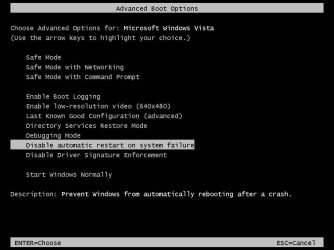
Try restarting your computer and upon booting Windows, tap the F8 key until you see this screen. Choose the option in the screenshot and report the error that the BSOD is showing.
 

Attachments

  • disable-auto-restart-system-failure-vista-02.jpg
    disable-auto-restart-system-failure-vista-02.jpg
    48.5 KB · Views: 12

My Computer My Computer

At a glance

Windows 7 Ultimate x64, Windows 7 Pro x64, Wi...Intel i7-4790K , Intel i7-3770K, Intel i7-451...12GB Corsair VengeanceEVGA GeForce GTX 660 2GB, 2X GIGABYTE 6890, N...
Computer type
PC/Desktop
Computer Manufacturer/Model Number
Custom (desktop), Custom (desktop), Lenovo U530 Touch
OS
Windows 7 Ultimate x64, Windows 7 Pro x64, Windows 10 Home x64
CPU
Intel i7-4790K , Intel i7-3770K, Intel i7-4510ULT
Motherboard
Asus Z87-PRO (main), Asus P8P67 Rev 3.1(secondary)
Memory
12GB Corsair Vengeance
Graphics Card(s)
EVGA GeForce GTX 660 2GB, 2X GIGABYTE 6890, Nvidia GT730M
Sound Card
Realtek Integrated, IDT (both laptops)
Monitor(s) Displays
Samsung S22C300H 21.5"
Screen Resolution
1920x1080 (Both machines)
Hard Drives
Main:
Muskin SSD 240GB
Seagate 320GB
Western Digital 1TB
Seagate 2TB

Seconday:
Toshiba 1TB
WD 1TB

Lenovo Laptop:
SAMSUNG SM843 SSD 480GB
PSU
Corsair GS700, COOLMAX CUL-850B (secondary)
Case
Thermaltake Chaser
Cooling
Corsair H60 Dual Fans, Stock Cooler
Keyboard
Logitech K360
Mouse
Logitech M310
Internet Speed
16Mbps
Antivirus
Comodo Internet Security Premium, MWB
Browser
Chrome, Firefox
Other Info
I have three systems listed in the specs area. My main desktop and my secondary desktop that was my previous build. The last one (in all the sections) is my Lenovo laptop.

Thanks for your interest in my machines! :)
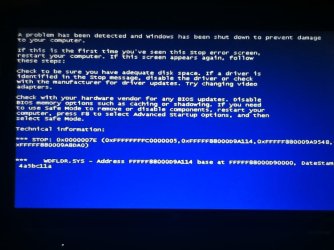
It says that "A problem has been detected.....................................Select Safe Mode.
And after it there is a file name 'WDFLR.SYS' written and some Hexadeximal code like 0x0000007E etc.
 

Attachments

  • WDFLDR_sys%20Bluescreen.JPG
    WDFLDR_sys%20Bluescreen.JPG
    80 KB · Views: 23

My Computer My Computer

At a glance

Windows 7 Home PremiumIntel(R) Core(TM)2 Duo CPU T6600 @ 2.20GHz4Gb DDR3ATI Mobility Radeon HD 4570 (512 Mb)
Computer Manufacturer/Model Number
Acer Aspire 5738G (Laptop)
OS
Windows 7 Home Premium
CPU
Intel(R) Core(TM)2 Duo CPU T6600 @ 2.20GHz
Motherboard
Phoenix Technologies LTD ( JV50 )
Memory
4Gb DDR3
Graphics Card(s)
ATI Mobility Radeon HD 4570 (512 Mb)
Here is what I recommend: Find someone who has Windows 7 64-bit Home Premium installed. Copy their WDFLDR.SYS file to a flash drive. It will be located in C:\Windows\System32\Drivers.

On your system, plug in the flash drive. Use http://www.sevenforums.com/tutorials/666-advanced-boot-options.html to choose Repair Your Computer and then use http://www.sevenforums.com/tutorials/93347-copy-paste-windows-recovery-console.html to replace the wdfldr.sys file in your own Windows\System32\Drivers directory.

NOTE: Your Windows directory may not be on C: and may be on D:, E:, F:, or even G: depending on your partition layout. It will not be on X: because X: is the memory virtual drive created for the recovery environment.
 

My Computer My Computer

At a glance

Windows 7 Home Premium 64 BitIntel(R) Core(TM)2 Quad CPU Q9550 @ 2.83GHz6.00 GB Hundai HMT125U6BFR8C-H9ATI Radeon HD 4850
Computer Manufacturer/Model Number
HP Pavilion e9110t
OS
Windows 7 Home Premium 64 Bit
CPU
Intel(R) Core(TM)2 Quad CPU Q9550 @ 2.83GHz
Motherboard
Pegatron IPIEL-LA3
Memory
6.00 GB Hundai HMT125U6BFR8C-H9
Graphics Card(s)
ATI Radeon HD 4850
Sound Card
Realtek High Definition Audio/ATI High Definition Audio
Monitor(s) Displays
Acer AL2216W
Screen Resolution
1680x1050
Hard Drives
Hitachi HDP725050GLA360 ATA Device 500 GB
PSU
Unknown/installed by HP
Case
HP generic case
Cooling
Intel Stock Cooling
Keyboard
HP Keyboard
Mouse
HP Mouse
Internet Speed
Download: 19.15 Mbps Upload: 1.67 Mbps
Other Info
Network Adapter Realtek RTL8168D/8111D Family PCI-E Gigabit Ethernet NIC (NDIS 6.20)
Network Adapter 802.11n Wireless PCI Express Card LAN Adapter
You mean to say that I should find a system having the same OS installed as of mine.
But Wdfldr.sys file is already there in my Drivers Folder ( I can view the structure of my failed OS via my another Windows 8 installed on another drive)
 

My Computer My Computer

At a glance

Windows 7 Home PremiumIntel(R) Core(TM)2 Duo CPU T6600 @ 2.20GHz4Gb DDR3ATI Mobility Radeon HD 4570 (512 Mb)
Computer Manufacturer/Model Number
Acer Aspire 5738G (Laptop)
OS
Windows 7 Home Premium
CPU
Intel(R) Core(TM)2 Duo CPU T6600 @ 2.20GHz
Motherboard
Phoenix Technologies LTD ( JV50 )
Memory
4Gb DDR3
Graphics Card(s)
ATI Mobility Radeon HD 4570 (512 Mb)
You mean to say that I should find a system having the same OS installed as of mine.
But Wdfldr.sys file is already there in my Drivers Folder ( I can view the structure of my failed OS via my another Windows 8 installed on another drive)

If you can view the folder from Windows 8, delete Wdfldr.sys from the drivers folder and then replace it with someone else's copy.
 

My Computer My Computer

At a glance

Windows 7 Ultimate x64, Windows 7 Pro x64, Wi...Intel i7-4790K , Intel i7-3770K, Intel i7-451...12GB Corsair VengeanceEVGA GeForce GTX 660 2GB, 2X GIGABYTE 6890, N...
Computer type
PC/Desktop
Computer Manufacturer/Model Number
Custom (desktop), Custom (desktop), Lenovo U530 Touch
OS
Windows 7 Ultimate x64, Windows 7 Pro x64, Windows 10 Home x64
CPU
Intel i7-4790K , Intel i7-3770K, Intel i7-4510ULT
Motherboard
Asus Z87-PRO (main), Asus P8P67 Rev 3.1(secondary)
Memory
12GB Corsair Vengeance
Graphics Card(s)
EVGA GeForce GTX 660 2GB, 2X GIGABYTE 6890, Nvidia GT730M
Sound Card
Realtek Integrated, IDT (both laptops)
Monitor(s) Displays
Samsung S22C300H 21.5"
Screen Resolution
1920x1080 (Both machines)
Hard Drives
Main:
Muskin SSD 240GB
Seagate 320GB
Western Digital 1TB
Seagate 2TB

Seconday:
Toshiba 1TB
WD 1TB

Lenovo Laptop:
SAMSUNG SM843 SSD 480GB
PSU
Corsair GS700, COOLMAX CUL-850B (secondary)
Case
Thermaltake Chaser
Cooling
Corsair H60 Dual Fans, Stock Cooler
Keyboard
Logitech K360
Mouse
Logitech M310
Internet Speed
16Mbps
Antivirus
Comodo Internet Security Premium, MWB
Browser
Chrome, Firefox
Other Info
I have three systems listed in the specs area. My main desktop and my secondary desktop that was my previous build. The last one (in all the sections) is my Lenovo laptop.

Thanks for your interest in my machines! :)
Well i tried doing the same,but it din't worked :(
 

My Computer My Computer

At a glance

Windows 7 Home PremiumIntel(R) Core(TM)2 Duo CPU T6600 @ 2.20GHz4Gb DDR3ATI Mobility Radeon HD 4570 (512 Mb)
Computer Manufacturer/Model Number
Acer Aspire 5738G (Laptop)
OS
Windows 7 Home Premium
CPU
Intel(R) Core(TM)2 Duo CPU T6600 @ 2.20GHz
Motherboard
Phoenix Technologies LTD ( JV50 )
Memory
4Gb DDR3
Graphics Card(s)
ATI Mobility Radeon HD 4570 (512 Mb)
You mean to say that I should find a system having the same OS installed as of mine.
But Wdfldr.sys file is already there in my Drivers Folder ( I can view the structure of my failed OS via my another Windows 8 installed on another drive)

The file may be corrupted. Just because it is there does not mean it is intact. May I also recommend you proceed with the steps in http://www.sevenforums.com/tutorials/139810-sfc-scannow-run-command-prompt-boot.html to see if it can repair any other corrupted files.


Well i tried doing the same,but it din't worked :(

Not sure I understand what you mean. You tried replacing the file? Or you just tried starting Windows again? Did you replace it with someone else's copy, or did you use your own? Please explain what steps you did in more detail.
 

My Computer My Computer

At a glance

Windows 7 Home Premium 64 BitIntel(R) Core(TM)2 Quad CPU Q9550 @ 2.83GHz6.00 GB Hundai HMT125U6BFR8C-H9ATI Radeon HD 4850
Computer Manufacturer/Model Number
HP Pavilion e9110t
OS
Windows 7 Home Premium 64 Bit
CPU
Intel(R) Core(TM)2 Quad CPU Q9550 @ 2.83GHz
Motherboard
Pegatron IPIEL-LA3
Memory
6.00 GB Hundai HMT125U6BFR8C-H9
Graphics Card(s)
ATI Radeon HD 4850
Sound Card
Realtek High Definition Audio/ATI High Definition Audio
Monitor(s) Displays
Acer AL2216W
Screen Resolution
1680x1050
Hard Drives
Hitachi HDP725050GLA360 ATA Device 500 GB
PSU
Unknown/installed by HP
Case
HP generic case
Cooling
Intel Stock Cooling
Keyboard
HP Keyboard
Mouse
HP Mouse
Internet Speed
Download: 19.15 Mbps Upload: 1.67 Mbps
Other Info
Network Adapter Realtek RTL8168D/8111D Family PCI-E Gigabit Ethernet NIC (NDIS 6.20)
Network Adapter 802.11n Wireless PCI Express Card LAN Adapter
I copied and replace my file with someone's else file (wdflr.sys) but it din't worked !
 

My Computer My Computer

At a glance

Windows 7 Home PremiumIntel(R) Core(TM)2 Duo CPU T6600 @ 2.20GHz4Gb DDR3ATI Mobility Radeon HD 4570 (512 Mb)
Computer Manufacturer/Model Number
Acer Aspire 5738G (Laptop)
OS
Windows 7 Home Premium
CPU
Intel(R) Core(TM)2 Duo CPU T6600 @ 2.20GHz
Motherboard
Phoenix Technologies LTD ( JV50 )
Memory
4Gb DDR3
Graphics Card(s)
ATI Mobility Radeon HD 4570 (512 Mb)

My Computer My Computer

At a glance

Windows 7 Home Premium 64 BitIntel(R) Core(TM)2 Quad CPU Q9550 @ 2.83GHz6.00 GB Hundai HMT125U6BFR8C-H9ATI Radeon HD 4850
Computer Manufacturer/Model Number
HP Pavilion e9110t
OS
Windows 7 Home Premium 64 Bit
CPU
Intel(R) Core(TM)2 Quad CPU Q9550 @ 2.83GHz
Motherboard
Pegatron IPIEL-LA3
Memory
6.00 GB Hundai HMT125U6BFR8C-H9
Graphics Card(s)
ATI Radeon HD 4850
Sound Card
Realtek High Definition Audio/ATI High Definition Audio
Monitor(s) Displays
Acer AL2216W
Screen Resolution
1680x1050
Hard Drives
Hitachi HDP725050GLA360 ATA Device 500 GB
PSU
Unknown/installed by HP
Case
HP generic case
Cooling
Intel Stock Cooling
Keyboard
HP Keyboard
Mouse
HP Mouse
Internet Speed
Download: 19.15 Mbps Upload: 1.67 Mbps
Other Info
Network Adapter Realtek RTL8168D/8111D Family PCI-E Gigabit Ethernet NIC (NDIS 6.20)
Network Adapter 802.11n Wireless PCI Express Card LAN Adapter
Back
Top