All apps closing down overnight when pc is in sleep.

tan8856

New member
Local time
11:29 AM
Messages
5
Hi

I work on my pc until late at night so have several programs open plus firefox with numerous tabs. I go to bed, the pc goes to sleep, but when i come down in the morning all my programs have closed. All I see is my desktop. No error messages (as pps have mentioned). The pc come out of sleep but its like its restarted itself at some point in the night.

Its rather annoying as I will have all the programs set up ready to start work again in the morning and wont have bookmarked all the browser tabs :rolleyes: but everything has disappeared.

It doesnt happen every night.

Thanks.
 

My Computer My Computer

At a glance

64 bit win 7 home premium
Computer Manufacturer/Model Number
dell inspiron 580
OS
64 bit win 7 home premium
Do you have Hibernation enabled?

you may want to check the following setting in Power Options. Navigate to Power Options in Control Panel and click your power plan (usually Balanced or Power Saver). Click the Advanced power options link and look for this setting:

powerops.png


If the setting for On Battery is similar to mine here, change it to 0 (never). That should correct it for you.
 

My Computer My Computer

At a glance

Windows 7 Ultimate x64, BackTrack Linux 5 R2,...Intel Core i7 920 OC to 3.6GHzCorsair 6GB DDR3ATI Radeon 4890
Computer Manufacturer/Model Number
Custom Build
OS
Windows 7 Ultimate x64, BackTrack Linux 5 R2, Windows XP
CPU
Intel Core i7 920 OC to 3.6GHz
Motherboard
ASUS P6T Deluxe V2
Memory
Corsair 6GB DDR3
Graphics Card(s)
ATI Radeon 4890
Monitor(s) Displays
ASUS 23"
Screen Resolution
1920x1080
Hard Drives
150GB Velociraptor
640GB
PSU
Corsair 850w
Case
CoolerMaster HAF932
Cooling
CoolerMaster V8
Internet Speed
30Mbps
Thanks doubled822

Ive done that. It was slightly different for me as im on a desktop and im guessing you are laptop. I now have 'Hibernate After = Never'.

Whats the diff between sleep, hybrid and hibernate? Is it just energy consumption related? Will it make much of a consumption difference if my pc never hibernates? I never turn my pc off.

Cheers.
 

My Computer My Computer

At a glance

64 bit win 7 home premium
Computer Manufacturer/Model Number
dell inspiron 580
OS
64 bit win 7 home premium
Here is a good article, although pertaining to Vista but also applies to Win7.
What is Hybrid Sleep and Differences with Basic Sleep Mode in Vista « My Digital Life

It looks as though your computer may be going into Hybrid Sleep mode which supposedly automatically saves your work. Try playing around with the settings, disabling Hybrid Sleep perhaps. I use the standard "sleep" on my desktop PC at home and it usually picks up instantly right where I left off. I'm so used to using my laptop more frequently that I posted assuming as such for your case. :geek:

When you turn your computer back on, do you have to completely log in and reload your profile as well?
 

My Computer My Computer

At a glance

Windows 7 Ultimate x64, BackTrack Linux 5 R2,...Intel Core i7 920 OC to 3.6GHzCorsair 6GB DDR3ATI Radeon 4890
Computer Manufacturer/Model Number
Custom Build
OS
Windows 7 Ultimate x64, BackTrack Linux 5 R2, Windows XP
CPU
Intel Core i7 920 OC to 3.6GHz
Motherboard
ASUS P6T Deluxe V2
Memory
Corsair 6GB DDR3
Graphics Card(s)
ATI Radeon 4890
Monitor(s) Displays
ASUS 23"
Screen Resolution
1920x1080
Hard Drives
150GB Velociraptor
640GB
PSU
Corsair 850w
Case
CoolerMaster HAF932
Cooling
CoolerMaster V8
Internet Speed
30Mbps
No i dont need to login/reload, its literally as if its coming out of screen sleep, it just wakes up and shows me the desktop but all the apps have closed.

I'll let you know how it goes :)
 

My Computer My Computer

At a glance

64 bit win 7 home premium
Computer Manufacturer/Model Number
dell inspiron 580
OS
64 bit win 7 home premium
.......No error messages (as pps have mentioned). The pc come out of sleep but its like its restarted itself at some point in the night......
Welcome to the Seven Forums.

Are you saying that there were no error messages on the screen or are you saying that you have looked thru the Windows event logs for errors? Those event logs would also tell you if the computer restarted, but if you have a password set and automatic log on disabled, then you would know if it restarted.

Edit: btw, you are not the first person to report this issue. I cannot locate the thread right now...
 

My Computer My Computer

At a glance

W7 Pro SP1 64biti78GBIntel HD Graphics
Computer type
Laptop
Computer Manufacturer/Model Number
Employer provided Dell Latitude
OS
W7 Pro SP1 64bit
CPU
i7
Memory
8GB
Graphics Card(s)
Intel HD Graphics
Hard Drives
crappy SSD
Antivirus
Employer mandated Symantec Endpoint Protection
Browser
Pale Moon 64bit, IE11 64bit & Chrome 64bit
"It doesnt happen every night."

Does the frequency coincide with Windows Update or other Updates that require a reboot?
 

My Computer My Computer

At a glance

Windows 7 Home Premium x64
OS
Windows 7 Home Premium x64
Hi & thanks for your replies.

UsernameIssues - there were no error messages on the screen. How do i view the event logs? They would be interesting...

gigagiggles - it seems to a couple of times a week so dont think its related to updates.

Id just assumed it was my kids messing around on the pc but i now know it isnt :zip:
 

My Computer My Computer

At a glance

64 bit win 7 home premium
Computer Manufacturer/Model Number
dell inspiron 580
OS
64 bit win 7 home premium
UsernameIssue - Ive got to the event logs and there are a number of warning 28, error 251, info 1553 and audit 360. Is this normal? Which are relevant to me? Thanks.
 

My Computer My Computer

At a glance

64 bit win 7 home premium
Computer Manufacturer/Model Number
dell inspiron 580
OS
64 bit win 7 home premium
I'm glad that you found your way to the event logs - I was on my way out, so that post was short. I probably should have spent more time asking questions rather than suggesting actions this early in the game.

One possibility is that the computer is restarting and then going to sleep - you come in and all you see is a computer that needs waking up. You also mentioned that you do not have to log in when you wake it up. And the desktop did not reload or rebuild like you would see during a reboot - the computer was just asleep. So, what I should have asked you, "Do you have a password on the account?" and "Is there only one user account on this computer?"

One user account with no password = auto "log on" after booting

If that is the case, then it is quite possible that...
...some software is causing a restart during the idle night time
...the system logs itself on after the restart
...the system eventually goes to sleep
...you find it asleep the next morning - with the applications closed

I finally thought of a useful search term - so I located the forum threads that I was looking for. They are slightly different, but the apps closed each night due to the system logging the user off.

http://www.sevenforums.com/general-discussion/220520-get-loged-out-over-night.html
and
http://www.sevenforums.com/general-discussion/229710-overnight-logging-off.html

You can see my tiny attempt at helping in that first thread. I suggested opening notepad, entering in some text - but not saving it. That should prevent the system from logging you off and thus prevent the computer from restarting. However, the software can force a restart. That would cause the restart even if an app was opened with unsaved data. I've not encountered too many apps that use the force switch, it is kind of rude :-(

So - you can try the same thing - leave notepad open with unsaved text. Then see if you find the computer looking like this some morning:
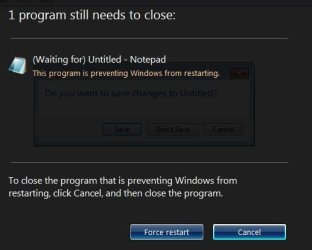
notepad-restart.JPG


Back to the Windows Event logs. The main two of interest are the Application events and the System events. If/when you find all of your apps closed, work back thru the System event log entries looking for a large block of event ID 7036. Those indicate that services are being stopped and I find that grouping easy to scan for.
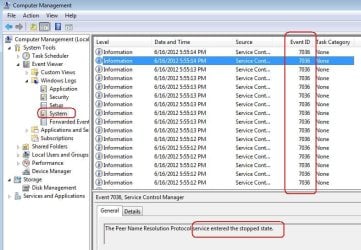
service-stopped.JPG

You can also look thru the Application event log to see if there is an entry like the one mentioned in the second thread that I linked to above - an entry that tells you which application is restarting the computer each night.


As far as the event entries that you found and asked about:
You can select the entry of interest and read a bit more info in the box below the list. A search of the internet for warning 28 leads me to think that it is related to your network adapter. Probably nothing serious. You can research the other entries or copy/paste the info from the box below the list for each entry of interest - then maybe someone can comment on them.

 

My Computer My Computer

At a glance

W7 Pro SP1 64biti78GBIntel HD Graphics
Computer type
Laptop
Computer Manufacturer/Model Number
Employer provided Dell Latitude
OS
W7 Pro SP1 64bit
CPU
i7
Memory
8GB
Graphics Card(s)
Intel HD Graphics
Hard Drives
crappy SSD
Antivirus
Employer mandated Symantec Endpoint Protection
Browser
Pale Moon 64bit, IE11 64bit & Chrome 64bit
Hi
MY desk top PC does the same thing. Power options are on never sleep. I like to keep the PC. The screen comes on when i move the mouse, Outlook is on but nothing else??
Help - please
 

My Computer My Computer

At a glance

Wind 7 Pro 64-bit
OS
Wind 7 Pro 64-bit
Hi
MY desk top PC does the same thing. Power options are on never sleep. I like to keep the PC. The screen comes on when i move the mouse, Outlook is on but nothing else??
Help - please
open notepad
type in some junk text
do not close notepad
do not save the junk text that you typed in
leave it that way overnight
let us know if notepad is open in the morning
 

My Computer My Computer

At a glance

W7 Pro SP1 64biti78GBIntel HD Graphics
Computer type
Laptop
Computer Manufacturer/Model Number
Employer provided Dell Latitude
OS
W7 Pro SP1 64bit
CPU
i7
Memory
8GB
Graphics Card(s)
Intel HD Graphics
Hard Drives
crappy SSD
Antivirus
Employer mandated Symantec Endpoint Protection
Browser
Pale Moon 64bit, IE11 64bit & Chrome 64bit
Hi Seven Guru..
will do..... Thank you
 

My Computer My Computer

At a glance

Wind 7 Pro 64-bit
OS
Wind 7 Pro 64-bit
Sir,
It happened again. But the notepad also closed and could not be found this morning. My VoIP software re-loaded, my Outlook re-loaded, but NO Note Pad or Firefox. I opened note pad and the screen was blank

So what is happening???

Dan
 

My Computer My Computer

At a glance

Wind 7 Pro 64-bit
OS
Wind 7 Pro 64-bit
Sir,
It happened again. But the notepad also closed and could not be found this morning. My VoIP software re-loaded, my Outlook re-loaded, but NO Note Pad or Firefox. I opened note pad and the screen was blank

So what is happening???

Dan
look back at post 10 and see if you have anything in the event logs that tell you if the computer was forced to restart.
 

My Computer My Computer

At a glance

W7 Pro SP1 64biti78GBIntel HD Graphics
Computer type
Laptop
Computer Manufacturer/Model Number
Employer provided Dell Latitude
OS
W7 Pro SP1 64bit
CPU
i7
Memory
8GB
Graphics Card(s)
Intel HD Graphics
Hard Drives
crappy SSD
Antivirus
Employer mandated Symantec Endpoint Protection
Browser
Pale Moon 64bit, IE11 64bit & Chrome 64bit
Sir
Thank you. I found the log, but meant nothing to me.

There is another issue that may be related, I cannot install:

Update for Windows 7 for x64-based Systems (KB2592687)

Update for Kernel-Mode Driver Framework version 1.11 for Windows 7 for x64-based Systems (KB2685811)


Then there is the Bing - update - that I really do not want....


Dan
 

My Computer My Computer

At a glance

Wind 7 Pro 64-bit
OS
Wind 7 Pro 64-bit
What we are looking for is a section of entries that indicate that the computer restarted. Those "7026" entries shown in one of the screenshots in that post indicate that the system is shutting down. Do you see any of those during last night? If you find them, then look at the entries right before they start - one of those entries might let us know why the system is restarting.

maybe this info will help with the update not working
How do I reset Windows Update components?
 

My Computer My Computer

At a glance

W7 Pro SP1 64biti78GBIntel HD Graphics
Computer type
Laptop
Computer Manufacturer/Model Number
Employer provided Dell Latitude
OS
W7 Pro SP1 64bit
CPU
i7
Memory
8GB
Graphics Card(s)
Intel HD Graphics
Hard Drives
crappy SSD
Antivirus
Employer mandated Symantec Endpoint Protection
Browser
Pale Moon 64bit, IE11 64bit & Chrome 64bit
Sir
I am not really sure what I am looking for but I could not find any 7026's.

There is NO password on any of my PC's - just confused me. No log in screens

I will leave the Note Pad open again... but it has been happening for the last....at least 5-6 weeks.....

My other PC does not do it..... Same OS. But is has nothing on it.... I have just put in a new SSD - so just leaving it on.... to see. Nothing but the OS and there are no Outstanding updates - strange.... But this PC has ALL my programmes and data,

My gut feeling is it will not get resolved... like my remote desk-top problem...ha-ha I even paid a man and it is still not working...
 

My Computer My Computer

At a glance

Wind 7 Pro 64-bit
OS
Wind 7 Pro 64-bit
sorry, I had a typo - you should see a series of 7036 events - like those shown in the picture in post 10

restart one of your w7 computers and you will see them - then you will know what you are looking for

what we want to do is to look at the events right before the computer shuts down or right before it starts up.
 

My Computer My Computer

At a glance

W7 Pro SP1 64biti78GBIntel HD Graphics
Computer type
Laptop
Computer Manufacturer/Model Number
Employer provided Dell Latitude
OS
W7 Pro SP1 64bit
CPU
i7
Memory
8GB
Graphics Card(s)
Intel HD Graphics
Hard Drives
crappy SSD
Antivirus
Employer mandated Symantec Endpoint Protection
Browser
Pale Moon 64bit, IE11 64bit & Chrome 64bit
.......There is NO password on any of my PC's - just confused me. No log in screens..........
Just so that others know why you mentioned this - they can see these posts on RDC. If you do not have a password assigned to a user on a computer, then you cannot use remote desktop connection to remotely control it. The person that you paid should have known this.
 
Last edited:

My Computer My Computer

At a glance

W7 Pro SP1 64biti78GBIntel HD Graphics
Computer type
Laptop
Computer Manufacturer/Model Number
Employer provided Dell Latitude
OS
W7 Pro SP1 64bit
CPU
i7
Memory
8GB
Graphics Card(s)
Intel HD Graphics
Hard Drives
crappy SSD
Antivirus
Employer mandated Symantec Endpoint Protection
Browser
Pale Moon 64bit, IE11 64bit & Chrome 64bit
Back
Top