JavaScript is disabled. For a better experience, please enable JavaScript in your browser before proceeding.
You are using an out of date browser. It may not display this or other websites correctly.
You should upgrade or use an
alternative browser .
Solved How to Create a New Text Document ?
Hello everyone and thanks for your time.
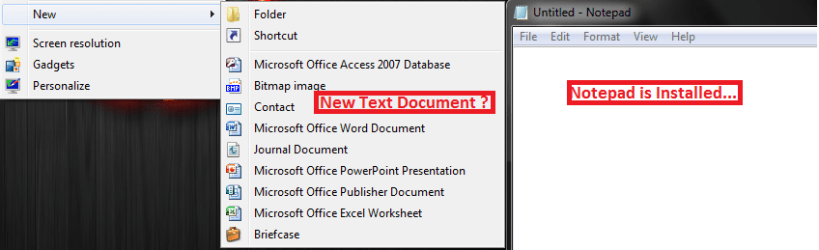
I have been using Windows 7 for a long time and have gotten used to all the keys, mouse movements etc for opening stuff. Recently I bought a new Laptop with same version of Windows installed (Ultimate). However, when I right click the Desktop, the context menu of
New does not show the option to Create a New Text Document. This is proving to be a real pain in the back
. I have Notepad installed (by Default as it should be), and double-clicking *.txt files opens it, but the shortcut is nowhere to be seen. Please tell me why this is so and the easiest and most painless way (preferably without the need to Install something e.g. Registry Entry or Portable Program/Single *.exe Program would be better) to do it.
Thanks.
Untitled.png
24.6 KB
· Views: 19
Microsoft Windows 7 Ultimate 64-bit Intel Core i3-3110M @ 2.40 Ghz Ivy Bridge 22n... 4.00 GB Dual-Channel DDR3 @ 665MHz (9-9-9-24) Intel HD Graphics 4000 HP ProBook 4540s Microsoft Windows 7 Ultimate 64-bit Intel Core i3-3110M @ 2.40 Ghz Ivy Bridge 22nm Technology Hewlett-Packard 17F6 (U3E1) 4.00 GB Dual-Channel DDR3 @ 665MHz (9-9-9-24) Intel HD Graphics 4000 IDT High Definition Audio CODEC Generic PnP Monitor 1366x768@60Hz 466GB Hitachi HTS727550A9E364 (SATA) Standard PS/2 Keyboard Fixed Dell HID-compliant mouse 3 Mbs/s Down, 1Mbs/s Up. Bought by Laptop on 24 December 2012, after making sure the world wasn't going to end.
Administrator
Staff member
Hello Forz,
You might see if using step 10 in the tutorial below will be able to restore New -> "Text Document" for you.
If it doesn't, then download and merge the .reg file for the listed
txt option in the tutorial below to restore it's default associations.
Hope this helps,
Shawn
Last edited: Jan 4, 2013
64-bit Windows 11 Pro for Workstations Intel i7-8700K OC'd to 5 GHz 64 GB (4x16GB) G.SKILL TridentZ RGB DDR4 3600... ASUS ROG-STRIX-GTX1080TI-O11G-GAMING PC/Desktop Self built custom 64-bit Windows 11 Pro for Workstations Intel i7-8700K OC'd to 5 GHz ASUS ROG Maximus XI Formula Z390 64 GB (4x16GB) G.SKILL TridentZ RGB DDR4 3600 MHz ASUS ROG-STRIX-GTX1080TI-O11G-GAMING Integrated 2 x Samsung Odyssey G7 27" 2560x1440 1TB Samsung 990 PRO M.2, Seasonic Prime Titanium 850W Thermaltake Core P3 Corsair Hydro H115i Logitech wireless K800 Logitech MX Master 4 2 Gb/s Download and 100 Mb/s Upload Malwarebyte Anti-Malware Premium Google Chrome Logitech Z625 speaker system,
Former Indy-Bostonian
Guru
Gold Member
VIP
This .reg file should add the .txt ShellNew and then show up in your New context menu
lol Brink beat me to it, I forgot there is a whole Tutorial for each. I just went into my registry and found the key. Hope we helped
I would use the .reg file provided in the Tutorial, it is probably better. I have removed mine since it is already in the forum tutorials
Win7 Home Premium 64x Intel Core 2 Duo P7450 / 2.13 GHz (2.29 with ... 4 GB PC-6400 Hyundai (2X2) at 800Mhz NVIDIA GeForce GTX 260M 1GB DDR3 VRAM Laptop ASUS G60-RBBX05 Win7 Home Premium 64x Intel Core 2 Duo P7450 / 2.13 GHz (2.29 with Extreme Turbo) 4 GB PC-6400 Hyundai (2X2) at 800Mhz NVIDIA GeForce GTX 260M 1GB DDR3 VRAM 16" LED Backlit 1366 x 768 on laptop 1600x1050 max res on 22" external mon OCZ Agility 3 60GB SSD / 320 GB - Serial ATA-150 - 7200 rpm 6-cell Lithium ion { lasts 1.5 hours } ASUS G60 Laptop Chicklet type back-lit (white light) keyboard Logitech G9 Laser Mouse 3200dpi and 1000 reports per minute Comcast 8.60mb/s up - 3.11mb/s down MSE Firefox General mid-budget gaming Comp. Low batterylife - High FrameRates - currently overheating problems :(
Psychopathic Member
Thread Starter
You might see if using step 19 in the tutorial below will be able to restore New -> "Text Document" for you.
Uh, I might be wrong, but that tutorial has total of 16 steps
Anyways I used the txt document reg file in "Default File Type Associations - Restore" and it worked. Thanks Shawn and Thorsen!
Microsoft Windows 7 Ultimate 64-bit Intel Core i3-3110M @ 2.40 Ghz Ivy Bridge 22n... 4.00 GB Dual-Channel DDR3 @ 665MHz (9-9-9-24) Intel HD Graphics 4000 HP ProBook 4540s Microsoft Windows 7 Ultimate 64-bit Intel Core i3-3110M @ 2.40 Ghz Ivy Bridge 22nm Technology Hewlett-Packard 17F6 (U3E1) 4.00 GB Dual-Channel DDR3 @ 665MHz (9-9-9-24) Intel HD Graphics 4000 IDT High Definition Audio CODEC Generic PnP Monitor 1366x768@60Hz 466GB Hitachi HTS727550A9E364 (SATA) Standard PS/2 Keyboard Fixed Dell HID-compliant mouse 3 Mbs/s Down, 1Mbs/s Up. Bought by Laptop on 24 December 2012, after making sure the world wasn't going to end.
Administrator
Staff member
Sorry about that. My butter fingers type step 19 instead of 10.
I'm happy to hear that got it sorted for you though. Glad we could help.
64-bit Windows 11 Pro for Workstations Intel i7-8700K OC'd to 5 GHz 64 GB (4x16GB) G.SKILL TridentZ RGB DDR4 3600... ASUS ROG-STRIX-GTX1080TI-O11G-GAMING PC/Desktop Self built custom 64-bit Windows 11 Pro for Workstations Intel i7-8700K OC'd to 5 GHz ASUS ROG Maximus XI Formula Z390 64 GB (4x16GB) G.SKILL TridentZ RGB DDR4 3600 MHz ASUS ROG-STRIX-GTX1080TI-O11G-GAMING Integrated 2 x Samsung Odyssey G7 27" 2560x1440 1TB Samsung 990 PRO M.2, Seasonic Prime Titanium 850W Thermaltake Core P3 Corsair Hydro H115i Logitech wireless K800 Logitech MX Master 4 2 Gb/s Download and 100 Mb/s Upload Malwarebyte Anti-Malware Premium Google Chrome Logitech Z625 speaker system,


 . I have Notepad installed (by Default as it should be), and double-clicking *.txt files opens it, but the shortcut is nowhere to be seen. Please tell me why this is so and the easiest and most painless way (preferably without the need to Install something e.g. Registry Entry or Portable Program/Single *.exe Program would be better) to do it.