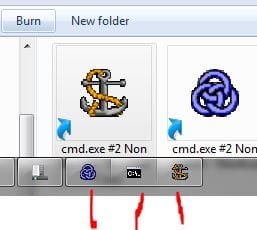
I know, you're shaking your head and about to type in:
And, getting ready with the follow up "You can always just run it twice. That's allowed".
Well, there are two problems with those answers. The first answer has the unfortunate property of being wrong. Well, not "wrong", exactly; the program won't function correctly unless it is called cmd.exe and in the system32 directory and there must exist another copy in a specially named folder, and a special "encrypted copy" with an ".mui" extension also having a duplicate in a specially named folder.
In fact, cmd.exe only works properly (as far as I can tell) as long as you have the following collection of pairs of identical binaries:
Added to that, just as a triple check here's what "fc" says:
C:\Windows>fc C:\Windows\System32\cmd.exe C:\Windows\winsxs\x86_microsoft-windows-commandprompt_31bf3856ad364e35_6.1.7601.17514_none_8d1430a8789ea27a\cmd.exe
Comparing files C:\WINDOWS\SYSTEM32\cmd.exe and C:\WINDOWS\WINSXS\X86_MICROSOFT-WINDOWS-COMMANDPROMPT_31BF3856AD364E35_6.1.7601.17514_NONE_8D1430A8789EA27A\CMD.EXE
FC: no differences encountered
and, as you can probably guess:
C:\Windows>fc C:\Windows\System32\en-US\cmd.exe.mui C:\Windows\winsxs\x86_micros
oft-windows-c..andprompt.resources_31bf3856ad364e35_6.1.7601.17514_en-us_8189482
3f02c4c17\cmd.exe.mui
Comparing files C:\WINDOWS\SYSTEM32\EN-US\cmd.exe.mui and C:\WINDOWS\WINSXS\X86_MICROSOFT-WINDOWS-C..ANDPROMPT.RESOURCES_31BF3856AD364E35_6.1.7601.17514_EN-US_81894823F02C4C17\CMD.EXE.MUI
FC: no differences encountered
With the caveat that:
C:\Windows>fc C:\Windows\System32\cmd.exe C:\Windows\System32\en-US\cmd.exe.mui
Comparing files C:\WINDOWS\SYSTEM32\cmd.exe and C:\WINDOWS\SYSTEM32\EN-US\CMD.EXE.MUI
0000003C: E8 B8
00000080: DE 01
00000081: 4E 75
00000082: 92 F5
00000083: B9 D9
00000084: 9A 45
00000085: 2F 14
00000086: FC 9B
... etc
And if you try to run cmd.exe from any other directory it *can* work, but you get directory listings (or any listing) like this:
************************************************
C:\Windows>d:cmd
The system cannot find message text for message number 0x2350 in the message file for Application.
Copyright (c) 2009 Microsoft Corporation. All rights reserved.
C:\Windows>dir
The system cannot find message text for message number 0x235f in the message file for Application.
The system cannot find message text for message number 0x235b in the message file for Application.
The system cannot find message text for message number 0x2339 in the message file for Application.
08/06/2014 09:26 PM The system cannot find message text for message number 0x2373 in the message file for Application.
.
08/06/2014 09:26 PM The system cannot find message text for message number 0x2373 in the message file for Application.
..
07/14/2009 09:37 AM The system cannot find message text for message number 0x2373 in the message file for Application.
AppCompat
11/21/2010 07:38 AM The system cannot find message text for message number 0x2373 in the message file for Application.
ETC ....
07/14/2009 08:14 AM 31,232 twunk_32.exe
06/11/2009 04:14 AM 51,867 Ultimate.xml
07/14/2009 11:54 AM 403 win.ini
08/06/2014 08:43 PM 1,404,268 WindowsUpdate.log
06/11/2009 04:42 AM 256,192 winhelp.exe
07/14/2009 08:14 AM 9,728 winhlp32.exe
06/11/2009 04:34 AM 316,640 WMSysPr9.prx
07/14/2009 08:14 AM 9,216 write.exe
The system cannot find message text for message number 0x2378 in the message file for Application.
The system cannot find message text for message number 0x2379 in the message file for Application.
************************************************
And you can probably guess why.
Now, prior to being forced to install SP1 (because I accidentally messed up my registry and Windows "accidentally" deleted all my restore points so I had to do a re-install from scratch) I discovered a way around this which was simply to put your copy of cmd.exe under a new name (CommandProcessor.exe say) and create a .mui file in the en-US folder which was also an exact copy of cmd.exe (which it isn't possible with the new and improved version)
So I could have two "product instances" (for lack of a better word) of cmd.exe. And the reason that is desirable, if not necessary, is because one of them is running with administrator rights and the other with standard rights and I need to be able to distinguish between these two completely different beasts and not have them occupy the same position on the taskbar. In fact, I had disabled the update service only because I knew this change was coming.
The reason why it is of critical importance that the two instances do not appear together is because I know with 100% certainty that otherwise I will eventually make a mistake and run *explorer* from the wrong box say, when it crashes (or more likely when I kill it as I often do).
Following that, now unbeknownst to me, I would be running everything with administrator privileges for as long as that explorer's session lasts (ie. up to days).
Any ideas? I would like to duplicate this "gang of 4" and simply have a differently named program that has the same code in it as cmd.exe
Thanks in advance,
Alan
- copy %windir%\system32\cmd.exe C:\MyUtilities\cmd.exe (or failing that)
- copy %windir%\system32\cmd.exe C:\MyUtilities\MyCmd.exe
And, getting ready with the follow up "You can always just run it twice. That's allowed".
Well, there are two problems with those answers. The first answer has the unfortunate property of being wrong. Well, not "wrong", exactly; the program won't function correctly unless it is called cmd.exe and in the system32 directory and there must exist another copy in a specially named folder, and a special "encrypted copy" with an ".mui" extension also having a duplicate in a specially named folder.
In fact, cmd.exe only works properly (as far as I can tell) as long as you have the following collection of pairs of identical binaries:
Collection 1:
C:\Windows\System32\cmd.exe
C:\Windows\winsxs\x86_microsoft-windows-commandprompt_31bf3856ad364e35_6.1.7601.17514_none_8d1430a8789ea27a\cmd.exe
Collection 2:
C:\Windows\System32\en-US\cmd.exe.mui
C:\Windows\winsxs\x86_microsoft-windows-c..andprompt.resources_31bf3856ad364e35_6.1.7601.17514_en-us_81894823f02c4c17\cmd.exe.mui
C:\Windows\System32\cmd.exe
C:\Windows\winsxs\x86_microsoft-windows-commandprompt_31bf3856ad364e35_6.1.7601.17514_none_8d1430a8789ea27a\cmd.exe
Collection 2:
C:\Windows\System32\en-US\cmd.exe.mui
C:\Windows\winsxs\x86_microsoft-windows-c..andprompt.resources_31bf3856ad364e35_6.1.7601.17514_en-us_81894823f02c4c17\cmd.exe.mui
Added to that, just as a triple check here's what "fc" says:
C:\Windows>fc C:\Windows\System32\cmd.exe C:\Windows\winsxs\x86_microsoft-windows-commandprompt_31bf3856ad364e35_6.1.7601.17514_none_8d1430a8789ea27a\cmd.exe
Comparing files C:\WINDOWS\SYSTEM32\cmd.exe and C:\WINDOWS\WINSXS\X86_MICROSOFT-WINDOWS-COMMANDPROMPT_31BF3856AD364E35_6.1.7601.17514_NONE_8D1430A8789EA27A\CMD.EXE
FC: no differences encountered
and, as you can probably guess:
C:\Windows>fc C:\Windows\System32\en-US\cmd.exe.mui C:\Windows\winsxs\x86_micros
oft-windows-c..andprompt.resources_31bf3856ad364e35_6.1.7601.17514_en-us_8189482
3f02c4c17\cmd.exe.mui
Comparing files C:\WINDOWS\SYSTEM32\EN-US\cmd.exe.mui and C:\WINDOWS\WINSXS\X86_MICROSOFT-WINDOWS-C..ANDPROMPT.RESOURCES_31BF3856AD364E35_6.1.7601.17514_EN-US_81894823F02C4C17\CMD.EXE.MUI
FC: no differences encountered
With the caveat that:
C:\Windows>fc C:\Windows\System32\cmd.exe C:\Windows\System32\en-US\cmd.exe.mui
Comparing files C:\WINDOWS\SYSTEM32\cmd.exe and C:\WINDOWS\SYSTEM32\EN-US\CMD.EXE.MUI
0000003C: E8 B8
00000080: DE 01
00000081: 4E 75
00000082: 92 F5
00000083: B9 D9
00000084: 9A 45
00000085: 2F 14
00000086: FC 9B
... etc
And if you try to run cmd.exe from any other directory it *can* work, but you get directory listings (or any listing) like this:
************************************************
C:\Windows>d:cmd
The system cannot find message text for message number 0x2350 in the message file for Application.
Copyright (c) 2009 Microsoft Corporation. All rights reserved.
C:\Windows>dir
The system cannot find message text for message number 0x235f in the message file for Application.
The system cannot find message text for message number 0x235b in the message file for Application.
The system cannot find message text for message number 0x2339 in the message file for Application.
08/06/2014 09:26 PM The system cannot find message text for message number 0x2373 in the message file for Application.
.
08/06/2014 09:26 PM The system cannot find message text for message number 0x2373 in the message file for Application.
..
07/14/2009 09:37 AM The system cannot find message text for message number 0x2373 in the message file for Application.
AppCompat
11/21/2010 07:38 AM The system cannot find message text for message number 0x2373 in the message file for Application.
ETC ....
07/14/2009 08:14 AM 31,232 twunk_32.exe
06/11/2009 04:14 AM 51,867 Ultimate.xml
07/14/2009 11:54 AM 403 win.ini
08/06/2014 08:43 PM 1,404,268 WindowsUpdate.log
06/11/2009 04:42 AM 256,192 winhelp.exe
07/14/2009 08:14 AM 9,728 winhlp32.exe
06/11/2009 04:34 AM 316,640 WMSysPr9.prx
07/14/2009 08:14 AM 9,216 write.exe
The system cannot find message text for message number 0x2378 in the message file for Application.
The system cannot find message text for message number 0x2379 in the message file for Application.
************************************************
And you can probably guess why.
Now, prior to being forced to install SP1 (because I accidentally messed up my registry and Windows "accidentally" deleted all my restore points so I had to do a re-install from scratch) I discovered a way around this which was simply to put your copy of cmd.exe under a new name (CommandProcessor.exe say) and create a .mui file in the en-US folder which was also an exact copy of cmd.exe (which it isn't possible with the new and improved version)
So I could have two "product instances" (for lack of a better word) of cmd.exe. And the reason that is desirable, if not necessary, is because one of them is running with administrator rights and the other with standard rights and I need to be able to distinguish between these two completely different beasts and not have them occupy the same position on the taskbar. In fact, I had disabled the update service only because I knew this change was coming.
The reason why it is of critical importance that the two instances do not appear together is because I know with 100% certainty that otherwise I will eventually make a mistake and run *explorer* from the wrong box say, when it crashes (or more likely when I kill it as I often do).
Following that, now unbeknownst to me, I would be running everything with administrator privileges for as long as that explorer's session lasts (ie. up to days).
Any ideas? I would like to duplicate this "gang of 4" and simply have a differently named program that has the same code in it as cmd.exe
Thanks in advance,
Alan
My Computer
- Computer type
- PC/Desktop
- Computer Manufacturer/Model Number
- Acer
- OS
- Windows 7 Ultimate 32 bit
- CPU
- Pentium P6200 dual core@1GHz
- Motherboard
- Acer Aspire 5742Z
- Memory
- 2 Gig
- Graphics Card(s)
- Intel
- Hard Drives
- 1
- Antivirus
- MS Security Essentials
- Browser
- Chrome