Solved Slow deletion of files

jlauret7

New member
Local time
6:16 AM
Messages
21
Greetings.
I have been facing an issue with my system whereas "some" file deletion are very slow. Two cases are dramatic examples:
- use from a command line of DeleteXP.exe
- trying to remove a book from Calibre GUI

A few things before people jump to the usual suggestions. I tried all of the below without better results
- recreate the Recycle Bin (mutiple recipe including safe boot, delete, reboot)
- defrag and analyze drive for errors (none found)
- scan for virus, trojan, etc ... none found (three utilities used from MS, MalwareBytes and Outpost)
- create a new account and try file deletion under this new account (same condition)
- disable anti-virus and try again
- boot in safe mode and try again
- ...

Nothing helped. A note as well this does not happen systematically (if I delete from Windows Explorer,
things work fine and many tools/GUI I have delete the file alright). I tried to speculate with the author
of Calibre that perhaps the use of SHFileOperation() could be the cause but was somewhat left with
a "not a problem with our tool, works elsewhere, figure out what slows down your computer".

I focused on DeleteXP and traced it using "Process Monitor" and see the hang as below:

08:26:52.2325829 DeleteXP.exe 7196 CloseFile C:\Windows\SysWOW64\RpcRtRemote.dll SUCCESS
08:26:52.2327881 DeleteXP.exe 7196 RegQueryKey HKLM SUCCESS Query: HandleTags, HandleTags: 0x0
08:26:52.2328258 DeleteXP.exe 7196 RegOpenKey HKLM\SYSTEM\CurrentControlSet\Services\BFE REPARSE Desired Access: Read
08:26:52.2328593 DeleteXP.exe 7196 RegOpenKey HKLM\System\CurrentControlSet\Services\BFE SUCCESS Desired Access: Read
08:26:52.2328863 DeleteXP.exe 7196 RegSetInfoKey HKLM\System\CurrentControlSet\services\BFE SUCCESS KeySetInformationClass: KeySetHandleTagsInformation, Length: 0
08:26:52.2329040 DeleteXP.exe 7196 RegCloseKey HKLM\System\CurrentControlSet\services\BFE SUCCESS
08:26:52.2346652 DeleteXP.exe 7196 Thread Create SUCCESS Thread ID: 7592
08:26:52.2354947 DeleteXP.exe 7196 Thread Create SUCCESS Thread ID: 7664
08:27:22.2135266 DeleteXP.exe 7196 Thread Create SUCCESS Thread ID: 6152
08:27:22.3203836 DeleteXP.exe 7196 RegQueryKey HKLM SUCCESS Query: HandleTags, HandleTags: 0x0
08:27:22.3204533 DeleteXP.exe 7196 RegOpenKey HKLM\Software\Wow6432Node\Microsoft\Windows\CurrentVersion\Policies\Explorer REPARSE Desired Access: Query Value
08:27:22.3205091 DeleteXP.exe 7196 RegOpenKey HKLM\SOFTWARE\Microsoft\Windows\CurrentVersion\Policies\Explorer SUCCESS Desired Access: Query Value
08:27:22.3205534 DeleteXP.exe 7196 RegSetInfoKey HKLM\SOFTWARE\Microsoft\Windows\CurrentVersion\Policies\Explorer SUCCESS KeySetInformationClass: KeySetHandleTagsInformation, Length: 0
08:27:22.3205980 DeleteXP.exe 7196 RegQueryValue HKLM\SOFTWARE\Microsoft\Windows\CurrentVersion\Policies\Explorer\NoPropertiesMyComputer NAME NOT FOUND Length: 144
08:27:22.3206369 DeleteXP.exe 7196 RegCloseKey HKLM\SOFTWARE\Microsoft\Windows\CurrentVersion\Policies\Explorer SUCCESS

there is a 30 seconds delay between two "Thread Create"

08:26:52.2354947 DeleteXP.exe 7196 Thread Create SUCCESS Thread ID: 7664
08:27:22.2135266 DeleteXP.exe 7196 Thread Create SUCCESS Thread ID: 6152

Any idea of what may cause this?

BTW:
Computer Type ACPI x64-based PC (Mobile)
Operating System Microsoft Windows 7 Professional
OS Service Pack Service Pack 1
CPU Type Mobile DualCore Intel Core i5-480M, 2933 MHz (22 x 133)

And I tried to see if an Intel driver updated existed but none were found (it is always possible that
a past driver update may have caused this though / if someone thinks it is worth back-stepping,
will do).

Hope this report is complete and someone could help me / hint something I have not tried yet.
 

My Computer My Computer

At a glance

Windows 7 ProfessionalIntel (R) Core(TM) i5 M4804 GB
Computer Manufacturer/Model Number
SOny VAIO VPCS137GX
OS
Windows 7 Professional
CPU
Intel (R) Core(TM) i5 M480
Memory
4 GB
~~~Any idea of what may cause this?~~~
Disabling your antivirus (AV) app might not remove the file filter drivers. The AV app might still be inspecting things, just not acting on what it sees. You might want to uninstall the AV app as a test.

You might also want to keep a Virtual Machine around for such testing. One with no 3rd party software installed. One that is frozen so that it is almost always the same (updated only with patches - then that version is frozen).
 

My Computer My Computer

At a glance

W7 Pro SP1 64biti78GBIntel HD Graphics
Computer type
Laptop
Computer Manufacturer/Model Number
Employer provided Dell Latitude
OS
W7 Pro SP1 64bit
CPU
i7
Memory
8GB
Graphics Card(s)
Intel HD Graphics
Hard Drives
crappy SSD
Antivirus
Employer mandated Symantec Endpoint Protection
Browser
Pale Moon 64bit, IE11 64bit & Chrome 64bit
~~~Any idea of what may cause this?~~~
Disabling your antivirus (AV) app might not remove the file filter drivers. The AV app might still be inspecting things, just not acting on what it sees. You might want to uninstall the AV app as a test.

You might also want to keep a Virtual Machine around for such testing. One with no 3rd party software installed. One that is frozen so that it is almost always the same (updated only with patches - then that version is frozen).

I wish this was the reason. More tries:
- removed anti-virus entirely (Outpost Security Suite) and rebooted + booted in safe mode (so rebooted twice in other words) - no change, still slow deletion (tested both DeleteXP and Calibre)
- attempted to restore Intel® Chipset Driver + Intel® 5 Series 4/6 Port SATA AHCI Controller Driver
to the latest version approved by the vendor (Sony laptop / Sony support provides the packages and I installed those as I may have updated it with a Driver update software) - no change
- forgot to add one detail on first post: I also made sure to go to http://www.intel.com/p/en_US/support/detect and check - actually, all relevant CPU drivers are up to date

Is it possible that a Windows update caused this? Let's say, a past 4 months update or so ...
I am at a loss as per what to check or try next ...
 

My Computer My Computer

At a glance

Windows 7 ProfessionalIntel (R) Core(TM) i5 M4804 GB
Computer Manufacturer/Model Number
SOny VAIO VPCS137GX
OS
Windows 7 Professional
CPU
Intel (R) Core(TM) i5 M480
Memory
4 GB
I'm not familiar with DeleteXP. Got a link to it?

I'll see how well it works for me.
 

My Computer My Computer

At a glance

W7 Pro SP1 64biti78GBIntel HD Graphics
Computer type
Laptop
Computer Manufacturer/Model Number
Employer provided Dell Latitude
OS
W7 Pro SP1 64bit
CPU
i7
Memory
8GB
Graphics Card(s)
Intel HD Graphics
Hard Drives
crappy SSD
Antivirus
Employer mandated Symantec Endpoint Protection
Browser
Pale Moon 64bit, IE11 64bit & Chrome 64bit
A Google search for DeleteXP gets no hits.
 

My Computer My Computer

At a glance

Windows 10 Pro X64Intel Quad Core i7-4770 @ 3.4Ghz16.0GB PC3-12800 DDR3 SDRAM 1600 MHzIntel Integrated HD Graphics
Computer type
PC/Desktop
Computer Manufacturer/Model Number
Lenovo IdeaCenter 450
OS
Windows 10 Pro X64
CPU
Intel Quad Core i7-4770 @ 3.4Ghz
Memory
16.0GB PC3-12800 DDR3 SDRAM 1600 MHz
Graphics Card(s)
Intel Integrated HD Graphics
Sound Card
Realtek HD Audio
Monitor(s) Displays
HP 22" LCD
Screen Resolution
1680 x 1050
Hard Drives
250GB Samsung EVO SATA-3 SSD
2TB Seagate ST2000DM001 SATA-2
1.5TB Seagate ST3150041AS SATA
Keyboard
Dell USB
Mouse
Lenovo USB
Internet Speed
Cable via Road Runner 3MB Upload, 30MB Download
Antivirus
Windows Defender, MBAM Pro, MBAE
Browser
Seamonkey
Other Info
UEFI/GPT
PLDS DVD-RW DH16AERSH
See attached as a .ZIP
But at the end, the same thing happens with Calibre. I suspect the common denominator being the old(er)
API call to SHFileOperation().
 

Attachments

My Computer My Computer

At a glance

Windows 7 ProfessionalIntel (R) Core(TM) i5 M4804 GB
Computer Manufacturer/Model Number
SOny VAIO VPCS137GX
OS
Windows 7 Professional
CPU
Intel (R) Core(TM) i5 M480
Memory
4 GB
I'm not understanding jlauret7.
Are you dual booting with XP (operating system) or is DeleteXP a program? I can't find a program with that name.
 

My Computer My Computer

At a glance

Windows 10 Pro. 64/ version 1709 Windows 7 Pr...Intel i7-6800K @ 4.3Corsair Platinum 16 gig @2400EVGA GTX 1070 OC
Computer type
PC/Desktop
Computer Manufacturer/Model Number
Home made Desktop
OS
Windows 10 Pro. 64/ version 1709 Windows 7 Pro/64
CPU
Intel i7-6800K @ 4.3
Motherboard
ASUS X-99 Deluxe II
Memory
Corsair Platinum 16 gig @2400
Graphics Card(s)
EVGA GTX 1070 OC
Monitor(s) Displays
Asus 27" LED LCD/VE278Q
Screen Resolution
1920-1080 or 1280-720 HDMI
Hard Drives
INTEL SSD 730-240 Gb Sata 3.0/
PSU
EVGA Platium 1200W
Case
Phanteks Luxe Tempered Glass 8 fans/ one radiator
Cooling
XSPC/ Water Cooled CPU
Keyboard
Das 4 Professional
Mouse
Logitech M705/MX Anywhere 2-S
Internet Speed
100 mbits
Antivirus
Microsoft Security Essentials/ Malwarebytes Premium 3.0/ SAS
Browser
I.E. 11 default/Firefox/ ISP Time Warner Cable/Spectrum
Other Info
LG BluRay Burner/
Sound system-KLipsch-THX/
Icy Dock ssd Hot Swap bays.
Could you just post the web site. I really don't care to download a mystery zip file.
 

My Computer My Computer

At a glance

Windows 10 Pro. 64/ version 1709 Windows 7 Pr...Intel i7-6800K @ 4.3Corsair Platinum 16 gig @2400EVGA GTX 1070 OC
Computer type
PC/Desktop
Computer Manufacturer/Model Number
Home made Desktop
OS
Windows 10 Pro. 64/ version 1709 Windows 7 Pro/64
CPU
Intel i7-6800K @ 4.3
Motherboard
ASUS X-99 Deluxe II
Memory
Corsair Platinum 16 gig @2400
Graphics Card(s)
EVGA GTX 1070 OC
Monitor(s) Displays
Asus 27" LED LCD/VE278Q
Screen Resolution
1920-1080 or 1280-720 HDMI
Hard Drives
INTEL SSD 730-240 Gb Sata 3.0/
PSU
EVGA Platium 1200W
Case
Phanteks Luxe Tempered Glass 8 fans/ one radiator
Cooling
XSPC/ Water Cooled CPU
Keyboard
Das 4 Professional
Mouse
Logitech M705/MX Anywhere 2-S
Internet Speed
100 mbits
Antivirus
Microsoft Security Essentials/ Malwarebytes Premium 3.0/ SAS
Browser
I.E. 11 default/Firefox/ ISP Time Warner Cable/Spectrum
Other Info
LG BluRay Burner/
Sound system-KLipsch-THX/
Icy Dock ssd Hot Swap bays.
When I do Google DeleteXP.exe 7196 from your post #1 I don't get much but I do get this.

In response to a complaint we received under the US Digital Millennium Copyright Act, we have removed 1 result(s) from this page. If you wish, you may read the DMCA complaint that caused the removal(s) at ChillingEffects.org
 

My Computer My Computer

At a glance

Windows 10 Pro. 64/ version 1709 Windows 7 Pr...Intel i7-6800K @ 4.3Corsair Platinum 16 gig @2400EVGA GTX 1070 OC
Computer type
PC/Desktop
Computer Manufacturer/Model Number
Home made Desktop
OS
Windows 10 Pro. 64/ version 1709 Windows 7 Pro/64
CPU
Intel i7-6800K @ 4.3
Motherboard
ASUS X-99 Deluxe II
Memory
Corsair Platinum 16 gig @2400
Graphics Card(s)
EVGA GTX 1070 OC
Monitor(s) Displays
Asus 27" LED LCD/VE278Q
Screen Resolution
1920-1080 or 1280-720 HDMI
Hard Drives
INTEL SSD 730-240 Gb Sata 3.0/
PSU
EVGA Platium 1200W
Case
Phanteks Luxe Tempered Glass 8 fans/ one radiator
Cooling
XSPC/ Water Cooled CPU
Keyboard
Das 4 Professional
Mouse
Logitech M705/MX Anywhere 2-S
Internet Speed
100 mbits
Antivirus
Microsoft Security Essentials/ Malwarebytes Premium 3.0/ SAS
Browser
I.E. 11 default/Firefox/ ISP Time Warner Cable/Spectrum
Other Info
LG BluRay Burner/
Sound system-KLipsch-THX/
Icy Dock ssd Hot Swap bays.
Could you just post the web site. I really don't care to download a mystery zip file.

I uploaded the program in a .ZIP - sorry for confusing you, I thought that a standalone simple program
having the SAME effect (impossibly long file deletion) than other more complex program (like Calibre, calibre - E-book management) would be easier to debug. DeleteXP is a rather ancient program allowing deleting
files from a CMD prompt (moving it to the Recycler Bin) ... just like the call in Calibre seem to be doing.
 

My Computer My Computer

At a glance

Windows 7 ProfessionalIntel (R) Core(TM) i5 M4804 GB
Computer Manufacturer/Model Number
SOny VAIO VPCS137GX
OS
Windows 7 Professional
CPU
Intel (R) Core(TM) i5 M480
Memory
4 GB
I'm not confused. I just want a safe website to study and understand that program.
 

My Computer My Computer

At a glance

Windows 10 Pro. 64/ version 1709 Windows 7 Pr...Intel i7-6800K @ 4.3Corsair Platinum 16 gig @2400EVGA GTX 1070 OC
Computer type
PC/Desktop
Computer Manufacturer/Model Number
Home made Desktop
OS
Windows 10 Pro. 64/ version 1709 Windows 7 Pro/64
CPU
Intel i7-6800K @ 4.3
Motherboard
ASUS X-99 Deluxe II
Memory
Corsair Platinum 16 gig @2400
Graphics Card(s)
EVGA GTX 1070 OC
Monitor(s) Displays
Asus 27" LED LCD/VE278Q
Screen Resolution
1920-1080 or 1280-720 HDMI
Hard Drives
INTEL SSD 730-240 Gb Sata 3.0/
PSU
EVGA Platium 1200W
Case
Phanteks Luxe Tempered Glass 8 fans/ one radiator
Cooling
XSPC/ Water Cooled CPU
Keyboard
Das 4 Professional
Mouse
Logitech M705/MX Anywhere 2-S
Internet Speed
100 mbits
Antivirus
Microsoft Security Essentials/ Malwarebytes Premium 3.0/ SAS
Browser
I.E. 11 default/Firefox/ ISP Time Warner Cable/Spectrum
Other Info
LG BluRay Burner/
Sound system-KLipsch-THX/
Icy Dock ssd Hot Swap bays.
A Google search for DeleteXP gets no hits.

I got results using a search term of "DeleteXP.exe".
(Quotation marks included.)


I'm not confused. I just want a safe website to study and understand that program.
http://www.easytools.com/downloads/freebies.html
Scroll down until you see the "Delete XP" app (formerly Delete'97).

Here is a VirusTotal link to the zip that the OP posted:
https://www.virustotal.com/en/file/...bf1d06598ff4e32d459c311f/analysis/1375589285/
And to the EXE in that zip:
https://www.virustotal.com/en/file/...33fc6e745bfdf6aba0c61541/analysis/1375589374/
Which had been uploaded/scanned before in April of this year:
https://www.virustotal.com/en/file/...8e0b4192ea033fc6e745bfdf6aba0c61541/analysis/


@OP,
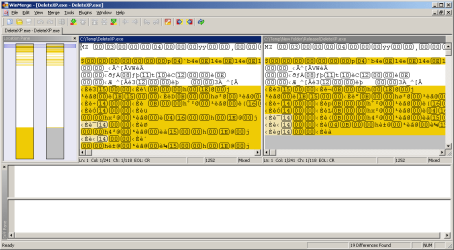
The EXE in the zip that you uploaded and the EXE in the zip available via the download link from the website linked to above are bit for bit the same. However, the EXE in the zip available via the download source code link from that same website is slightly different. Both are version 2.5, but perhaps one was recompiled to change something not deserving of a revision number change.

compare.png

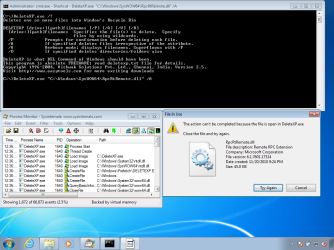
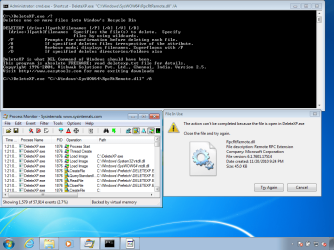
I only mention the differences between the two EXE files to explain why I'm posting two screenshots - I got the same error when attempting to use both versions inside a W7 pro 64bit Virtual Machine (all patched up):

error1.png

error2.png

I was able to delete an empty text file from the root of c:\ using the "Delete XP" app... I'm just not sure how/why our experiences were so different when attempting to delete the DLL mentioned in the OP. It may not be worth your time to educate me on how to reproduce your experience with this app. I'll understand if you do not want to take that path.

What is reason for using this method for deleting files?
Is it the fact that the files can go to the recycle bin?
 
Last edited:

My Computer My Computer

At a glance

W7 Pro SP1 64biti78GBIntel HD Graphics
Computer type
Laptop
Computer Manufacturer/Model Number
Employer provided Dell Latitude
OS
W7 Pro SP1 64bit
CPU
i7
Memory
8GB
Graphics Card(s)
Intel HD Graphics
Hard Drives
crappy SSD
Antivirus
Employer mandated Symantec Endpoint Protection
Browser
Pale Moon 64bit, IE11 64bit & Chrome 64bit
~~~
Is it possible that a Windows update caused this? Let's say, a past 4 months update or so ...
I am at a loss as per what to check or try next ...
Just to address these questions in a less busy post - I'll repeat that my testing was in a VM that was all patched up. A fresh and frozen OS build only 24 days old.

It would be interesting to see how things work for you within a VM. That should take the chip set drivers out of the equation. You can do a test for free. Only your labor (and maybe your download bandwidth - if you need/want an w7 ISO with SP1*) would be involved. You can skip registration/activation during the install. This should give you 30 days of testing. Dump the VM after that.

*See the note box in step one of this tutorial for a link to those W7 ISO files.
 

My Computer My Computer

At a glance

W7 Pro SP1 64biti78GBIntel HD Graphics
Computer type
Laptop
Computer Manufacturer/Model Number
Employer provided Dell Latitude
OS
W7 Pro SP1 64bit
CPU
i7
Memory
8GB
Graphics Card(s)
Intel HD Graphics
Hard Drives
crappy SSD
Antivirus
Employer mandated Symantec Endpoint Protection
Browser
Pale Moon 64bit, IE11 64bit & Chrome 64bit
What is reason for using this method for deleting files?
Is it the fact that the files can go to the recycle bin?

As noted, explaining this problem using DeleteXP.exe was just an example to illustrated (within a confined
and smaller program) what I am experiencing with other tools such as Calibre eBook. I thought that it
would be easier to trace what it does (obviously, Calibre is a much more complicated program).

But the reason I have DeleteXP.exe on my laptop IS indeed for scripting purposes and the fact that
it moves files to the Recycle Bin - an example usage: from a cygwin cron, I can search for trash files
and delete (but in case something goes wrong I can always recover). But this is a side track from the
core issue I am experiencing.

The point remains that a few utilities exhibit this slow file deletion behavior and they seem to have one thing in common: the use of the old(er) delete API. I used to have this problem as well with a tool called TotalUninstall ... Every uninstall using that tool would at some stage delete files so slowly that it became unusable ... until I upgraded to the Windows 7 / Windows 8 compatible version (then all was well again).


...
It would be interesting to see how things work for you within a VM. That should take the chip set drivers out of the equation. You can do a test for free. Only your labor (and maybe your download bandwidth - if you need/want an w7 ISO with SP1*) would be involved. You can skip registration/activation during the install. This should give you 30 days of testing. Dump the VM after that.

*See the note box in step one of this tutorial for a link to those W7 ISO files.

I will try following this suggestion (never did that before) and report.
 

My Computer My Computer

At a glance

Windows 7 ProfessionalIntel (R) Core(TM) i5 M4804 GB
Computer Manufacturer/Model Number
SOny VAIO VPCS137GX
OS
Windows 7 Professional
CPU
Intel (R) Core(TM) i5 M480
Memory
4 GB

My Computer My Computer

At a glance

Windows 7 ProfessionalIntel (R) Core(TM) i5 M4804 GB
Computer Manufacturer/Model Number
SOny VAIO VPCS137GX
OS
Windows 7 Professional
CPU
Intel (R) Core(TM) i5 M480
Memory
4 GB
I probably should have explained that I asked why you had these apps (and if you needed the recycle bin feature) so that maybe forum members can help you find a command line tool that calls a newer API and still uses the recycle bin.

Even if the end of this research finds some combo of software/driver/whatever on your computer that causes this slowdown - the best solution for us to help you with might just be to find a new set of command line apps.
 

My Computer My Computer

At a glance

W7 Pro SP1 64biti78GBIntel HD Graphics
Computer type
Laptop
Computer Manufacturer/Model Number
Employer provided Dell Latitude
OS
W7 Pro SP1 64bit
CPU
i7
Memory
8GB
Graphics Card(s)
Intel HD Graphics
Hard Drives
crappy SSD
Antivirus
Employer mandated Symantec Endpoint Protection
Browser
Pale Moon 64bit, IE11 64bit & Chrome 64bit
To be clear: I do get (and appreciate) that DeleteXP is what you picked/provided for us to help you with. I know that Calibre eBook is doing this delay too. You are probably write about the API that they call... but the solution for you might still be the same: find better apps.

It would be interesting to know why the delay happens for you, but since I cannot reproduce the delete that you highlighted. I'm not sure what to try next on my end. If you want, you can also try the clean boot steps mentioned here: http://www.sevenforums.com/tutorial...ation-conflicts-performing-clean-startup.html
 

My Computer My Computer

At a glance

W7 Pro SP1 64biti78GBIntel HD Graphics
Computer type
Laptop
Computer Manufacturer/Model Number
Employer provided Dell Latitude
OS
W7 Pro SP1 64bit
CPU
i7
Memory
8GB
Graphics Card(s)
Intel HD Graphics
Hard Drives
crappy SSD
Antivirus
Employer mandated Symantec Endpoint Protection
Browser
Pale Moon 64bit, IE11 64bit & Chrome 64bit
I probably should have explained that I asked why you had these apps (and if you needed the recycle bin feature) so that maybe forum members can help you find a command line tool that calls a newer API and still uses the recycle bin.

Even if the end of this research finds some combo of software/driver/whatever on your computer that causes this slowdown - the best solution for us to help you with might just be to find a new set of command line apps.

I appreciate your suggestions and help. The command line DeleteXP.exe issue is secondary however (was just an example and I can leave without a working solution for that command line tool ... although if you end up finding a better tool, I won't say no either as it has its convenience).

The real problem I have is with Calibre - unlike my story and similar experience with TotalUninstall (older version suddenly also performed deletes as slow as hell / upgrade resolved the issue), there is no "upgrade" per-se I can perform for Calibre (get their tool as-is and that's it). Suggesting to the authors to try changing SHFileOperation() to the newer IFileOperation() leaded to them saying "no way" (or equivalent) and that the problem is mine as they could not reproduce the issue (https://bugs.launchpad.net/calibre/+bug/1205889). Don't get me wrong: I agree with their answer (can't change code for one person) and also appreciated that they tried to reproduce the problem and could not (BTW: this means I won't on a fresh Windows 7 install) and also understand why they don't want to change their code (IFileOperation() came up with Vista onward; they would have problem supporting XP with one source if they change their code using a more recent API call).

But if I could re-compile their code and change the calls as a test, I would because those delete problems have not appeared in ANY program that are declared fully Windows 7 compatible (but apart from gcc/cygwin, I do not have any compiler tool): what I would do is try to change SHFileOperation() to an IFileOperation() call and see if that changes anything ("SH" suggests something to do with a shell invocation; perhaps something goes bad there but I can't think of what - your pointer to the AV was a good thing to try for sure).
 

My Computer My Computer

At a glance

Windows 7 ProfessionalIntel (R) Core(TM) i5 M4804 GB
Computer Manufacturer/Model Number
SOny VAIO VPCS137GX
OS
Windows 7 Professional
CPU
Intel (R) Core(TM) i5 M480
Memory
4 GB
To be clear: I do get (and appreciate) that DeleteXP is what you picked/provided for us to help you with. I know that Calibre eBook is doing this delay too. You are probably write about the API that they call... but the solution for you might still be the same: find better apps.

It would be interesting to know why the delay happens for you, but since I cannot reproduce the delete that you highlighted. I'm not sure what to try next on my end. If you want, you can also try the clean boot steps mentioned here: http://www.sevenforums.com/tutorial...ation-conflicts-performing-clean-startup.html

My post crossed this one. Would you know of a better tool than ProcessMonitor to trace an apps call stack (and child-process)?
 

My Computer My Computer

At a glance

Windows 7 ProfessionalIntel (R) Core(TM) i5 M4804 GB
Computer Manufacturer/Model Number
SOny VAIO VPCS137GX
OS
Windows 7 Professional
CPU
Intel (R) Core(TM) i5 M480
Memory
4 GB
Yes - we cross posted. I should have refreshed :-(

I understand about wanting Process Monitor to grab the info that you mentioned and maybe offer the option to automatically trace children - maybe that will come someday. I don't know of a tool that does those things, but debugging is not really my area and I'm not a programmer...

I installed Calibre before I saw your post/link to your Calibre forum/thread. I set Calibre up for general device and epub docs - then grabed a dozen or so epub docs from gutenberg.org. They all went into the manager just fine and they all deleted (using Calibre's GUI) in a flash. Process Monitor showed no delays.

Maybe I should have pointed you to the clean boot tutorial earlier because is it looking more and more like a software conflict; but I think that you will like having a Virtual Machine to temporarily play with.

Based on the guess in the Calibre forum/thread that something is making the Recycle Bin slow - I would suggest that you try Calibre inside your Virtual Machine without (and then with) your anti-virus tool. I'm not familiar with Outpost's security app(s) so I cannot say that they suffer from the same issue that other security apps sometimes do: that of not always uninstalling well. A number of companies offer more aggressive cleanup tools to be used after the normal uninstall/reboot.
 

My Computer My Computer

At a glance

W7 Pro SP1 64biti78GBIntel HD Graphics
Computer type
Laptop
Computer Manufacturer/Model Number
Employer provided Dell Latitude
OS
W7 Pro SP1 64bit
CPU
i7
Memory
8GB
Graphics Card(s)
Intel HD Graphics
Hard Drives
crappy SSD
Antivirus
Employer mandated Symantec Endpoint Protection
Browser
Pale Moon 64bit, IE11 64bit & Chrome 64bit
Back
Top