Solved Slow deletion of files

My Computer My Computer

At a glance

W7 Pro SP1 64biti78GBIntel HD Graphics
Computer type
Laptop
Computer Manufacturer/Model Number
Employer provided Dell Latitude
OS
W7 Pro SP1 64bit
CPU
i7
Memory
8GB
Graphics Card(s)
Intel HD Graphics
Hard Drives
crappy SSD
Antivirus
Employer mandated Symantec Endpoint Protection
Browser
Pale Moon 64bit, IE11 64bit & Chrome 64bit
I re-read the Calibre thread again and I'm wondering if this might help:
http://www.sevenforums.com/tutorials/1538-sfc-scannow-command-system-file-checker.html

I did not see where you had tried that before.

I did try this yes (and the whole slew of usual first tries) - no problems found :-( . For good measure, I did it again before posting this (still comes clean, no integriry violation).

I saw your post on trying Calibre - thanks for that (Kovid probably got no delays as you observed). I have a gap of 40 seconds delay with Calibre (20 seconds with DeleteXP) and no clues of what those programs are doing/waiting for during that excruciatingly long time (Process Monitor shows pages and pages of calls in that 20 seconds window as you may guess).

If there is a programmer reading this, would be nice to have the speculation of SHFileOperation() versus the newer IFileOperation() validated (tried). I can't compile but would be willing to test a provided program.

My best bet seems to be the Clean Boot as you suggested and trying to trace again (will do later in the day as I need my computer now ... if there are more quick checks, I can do it "in between"). If I finally find the issue, I will report hoping it will save others some time.
 

My Computer My Computer

At a glance

Windows 7 ProfessionalIntel (R) Core(TM) i5 M4804 GB
Computer Manufacturer/Model Number
SOny VAIO VPCS137GX
OS
Windows 7 Professional
CPU
Intel (R) Core(TM) i5 M480
Memory
4 GB
Why use DeleteXP when you can use the built in delete (del) command? If it's a really old program, perhaps that is why you are having problems with it?
 

My Computer My Computer

At a glance

Windows 10 Pro X64Intel Quad Core i7-4770 @ 3.4Ghz16.0GB PC3-12800 DDR3 SDRAM 1600 MHzIntel Integrated HD Graphics
Computer type
PC/Desktop
Computer Manufacturer/Model Number
Lenovo IdeaCenter 450
OS
Windows 10 Pro X64
CPU
Intel Quad Core i7-4770 @ 3.4Ghz
Memory
16.0GB PC3-12800 DDR3 SDRAM 1600 MHz
Graphics Card(s)
Intel Integrated HD Graphics
Sound Card
Realtek HD Audio
Monitor(s) Displays
HP 22" LCD
Screen Resolution
1680 x 1050
Hard Drives
250GB Samsung EVO SATA-3 SSD
2TB Seagate ST2000DM001 SATA-2
1.5TB Seagate ST3150041AS SATA
Keyboard
Dell USB
Mouse
Lenovo USB
Internet Speed
Cable via Road Runner 3MB Upload, 30MB Download
Antivirus
Windows Defender, MBAM Pro, MBAE
Browser
Seamonkey
Other Info
UEFI/GPT
PLDS DVD-RW DH16AERSH
Why use DeleteXP when you can use the built in delete (del) command? If it's a really old program, perhaps that is why you are having problems with it?

DeleteXP was a program I used to provide a smaller example. I am having the same problem with Calibre eBook, a much bigger application (so not as easy to debug and trace) and this is really where my problem is. I had this problem with other apps before but upon upgrading to a "Windows 7 & 8 certified" version, the issue went away ... so I suspect a ill-use of an older programmatic API Calibre may be using. Regardless of my speculations, if anyone has an idea of what may cause this, I am game for listening ... I have seen people having similar problems on Windows 7 (with no real resolve so far).

Thank you.
 

My Computer My Computer

At a glance

Windows 7 ProfessionalIntel (R) Core(TM) i5 M4804 GB
Computer Manufacturer/Model Number
SOny VAIO VPCS137GX
OS
Windows 7 Professional
CPU
Intel (R) Core(TM) i5 M480
Memory
4 GB
I've never used Process Explorer with traces, but the slow thread creation, may be due to the query and not find the correct key:

Code:
08:27:22.3205980 DeleteXP.exe 7196 RegQueryValue HKLM\SOFTWARE\Microsoft\Windows\CurrentVersion\Policies\Explorer\NoPropertiesMyComputer NAME NOT FOUND Length: 144

My guessing the program is looking for this key, and then not finding it, but since the program still runs without error, the thread creation is just delayed. The thread delay will specific to that program from what I understand.

I've never written or used the Windows Shell API, so I wouldn't be able to properly comment on SHFileOperation() function call, but since the API has been changed from Windows Vista to the IFileOperation interface to provide tighter control to certain functions. I don't think is will be any performance difference between the two, just better control.

I'll check if that key exists, and also I'm wondering about the compatibility between the two programs with Windows 7?
 

My Computer My Computer

Computer type
Laptop
I've never used Process Explorer with traces, but the slow thread creation, may be due to the query and not find the correct key:

[...]

I'll check if that key exists, and also I'm wondering about the compatibility between the two programs with Windows 7?

Thanks Blue for checking.
The problem occurs as well with Calibre (I used DeleteXP as a double check of a rpogram I am sure is using the older API for delete operations). The Calibre trace is below

16:26:10.2614514 calibre.exe 8276 RegOpenKey HKCR\Wow6432Node\CLSID\{3EEF301F-B596-4C0B-BD92-013BEAFCE793}\InprocHandler32 NAME NOT FOUND Desired Access: Query Value
16:26:10.2614999 calibre.exe 8276 RegQueryKey HKCR\Wow6432Node\CLSID\{3EEF301F-B596-4C0B-BD92-013BEAFCE793} SUCCESS Query: Name
16:26:10.2615399 calibre.exe 8276 RegQueryKey HKCR\Wow6432Node\CLSID\{3EEF301F-B596-4C0B-BD92-013BEAFCE793} SUCCESS Query: HandleTags, HandleTags: 0x401
16:26:10.2616092 calibre.exe 8276 RegOpenKey HKCU\Software\Classes\Wow6432Node\CLSID\{3EEF301F-B596-4C0B-BD92-013BEAFCE793}\InprocHandler NAME NOT FOUND Desired Access: Query Value
16:26:10.2616604 calibre.exe 8276 RegQueryKey HKCR\Wow6432Node\CLSID\{3EEF301F-B596-4C0B-BD92-013BEAFCE793} SUCCESS Query: HandleTags, HandleTags: 0x401
16:26:10.2617039 calibre.exe 8276 RegOpenKey HKCR\Wow6432Node\CLSID\{3EEF301F-B596-4C0B-BD92-013BEAFCE793}\InprocHandler NAME NOT FOUND Desired Access: Query Value
16:26:10.2617401 calibre.exe 8276 RegCloseKey HKCR\Wow6432Node\CLSID\{3EEF301F-B596-4C0B-BD92-013BEAFCE793} SUCCESS
16:26:37.5307264 calibre.exe 8276 Thread Exit SUCCESS Thread ID: 8528, User Time: 0.0000000, Kernel Time: 0.0000000
16:26:37.5316260 calibre.exe 8276 Thread Exit SUCCESS Thread ID: 1356, User Time: 0.0000000, Kernel Time: 0.0000000
16:26:40.2627325 calibre.exe 8276 Thread Create SUCCESS Thread ID: 1088
16:26:41.9062775 calibre.exe 8276 ReadFile C:\Windows\SysWOW64\shell32.dll SUCCESS Offset: 25,600, Length: 8,192, I/O Flags: Non-cached, Paging I/O, Synchronous Paging I/O, Priority: Normal
16:26:41.9176179 calibre.exe 8276 RegQueryKey HKLM SUCCESS Query: HandleTags, HandleTags: 0x0
16:26:41.9176621 calibre.exe 8276 RegOpenKey HKLM\Software\Wow6432Node\Microsoft\Windows\CurrentVersion\Policies\Explorer REPARSE Desired Access: Query Value
16:26:41.9177010 calibre.exe 8276 RegOpenKey HKLM\SOFTWARE\Microsoft\Windows\CurrentVersion\Policies\Explorer SUCCESS Desired Access: Query Value
16:26:41.9177264 calibre.exe 8276 RegSetInfoKey HKLM\SOFTWARE\Microsoft\Windows\CurrentVersion\Policies\Explorer SUCCESS KeySetInformationClass: KeySetHandleTagsInformation, Length: 0
16:26:41.9177488 calibre.exe 8276 RegQueryValue HKLM\SOFTWARE\Microsoft\Windows\CurrentVersion\Policies\Explorer\NoPropertiesMyComputer NAME NOT FOUND Length: 144
16:26:41.9177676 calibre.exe 8276 RegCloseKey HKLM\SOFTWARE\Microsoft\Windows\CurrentVersion\Policies\Explorer SUCCESS
16:26:41.9177876 calibre.exe 8276 RegQueryKey HKCU SUCCESS Query: HandleTags, HandleTags: 0x0

Observe carefully - from

16:26:10.2617401 calibre.exe 8276 RegCloseKey HKCR\Wow6432Node\CLSID\{3EEF301F-B596-4C0B-BD92-013BEAFCE793} SUCCESS

to the first thread exit

16:26:37.5307264 calibre.exe 8276 Thread Exit SUCCESS Thread ID: 8528, User Time: 0.0000000, Kernel Time: 0.0000000

a good 27 seconds were spent ... another few seconds for creating anew thread

16:26:40.2627325 calibre.exe 8276 Thread Create SUCCESS Thread ID: 1088

Then later, I have some delays again

16:26:44.1889100 calibre.exe 8276 RegCloseKey HKCU\Software\Microsoft\Windows\CurrentVersion\Explorer\BitBucket\Volume\{dedcd2e7-981a-11e0-b941-ec55f9cb2dff} SUCCESS
16:26:44.1889570 calibre.exe 8276 RegCloseKey HKCU\Software\Microsoft\Windows\CurrentVersion\Explorer\BitBucket\Volume\{dedcd2e2-981a-11e0-b941-ec55f9cb2dff} SUCCESS
16:27:13.5419709 calibre.exe 8276 RegQueryKey HKCU SUCCESS Query: HandleTags, HandleTags: 0x0
16:27:13.5420236 calibre.exe 8276 RegOpenKey HKCU\Software\Microsoft\Windows\CurrentVersion\Explorer\MountPoints2\CPC\Volume SUCCESS Desired Access: Read
16:27:13.5420648 calibre.exe 8276 RegSetInfoKey HKCU\Software\Microsoft\Windows\CurrentVersion\Explorer\MountPoints2\CPC\Volume SUCCESS KeySetInformationClass: KeySetHandleTagsInformation, Length: 0
16:27:13.5421380 calibre.exe 8276 RegQueryKey HKCU\Software\Microsoft\Windows\CurrentVersion\Explorer\MountPoints2\CPC\Volume SUCCESS Query: HandleTags, HandleTags: 0x400
16:27:13.5421865 calibre.exe 8276 RegOpenKey HKCU\Software\Microsoft\Windows\CurrentVersion\Explorer\MountPoints2\CPC\Volume\{3ce4156a-c100-11e0-b3ff-806e6f6e6963}\ SUCCESS Desired Access: Read


here goes another 30 seconds and finally at


16:27:13.5470962 calibre.exe 8276 QueryDirectory C:\Users\xxx\Documents\Calibre Library\Mark Twain SUCCESS Filter: Mark Twain, 1: Mark Twain

Mark Twain is removed. It spent quite a bit just for one book (then resumes to rebuild the index).

The total operation is a good minute in this case to remove/delete one book from the library.
I know for a fact that Kovid uses SHFileOperation() rather than IFileOperation() and have seen threads (SHFileOperation very slow when many files in folder - Software Development for Windows Vista - Windows Tech, c++ - Using SHFileOperation: What errors are occuring - Stack Overflow, etc ...) where that function is questioned.


I am dreaming of the day that I can solve this problem ... I hope you will have a good idea.

Many thanks for looking into it.

 

My Computer My Computer

At a glance

Windows 7 ProfessionalIntel (R) Core(TM) i5 M4804 GB
Computer Manufacturer/Model Number
SOny VAIO VPCS137GX
OS
Windows 7 Professional
CPU
Intel (R) Core(TM) i5 M480
Memory
4 GB

My Computer My Computer

Computer type
Laptop
Another thing too, the same error:

Code:
16:26:41.9177488 calibre.exe 8276 RegQueryValue HKLM\SOFTWARE\Microsoft\Windows\CurrentVersion\Policies\Explorer\NoPropertiesMyComputer NAME NOT FOUND Length: 144

SHFileOperation()
seems to be the problem, it gives reason for Microsoft to change the API and recommend using the IFileOperation.

More threads related to very slow performance:


Two questions:

- Should I try to create Explorer\NoPropertiesMyComputer and if so, what is its type?

- We are converging on SHFileOperation() is sometimes (for a few "victims") painfully slow and unworkable + this has been known and Microsoft recommended the use of IFileOperation. Can we demonstrate this? If so, perhaps the authors of Calibre would be willing to re-code ...
 

My Computer My Computer

At a glance

Windows 7 ProfessionalIntel (R) Core(TM) i5 M4804 GB
Computer Manufacturer/Model Number
SOny VAIO VPCS137GX
OS
Windows 7 Professional
CPU
Intel (R) Core(TM) i5 M480
Memory
4 GB
I've spent a fair amount of time with Process Monitor and these types of things come up a lot. They sure look like an error, but lots of operations that are native to Windows will cause entries like this. It should not cause a process to hang - but since your computer is doing something that is not normal, we can go a little ways down this road:

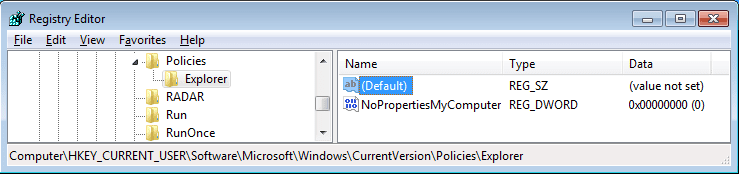
The registry entry is a local police setting. (See here and here.) If that policy has never been set, then the registry key may be absent. It is absent on a fresh install of W7 pro. You can create the key of Explorer and then the DWORD of NoPropertiesMyComputer if you want.

You should leave the value at 0:

NoPropertiesMyComputer.png


Setting it to a value of 1 (and then restarting the computer) should remove the Properties entry from the context menu of Computer:

properties.png


Have you had a chance to try a clean boot?
 

My Computer My Computer

At a glance

W7 Pro SP1 64biti78GBIntel HD Graphics
Computer type
Laptop
Computer Manufacturer/Model Number
Employer provided Dell Latitude
OS
W7 Pro SP1 64bit
CPU
i7
Memory
8GB
Graphics Card(s)
Intel HD Graphics
Hard Drives
crappy SSD
Antivirus
Employer mandated Symantec Endpoint Protection
Browser
Pale Moon 64bit, IE11 64bit & Chrome 64bit
I've spent a fair amount of time with Process Monitor and these types of things come up a lot. They sure look like an error, but lots of operations that are native to Windows will cause entries like this. It should not cause a process to hang - but since your computer is doing something that is not normal, we can go a little ways down this road:

Yes, agreed - I have seen a ot of those operations (and wondered why they are done at all) with Windows (check a directory exists, check a reg key is set, etc ... eventually leading to a not found). Never saw this as a problem and assume this is Windows way to check if options exists or not.

The registry entry is a local police setting. (See here and here.) If that policy has never been set, then the registry key may be absent. It is absent on a fresh install of W7 pro. You can create the key of Explorer and then the DWORD of NoPropertiesMyComputer if you want.

You should leave the value at 0:

[...]

So, I did set this value and tried (both DeleteXP and Calibre) with no changes whatsoever. With that observation and the previous ones (kind of normal operations to check REG keys), I think we should abandon the idea that those missing REG keys have any effect.


Have you had a chance to try a clean boot?

I have and there were no change either :cry:
To make sure, tried also both my initial issue (Calibre) and the smaller self-contained program also hanging as a test (DeleteXP). The delays are as usual (20 to 40 seconds per file).

If one look at the post follow-up from Blue and the few I posted, the problem of "slow file deletion" has been observed by other people in other context (btw, I cannot access his first link but it is the same as How can I recycle w/o using SHFileOperation (which is painfully slow)?).
 

My Computer My Computer

At a glance

Windows 7 ProfessionalIntel (R) Core(TM) i5 M4804 GB
Computer Manufacturer/Model Number
SOny VAIO VPCS137GX
OS
Windows 7 Professional
CPU
Intel (R) Core(TM) i5 M480
Memory
4 GB
Have you tried reinstalling both of the programs again?
 

My Computer My Computer

Computer type
Laptop
Have you tried reinstalling both of the programs again?

Yes, that was one of the first thing I did before contacting the authors of Calibre eBook. Steps were
- export all my eBooks
- remove Calibre + make sure the related directories (especially where the index was) is gone; I initially
thought that my index library may be corrupt and re-creating it would help
- re-install
- re-import my books
- add one random book ... remove .. and :cry: ... same

Note though that did not have that much hope having noticed the sme slow response behavior with other apps before (an UPGRADE to a newer version "fully Windows 7 & 8 compatible" made the problem go away - I do not have that luxury with Calibre).
 

My Computer My Computer

At a glance

Windows 7 ProfessionalIntel (R) Core(TM) i5 M4804 GB
Computer Manufacturer/Model Number
SOny VAIO VPCS137GX
OS
Windows 7 Professional
CPU
Intel (R) Core(TM) i5 M480
Memory
4 GB
Just so folks in the thread can see what we are talking about:


That was inside a Virtual Machine running W7pro64bit. It had 1.5GB RAM and 4 cores of a mobile i5 CPU assigned. The host computer (and thus the VM) has an SSD.

I grabbed the epub files from here:
50 top free ebook classics in Kindle and epub format | iBookNook


BTW, is it normal for the deletion process to leave the original epub files behind?
 

My Computer My Computer

At a glance

W7 Pro SP1 64biti78GBIntel HD Graphics
Computer type
Laptop
Computer Manufacturer/Model Number
Employer provided Dell Latitude
OS
W7 Pro SP1 64bit
CPU
i7
Memory
8GB
Graphics Card(s)
Intel HD Graphics
Hard Drives
crappy SSD
Antivirus
Employer mandated Symantec Endpoint Protection
Browser
Pale Moon 64bit, IE11 64bit & Chrome 64bit
BTW, is it normal for the deletion process to leave the original epub files behind?

A drag-and-drop will add an eBook to Calibre's private directory (for me, C:\Users\XXX\Documents\Calibre Library\$Author\$Title). Removing cleans it there for sure (but the one you dragged and dropped remains as-is of course as a copy was added). Is this what you meant?

What about if we approach this from a different angle:

What on Windows 7 can cause a thread to hang there doing nothing for 20 to 40 seconds?

Perhaps if we can name a few reasons and check, there is a chance to find the issue (although I doubt that all thread creation hang as the OS would be completely dysfunctional if that was so ... but still worth trying to think away from Calibre or DeleteXP or ... ). Especially, do you know what that SHFileOperation does? It invokes a "shell" but what does it do then and what does that mean exactly? Does it use a PATH environment and search for something (like invoke a command from the shell)? Any special directories I should be looking at then? In Unix, invoking a shell command would look into $PATH and if one of the path in $PATH is problematic (hanging or slow lookup), the execution of the command can be direly delayed ... Having no clue of Windows mechanisms for what is called "shell" activation, I am wondering if perhaps there is a similar issue here.
 

My Computer My Computer

At a glance

Windows 7 ProfessionalIntel (R) Core(TM) i5 M4804 GB
Computer Manufacturer/Model Number
SOny VAIO VPCS137GX
OS
Windows 7 Professional
CPU
Intel (R) Core(TM) i5 M480
Memory
4 GB
BTW, is it normal for the deletion process to leave the original epub files behind?

A drag-and-drop will add an eBook to Calibre's private directory (for me, C:\Users\XXX\Documents\Calibre Library\$Author\$Title). Removing cleans it there for sure (but the one you dragged and dropped remains as-is of course as a copy was added). Is this what you meant?

What about if we approach this from a different angle:

What on Windows 7 can cause a thread to hang there doing nothing for 20 to 40 seconds?

Information about SHFileOperation() and File System Objects:

Working with Files

SHFileOperation function (Windows)

The thread could have a lower priority level, but the thread should receive a priority boost after a while to prevent CPU starvation.

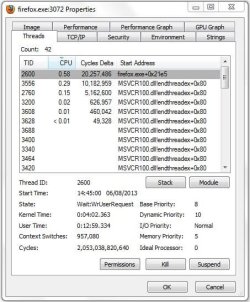
Open Process Explorer, and then double click the DeleteXP.exe process, go to the Threads tab, and then post a screenshot - http://www.sevenforums.com/tutorials/9733-screenshots-files-upload-post-seven-forums.html

Base Priority = Starting priority of the thread associated with the process.

Dynamic Priority = The current priority of the thread.

FF.JPG
 

My Computer My Computer

Computer type
Laptop
Open Process Explorer, and then double click the DeleteXP.exe process, go to the Threads tab, and then post a screenshot - http://www.sevenforums.com/tutorials/9733-screenshots-files-upload-post-seven-forums.html

Base Priority = Starting priority of the thread associated with the process.

Dynamic Priority = The current priority of the thread.

OK, trying ... see the attachment below (I do not see anything strange I have to say).
 

Attachments

  • DeleteXP-threads.png
    DeleteXP-threads.png
    19.3 KB · Views: 8

My Computer My Computer

At a glance

Windows 7 ProfessionalIntel (R) Core(TM) i5 M4804 GB
Computer Manufacturer/Model Number
SOny VAIO VPCS137GX
OS
Windows 7 Professional
CPU
Intel (R) Core(TM) i5 M480
Memory
4 GB

My Computer My Computer

Computer type
Laptop
Does it act slow when you have other programs open? Ensure you have the two programs running if your creating the User-Mode dump file:

Try creating a User-Mode dump file - How to create a user-mode process dump file in Windows Vista and in Windows 7

Then upload the dump files to here [...]

OK, so I created a dump of DeleteXP.exe (again just because it is a smaller program - if there is a need for one from Calibre, could do that instead). However, the full dump is 15 MB compressed ... So I am uploading the minidump.
 
Last edited:

My Computer My Computer

At a glance

Windows 7 ProfessionalIntel (R) Core(TM) i5 M4804 GB
Computer Manufacturer/Model Number
SOny VAIO VPCS137GX
OS
Windows 7 Professional
CPU
Intel (R) Core(TM) i5 M480
Memory
4 GB
The call stack for the dump file seems to be corrupt, create a Minidump of both processes with ProcDump
 

My Computer My Computer

Computer type
Laptop
The call stack for the dump file seems to be corrupt, create a Minidump of both processes with ProcDump

Sorry again for the delay in responding (on the move until next week).
I have tried again using procdump.exe and attach both calibre and DeleteXP - I waited until the command
got stuck to proceed with a dump (noticed the dump creation is near immediate). I hope those dumps are
fine.
 
Last edited:

My Computer My Computer

At a glance

Windows 7 ProfessionalIntel (R) Core(TM) i5 M4804 GB
Computer Manufacturer/Model Number
SOny VAIO VPCS137GX
OS
Windows 7 Professional
CPU
Intel (R) Core(TM) i5 M480
Memory
4 GB
Back
Top