"Task scheduler" & where to find it?

5tevie

New member
Local time
1:48 PM
Messages
23
Hi guys,
I have been told that Windows 7 includes something called a Task scheduler and that I can get it to do things like running security scans automatically before the PC shuts down. Now, this may sound a bit strange but I can't find it. Mostly because I'm blind as a bat and the Computer screen, although a decent size, sits about 8 feet from my eyes. So, if some kind soul could tell me exactly where to find it, I'll have a Goosey and see what I can find out.
Cheers,
Steve.
 

My Computer My Computer

At a glance

Windows 7 Professional 64 bitIntel Core 2 Duo E8400 3.0GHz4 GHz??
Computer type
PC/Desktop
Computer Manufacturer/Model Number
Dell OptiPlex 760 SFF
OS
Windows 7 Professional 64 bit
CPU
Intel Core 2 Duo E8400 3.0GHz
Motherboard
??
Memory
4 GHz
Graphics Card(s)
??
Hard Drives
1 x 750 GB
Antivirus
MSE(updated)
Browser
Google Chrome
Hi, Welcome to Seven forums.

check out this tutorial. In this you will get the complete process on how to run the task scheduler and how to schedule a task in Win 7.

Keep us posted.
 

My Computer My Computer

At a glance

Windows 11 x64i5 2500K @ 3.3 GHz16 GB DDR 3 @ 1600MhzMSI 1050TI 4GB OC version
Computer type
PC/Desktop
Computer Manufacturer/Model Number
Custom Bulid/Self made
OS
Windows 11 x64
CPU
i5 2500K @ 3.3 GHz
Motherboard
ASUS P8 Z77 V pro
Memory
16 GB DDR 3 @ 1600Mhz
Graphics Card(s)
MSI 1050TI 4GB OC version
Sound Card
On Board (Realtek HD audio)
Monitor(s) Displays
Samsung 22" LCD
Screen Resolution
1920*1080
Hard Drives
Seagate 1 TB, WD 1TB, Seagate 2 TB ( I use a lot of space)
PSU
coolermaster 750 W
Case
Coolermaster HAF912
Cooling
Coolermaster hyper 212 EVO
Keyboard
Samsung
Mouse
Dell Wireless
Internet Speed
Wireless 50 Mbps
Antivirus
AVG 2016 Internet Security
Browser
Google Chrome
WOW!!! ... That was quick.
Off for a read. I shall report back later.
Cheers,
Steve
 

My Computer My Computer

At a glance

Windows 7 Professional 64 bitIntel Core 2 Duo E8400 3.0GHz4 GHz??
Computer type
PC/Desktop
Computer Manufacturer/Model Number
Dell OptiPlex 760 SFF
OS
Windows 7 Professional 64 bit
CPU
Intel Core 2 Duo E8400 3.0GHz
Motherboard
??
Memory
4 GHz
Graphics Card(s)
??
Hard Drives
1 x 750 GB
Antivirus
MSE(updated)
Browser
Google Chrome
Do keep us posted. :)
 

My Computer My Computer

At a glance

Windows 11 x64i5 2500K @ 3.3 GHz16 GB DDR 3 @ 1600MhzMSI 1050TI 4GB OC version
Computer type
PC/Desktop
Computer Manufacturer/Model Number
Custom Bulid/Self made
OS
Windows 11 x64
CPU
i5 2500K @ 3.3 GHz
Motherboard
ASUS P8 Z77 V pro
Memory
16 GB DDR 3 @ 1600Mhz
Graphics Card(s)
MSI 1050TI 4GB OC version
Sound Card
On Board (Realtek HD audio)
Monitor(s) Displays
Samsung 22" LCD
Screen Resolution
1920*1080
Hard Drives
Seagate 1 TB, WD 1TB, Seagate 2 TB ( I use a lot of space)
PSU
coolermaster 750 W
Case
Coolermaster HAF912
Cooling
Coolermaster hyper 212 EVO
Keyboard
Samsung
Mouse
Dell Wireless
Internet Speed
Wireless 50 Mbps
Antivirus
AVG 2016 Internet Security
Browser
Google Chrome
OK, First off, let me say that I very much appreciate the help that you guys come up with. The only problem is that it sometimes falls at the first hurdle.
For instance, I went to the tutorial and read this right at the beginning ......
Open Task Scheduler by clicking the Start button, clicking Control Panel, then, System and Security, clicking Administrative Tools, and then double-clicking Task Scheduler.* Administrator permission required If you're prompted for an administrator password or confirmation, type the password or provide confirmation.
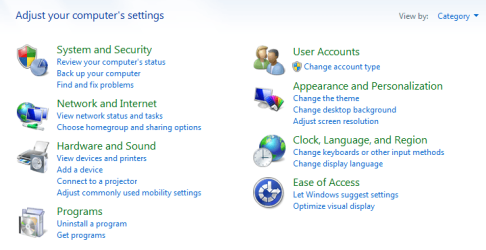
So, I'm looking at the list of things in Control panel and there is no sign of anything called "System and Security". This annoys me because, although given good advice by helpful band of guys, the computer system has let them down. Anyway, because of that flaw, I decided to have a mooch around the Control panel options to see what I could find. It was only then that I discovered, "View by" and changed the icon size. That was no good so I tried clicking on, "Category" ..... BANG!!! There it was "System and Security". I would never have found it except by accident. Now, call me picky but surely that simple action should have been right at the start of the Tutorial, as in .....
Open Task Scheduler by clicking the Start button, clicking Control Panel, clicking "View by", then "Category" then, System and Security.
Just a thought. Anyway, back to the tutorial.
 
Last edited:

My Computer My Computer

At a glance

Windows 7 Professional 64 bitIntel Core 2 Duo E8400 3.0GHz4 GHz??
Computer type
PC/Desktop
Computer Manufacturer/Model Number
Dell OptiPlex 760 SFF
OS
Windows 7 Professional 64 bit
CPU
Intel Core 2 Duo E8400 3.0GHz
Motherboard
??
Memory
4 GHz
Graphics Card(s)
??
Hard Drives
1 x 750 GB
Antivirus
MSE(updated)
Browser
Google Chrome
I understand what you mean. But, it is very clear. Normally in the control panel the icons are viewed as "Small icons". You get the options at the top right side to change the view type. This is how you see with option selected Category (first pic).

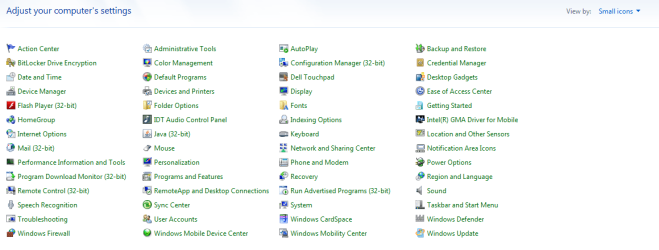
And of you change the option to small icons, it will change to (second pic)
 

Attachments

  • 1.png
    1.png
    23.2 KB · Views: 0
  • 2.png
    2.png
    26.1 KB · Views: 1

My Computer My Computer

At a glance

Windows 11 x64i5 2500K @ 3.3 GHz16 GB DDR 3 @ 1600MhzMSI 1050TI 4GB OC version
Computer type
PC/Desktop
Computer Manufacturer/Model Number
Custom Bulid/Self made
OS
Windows 11 x64
CPU
i5 2500K @ 3.3 GHz
Motherboard
ASUS P8 Z77 V pro
Memory
16 GB DDR 3 @ 1600Mhz
Graphics Card(s)
MSI 1050TI 4GB OC version
Sound Card
On Board (Realtek HD audio)
Monitor(s) Displays
Samsung 22" LCD
Screen Resolution
1920*1080
Hard Drives
Seagate 1 TB, WD 1TB, Seagate 2 TB ( I use a lot of space)
PSU
coolermaster 750 W
Case
Coolermaster HAF912
Cooling
Coolermaster hyper 212 EVO
Keyboard
Samsung
Mouse
Dell Wireless
Internet Speed
Wireless 50 Mbps
Antivirus
AVG 2016 Internet Security
Browser
Google Chrome
Archer .... If I click on Control Panel, I always get your second picture and, as you can see, there is no mention of "System & Security". When that happened, my only thought was, maybe my version of Windows 7 is a different version to the one used in the tutorial.
The bad news now is that as far as I can see, there's no way to do what I wanted anyway.
What I wanted to do was set my PC up so that it ran MSE and Malwarebytes when the computer was shut down. I appear to be snookered 'cos there is no option to "Run on shutdown."
Ah well, it was worth a try.
Cheers all,
Steve.
 

My Computer My Computer

At a glance

Windows 7 Professional 64 bitIntel Core 2 Duo E8400 3.0GHz4 GHz??
Computer type
PC/Desktop
Computer Manufacturer/Model Number
Dell OptiPlex 760 SFF
OS
Windows 7 Professional 64 bit
CPU
Intel Core 2 Duo E8400 3.0GHz
Motherboard
??
Memory
4 GHz
Graphics Card(s)
??
Hard Drives
1 x 750 GB
Antivirus
MSE(updated)
Browser
Google Chrome
Their is no option for any computer to do anything when it is shutdown, (off).

From post #7.
What I wanted to do was set my PC up so that it ran MSE and Malwarebytes when the computer was shut down. I appear to be snookered 'cos there is no option to "Run on shutdown."
Ah well, it was worth a try.
Cheers all,
Steve.
 

My Computer My Computer

At a glance

Windows 10 Pro. 64/ version 1709 Windows 7 Pr...Intel i7-6800K @ 4.3Corsair Platinum 16 gig @2400EVGA GTX 1070 OC
Computer type
PC/Desktop
Computer Manufacturer/Model Number
Home made Desktop
OS
Windows 10 Pro. 64/ version 1709 Windows 7 Pro/64
CPU
Intel i7-6800K @ 4.3
Motherboard
ASUS X-99 Deluxe II
Memory
Corsair Platinum 16 gig @2400
Graphics Card(s)
EVGA GTX 1070 OC
Monitor(s) Displays
Asus 27" LED LCD/VE278Q
Screen Resolution
1920-1080 or 1280-720 HDMI
Hard Drives
INTEL SSD 730-240 Gb Sata 3.0/
PSU
EVGA Platium 1200W
Case
Phanteks Luxe Tempered Glass 8 fans/ one radiator
Cooling
XSPC/ Water Cooled CPU
Keyboard
Das 4 Professional
Mouse
Logitech M705/MX Anywhere 2-S
Internet Speed
100 mbits
Antivirus
Microsoft Security Essentials/ Malwarebytes Premium 3.0/ SAS
Browser
I.E. 11 default/Firefox/ ISP Time Warner Cable/Spectrum
Other Info
LG BluRay Burner/
Sound system-KLipsch-THX/
Icy Dock ssd Hot Swap bays.

My Computer My Computer

At a glance

Windows 11 x64i5 2500K @ 3.3 GHz16 GB DDR 3 @ 1600MhzMSI 1050TI 4GB OC version
Computer type
PC/Desktop
Computer Manufacturer/Model Number
Custom Bulid/Self made
OS
Windows 11 x64
CPU
i5 2500K @ 3.3 GHz
Motherboard
ASUS P8 Z77 V pro
Memory
16 GB DDR 3 @ 1600Mhz
Graphics Card(s)
MSI 1050TI 4GB OC version
Sound Card
On Board (Realtek HD audio)
Monitor(s) Displays
Samsung 22" LCD
Screen Resolution
1920*1080
Hard Drives
Seagate 1 TB, WD 1TB, Seagate 2 TB ( I use a lot of space)
PSU
coolermaster 750 W
Case
Coolermaster HAF912
Cooling
Coolermaster hyper 212 EVO
Keyboard
Samsung
Mouse
Dell Wireless
Internet Speed
Wireless 50 Mbps
Antivirus
AVG 2016 Internet Security
Browser
Google Chrome
Sorry guys, I need to clarify what I meant by "on shutdown."
I don't mean while the PC is shut down. I meant just as the pc starts to close down.
Maybe reading this thread will explain better.... Gentlemen .... Get your thinking heads on .... - The eBay Community

I am blackburn_stevie and the forum is the PC help forum on eBay.
Cheers,
Steve
 

My Computer My Computer

At a glance

Windows 7 Professional 64 bitIntel Core 2 Duo E8400 3.0GHz4 GHz??
Computer type
PC/Desktop
Computer Manufacturer/Model Number
Dell OptiPlex 760 SFF
OS
Windows 7 Professional 64 bit
CPU
Intel Core 2 Duo E8400 3.0GHz
Motherboard
??
Memory
4 GHz
Graphics Card(s)
??
Hard Drives
1 x 750 GB
Antivirus
MSE(updated)
Browser
Google Chrome
I don't know why the MS article (link in Post #2) says to click "System and Security" in Control Panel.
Maybe the instructions were written for an older OS / Control Panel version, and they are outdated now ?
In screen print 2 (Post # 6) Administrative Tools is displayed.
Click on Administrative Tools, and you should see Task Scheduler.

Another way to get to Task Scheduler (or other programs) you are looking for is to use the Start Menu Search option.
It' a great way to quickly and easily find programs...

1) Left click the Start Orb
2) Type in text to search for the program you are looking for
3) Left click to run the program...

My screen print example shows what is listed when I type in "Task".
The list is interactive, the more you enter the list changes, filtering the results ...

SMSSP01.png
 

My Computer My Computer

At a glance

Multi-Boot W7_Pro_x64 W8.1_Pro_x64 W10_Pro_x6...AMD Athlon II x4 6206GB GSkill DDR2 800AMD 4670 GPU + AMD 4200 IGP
Computer type
PC/Desktop
Computer Manufacturer/Model Number
home built
OS
Multi-Boot W7_Pro_x64 W8.1_Pro_x64 W10_Pro_x64 +Linux_VMs +Chromium_VM
CPU
AMD Athlon II x4 620
Motherboard
Gigabyte GA-MA785G-UD3H
Memory
6GB GSkill DDR2 800
Graphics Card(s)
AMD 4670 GPU + AMD 4200 IGP
Sound Card
on board Realtek ALC889A
Monitor(s) Displays
RCA 40" LCD TV, Insignia 32" LCD TV, HP 15" LCD monitor
Screen Resolution
1680 x 1050
Hard Drives
OCZ Vertex 3 120GB,
Samsung F3 1TB (3),
Several others - WD, Seagate, Hitachi, ...
PSU
Corsair 500 W
Case
Rosewill mid tower
Cooling
CM 90mm rifle
Keyboard
Gyration wireless, Logitech wireless, Dell USB wired
Mouse
Gyration wireless, Logitech wireless, V7 USB wired
Internet Speed
Spectrum - 100Mbps D / 10Mbps U
Antivirus
Avast, MBAM3, EMET, WinPatrol
Browser
Pale Moon, Firefox, IE
Other Info
2 multi-boot PC's
Mainly HTPC/Office/Gen purpose (no gaming).
Trendnet USB KVM.
LG DVD burner/Blue Ray Player.
Tray system for removable SATA backup drives.

Not currently OCd, under-volted.
I use Hybrid sleep, rarely re-boot or shutdown.

Hauppauge HD-PVR, Avermedia PCIe TV Tuner, Hauppauge PCI TV Tuner.
Thanks very much, David. That's a lot clearer than the tutorial, lol.
 

My Computer My Computer

At a glance

Windows 7 Professional 64 bitIntel Core 2 Duo E8400 3.0GHz4 GHz??
Computer type
PC/Desktop
Computer Manufacturer/Model Number
Dell OptiPlex 760 SFF
OS
Windows 7 Professional 64 bit
CPU
Intel Core 2 Duo E8400 3.0GHz
Motherboard
??
Memory
4 GHz
Graphics Card(s)
??
Hard Drives
1 x 750 GB
Antivirus
MSE(updated)
Browser
Google Chrome
You're welcome, and glad to hear that helped.
:)
 

My Computer My Computer

At a glance

Multi-Boot W7_Pro_x64 W8.1_Pro_x64 W10_Pro_x6...AMD Athlon II x4 6206GB GSkill DDR2 800AMD 4670 GPU + AMD 4200 IGP
Computer type
PC/Desktop
Computer Manufacturer/Model Number
home built
OS
Multi-Boot W7_Pro_x64 W8.1_Pro_x64 W10_Pro_x64 +Linux_VMs +Chromium_VM
CPU
AMD Athlon II x4 620
Motherboard
Gigabyte GA-MA785G-UD3H
Memory
6GB GSkill DDR2 800
Graphics Card(s)
AMD 4670 GPU + AMD 4200 IGP
Sound Card
on board Realtek ALC889A
Monitor(s) Displays
RCA 40" LCD TV, Insignia 32" LCD TV, HP 15" LCD monitor
Screen Resolution
1680 x 1050
Hard Drives
OCZ Vertex 3 120GB,
Samsung F3 1TB (3),
Several others - WD, Seagate, Hitachi, ...
PSU
Corsair 500 W
Case
Rosewill mid tower
Cooling
CM 90mm rifle
Keyboard
Gyration wireless, Logitech wireless, Dell USB wired
Mouse
Gyration wireless, Logitech wireless, V7 USB wired
Internet Speed
Spectrum - 100Mbps D / 10Mbps U
Antivirus
Avast, MBAM3, EMET, WinPatrol
Browser
Pale Moon, Firefox, IE
Other Info
2 multi-boot PC's
Mainly HTPC/Office/Gen purpose (no gaming).
Trendnet USB KVM.
LG DVD burner/Blue Ray Player.
Tray system for removable SATA backup drives.

Not currently OCd, under-volted.
I use Hybrid sleep, rarely re-boot or shutdown.

Hauppauge HD-PVR, Avermedia PCIe TV Tuner, Hauppauge PCI TV Tuner.
~~~
........that simple action should have been right at the start of the Tutorial, as in .....
Open Task Scheduler by clicking the Start button, clicking Control Panel, clicking "View by", then "Category" then, System and Security.
Just a thought. Anyway, back to the tutorial.
Thanks for the feedback - but maybe something needs to be cleared up here. The tutorial that archer linked to is controlled by Microsoft. We do not have the ability to change it. (We are not associated with Microsoft.) There is a feedback process on the page that archer linked to if you want to tell them about your suggestion.

That said, the default view is Category. Many authors of tutorials figure if you change the view from the default setting, then you should know how/when to put it back. I try and include info that works no matter what view is selected.

If archer has pointed you to this tutorial (which we can change), then the control panel view is not an issue.

I tend to tell people to click on Start
...right click on Computer (in the right column/pane)
...select Manage from the context menu
...select Task Scheduler from the left pane

I like to show people that Manage snap-in. It contains so many goodies :-)


But - as you have discovered - created a scheduled task is not what you want to do.

You will need to create a batch file to run stuff - then have the batch file shut the computer down. The link in post #9 can setup the computer so that this batch file runs when you tell the computer to shutdown. Or you can skip that and just click on the batch file manually.

There might be a problem with what you want to do. Running MSE (running a scan?) and running Malwarebytes (running a scan?) might require human interaction if some malware is found. The computer would not shutdown, it would just sit there waiting for a human.

Do you need help making a batch file?

I'm not sure how to "run Malwarebytes" the way that you need via a batch file.
 
Last edited:

My Computer My Computer

At a glance

W7 Pro SP1 64biti78GBIntel HD Graphics
Computer type
Laptop
Computer Manufacturer/Model Number
Employer provided Dell Latitude
OS
W7 Pro SP1 64bit
CPU
i7
Memory
8GB
Graphics Card(s)
Intel HD Graphics
Hard Drives
crappy SSD
Antivirus
Employer mandated Symantec Endpoint Protection
Browser
Pale Moon 64bit, IE11 64bit & Chrome 64bit
Looking back what I said in Post #11,
System and Security is correct if you have Control Panel displayed as in Post #6 /Screen Print 1.
System and Security is not correct/confusing if you have Control Panel displayed as in Post #6 /Screen Print 2.
:geek:
 

My Computer My Computer

At a glance

Multi-Boot W7_Pro_x64 W8.1_Pro_x64 W10_Pro_x6...AMD Athlon II x4 6206GB GSkill DDR2 800AMD 4670 GPU + AMD 4200 IGP
Computer type
PC/Desktop
Computer Manufacturer/Model Number
home built
OS
Multi-Boot W7_Pro_x64 W8.1_Pro_x64 W10_Pro_x64 +Linux_VMs +Chromium_VM
CPU
AMD Athlon II x4 620
Motherboard
Gigabyte GA-MA785G-UD3H
Memory
6GB GSkill DDR2 800
Graphics Card(s)
AMD 4670 GPU + AMD 4200 IGP
Sound Card
on board Realtek ALC889A
Monitor(s) Displays
RCA 40" LCD TV, Insignia 32" LCD TV, HP 15" LCD monitor
Screen Resolution
1680 x 1050
Hard Drives
OCZ Vertex 3 120GB,
Samsung F3 1TB (3),
Several others - WD, Seagate, Hitachi, ...
PSU
Corsair 500 W
Case
Rosewill mid tower
Cooling
CM 90mm rifle
Keyboard
Gyration wireless, Logitech wireless, Dell USB wired
Mouse
Gyration wireless, Logitech wireless, V7 USB wired
Internet Speed
Spectrum - 100Mbps D / 10Mbps U
Antivirus
Avast, MBAM3, EMET, WinPatrol
Browser
Pale Moon, Firefox, IE
Other Info
2 multi-boot PC's
Mainly HTPC/Office/Gen purpose (no gaming).
Trendnet USB KVM.
LG DVD burner/Blue Ray Player.
Tray system for removable SATA backup drives.

Not currently OCd, under-volted.
I use Hybrid sleep, rarely re-boot or shutdown.

Hauppauge HD-PVR, Avermedia PCIe TV Tuner, Hauppauge PCI TV Tuner.
...Normally in the control panel the icons are viewed as "Small icons"....
I don't think "Small icons" is normal (Default).

I don't know why the MS article (link in Post #2) says to click "System and Security" in Control Panel....
Because that is what the default settings would show a user. Do you see something different using the Category view? (edit: I see that we cross posted. You've answered that question - thanks.)

I'm beginning to question my Virtual Machines now that two members have different default settings :-)
 

My Computer My Computer

At a glance

W7 Pro SP1 64biti78GBIntel HD Graphics
Computer type
Laptop
Computer Manufacturer/Model Number
Employer provided Dell Latitude
OS
W7 Pro SP1 64bit
CPU
i7
Memory
8GB
Graphics Card(s)
Intel HD Graphics
Hard Drives
crappy SSD
Antivirus
Employer mandated Symantec Endpoint Protection
Browser
Pale Moon 64bit, IE11 64bit & Chrome 64bit
I believe the default setting is Categories.
I never liked that as it added another "level" to find things.
I always use the non-default view to show everything...it's easier for me to find things quickly.
I've been doing it that way in Win 7 for over 4 years, so for me it's "normal" ... ;)
 

My Computer My Computer

At a glance

Multi-Boot W7_Pro_x64 W8.1_Pro_x64 W10_Pro_x6...AMD Athlon II x4 6206GB GSkill DDR2 800AMD 4670 GPU + AMD 4200 IGP
Computer type
PC/Desktop
Computer Manufacturer/Model Number
home built
OS
Multi-Boot W7_Pro_x64 W8.1_Pro_x64 W10_Pro_x64 +Linux_VMs +Chromium_VM
CPU
AMD Athlon II x4 620
Motherboard
Gigabyte GA-MA785G-UD3H
Memory
6GB GSkill DDR2 800
Graphics Card(s)
AMD 4670 GPU + AMD 4200 IGP
Sound Card
on board Realtek ALC889A
Monitor(s) Displays
RCA 40" LCD TV, Insignia 32" LCD TV, HP 15" LCD monitor
Screen Resolution
1680 x 1050
Hard Drives
OCZ Vertex 3 120GB,
Samsung F3 1TB (3),
Several others - WD, Seagate, Hitachi, ...
PSU
Corsair 500 W
Case
Rosewill mid tower
Cooling
CM 90mm rifle
Keyboard
Gyration wireless, Logitech wireless, Dell USB wired
Mouse
Gyration wireless, Logitech wireless, V7 USB wired
Internet Speed
Spectrum - 100Mbps D / 10Mbps U
Antivirus
Avast, MBAM3, EMET, WinPatrol
Browser
Pale Moon, Firefox, IE
Other Info
2 multi-boot PC's
Mainly HTPC/Office/Gen purpose (no gaming).
Trendnet USB KVM.
LG DVD burner/Blue Ray Player.
Tray system for removable SATA backup drives.

Not currently OCd, under-volted.
I use Hybrid sleep, rarely re-boot or shutdown.

Hauppauge HD-PVR, Avermedia PCIe TV Tuner, Hauppauge PCI TV Tuner.
I believe the default setting is Categories.
I never liked that as it added another "level" to find things.
I always use the non-default view to show everything...it's easier for me to find things quickly.
I've been doing it that way in Win 7 for over 4 years, so for me it's "normal" ... ;)
One of the first things that I change is:
show the Control Panel as a menu...
...so I know what you mean about 'for me it's "normal"'.
I sometimes have to open a VM before composing instructions.
 

My Computer My Computer

At a glance

W7 Pro SP1 64biti78GBIntel HD Graphics
Computer type
Laptop
Computer Manufacturer/Model Number
Employer provided Dell Latitude
OS
W7 Pro SP1 64bit
CPU
i7
Memory
8GB
Graphics Card(s)
Intel HD Graphics
Hard Drives
crappy SSD
Antivirus
Employer mandated Symantec Endpoint Protection
Browser
Pale Moon 64bit, IE11 64bit & Chrome 64bit
OK, just to clear something up.
This Dell PC is new to me and has a fresh install of Windows 7 Pro installed. Now, without me changing anything at all, when I clicked on Control Panel as advised to in the Tutorial, I got a picture just like the second image above. Once I realised that I could not follow the next instruction (namely click on System and Security) that's when I did a search and clicked on Category.
Many thanks,
Steve
 

My Computer My Computer

At a glance

Windows 7 Professional 64 bitIntel Core 2 Duo E8400 3.0GHz4 GHz??
Computer type
PC/Desktop
Computer Manufacturer/Model Number
Dell OptiPlex 760 SFF
OS
Windows 7 Professional 64 bit
CPU
Intel Core 2 Duo E8400 3.0GHz
Motherboard
??
Memory
4 GHz
Graphics Card(s)
??
Hard Drives
1 x 750 GB
Antivirus
MSE(updated)
Browser
Google Chrome
Back
Top