Help, Task Scheduler won't run a program at startup!

Marty McFly

New member
Member
VIP
Local time
4:28 PM
Messages
120
Location
UK
I'm trying to use Task Scheduler to run a program at startup, but it doesn't work.

It works if I change the trigger from "at system startup" to "one time". But it never works at startup.
 

My Computer

OS
Windows 7 Home Premium 64bit

My Computers

System One System Two

  • Computer type
    PC/Desktop
    OS
    Windows 7 Ultimate 64-bit SP1
    CPU
    Intel Core 2 Quad Q6700 @ 2.66GHz
    Motherboard
    ECS MCP73PVT-SM
    Memory
    4.00GB Single-Channel DDR2 @ 399MHz
    Graphics Card(s)
    2047MB NVIDIA GeForce GT 710 (ASUStek Computer Inc)
    Sound Card
    Realtek High Definition Audio
    Monitor(s) Displays
    HP 21kd
    Screen Resolution
    1920x1080@60Hz
    Hard Drives
    149GB Western Digital WDC WD1600AABS-61PRA0 ATA Device (SATA )
    4000GB Seagate ST4000DM004-2U9104 ATA Device (SATA )
    931GB TOSHIBA External USB 3.0 USB Device (USB (SATA) )
    Antivirus
    None. Don't Need it.
    Browser
    Librewolf Portable
    Other Info
    It's a very old system.
  • Computer type
    PC/Desktop
I'm trying to use Task Scheduler to run a program at startup, but it doesn't work. It works if I change the trigger from "at system startup" to "one time". But it never works at startup.

Marty, you DO realize that in all versions of Windows there is a "Startup" folder, Eh?
If I want something to run at startup, I just put a shortcut to it in the "Startup" folder and it's DONE.
I have three different things running at startup on my own PC, all from the "Startup" folder.

Try it, you'll like it!

:cool:
 

My Computer

Computer type
PC/Desktop
Computer Manufacturer/Model Number
Various
OS
Win 7 Pro, SP1, x86, Win-11/Pro/64
CPU
AMD
Motherboard
Various
Memory
8GB Crucial
Graphics Card(s)
Various
Sound Card
OnBoard
Monitor(s) Displays
Acer 21.5"
Hard Drives
Crucial SSD, 500 GB
PSU
OEM
Case
SFF Slim Line Case
Cooling
OEM
Keyboard
eMachines
Mouse
Logitech Wireless
Internet Speed
varies
Antivirus
Windows Defender/Super Anti-Spyware
Browser
Firefox
Make sure you select "Run with the highest privileges" and "Configure for windows 7..."
Thank you very much but I already did both these and it doesn't run at startup.

Marty, you DO realize that in all versions of Windows there is a "Startup" folder, Eh?
Thank you but I don't like the Startup folder and I removed it. I like my Start Menu to be nice and neat and every folder to contain useful links that I use regularly - having a Startup folder just clutters it unnecessarily and makes it a little harder to find the folder I'm looking for when I use the Start Menu.
 

My Computer

OS
Windows 7 Home Premium 64bit
What program are you trying to execute?

If your program doesn't need admin rights you can starting it from the registry.

Execute "regedit.exe", and go to:
HKEY_CURRENT_USER\Software\Microsoft\Windows\CurrentVersion\Run
Create a new string value, wich its value is the full path to your program.

Or make a "file.reg" with the following, modify the path and double click on it:
--------------------------------------------------------------
Code:
Windows Registry Editor Version 5.00

[HKEY_CURRENT_USER\Software\Microsoft\Windows\CurrentVersion\Run]
"myprog"="\"c:\\path\\to\\program.exe\""
 

My Computers

System One System Two

  • Computer type
    PC/Desktop
    OS
    Windows 7 Ultimate 64-bit SP1
    CPU
    Intel Core 2 Quad Q6700 @ 2.66GHz
    Motherboard
    ECS MCP73PVT-SM
    Memory
    4.00GB Single-Channel DDR2 @ 399MHz
    Graphics Card(s)
    2047MB NVIDIA GeForce GT 710 (ASUStek Computer Inc)
    Sound Card
    Realtek High Definition Audio
    Monitor(s) Displays
    HP 21kd
    Screen Resolution
    1920x1080@60Hz
    Hard Drives
    149GB Western Digital WDC WD1600AABS-61PRA0 ATA Device (SATA )
    4000GB Seagate ST4000DM004-2U9104 ATA Device (SATA )
    931GB TOSHIBA External USB 3.0 USB Device (USB (SATA) )
    Antivirus
    None. Don't Need it.
    Browser
    Librewolf Portable
    Other Info
    It's a very old system.
  • Computer type
    PC/Desktop
What program are you trying to execute?
AutoHotKey, for custom keyboard shortcuts.

If your program doesn't need admin rights you can starting it from the registry.
I followed your instructions and it worked! :-)

Thank you! :-)
 

My Computer

OS
Windows 7 Home Premium 64bit
I've just realised that the program doesn't quite run properly unless it has admin rights.

Do you know any way to use the registry to make it launch with admin rights?
 

My Computer

OS
Windows 7 Home Premium 64bit
Ok, I downloaded and test my own autohotkey script task. There's indeed a problem.

Windows execute the script with high privileges as expected, but the problem is that the icon tray its not showing up.

In this thread speak about the issue and found a solution that didn't work for me: https://www.autohotkey.com/boards/viewtopic.php?t=82981


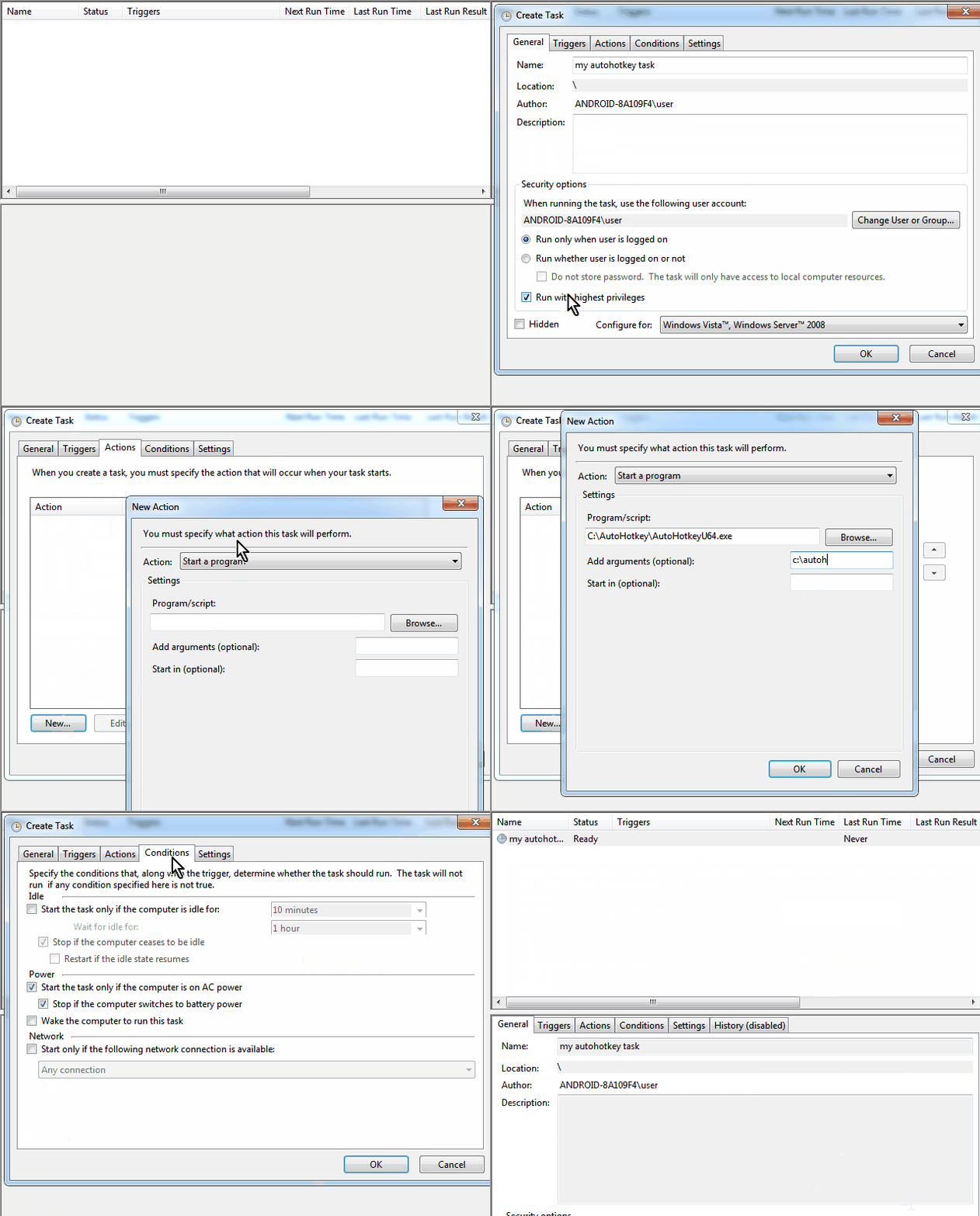
So, I found a workaround, it's a two steps solution:
---------------------------------
Step 1 - Do the task with no trigger:
- general: name your task, select Run with highest privileges, and Configure for: windows 7
- trigger: nothing
- actions: put the program ..\AutoHotkeyU64.exe from whatever folder you put it, and as Add arguments put the full path to your script.
- conditions: nothing
- Settings: select If the task fails, restart

2Gad9FT.png


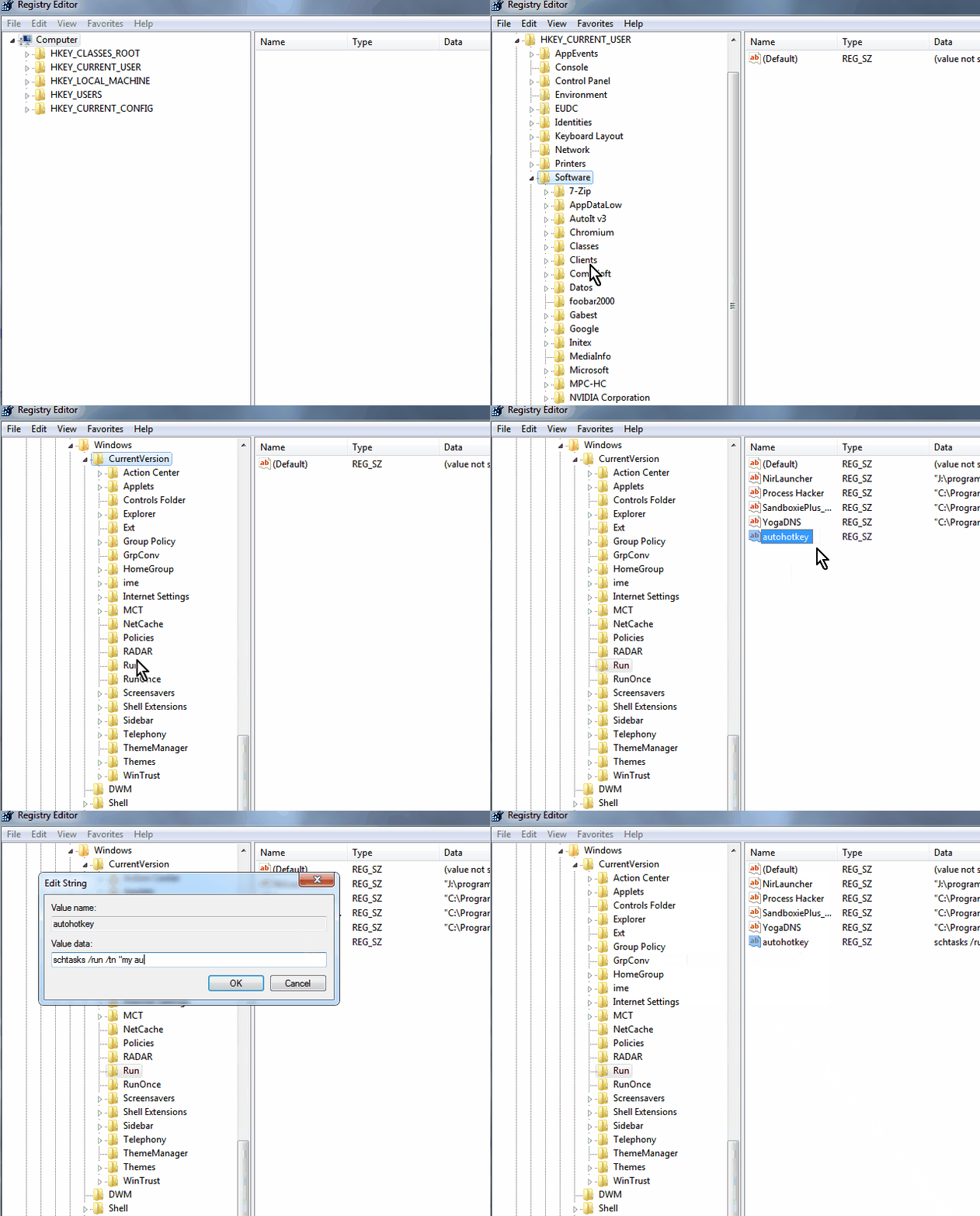
Step 2 - Start the task from the registry:
- execute regedit.exe
- go to HKEY_CURRENT_USER\Software\Microsoft\Windows\CurrentVersion\Run
- add a new string value and as a value put: schtasks /run /tn "my autohotkey task"

(the name must be the same you use when you create the task in task manager, if you put it in a custom folder just add it as a prefix to the name like this "my custom folder\my autohotkey task" ) . Doble quotes are important if your task contain spaces)

6aHtDC3.png


And that's it. Your autohotkey script now must be running, with the tray icon showing and with full privileges.
 
Last edited:

My Computers

System One System Two

  • Computer type
    PC/Desktop
    OS
    Windows 7 Ultimate 64-bit SP1
    CPU
    Intel Core 2 Quad Q6700 @ 2.66GHz
    Motherboard
    ECS MCP73PVT-SM
    Memory
    4.00GB Single-Channel DDR2 @ 399MHz
    Graphics Card(s)
    2047MB NVIDIA GeForce GT 710 (ASUStek Computer Inc)
    Sound Card
    Realtek High Definition Audio
    Monitor(s) Displays
    HP 21kd
    Screen Resolution
    1920x1080@60Hz
    Hard Drives
    149GB Western Digital WDC WD1600AABS-61PRA0 ATA Device (SATA )
    4000GB Seagate ST4000DM004-2U9104 ATA Device (SATA )
    931GB TOSHIBA External USB 3.0 USB Device (USB (SATA) )
    Antivirus
    None. Don't Need it.
    Browser
    Librewolf Portable
    Other Info
    It's a very old system.
  • Computer type
    PC/Desktop
Hi Diz and thanks so much for your help here! :-) Gracias!

I know that you updated your above answer. I had actually read the original answer yesterday, and had already followed the steps you gave to use Task Scheduler alone. I was waiting for the next reboot to see if it worked.

To my surprise, when I booted this morning, it worked! It started up fully, with admin rights, including the system tray icon!

I wasn't expecting it to work, as your instructions were more or less exacly what I'd already been doing, including "Run with highest privileges", configuring for "Windows ® 7 [etc]" and the "retry every minute" thing. The only thing I hadn't been doing was the trigger being for the specific user, which I did this time. So I guess that made the difference!?

Why it worked for me and not you, I don't know. I also wonder if it will work every time, because there often seems to be an inconsistency to how things boot on my machine. So I'm glad you offered the above alternative solution! I may well need it. I'll report back here on whether this continues to work.

As for that AutoHotKey forum thread, the forum seems to be down right now so I can't see it.
 

My Computer

OS
Windows 7 Home Premium 64bit
Well I'm happy to report that the 100% Task Scheduler method seems to be working perfectly for me now!

Again, I believe the key detail was to set the trigger to be for the "specific user"!

Thank you once again, Diz! :-)
 

My Computer

OS
Windows 7 Home Premium 64bit
Marty, you DO realize that in all versions of Windows there is a "Startup" folder, Eh?
If I want something to run at startup, I just put a shortcut to it in the "Startup" folder and it's DONE.
I have three different things running at startup on my own PC, all from the "Startup" folder.

Try it, you'll like it!

:cool:
I'm a week behind this, but I thought I'd mention that I have a script to make a system restore point on the first startup of the day and a shortcut didn't work. I had to put the script in the startup folder. Just an FYI is someone has trouble making something work with a shortcut.
 

My Computer

Computer type
Laptop
Computer Manufacturer/Model Number
HP
OS
Windows 7 Home Premium 64bit
I'm a week behind this, but I thought I'd mention that I have a script to make a system restore point on the first startup of the day and a shortcut didn't work. I had to put the script in the startup folder. Just an FYI is someone has trouble making something work with a shortcut.

You don't know how happy I am, to see someone besides me forcing a new Restore Point on every Startup.
And YES to having to actually put the 'Script' itself in the Startup Folder.
It's something I've been doing for years, ever since MS invented the System Restore feature.
You can easily set the amount of space on the Hard Drive to devote to Restore Points, so they don't just take over the entire HD.
Like, they did in Windows ME. :mad: Just don't forget to set that Max. Space.

Cheers Mate!
TM :cool:
 

My Computer

Computer type
PC/Desktop
Computer Manufacturer/Model Number
Various
OS
Win 7 Pro, SP1, x86, Win-11/Pro/64
CPU
AMD
Motherboard
Various
Memory
8GB Crucial
Graphics Card(s)
Various
Sound Card
OnBoard
Monitor(s) Displays
Acer 21.5"
Hard Drives
Crucial SSD, 500 GB
PSU
OEM
Case
SFF Slim Line Case
Cooling
OEM
Keyboard
eMachines
Mouse
Logitech Wireless
Internet Speed
varies
Antivirus
Windows Defender/Super Anti-Spyware
Browser
Firefox
You don't know how happy I am, to see someone besides me forcing a new Restore Point on every Startup.
And YES to having to actually put the 'Script' itself in the Startup Folder.
It's something I've been doing for years, ever since MS invented the System Restore feature.
You can easily set the amount of space on the Hard Drive to devote to Restore Points, so they don't just take over the entire HD.
Like, they did in Windows ME. :mad: Just don't forget to set that Max. Space.

Cheers Mate!
TM :cool:

Just to clarify, my script creates only one restore point on first start of the day. If I need others during the day, I will create them the normal way using System Restore.
 

My Computer

Computer type
Laptop
Computer Manufacturer/Model Number
HP
OS
Windows 7 Home Premium 64bit
Back
Top