Win 7 - Monitor blanks during recovery/chkdsk, but processes still run

Zarathud

New member
Local time
10:45 PM
Messages
12
Dell XPS 435T/9000 with Win 7 64-Bit

I was having all kinds of BSOD and system freezing issues so I decided to do a clean install from my system recovery disks to return to a factory image. After inserting the 2nd recovery disk, the screen went blank and I could not get it to come back on (turning monitor off and on, unplug/plug power cord, etc.). I let the process run as the computer was still on and eventually the DVD drive opened. I assumed this meant the process was done so I manually rebooted the system with the power button and the system booted into Win 7 normal with the factory image installed. I immediately ran a chkdsk and during phase 5 the screen blanked again. I let it run again and a few hours later the machine booted into windows normally. I checked the event viewer and chkdsk completed normally.

What could be causing the screen blank to occur?

What additional info can I provide to help diagnose this?
 

My Computer My Computer

At a glance

Windows 7 Professional 64-bit SP1Intel Core i7 CPU 920 @ 2.67 GHz12.0 GBGeForce GTS 240
Computer type
PC/Desktop
Computer Manufacturer/Model Number
Dell Studio XPS 435T
OS
Windows 7 Professional 64-bit SP1
CPU
Intel Core i7 CPU 920 @ 2.67 GHz
Motherboard
Dell 0X501H - Chipset: Intel X58 - BIOS: A16
Memory
12.0 GB
Graphics Card(s)
GeForce GTS 240
Hard Drives
Seagate ST31000528AS - 1 TB
Antivirus
AVG Free 2014
Browser
IE 11, Chrome 32
Hello Zarathud mate if you want to just do a reinstall then you could follow this
http://www.sevenforums.com/tutorials/219487-clean-reinstall-factory-oem-windows-7-a.html#post1839164
Hopefully you have all the data you need backed up and the advantage of this way is that you will lose all the bloatware that came with the machine.
Anything off the disks you need after you can go to and get but I am guessing if you just want 7 up and running then this is your best bet.

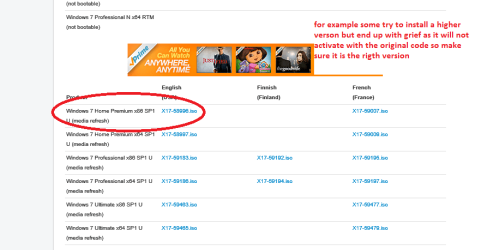
Just make sure you pick the correct version of Windows see pic
 

Attachments

  • ISO.PNG
    ISO.PNG
    22.2 KB · Views: 0

My Computer My Computer

At a glance

Desk1 7 Home Prem / Desk2 10 Pro / Main lap A...Desk1 i5 3750K / Laptop i7 GTX 860M / Desk2 i...Desk1 8GB (1866) / Desk2 16GB (1333) / Laptop...Desk 1& 2NVidia GTX 650 & Laptops on board Intel
Computer type
PC/Desktop
Computer Manufacturer/Model Number
Own build (new) Desk1 / Asus ROG Win 7 / Desk2 1st build
OS
Desk1 7 Home Prem / Desk2 10 Pro / Main lap Asus ROG 10 Pro 2 laptop Toshiba 7 Pro Asus P2520 7 & 10
CPU
Desk1 i5 3750K / Laptop i7 GTX 860M / Desk2 i5 2500
Motherboard
Desk1 Asus P877-V / Desk2 Gigabyte H67 UD3H / Laptop ?
Memory
Desk1 8GB (1866) / Desk2 16GB (1333) / Laptop 8Gb DDR3
Graphics Card(s)
Desk 1& 2NVidia GTX 650 & Laptops on board Intel
Sound Card
Desk 1 & 2 -XONAR DG Realtek High Def audio Laptop
Monitor(s) Displays
Desk 1 Benq HD 2450 / Desk2 Philips 24" / Laptop 17.5"
Screen Resolution
1920x1080 D1 & D2 & Laptop 1
Hard Drives
Desk1 Samsung 120GB 830 SSD
Asus ROG 256GB 850 Pro SSD
Desk2 Samsung 840 256 SSD
Toshiba 120GB EVO
PSU
Desk 1 Corsair HX 1050/ Laptop ? / Desk 2 Corsair HX 650
Case
Desk 1 Cooler HAF XM ? Toshiba laptop / Desk2 Coolermaster
Cooling
Fans on all Desk1 -2 Desk2 - all Coolermasters 5 Laptop ?
Keyboard
Desk 1 MS Sidewinder X6 Desk 2 MS Sidewinder X 4
Mouse
Desk 1&2 - Gigabyte MS 900 gamer - laptop - Logitec wireless
Internet Speed
ADSL2+
Other Info
One other Desktop (tester) and spare Toshba laptop both with SSD's
Running Kaspersky 2016 ISS on all machines config'd identically
Logitec audio stereo systems on each machine (x3)
Canon MG5250MFC
Router/modem TP-Link running WPA2SK
I may try a Clean Install without the recovery disks at some point, but I am concerned this is a BIOS or hardware issue as it occurred outside of the WIN 7 GUI (e.g. during the recovery process and during chkdsk).
 

My Computer My Computer

At a glance

Windows 7 Professional 64-bit SP1Intel Core i7 CPU 920 @ 2.67 GHz12.0 GBGeForce GTS 240
Computer type
PC/Desktop
Computer Manufacturer/Model Number
Dell Studio XPS 435T
OS
Windows 7 Professional 64-bit SP1
CPU
Intel Core i7 CPU 920 @ 2.67 GHz
Motherboard
Dell 0X501H - Chipset: Intel X58 - BIOS: A16
Memory
12.0 GB
Graphics Card(s)
GeForce GTS 240
Hard Drives
Seagate ST31000528AS - 1 TB
Antivirus
AVG Free 2014
Browser
IE 11, Chrome 32
Well I doubt it would be a BIOS problem as the thing would not get to boot anything - I stand to be corrected of course but the BIOS has to make the decision for example on what device to boot from.

If you have took for drivers then they are here Product Support | Dell US

But there are two things as in checking the hard drive and RAM

the drive you could check with say Seatools SeaTools for Windows | Seagate

and RAM


MEMTEST

Download thisone Memtest86+ - Advanced Memory Diagnostic Tool you will need to make a bootable disk setthe BIOS to optical (or USB if preferred) boot the machine and let it run forat LEAST 8passes unless the errors come up straight away. Takesfair time to complete and some leave it running overnight.

Ifyou do get errors then you will need to redo the memtest with eachseparate stick to find the culprit. Having said the it could be a slot problem
But please make sure at least 8 passes unless errors are thrown straight away.
 

My Computer My Computer

At a glance

Desk1 7 Home Prem / Desk2 10 Pro / Main lap A...Desk1 i5 3750K / Laptop i7 GTX 860M / Desk2 i...Desk1 8GB (1866) / Desk2 16GB (1333) / Laptop...Desk 1& 2NVidia GTX 650 & Laptops on board Intel
Computer type
PC/Desktop
Computer Manufacturer/Model Number
Own build (new) Desk1 / Asus ROG Win 7 / Desk2 1st build
OS
Desk1 7 Home Prem / Desk2 10 Pro / Main lap Asus ROG 10 Pro 2 laptop Toshiba 7 Pro Asus P2520 7 & 10
CPU
Desk1 i5 3750K / Laptop i7 GTX 860M / Desk2 i5 2500
Motherboard
Desk1 Asus P877-V / Desk2 Gigabyte H67 UD3H / Laptop ?
Memory
Desk1 8GB (1866) / Desk2 16GB (1333) / Laptop 8Gb DDR3
Graphics Card(s)
Desk 1& 2NVidia GTX 650 & Laptops on board Intel
Sound Card
Desk 1 & 2 -XONAR DG Realtek High Def audio Laptop
Monitor(s) Displays
Desk 1 Benq HD 2450 / Desk2 Philips 24" / Laptop 17.5"
Screen Resolution
1920x1080 D1 & D2 & Laptop 1
Hard Drives
Desk1 Samsung 120GB 830 SSD
Asus ROG 256GB 850 Pro SSD
Desk2 Samsung 840 256 SSD
Toshiba 120GB EVO
PSU
Desk 1 Corsair HX 1050/ Laptop ? / Desk 2 Corsair HX 650
Case
Desk 1 Cooler HAF XM ? Toshiba laptop / Desk2 Coolermaster
Cooling
Fans on all Desk1 -2 Desk2 - all Coolermasters 5 Laptop ?
Keyboard
Desk 1 MS Sidewinder X6 Desk 2 MS Sidewinder X 4
Mouse
Desk 1&2 - Gigabyte MS 900 gamer - laptop - Logitec wireless
Internet Speed
ADSL2+
Other Info
One other Desktop (tester) and spare Toshba laptop both with SSD's
Running Kaspersky 2016 ISS on all machines config'd identically
Logitec audio stereo systems on each machine (x3)
Canon MG5250MFC
Router/modem TP-Link running WPA2SK
@ zarathud. How is your monitor connected to the computer. Is by DVI, VGA, or HDMI.
 

My Computer My Computer

At a glance

Windows 7 Home Premium 64 bit sp1Intel i5 3570 3.4Ghz Ivy Bridge SKT 1155 quad...G-Skill Rip Jaws 16Gb (8x2) DDR3 -1600 PC3 12...Gigabyte NVIDIA GT610 1Gb DDR3 810/1200 PCI-E...
Computer type
PC/Desktop
Computer Manufacturer/Model Number
Self built using existing case
OS
Windows 7 Home Premium 64 bit sp1
CPU
Intel i5 3570 3.4Ghz Ivy Bridge SKT 1155 quad core
Motherboard
Gigabyte Z77-HD3 SKT 1155 2xSata 3, 4x USB 3.0
Memory
G-Skill Rip Jaws 16Gb (8x2) DDR3 -1600 PC3 12800 CL 10 red
Graphics Card(s)
Gigabyte NVIDIA GT610 1Gb DDR3 810/1200 PCI-E 2.0 Silent
Sound Card
NVIDIA High Definition & Realtech High Definition Audio
Monitor(s) Displays
2 x Philips 226V4L 16:9 aspect ratio
Screen Resolution
1920 x 1080 HD
Hard Drives
Samsung 840 Pro 256gb SSD, SATA 3.
Hitachi Touro Portable 1tb, USB 3.0 HDD used for image b/ups.
PSU
Corsair VS450
Case
Codeng
Cooling
PSU fan & CPU fan
Keyboard
Logitech
Mouse
Logitech Wireless trackball M570
Internet Speed
Wireless 3G. 3mg down & 550kb up.
Antivirus
Bitdefender Internet Security 2020
Browser
Opera (Current Version) & Firefox
Other Info
MS Office 2013 Pro. Davis weather station software. MGE Nova 600 avr UPS.

My Computer My Computer

At a glance

Windows 7 Professional 64-bit SP1Intel Core i7 CPU 920 @ 2.67 GHz12.0 GBGeForce GTS 240
Computer type
PC/Desktop
Computer Manufacturer/Model Number
Dell Studio XPS 435T
OS
Windows 7 Professional 64-bit SP1
CPU
Intel Core i7 CPU 920 @ 2.67 GHz
Motherboard
Dell 0X501H - Chipset: Intel X58 - BIOS: A16
Memory
12.0 GB
Graphics Card(s)
GeForce GTS 240
Hard Drives
Seagate ST31000528AS - 1 TB
Antivirus
AVG Free 2014
Browser
IE 11, Chrome 32
Back
Top