- Local time
- 6:14 PM
- Messages
- 5,915
Some people come up with a special and specific requirement. And so it is with pkerr. http://www.sevenforums.com/hardware-devices/320839-pc-won-t-remember-drive-letter.html#post2680332
He wants Windows to assign the same letter for all his external drives which he is using for backups. He will be connecting just one drive at a time.
The solution is simple.
Windows identifies a drive with a Windows unique ID. Each drive in fact has a unique ID.( the general scene)
You give the same unique ID to all the external drives that you want to have the same drive letter and Windows will oblige you by giving the same drive letter when you plug just one drive at a time.
Illustration:
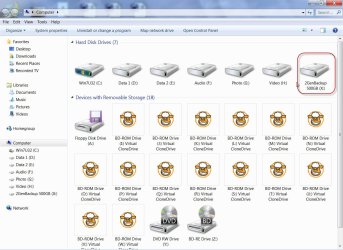
I have two drives one named ZotacBackup and the other GenBackup. Each have their own unique ID and normally these get the drive letters I and J.
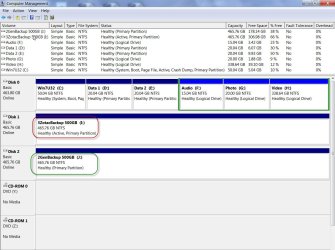
Unique ID of ZotacBackup I: is F3 64 5D 07 ( highlighted in green )
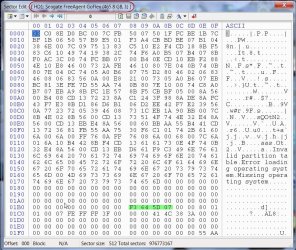
Unique ID of GenBackup J: is AB 3E 68 39 ( highlighted in green)
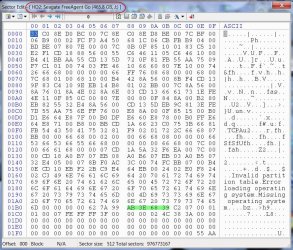
Now I shall change the Unique ID of GenBackup J: to F3 64 5D 07 ( the same as that of ZotacBackup I: using bootice - my favourite program.)
Changing the Unique ID of GenBackup J:
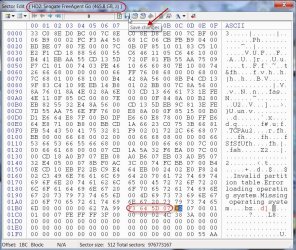
Changed:
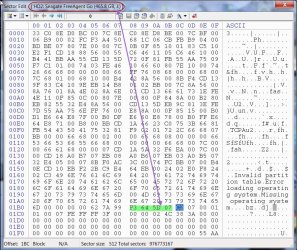
This change will be perceived by Windows the next time you connect the drive.
Now both the drives have the same Unique ID.
I shall plug out the GenBackup J: leaving only the ZotacBackup I: and change its drive letter to R (or any other free drive letter one may want).
Changing Zotac Backup I: to ZotacBackup R: ( Now Windows has associated Drive letter R with the Unique ID F3 64 5D 07 )
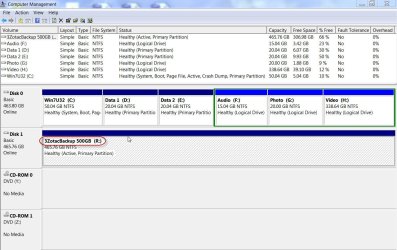
Now I disconnect ZotacBackup R.
Done.
Now whether I connect ZotacBackup drive or GenBackup drive (only one at a time) these drives will get the same drive letter R .
See it for yourself.
ZotacBackup is R:
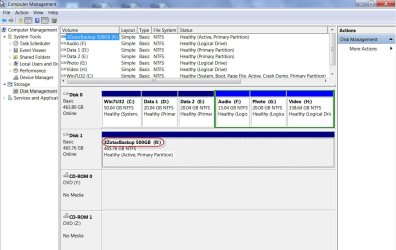
GenBackup is also R:
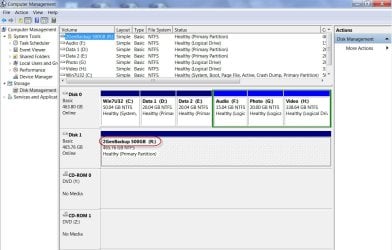
And so that is it. Give the same Unique ID to all the drives and Windows will assign the same drive letter when you connect one and only one.
Windows is dumb.
Another innovative idea ( which I haven't tried but what I think should work ) after a break. ( Time for me to hit the sack now.)
Note: The above method will work only in case of all MBR disks with the same "start sector". (Windows by design formats all HDDs with start Sector at LBA 2048; Other partitioning/formatting software may put the start sector at LBA 63)
He wants Windows to assign the same letter for all his external drives which he is using for backups. He will be connecting just one drive at a time.
The solution is simple.
Windows identifies a drive with a Windows unique ID. Each drive in fact has a unique ID.( the general scene)
You give the same unique ID to all the external drives that you want to have the same drive letter and Windows will oblige you by giving the same drive letter when you plug just one drive at a time.
Illustration:
I have two drives one named ZotacBackup and the other GenBackup. Each have their own unique ID and normally these get the drive letters I and J.
Unique ID of ZotacBackup I: is F3 64 5D 07 ( highlighted in green )
Unique ID of GenBackup J: is AB 3E 68 39 ( highlighted in green)
Now I shall change the Unique ID of GenBackup J: to F3 64 5D 07 ( the same as that of ZotacBackup I: using bootice - my favourite program.)
Changing the Unique ID of GenBackup J:
Changed:
This change will be perceived by Windows the next time you connect the drive.
Now both the drives have the same Unique ID.
I shall plug out the GenBackup J: leaving only the ZotacBackup I: and change its drive letter to R (or any other free drive letter one may want).
Changing Zotac Backup I: to ZotacBackup R: ( Now Windows has associated Drive letter R with the Unique ID F3 64 5D 07 )
Now I disconnect ZotacBackup R.
Done.
Now whether I connect ZotacBackup drive or GenBackup drive (only one at a time) these drives will get the same drive letter R .
See it for yourself.
ZotacBackup is R:
GenBackup is also R:
And so that is it. Give the same Unique ID to all the drives and Windows will assign the same drive letter when you connect one and only one.
Windows is dumb.
Another innovative idea ( which I haven't tried but what I think should work ) after a break. ( Time for me to hit the sack now.)
Note: The above method will work only in case of all MBR disks with the same "start sector". (Windows by design formats all HDDs with start Sector at LBA 2048; Other partitioning/formatting software may put the start sector at LBA 63)
Last edited:
My Computer
At a glance
Windows 7 Home Premium 32 bit
- OS
- Windows 7 Home Premium 32 bit