- Local time
- 5:35 AM
- Messages
- 892
Autohotkey is a macro program for the keyboard. I've gotten the hang of making its script file minimally.
If I simply run the AHK exe file as Admin in Win 7 my sample F1 program key works fine for the simple text/
login info I have in it.
However this program should be at system Startup. Autohotkey said something about putting the
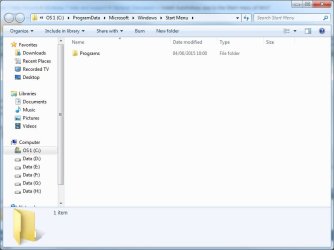
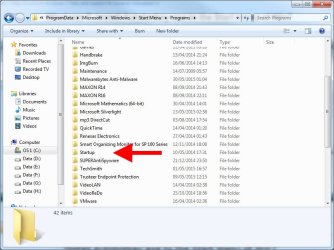
program in Start > Programs > Start folder but I see no such thing.
Alternativiely I tried to run msconfig the old XP way. That opens but I don't see how to add anything.
How can I make Autohorkey load at Startup?
Any suggestions for alternatives in freeware for Win7. Previously I was using Launchboard for many years in XP. That will load but not execute (remap the function keys) in Win7
If I simply run the AHK exe file as Admin in Win 7 my sample F1 program key works fine for the simple text/
login info I have in it.
However this program should be at system Startup. Autohotkey said something about putting the
program in Start > Programs > Start folder but I see no such thing.
Alternativiely I tried to run msconfig the old XP way. That opens but I don't see how to add anything.
How can I make Autohorkey load at Startup?
Any suggestions for alternatives in freeware for Win7. Previously I was using Launchboard for many years in XP. That will load but not execute (remap the function keys) in Win7
My Computer
At a glance
Windows 7 x64 UltimateAMD Athlon II x3 4502 GB
- Computer type
- PC/Desktop
- Computer Manufacturer/Model Number
- custom
- OS
- Windows 7 x64 Ultimate
- CPU
- AMD Athlon II x3 450
- Motherboard
- MSI 880GM
- Memory
- 2 GB
- Hard Drives
- various
- Browser
- Firefox, Opera