Pin Internet sites to the Start Menu

GeeN

New member
Local time
10:21 AM
Messages
7
Hi All,

This is my first mail to the forum, and I hope you will be able to help me on this.
I was looking for an answer all over the net without luck so far.

I would very much like to search specific internet sites directly from the start menu in win7. For instance, I could search PubMed (medical research database) or dictionaries that I like.

According to Microsoft there is a simple option for that in win7 Pro.
I only need to "Pin Internet sites to the Start Menu"
See this technet page: Group Policy for Windows Search, Browse, and Organize

The only thing I should do is to enable the appropriate group policy:
Pin Internet sites to the Search again links and the Start Menu.
And to set up the sites according to the simple rule.

However, sites that are set this way do show up NEITHER in search again links NOR in the start menu.

You could take a look at this site as well, where it is shown with photos how it should work in real life:
Pin Any search site to Start menu and Windows Explorer

Restart does not help, I checked the registry it shows the same setting as the Group Policy editor and everithing looks OK except, that sites that are set this way do NOT show up in the start menu.

I removed "See more results" from the start menu and added Search the Internet link to the Start Menu without any problem. I could also set up a "Custom Instant Search Internet search provider" group policy, so I have at least one internet site that I can search from the net.

Federated search is not good for me because I would like to have my results in the browser (and federated search works only for certain search providers).

I would highly appreciate, if someone could tell me what setting can prevent this group policy to take effect and to show me the search opptions.

Your help would make my work much easier.
Thank you in advance.
GeeN
 

My Computer My Computer

At a glance

Windows 7 Professional 64-bit
OS
Windows 7 Professional 64-bit
First Welcome to the forum.
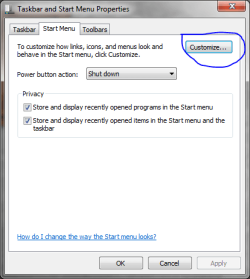
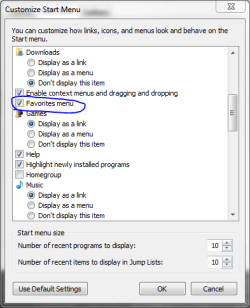
The Best and fastest way to do it is right click when your start menu is up select properties. Then click customize then add your favorites bar in there.
 

Attachments

  • Capture.PNG
    Capture.PNG
    12.9 KB · Views: 8
  • Capture1.PNG
    Capture1.PNG
    13.4 KB · Views: 6
Last edited:

My Computer My Computer

At a glance

Windows 7 Pro 64bitIntel Core i7 2600K @ 3.40GHz16.0GB Dual-Channel DDR3 @ 799MHzDual GTX 560TI
Computer type
PC/Desktop
Computer Manufacturer/Model Number
Custom Build
OS
Windows 7 Pro 64bit
CPU
Intel Core i7 2600K @ 3.40GHz
Motherboard
ASUSTeK Computer INC. P8P67 PRO (LGA1155)
Memory
16.0GB Dual-Channel DDR3 @ 799MHz
Graphics Card(s)
Dual GTX 560TI
Sound Card
Realtek High Definition Audio
Monitor(s) Displays
23" and 24" monitor
Screen Resolution
1920-1080
Hard Drives
128GB SSD

2TB HD
Internet Speed
100MB
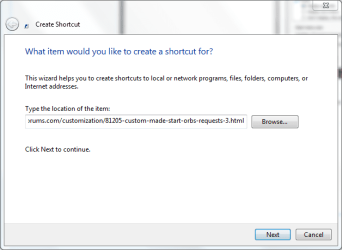
Another way to do it is copy the link right click on desktop and click New>Shortcut then paste the link and click next then name it then say finish. Last just drag the link to the start orb and your done. hope this helps
 

Attachments

  • Capture2.PNG
    Capture2.PNG
    14.6 KB · Views: 13
  • Capture3.PNG
    Capture3.PNG
    12.1 KB · Views: 12

My Computer My Computer

At a glance

Windows 7 Pro 64bitIntel Core i7 2600K @ 3.40GHz16.0GB Dual-Channel DDR3 @ 799MHzDual GTX 560TI
Computer type
PC/Desktop
Computer Manufacturer/Model Number
Custom Build
OS
Windows 7 Pro 64bit
CPU
Intel Core i7 2600K @ 3.40GHz
Motherboard
ASUSTeK Computer INC. P8P67 PRO (LGA1155)
Memory
16.0GB Dual-Channel DDR3 @ 799MHz
Graphics Card(s)
Dual GTX 560TI
Sound Card
Realtek High Definition Audio
Monitor(s) Displays
23" and 24" monitor
Screen Resolution
1920-1080
Hard Drives
128GB SSD

2TB HD
Internet Speed
100MB
Hi GeeN - You can pin a website to the taskbar by dragging the website (works for a shortcut of a file or folder as well) to the taskbar, and the website will be pinned to the taskbar -Pin a program to the taskbar.

Hope this helps!
Cheers,
Cassandra
Microsoft Windows Outreach
 

My Computer My Computer

At a glance

Windows 7 Professional 64-bitPentium(R) Dual-Core CPU E5300 @260GHz
Computer Manufacturer/Model Number
HP/p6207c
OS
Windows 7 Professional 64-bit
CPU
Pentium(R) Dual-Core CPU E5300 @260GHz
Sound Card
RealTek High Def Audio
Monitor(s) Displays
HP 2159m
Screen Resolution
1920 x 1080 x 60
Mouse
HP M/N: M-U0009-HP1
Internet Speed
Broadband
Thank you, but you misunderstood me.
I have my favorites in the Start Menu.
Please take a look at the links that I mentioned in my original post.
As I mentioned, I would like to search specific sites like PubMed or a Dictionary directly from the start menu search box.
This is an inbuildt function of win7.
See group policy editor too.
Also, here are two images to demonstrate my question again.
Thank you.
 

Attachments

  • Pin-Internet-Search[1].png
    Pin-Internet-Search[1].png
    17 KB · Views: 18
  • Internet-Search-Pinned[1].png
    Internet-Search-Pinned[1].png
    21.4 KB · Views: 19

My Computer My Computer

At a glance

Windows 7 Professional 64-bit
OS
Windows 7 Professional 64-bit
Thank you for your answers, but you still misunderstand me.

To put it simply, Win7 can do this:
In the Start Menu search box write e.g.: "Neuron"
Click on the Search Wikipedia above the search box.
And it takes you to this internet site (with the default browser):
http://en.wikipedia.org/wiki/Neuron

If you search internet databases frequently (like PubMed), it is a great time saver.

Let me rephrase it.
Go to start menu, in the search box write: gpedit.msc
This gives you the group policy editor.
Go here: User Configuration – Administrative Templates – Windows Components –
Windows Explorer - Pin Internet search sites to the “Search again” links and the Start menu

This policy setting lets you add Internet or intranet search site links to search different locations using the search term in the Search box.
You need to specify: A name for the link and the URL of the search site in OpenSearch format with {searchTerms} replacing the query string.
Example: http://www.example.com/results.aspx?q={searchTerms}

Configuring this policy allows you to add Internet or intranet sites links in the Start menu. Results are returned in the default web browser.

So my question is why I cannot see my links in the start menu after setting up everything according to MS instructions.

Can anyone help me?
 

My Computer My Computer

At a glance

Windows 7 Professional 64-bit
OS
Windows 7 Professional 64-bit
I understand what you're asking and I don't have the answer for it.

However, since you will need to fire up your web browser to access the site anyway, why don't you just use the searchbox in your web browser?

Another option I can think of is to enable the "Links" toolbar in the Superbar. You can just type the work you want and it will automatically fire up your default web browser which in turn would automatically search the term for you.
 

My Computer My Computer

At a glance

Windows 7 UltimateIntel C2D SP94002GB DDR3Integrated =(
Computer Manufacturer/Model Number
Dell E4300
OS
Windows 7 Ultimate
CPU
Intel C2D SP9400
Motherboard
Intel GS45
Memory
2GB DDR3
Graphics Card(s)
Integrated =(
Sound Card
Integrated =(
Monitor(s) Displays
Matte LCD
Screen Resolution
1280x800
Hard Drives
Intel X25-M Gen 2 SSD
WD Caviar Black
Mouse
MX 518, V470 - Logitech
To fatedquest.

Thanks for your answer.
Actually I would really like to minimize the number of key-strokes for searches, because I need to look up information on the web frequently. Since what I asked about is theoretically a build-in feature it would seem to be the most obvious choice. Nevertheless, I will need other methods if that is not feasible.

What did you mean by: " You can just type the word you want and it will automatically fire up your default web browser which in turn would automatically search the term for you. "

Where would you type that word? How would that automatically fire up my default browser? Thanks a lot.
 

My Computer My Computer

At a glance

Windows 7 Professional 64-bit
OS
Windows 7 Professional 64-bit
Hello Geen,

You could create separate internet shortcuts that you can pin separately to the Start Menu or taskbar.

Hope this helps,
Shawn
 

My Computer My Computer

At a glance

64-bit Windows 11 Pro for WorkstationsIntel i7-8700K OC'd to 5 GHz64 GB (4x16GB) G.SKILL TridentZ RGB DDR4 3600...ASUS ROG-STRIX-GTX1080TI-O11G-GAMING
Computer type
PC/Desktop
Computer Manufacturer/Model Number
Self built custom
OS
64-bit Windows 11 Pro for Workstations
CPU
Intel i7-8700K OC'd to 5 GHz
Motherboard
ASUS ROG Maximus XI Formula Z390
Memory
64 GB (4x16GB) G.SKILL TridentZ RGB DDR4 3600 MHz
Graphics Card(s)
ASUS ROG-STRIX-GTX1080TI-O11G-GAMING
Sound Card
Integrated
Monitor(s) Displays
2 x Samsung Odyssey G7 27"
Screen Resolution
2560x1440
Hard Drives
1TB Samsung 990 PRO M.2,
4TB Samsung 990 PRO PRO M.2,
TerraMaster F8 SSD Plus NAS
PSU
Seasonic Prime Titanium 850W
Case
Thermaltake Core P3
Cooling
Corsair Hydro H115i
Keyboard
Logitech wireless K800
Mouse
Logitech MX Master 4
Internet Speed
2 Gb/s Download and 100 Mb/s Upload
Antivirus
Malwarebyte Anti-Malware Premium
Browser
Google Chrome
Other Info
Logitech Z625 speaker system,
Logitech BRIO 4K Pro webcam,
HP Color LaserJet Pro MFP M477fdn,
APC SMART-UPS RT 1000 XL - SURT1000XLI,
Galaxy S23 Plus phone
Hello Brink,
Thank you for your answer.
Do you think you could help me with my original problem?
Thank you,
GeeN
 

My Computer My Computer

At a glance

Windows 7 Professional 64-bit
OS
Windows 7 Professional 64-bit

My Computer My Computer

At a glance

64-bit Windows 11 Pro for WorkstationsIntel i7-8700K OC'd to 5 GHz64 GB (4x16GB) G.SKILL TridentZ RGB DDR4 3600...ASUS ROG-STRIX-GTX1080TI-O11G-GAMING
Computer type
PC/Desktop
Computer Manufacturer/Model Number
Self built custom
OS
64-bit Windows 11 Pro for Workstations
CPU
Intel i7-8700K OC'd to 5 GHz
Motherboard
ASUS ROG Maximus XI Formula Z390
Memory
64 GB (4x16GB) G.SKILL TridentZ RGB DDR4 3600 MHz
Graphics Card(s)
ASUS ROG-STRIX-GTX1080TI-O11G-GAMING
Sound Card
Integrated
Monitor(s) Displays
2 x Samsung Odyssey G7 27"
Screen Resolution
2560x1440
Hard Drives
1TB Samsung 990 PRO M.2,
4TB Samsung 990 PRO PRO M.2,
TerraMaster F8 SSD Plus NAS
PSU
Seasonic Prime Titanium 850W
Case
Thermaltake Core P3
Cooling
Corsair Hydro H115i
Keyboard
Logitech wireless K800
Mouse
Logitech MX Master 4
Internet Speed
2 Gb/s Download and 100 Mb/s Upload
Antivirus
Malwarebyte Anti-Malware Premium
Browser
Google Chrome
Other Info
Logitech Z625 speaker system,
Logitech BRIO 4K Pro webcam,
HP Color LaserJet Pro MFP M477fdn,
APC SMART-UPS RT 1000 XL - SURT1000XLI,
Galaxy S23 Plus phone
Brink,
Thank you for your answer and links, but I knew about those options and those options are not what I was talking about. But I think you know that.

Is it really possible that nobody knows the answer to this.
This is in Win 7's group policy.
There should be a reason for that.

Does anyone knows who I should ask about this?

Thanks,
GeeN
 

My Computer My Computer

At a glance

Windows 7 Professional 64-bit
OS
Windows 7 Professional 64-bit
That is strange that this won't work for you.

Make sure the "Add Search link" under User Configuration – Administrative Templates – Start Menu and Taskbar is also turned on.

I have this setup on my machine to query wikepedia and technet.
 

My Computer My Computer

At a glance

Windows 7
OS
Windows 7
surfasb

Thanks a lot for your reply.
"Add Search Internet link to Start Menu" is enabled, and I can search the internet via this option.
But, although the option set up in gpedit.msc, I cannot "Pin Internet search sites to the “Search again” links and to the Start Menu" and cannot search in other internet seach sites like wiki, PubMed or technet directly. Why ???
 

My Computer My Computer

At a glance

Windows 7 Professional 64-bit
OS
Windows 7 Professional 64-bit
Back
Top