Windows and browsers are rapidly minimizing and maximizing, no malware

ChirantanGhosh

New member
Local time
2:11 AM
Messages
7
Windows and browsers are rapidly minimizing and maximizing - no malware accordting to Norton 360

Video of the situation: Windows and browsers are rapidly minimizing and maximizing - no malware accordting to Norton 360 - YouTube

The issue stared two days ago (20 June 2015)after I connected to my TV to see the game of thrones via VGA wire (this is usual practice for couple of years)

I'm using Windows 7 Pro (service pack 1) in Dell Latitude laptop, checked that all my Windows Updates are up-to-date. Don't mind the two black blotches on screen.

Checked if any keyboard buttons are hard pressed (stuck while pressed). Updated my Norton 360 and did full system scan - no issues found. Killed explorer in task manager and restarted the application. Escape button doesn't help.

Recently, I got a notification that Windows 10 is available free to me - do you think Microsoft is trying to give a soft nudge via windows update.

Any suggestions are welcome and highly appreciated.
 

My Computer My Computer

At a glance

Windows 7 Pro
Computer type
Laptop
Computer Manufacturer/Model Number
Dell Latitude
OS
Windows 7 Pro
Antivirus
Norton 360
Browser
Internet Explorer, Firefox, Chrome
My Computer My Computer

At a glance

Windows 7 Ultimate x64 SP1AMD Phenom 2 1090T2x8GB Kingston HyperX Fury Black 1600Mhz Unga...MSI GTX 970 Gaming 4G
Computer type
PC/Desktop
Computer Manufacturer/Model Number
Custom Build
OS
Windows 7 Ultimate x64 SP1
CPU
AMD Phenom 2 1090T
Motherboard
Gigabyte GA-890FXA-UD5
Memory
2x8GB Kingston HyperX Fury Black 1600Mhz Unganged
Graphics Card(s)
MSI GTX 970 Gaming 4G
Sound Card
Realtek On-Board HD 7.1 Audio / Logitech G35
Monitor(s) Displays
3xAcer GD245HQ
Screen Resolution
1920x1080
Hard Drives
Samsung 850 Pro 512GB SSD - OS /
WD Caviar Black SATA 3 - 1 TBx2 - Dynamic RAID 0 /
WD Caviar Green SATA 2 - 640GBx2 - Dynamic RAID 0 /
WD Caviar Green SATA 2 - 640GB - Internal Backup /
Seagate Barracude SATA 3 - 3TB - External Backup/ Sync
PSU
HighPower 1000W
Case
Cooler Master HAF 932
Cooling
Noctua NH-D14
Keyboard
Logitech G19
Mouse
Logitech G500
Internet Speed
100/4 Mbit Cable (100GB quota)
Antivirus
ZoneAlarm Extreme Security / MBAM Pro / MBAE Free / SAS Free
Browser
IE 11 - Firefox - Chrome
Other Info
Logitech F710/ G27/ G940/ Z5500 // TrackIR 5 // Nvidia 3D Surround Vision
Hi,

Please try Norton Power Eraser www.norton.com/npe and see if that helps.
Let us know if you need more help! Thank you.

Praveen
Norton Support.
 

My Computer My Computer

At a glance

Windows 7 Ultimate x64
Computer type
PC/Desktop
OS
Windows 7 Ultimate x64
Hi Praveen and Norton Support Team,

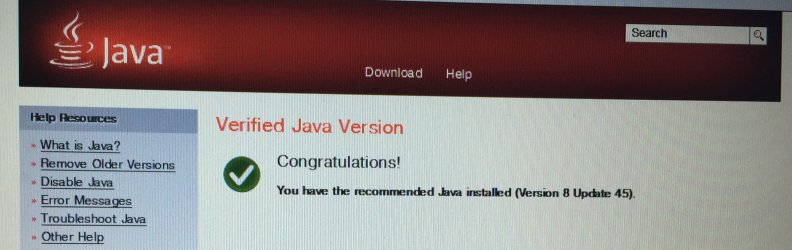
Installed NPE, it found no risks - suggested old Java removal. Did that and installed new Java. Rescanned with NPE and Norton 360 with update - still issue persists.


Hi GokAy,
Tried your suggestions- no stuck keys 😭

Would hate to format this laptop - any more suggestions?
 

Attachments

  • image.jpg
    image.jpg
    304.5 KB · Views: 2

My Computer My Computer

At a glance

Windows 7 Pro
Computer type
Laptop
Computer Manufacturer/Model Number
Dell Latitude
OS
Windows 7 Pro
Antivirus
Norton 360
Browser
Internet Explorer, Firefox, Chrome

My Computer My Computer

At a glance

W7 Pro SP1 64biti78GBIntel HD Graphics
Computer type
Laptop
Computer Manufacturer/Model Number
Employer provided Dell Latitude
OS
W7 Pro SP1 64bit
CPU
i7
Memory
8GB
Graphics Card(s)
Intel HD Graphics
Hard Drives
crappy SSD
Antivirus
Employer mandated Symantec Endpoint Protection
Browser
Pale Moon 64bit, IE11 64bit & Chrome 64bit
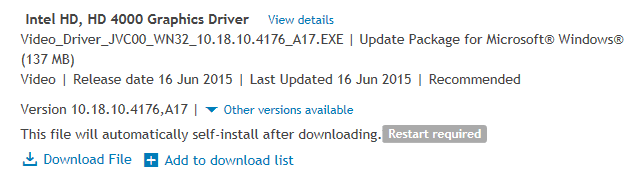
If updating the video driver fails to fix the issue or if the driver is not applicable to your hardware, then consider these steps: http://www.sevenforums.com/tutorial...ation-conflicts-performing-clean-startup.html

If those steps fail, then test the browser after booting the computer into the Safe Mode.

You can also try a new (temporary) profile. You can enable the Guest account for that test. That will tell us if the issue is system wide or an issue with your profile/account.


Does this issue happen for all browsers? If just one browser, consider uninstalling that browser, clearing out any left over folders and re-installing that browser.
 

My Computer My Computer

At a glance

W7 Pro SP1 64biti78GBIntel HD Graphics
Computer type
Laptop
Computer Manufacturer/Model Number
Employer provided Dell Latitude
OS
W7 Pro SP1 64bit
CPU
i7
Memory
8GB
Graphics Card(s)
Intel HD Graphics
Hard Drives
crappy SSD
Antivirus
Employer mandated Symantec Endpoint Protection
Browser
Pale Moon 64bit, IE11 64bit & Chrome 64bit

My Computer My Computer

At a glance

Windows 7 Ultimate x64 SP1AMD Phenom 2 1090T2x8GB Kingston HyperX Fury Black 1600Mhz Unga...MSI GTX 970 Gaming 4G
Computer type
PC/Desktop
Computer Manufacturer/Model Number
Custom Build
OS
Windows 7 Ultimate x64 SP1
CPU
AMD Phenom 2 1090T
Motherboard
Gigabyte GA-890FXA-UD5
Memory
2x8GB Kingston HyperX Fury Black 1600Mhz Unganged
Graphics Card(s)
MSI GTX 970 Gaming 4G
Sound Card
Realtek On-Board HD 7.1 Audio / Logitech G35
Monitor(s) Displays
3xAcer GD245HQ
Screen Resolution
1920x1080
Hard Drives
Samsung 850 Pro 512GB SSD - OS /
WD Caviar Black SATA 3 - 1 TBx2 - Dynamic RAID 0 /
WD Caviar Green SATA 2 - 640GBx2 - Dynamic RAID 0 /
WD Caviar Green SATA 2 - 640GB - Internal Backup /
Seagate Barracude SATA 3 - 3TB - External Backup/ Sync
PSU
HighPower 1000W
Case
Cooler Master HAF 932
Cooling
Noctua NH-D14
Keyboard
Logitech G19
Mouse
Logitech G500
Internet Speed
100/4 Mbit Cable (100GB quota)
Antivirus
ZoneAlarm Extreme Security / MBAM Pro / MBAE Free / SAS Free
Browser
IE 11 - Firefox - Chrome
Other Info
Logitech F710/ G27/ G940/ Z5500 // TrackIR 5 // Nvidia 3D Surround Vision
Hi Praveen and Norton Support Team,

Installed NPE, it found no risks - suggested old Java removal. Did that and installed new Java. Rescanned with NPE and Norton 360 with update - still issue persists.


Hi GokAy,
Tried your suggestions- no stuck keys ��

Would hate to format this laptop - any more suggestions?

Hi,

Can you please try restarting windows in safe mode and see if that works there?
Please check this link on how to start your computer in safe mode - Start your computer in safe mode - Windows Help
Let us know how it goes.

Praveen
Norton Support.
 

My Computer My Computer

At a glance

Windows 7 Ultimate x64
Computer type
PC/Desktop
OS
Windows 7 Ultimate x64
It could just be a faulty Keyboard or controller. Have u tried to boot in safe mode or to another OS, like a live linux CD/USB and see if the problem persist. If it does still it's a hardware problem if not it's a problem in windows like a driver/sysfile/DLL ect...
 

My Computer My Computer

At a glance

Windows 10I516GBNvidia GTX 660
Computer type
PC/Desktop
Computer Manufacturer/Model Number
Custom
OS
Windows 10
CPU
I5
Motherboard
MSI B85
Memory
16GB
Graphics Card(s)
Nvidia GTX 660
Sound Card
on board Sound Blaster
Monitor(s) Displays
Not Important
Screen Resolution
1080p
Hard Drives
64GB SSD ADATA
3-1TB WD 7500RPM
PSU
EVEGA 750 Gold Modular
Case
Antec
Cooling
Liquid CPU
Keyboard
Generic Mechanical
Mouse
5 button Dynex
Internet Speed
Fast 30mbs
Antivirus
Avast
Browser
Firefox/chrome
Thank you all for your suggestions, I really do appreciate your inputs.��

1. Booted in safe mode of existing windows profile - didn't see the issue till I connected to Internet via browsers (Firefox and Chrome). Rescanned via NPE - no risks. Scanned via Norton 360 - nothing found.

2. Booted in safe mode of new windows profile - didn't see the issue till I connected to Internet via browsers (Firefox and Chrome). Rescanned via NPE - no risks. Scanned via Norton 360 - 2 browser cookies, resolved. Issue is back.

--//--
Q2. Would you suggest - any online keyboard diagnostics tools (without download)?

Q3. I'll copy all my data in an external USB hard drive in safe mode with network - do you think I maybe copying the corrupt source (if it's an undetected malware)? Usually, I go to C drive > Users > copy the desktop, docs, pics & other folders

Q1 Repeat. Any other suggestions - other than formatting?
 

My Computer My Computer

At a glance

Windows 7 Pro
Computer type
Laptop
Computer Manufacturer/Model Number
Dell Latitude
OS
Windows 7 Pro
Antivirus
Norton 360
Browser
Internet Explorer, Firefox, Chrome
Forgot to mention, "wajiema" -I have no means of trying out another OS
 

My Computer My Computer

At a glance

Windows 7 Pro
Computer type
Laptop
Computer Manufacturer/Model Number
Dell Latitude
OS
Windows 7 Pro
Antivirus
Norton 360
Browser
Internet Explorer, Firefox, Chrome
I posted an app back in a post keycastow, run that and open Browser, see if it will register anything.

Did you try IE by the way?
 

My Computer My Computer

At a glance

Windows 7 Ultimate x64 SP1AMD Phenom 2 1090T2x8GB Kingston HyperX Fury Black 1600Mhz Unga...MSI GTX 970 Gaming 4G
Computer type
PC/Desktop
Computer Manufacturer/Model Number
Custom Build
OS
Windows 7 Ultimate x64 SP1
CPU
AMD Phenom 2 1090T
Motherboard
Gigabyte GA-890FXA-UD5
Memory
2x8GB Kingston HyperX Fury Black 1600Mhz Unganged
Graphics Card(s)
MSI GTX 970 Gaming 4G
Sound Card
Realtek On-Board HD 7.1 Audio / Logitech G35
Monitor(s) Displays
3xAcer GD245HQ
Screen Resolution
1920x1080
Hard Drives
Samsung 850 Pro 512GB SSD - OS /
WD Caviar Black SATA 3 - 1 TBx2 - Dynamic RAID 0 /
WD Caviar Green SATA 2 - 640GBx2 - Dynamic RAID 0 /
WD Caviar Green SATA 2 - 640GB - Internal Backup /
Seagate Barracude SATA 3 - 3TB - External Backup/ Sync
PSU
HighPower 1000W
Case
Cooler Master HAF 932
Cooling
Noctua NH-D14
Keyboard
Logitech G19
Mouse
Logitech G500
Internet Speed
100/4 Mbit Cable (100GB quota)
Antivirus
ZoneAlarm Extreme Security / MBAM Pro / MBAE Free / SAS Free
Browser
IE 11 - Firefox - Chrome
Other Info
Logitech F710/ G27/ G940/ Z5500 // TrackIR 5 // Nvidia 3D Surround Vision
Forgot to mention, "wajiema" -I have no means of trying out another OS
You can download a Linux Distro (they are free) and then run it from CD/DVD/USB.

You don't have to install it (most Linux Distros will run from CD/DVD/USB).

I'd suggest Linux Mint MATE.
 

My Computer My Computer

At a glance

W7 Ultimate SP1, LM19.2 MATE, W10 Home 1703, ...AMD Phenom II x6 1100T, 3.3 GHz12GB DDR3 1333 G-Skill (4GB x 2), G-Skill (2G...NVIDIA GeForce GTX 660
Computer type
PC/Desktop
Computer Manufacturer/Model Number
n/a
OS
W7 Ultimate SP1, LM19.2 MATE, W10 Home 1703, W10 Pro 1703 VM, #All 64 bit
CPU
AMD Phenom II x6 1100T, 3.3 GHz
Motherboard
ASUS M4A88T-M/USB3 (AM3)
Memory
12GB DDR3 1333 G-Skill (4GB x 2), G-Skill (2GB x 2)
Graphics Card(s)
NVIDIA GeForce GTX 660
Sound Card
Realtek?
Monitor(s) Displays
Samsung S23B350
Screen Resolution
1920x1080
Hard Drives
WD Green 2TB (SATA), WD Green 3TB (SATA), WD Blue 4TB (SATA), WD Blue 6TB (SATA)
PSU
Cooler Master
Case
Antec GX300 Tower
Cooling
3x Antec TRICOOL 120mm Fans
Mouse
Wired Optical
Internet Speed
DSL
Antivirus
Avast
Browser
Pale Moon (64 bit)
Other Info
2018-12-27 Upgraded HDDs
2015-12-10 Upgraded case, graphics card, storage
2015-08-15 Upgraded motherboard & RAM
2015-07-15 Upgraded LM17.1 to LM17.2
ChirantanGhosh,
Have you made any progress in solving this issue?
 

My Computer My Computer

At a glance

W7 Pro SP1 64biti78GBIntel HD Graphics
Computer type
Laptop
Computer Manufacturer/Model Number
Employer provided Dell Latitude
OS
W7 Pro SP1 64bit
CPU
i7
Memory
8GB
Graphics Card(s)
Intel HD Graphics
Hard Drives
crappy SSD
Antivirus
Employer mandated Symantec Endpoint Protection
Browser
Pale Moon 64bit, IE11 64bit & Chrome 64bit
No progress on the issue, the laptop to a local guy (as its OOW) - he checked for faulty keyboard to no avail
 

My Computer My Computer

At a glance

Windows 7 Pro
Computer type
Laptop
Computer Manufacturer/Model Number
Dell Latitude
OS
Windows 7 Pro
Antivirus
Norton 360
Browser
Internet Explorer, Firefox, Chrome
Thank you all for your suggestions, I really do appreciate your inputs.��

1. Booted in safe mode of existing windows profile - didn't see the issue till I connected to Internet via browsers (Firefox and Chrome). Rescanned via NPE - no risks. Scanned via Norton 360 - nothing found.

2. Booted in safe mode of new windows profile - didn't see the issue till I connected to Internet via browsers (Firefox and Chrome). Rescanned via NPE - no risks. Scanned via Norton 360 - 2 browser cookies, resolved. Issue is back.

--//--
Q2. Would you suggest - any online keyboard diagnostics tools (without download)?

Q3. I'll copy all my data in an external USB hard drive in safe mode with network - do you think I maybe copying the corrupt source (if it's an undetected malware)? Usually, I go to C drive > Users > copy the desktop, docs, pics & other folders

Q1 Repeat. Any other suggestions - other than formatting?

No progress on the issue, the laptop to a local guy (as its OOW) - he checked for faulty keyboard to no avail

re: Q2: It would seem that your local guy answered the question about the keyboard and/or keyboard controller being bad. (Running Linux Mint from a DVD would have answered that question for you.)

re: Q3: possibly... but you should backup your data anyway.

re: Q1: you might want to read thru this thread and comment on each suggestion. e.g. I do not see where you addressed my post #5 (video drivers) or my post #6 (the clean boot part).
 

My Computer My Computer

At a glance

W7 Pro SP1 64biti78GBIntel HD Graphics
Computer type
Laptop
Computer Manufacturer/Model Number
Employer provided Dell Latitude
OS
W7 Pro SP1 64bit
CPU
i7
Memory
8GB
Graphics Card(s)
Intel HD Graphics
Hard Drives
crappy SSD
Antivirus
Employer mandated Symantec Endpoint Protection
Browser
Pale Moon 64bit, IE11 64bit & Chrome 64bit
Did you even try using the program I linked? It is a portable app (no installation required).
All you had to do was start it and trigger the problem.
 

My Computer My Computer

At a glance

Windows 7 Ultimate x64 SP1AMD Phenom 2 1090T2x8GB Kingston HyperX Fury Black 1600Mhz Unga...MSI GTX 970 Gaming 4G
Computer type
PC/Desktop
Computer Manufacturer/Model Number
Custom Build
OS
Windows 7 Ultimate x64 SP1
CPU
AMD Phenom 2 1090T
Motherboard
Gigabyte GA-890FXA-UD5
Memory
2x8GB Kingston HyperX Fury Black 1600Mhz Unganged
Graphics Card(s)
MSI GTX 970 Gaming 4G
Sound Card
Realtek On-Board HD 7.1 Audio / Logitech G35
Monitor(s) Displays
3xAcer GD245HQ
Screen Resolution
1920x1080
Hard Drives
Samsung 850 Pro 512GB SSD - OS /
WD Caviar Black SATA 3 - 1 TBx2 - Dynamic RAID 0 /
WD Caviar Green SATA 2 - 640GBx2 - Dynamic RAID 0 /
WD Caviar Green SATA 2 - 640GB - Internal Backup /
Seagate Barracude SATA 3 - 3TB - External Backup/ Sync
PSU
HighPower 1000W
Case
Cooler Master HAF 932
Cooling
Noctua NH-D14
Keyboard
Logitech G19
Mouse
Logitech G500
Internet Speed
100/4 Mbit Cable (100GB quota)
Antivirus
ZoneAlarm Extreme Security / MBAM Pro / MBAE Free / SAS Free
Browser
IE 11 - Firefox - Chrome
Other Info
Logitech F710/ G27/ G940/ Z5500 // TrackIR 5 // Nvidia 3D Surround Vision
I posted an app back in a post keycastow, run that and open Browser, see if it will register anything.

Did you try IE by the way?

I tried KeyCastOW - all keys are showing respective symbols excepting "Shift" and Dell's "Function" buttons.
Is there something specific you want me to do with KeyCastOW? Can't see the screens that the blog shows. Would appreciate some detailed instructions.

Thanks for your thoughts.
 

My Computer My Computer

At a glance

Windows 7 Pro
Computer type
Laptop
Computer Manufacturer/Model Number
Dell Latitude
OS
Windows 7 Pro
Antivirus
Norton 360
Browser
Internet Explorer, Firefox, Chrome
Noticed something - I'm in Safemode with networking and backing up profiles... Almost two hours without incident but the moment I connect to Internet the same dance starts. This makes me think there is a malware involved - @Praveen and Norton Support Team, can you help?

Also, can't enable "Windows Security Center Services" - it's disabled.
 

My Computer My Computer

At a glance

Windows 7 Pro
Computer type
Laptop
Computer Manufacturer/Model Number
Dell Latitude
OS
Windows 7 Pro
Antivirus
Norton 360
Browser
Internet Explorer, Firefox, Chrome
Back
Top