
How to "Animate windows when minimizing and maximizing" in Vista, Windows 7, and Windows 8
Information
This tutorial will show you different options on how to turn on or off Animate windows when minimizing and maximizing in Vista, Windows 7, and Windows 8.
OPTION ONE
Through Visual Effects Settings
1. Open the Visual Effects settings window in Performance Options.
2. To Turn On "Animate Windows when Minimizing and Maximizing"
A) Check the Animate windows when minimizing and maximizing box, and click/tap on OK. (see screenshot below)

3. To Turn Off "Animate Windows when Minimizing and Maximizing"
A) Uncheck the Animate windows when minimizing and maximizing box, and click/tap on OK. (see screenshot above)
OPTION TWO
Using a REG File Download
1. Turn On "Animate Windows when Minimizing and Maximizing"
A) Click on the download button below to download the file below.
Turn_On_Animate_windows_when_minimizing_and_maximizing.reg
Download
B) Go to step 3.
2. Turn Off "Animate Windows when Minimizing and Maximizing"
A) Click on the download button below to download the file below.
Turn_Off_Animate_windows_when_minimizing_and_maximizing.reg
Download
3. Save the .reg file to your Desktop.
4. Double click/tap on the downloaded .reg file to merge it.
5. If prompted, click/tap on Run, Yes (Windows 7/8) or Continue (Vista), Yes, and OK to approve the merge.
6. Log off and log on, or restart the computer to apply the changes.
7. When done, you can delete the downloaded .reg file if you like.
OPTION THREE
Manually in Registry Editor
1. Press the Windows + R keys to open the Run dialog, type regedit, and press Enter.
2. If prompted by UAC, then click on Yes (Windows 7/8) or Continue (Vista).
3. In regedit, navigate to the location below. (see screenshot below)
HKEY_CURRENT_USER\Control Panel\Desktop\WindowsMetrics
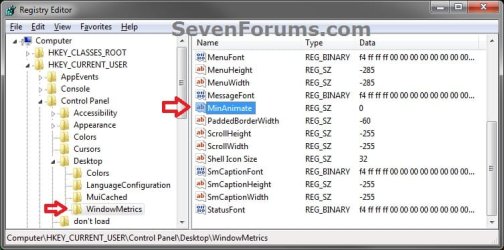
4. In the right pane, double click/tap on MinAnimate. (see screenshot above)
5. Turn On "Animate Windows when Minimizing and Maximizing"
A) Type in 1, and click/tap on OK. (see screenshot below)
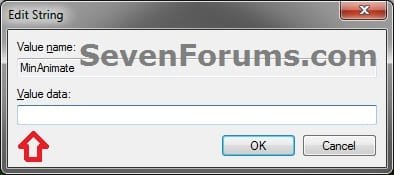
B) Go to step 7.
6. Turn Off "Animate Windows when Minimizing and Maximizing"
A) Type in 0, and click/tap on OK. (see screenshot above)
7. Close regedit.
8. Log off and log on, or restart the computer to apply the changes.
That's it,
Shawn
Related Tutorials
- How to Change the Visual Effects Settings in Windows 7
- How to Adjust Visual Effects in Windows 8 and 8.1
- How to Create a Visual Effects Performance Options Shortcut in Windows
- How to "Turn off all unnecessary animations" in Windows 7 and Vista
- How to "Turn off all unnecessary animations" in Windows 8 and 8.1
- How to Allow or Prevent Window Animations in Vista, Windows 7, and Windows 8
- How to Turn On or Off "Animate controls and elements inside windows"
Attachments
Last edited:


