
Hello,
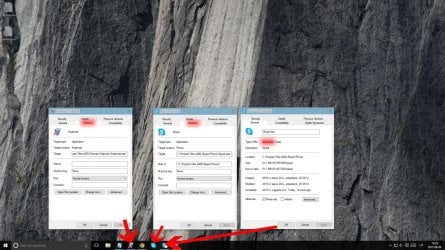
I‘ve been recently having a problem with duplicated items in taskbar and broken Jump Lists. I‘m now using Windows 10 but this problem occurred in Windows 8.1 too but then it somehow fixed itself. Some programs that I pin to taskbar have a tendency to duplicate themselves when clicked on. For now, I‘ve noticed this behaviour only in Skype and Spotify but it‘s still very annoying since duplicate icons take valuable taskbar space and even more—make Jump Lists of those programs broken, meaning that you can still see tasks program developers provided but after you click them nothing happens.
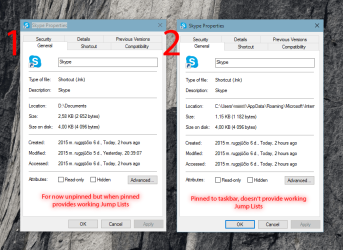
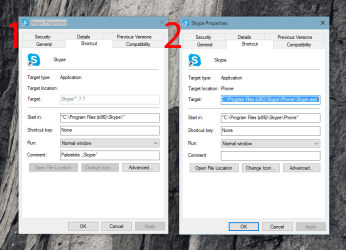
I‘ve tried loads of times pinning, repinning, deleting whole User Pinned folder from %appdata%/Microsoft/Internet Explorer/Quick Launch, clearing Jump List folders manually and automatically with Command Prompt commands as suggested here with no luck. The only thing I did achieve was when I pinned Skype to taskbar in my other user account, then copied the newly created shortcut from Use Pinned folder to my User Pinned folder—this made Skype Jump Lists working but duplicate icon in taskbar remained.
I‘ve recently found a tutorial which may force taskbar to use only one icon per app but I can‘t check this right now as 7+ Taskbar Tweaker isn‘t yet officially available for Windows 10 users.
Thank you for taking your time and reading my message, any suggestions would be appreciated,
MDJ
P. S. I don‘t know if this is related but I can‘t pin any Control Panel item to Quick Access whilst I can pin folders. Interesting side of this is that pinned Control Panel items appear in File Explorer's Jump List but after clicked I get a message that item is unavailable and that it might have been moved, renamed or removed.
I‘ve been recently having a problem with duplicated items in taskbar and broken Jump Lists. I‘m now using Windows 10 but this problem occurred in Windows 8.1 too but then it somehow fixed itself. Some programs that I pin to taskbar have a tendency to duplicate themselves when clicked on. For now, I‘ve noticed this behaviour only in Skype and Spotify but it‘s still very annoying since duplicate icons take valuable taskbar space and even more—make Jump Lists of those programs broken, meaning that you can still see tasks program developers provided but after you click them nothing happens.
I‘ve tried loads of times pinning, repinning, deleting whole User Pinned folder from %appdata%/Microsoft/Internet Explorer/Quick Launch, clearing Jump List folders manually and automatically with Command Prompt commands as suggested here with no luck. The only thing I did achieve was when I pinned Skype to taskbar in my other user account, then copied the newly created shortcut from Use Pinned folder to my User Pinned folder—this made Skype Jump Lists working but duplicate icon in taskbar remained.
I‘ve recently found a tutorial which may force taskbar to use only one icon per app but I can‘t check this right now as 7+ Taskbar Tweaker isn‘t yet officially available for Windows 10 users.
Thank you for taking your time and reading my message, any suggestions would be appreciated,
MDJ
P. S. I don‘t know if this is related but I can‘t pin any Control Panel item to Quick Access whilst I can pin folders. Interesting side of this is that pinned Control Panel items appear in File Explorer's Jump List but after clicked I get a message that item is unavailable and that it might have been moved, renamed or removed.
Attachments
Last edited:
My Computer
At a glance
Windows 10 Pro x64
- OS
- Windows 10 Pro x64

