
A way to remove the 'Hard Coded' Day Name from Taskbar?

sendhere

New member
Local time
12:54 PM
Messages
4
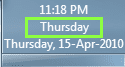
I've gone through all of the time and date settings but I can't seem to find a way to remove the day name (see attachment) that automatically appears on an extended taskbar.

I run my taskbar on the right side and I would like to free up the valuable vertical real estate that the redundant day name is occupying.

I imagine that there is a way to remove this through a registry. Anyone know?


Thanks.
 

Attachments
  • Capture.PNG
    Capture.PNG
    2 KB · Views: 609

My Computer

OS
Windows 7 64bit
You should be able to remove it from this function...
If you go into Control Panel > Date & Time > Time Settings > Calender Settings you can change the way it displays.

dandt.png

http://www.sevenforums.com/tutorials/3529-date-format-change.html

EDIT: That function won't remove it from a three bar taskbar, but it won't show up in a one or two bar taskbar.

Here's a program that will allow you to remove that portion. It's called T-Clock.

Tutorial:
TClock: Show Windows 7 Look-like Date & Time in System Tray in Windows XP and Vista - Tweaking with Vishal
Program File:
http://homepage1.nifty.com/kazubon/tclocklight/http://homepage1.nifty.com/kazubon/tclocklight/tclocklight-040702-3.zip
 
Last edited by a moderator:

My Computer

Computer Manufacturer/Model Number
Apple Macbook Pro (April 2009)
OS
W7 Ult. x64 | OS X
CPU
Intel Mobile Core 2 Duo 2.93Ghz [T9800 Penryn]
Motherboard
NVIDIA nForce 730i Rev. B1 [Mac-F2268EC8 (U2E1)]
Memory
4096MB Samsung DDR3 Dual Channel [PC3-8500F 1066Mhz]
Graphics Card(s)
NVIDIA GeForce 9600M GT 512MB [G96M Rev. C1]
Sound Card
SB X-Fi Surround 5.1 USB | Onboard Realtek (Disabled)
Monitor(s) Displays
Acer x223wbd 22" | Apple Anti-Glare 17" (Disabled)
Screen Resolution
{Current} 1440x900 {Acer} 1680x1050 {Apple} 1920x1200
Hard Drives
{Internal}
Seagate Momentus 320GB 2.5" 7200RPM [ST9320421AS]

{Externals}
LaCie 320GB USB 2.0 HDD [301284UR]
LaCie 750GB USB 2.0 FW400 eSATA HDD [301314U]
LaCie 1TB USB 2.0 HDD [301304UR]
PSU
Magsafe
Case
Aluminum/Unibody (MBP52)
Cooling
2 x 6000 RPM Fans
Keyboard
Logitech G-15v2 [PN 920-000379]
Mouse
Logitech G-9 [PN 910-000338]
Internet Speed
12Mbps/2.5Mbps w/ 24Mbps Speed Boost [Comcast]
Other Info
Logitech X-540 Speakers [PN 970223-0122]
Sennheiser PC-151 Headset
One way to free the space is to turn the clock off entirely. You could use any number of clock programs which will display in various fashions. I use ClocX, because the only time that I need it is to set other clock that I have around, so I can keep it transparent most of the time.
 

My Computer

Computer Manufacturer/Model Number
DIY
OS
W7x64 Pro, SuSe 12.1/** W7 x64 Pro, XP MCE
CPU
Phenom II 1090T w/Noctua NH-D14 /**4400+ X2 w/CM Hyper TX 3
Motherboard
ASRock 890FX Deluxe 4/**A8N-SLI
Memory
2 x 2GB Patriot PGS34g1600LLKA/**4x1GB Corsair VS
Graphics Card(s)
EVGA GTX460 SC/**EVGA 8800GTS
Sound Card
Asus Xonar D2X/**Xonar D1
Monitor(s) Displays
Acer X233H, Dell E152FPc /**LG M237-WD
Screen Resolution
1920x1080 & 1024x768/**1980x1080
Hard Drives
WDC 2TB, 1.5TB, 1TB, 500GB,Seagate 500GB , Maxtor 80GB /**500GB Seagate & WDC 1TB Black
PSU
CM RS600 w/ APC BX1000G/**Antec 500 TP w/ APC BX1000
Case
HAF922/**Antec 1040IIB
Cooling
3x200mm, 1x140 and 1x120mm/**5x80mm fans
Keyboard
Logitech Media USB/**Saitek Eclipse
Mouse
Cordless Trackman Wheel/**Ditto
Internet Speed
3.3Mbps
Other Info
SB 560 5.1 w/ Sennheiser RS140/**Creative T20 speakers, Dvico FusionHDTV7 Gold RT, Cisco E3000, HP 5510V AIO, Linksys E3000, Belkin F5U237 hub and **F5D8055 adapter
(** = 2nd rig)
Hi notsograymatter,

Thanks, but I fiddled around with those settings already and they only seem to affect the date/time display below the highlighted day name.
 

My Computer

OS
Windows 7 64bit
Hey seekmeister,

Thanks for the tip on Clocx. I will check it out.


I should reemphasize for others reading this thread that that the problem day name only appears when the taskbar is extended above it's default size.
 

My Computer

OS
Windows 7 64bit
Hey seekmeister,

Thanks for the tip on Clocx. I will check it out.


I should reemphasize for others reading this thread that that the problem day name only appears when the taskbar is extended above it's default size.

Just download Clocx or TClock that i referenced. That'll fix your problems.
 

My Computer

Computer Manufacturer/Model Number
Apple Macbook Pro (April 2009)
OS
W7 Ult. x64 | OS X
CPU
Intel Mobile Core 2 Duo 2.93Ghz [T9800 Penryn]
Motherboard
NVIDIA nForce 730i Rev. B1 [Mac-F2268EC8 (U2E1)]
Memory
4096MB Samsung DDR3 Dual Channel [PC3-8500F 1066Mhz]
Graphics Card(s)
NVIDIA GeForce 9600M GT 512MB [G96M Rev. C1]
Sound Card
SB X-Fi Surround 5.1 USB | Onboard Realtek (Disabled)
Monitor(s) Displays
Acer x223wbd 22" | Apple Anti-Glare 17" (Disabled)
Screen Resolution
{Current} 1440x900 {Acer} 1680x1050 {Apple} 1920x1200
Hard Drives
{Internal}
Seagate Momentus 320GB 2.5" 7200RPM [ST9320421AS]

{Externals}
LaCie 320GB USB 2.0 HDD [301284UR]
LaCie 750GB USB 2.0 FW400 eSATA HDD [301314U]
LaCie 1TB USB 2.0 HDD [301304UR]
PSU
Magsafe
Case
Aluminum/Unibody (MBP52)
Cooling
2 x 6000 RPM Fans
Keyboard
Logitech G-15v2 [PN 920-000379]
Mouse
Logitech G-9 [PN 910-000338]
Internet Speed
12Mbps/2.5Mbps w/ 24Mbps Speed Boost [Comcast]
Other Info
Logitech X-540 Speakers [PN 970223-0122]
Sennheiser PC-151 Headset
Back
Top