Doesn't show external drive anymore but visible in the disk management

Hedge

New member
Local time
9:39 AM
Messages
42
I have a 2,5" 500GB external hard-drive with a single partition (NTFS).
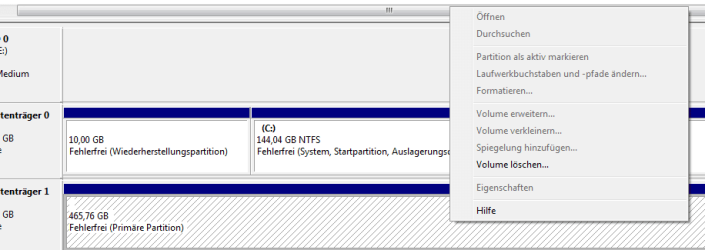
I can see it in the disk management utility (see attached screenshot) but it doesn't have a drive letter nor can't I assign one.

Attached to another PC running Windows XP it says "unknown partition" but also error-free and NTFS.

The problem could have been triggered by unplugging the harddrive without securely removing it.
 

Attachments

  • disk-management.PNG
    disk-management.PNG
    5.3 KB · Views: 128

My Computer My Computer

At a glance

Windows 7 RC1
OS
Windows 7 RC1
is it have files on that external hdd??

on Disk Mgmt, right click the offending disk.
Select Change drive letters and path.
Assign a drive letter.
 

My Computer My Computer

At a glance

windows 7Phenom II AMD Dragon 3.5GhzDDR3 4GBATI Radeon 512Mb
Computer Manufacturer/Model Number
built up
OS
windows 7
CPU
Phenom II AMD Dragon 3.5Ghz
Memory
DDR3 4GB
Graphics Card(s)
ATI Radeon 512Mb
Monitor(s) Displays
HP L1506
Screen Resolution
1152 x 864
Hard Drives
WDC 1 TB SATA-II Green Power
Keyboard
HP wireless keyboard
Mouse
HP Optic
Internet Speed
1GB
Yup it has about 300GB of files.

Everything is greyed out besides delte volume (which I won't do with all the files still unsaved).
 

My Computer My Computer

At a glance

Windows 7 RC1
OS
Windows 7 RC1
Is this a usb drive? Go to Device Manager. Do you see an Unknown Disk there or an error icon for a disk?
 

My Computer My Computer

At a glance

Windows 7 x64 pro/ Windows 7 x86 Pro/ XP SP3 x86
Computer Manufacturer/Model Number
Too many to describe...
OS
Windows 7 x64 pro/ Windows 7 x86 Pro/ XP SP3 x86

My Computer My Computer

At a glance

windows 7Phenom II AMD Dragon 3.5GhzDDR3 4GBATI Radeon 512Mb
Computer Manufacturer/Model Number
built up
OS
windows 7
CPU
Phenom II AMD Dragon 3.5Ghz
Memory
DDR3 4GB
Graphics Card(s)
ATI Radeon 512Mb
Monitor(s) Displays
HP L1506
Screen Resolution
1152 x 864
Hard Drives
WDC 1 TB SATA-II Green Power
Keyboard
HP wireless keyboard
Mouse
HP Optic
Internet Speed
1GB
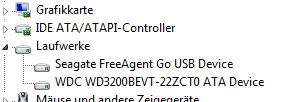
It shows up as Seagate FreeAgent Go (see screenshot).
I can't assign a drive-letter (see the other screenshot).
 

Attachments

  • free-agent.PNG
    free-agent.PNG
    2.9 KB · Views: 1,358
  • proof.png
    proof.png
    8.4 KB · Views: 97

My Computer My Computer

At a glance

Windows 7 RC1
OS
Windows 7 RC1
You can try uninstalling the drive in Device manager (right click, uninstall). Then click on the "scan for hardware changes" button and let the drive reinstall. If this drive with its own driver software, you can try reinstalling the driver.
 

My Computer My Computer

At a glance

Windows 7 x64 pro/ Windows 7 x86 Pro/ XP SP3 x86
Computer Manufacturer/Model Number
Too many to describe...
OS
Windows 7 x64 pro/ Windows 7 x86 Pro/ XP SP3 x86
OK I did that but nothing changed :/
 

My Computer My Computer

At a glance

Windows 7 RC1
OS
Windows 7 RC1
did you already try the other port of usb??
and due your information, you're already try to put into windows xp, but unknown partition.
it's sounds like the hdd is corrupted. if the files important,that's you got the backup?
 

My Computer My Computer

At a glance

windows 7Phenom II AMD Dragon 3.5GhzDDR3 4GBATI Radeon 512Mb
Computer Manufacturer/Model Number
built up
OS
windows 7
CPU
Phenom II AMD Dragon 3.5Ghz
Memory
DDR3 4GB
Graphics Card(s)
ATI Radeon 512Mb
Monitor(s) Displays
HP L1506
Screen Resolution
1152 x 864
Hard Drives
WDC 1 TB SATA-II Green Power
Keyboard
HP wireless keyboard
Mouse
HP Optic
Internet Speed
1GB
Unplug this drive. Shutdown the computer, physically disconnect from the power outlet. Wait for 5 minutes, plugin your drive, reconnect power, reboot.

Also, can you browse the drive contents in windows explorer?

BTW, are you still using RC?
 

My Computer My Computer

At a glance

Windows 7 x64 pro/ Windows 7 x86 Pro/ XP SP3 x86
Computer Manufacturer/Model Number
Too many to describe...
OS
Windows 7 x64 pro/ Windows 7 x86 Pro/ XP SP3 x86
Bill2 asks if you are running the RC version, if so it will cease to function today 1st June!
 

My Computer My Computer

At a glance

Microsoft Windows 7 Home Premium 64-bit 7601 ...Intel(R) Core(TM) i7-3770 CPU @ 3.40GHz8.00 GBIntel(R) HD Graphics 4000
Computer type
PC/Desktop
OS
Microsoft Windows 7 Home Premium 64-bit 7601 Multiprocessor Free Service Pack 1
CPU
Intel(R) Core(TM) i7-3770 CPU @ 3.40GHz
Motherboard
ASUSTeK COMPUTER INC. P8H77-M
Memory
8.00 GB
Graphics Card(s)
Intel(R) HD Graphics 4000
Sound Card
On Board
Monitor(s) Displays
Dell 24"
Screen Resolution
1920 x 1080
Hard Drives
(1) INTEL SSDSC2CT180A3 ATA Device (2) ST500DM002-1BD142 ATA Device (3) WDC WD3200AAKS-75L9A0 ATA Device (4) Generic- Compact Flash USB Device (5) Generic- MS/MS-Pro USB Device (6) Generic- SD/MMC USB Device (7) Generic- SM/xD-Picture USB
PSU
500w Corsair
Case
Cooler Master
Cooling
3 Fans
Keyboard
Logitech MK300
Mouse
Logitech WOM
Internet Speed
75Mb
Antivirus
Norton 360
Browser
Firefox, Opera, IE
1.) I tried two other USB ports
2.) It's the final version (although my profile says otherwise)
3.) I tried exactly what you suggested Bill2 (turning off etc) but it didn't work
4.) The drive isn't browsable (it doesn't have a driveletter)
 

My Computer My Computer

At a glance

Windows 7 RC1
OS
Windows 7 RC1
trying in safe mode.
 

My Computer My Computer

At a glance

windows 7Phenom II AMD Dragon 3.5GhzDDR3 4GBATI Radeon 512Mb
Computer Manufacturer/Model Number
built up
OS
windows 7
CPU
Phenom II AMD Dragon 3.5Ghz
Memory
DDR3 4GB
Graphics Card(s)
ATI Radeon 512Mb
Monitor(s) Displays
HP L1506
Screen Resolution
1152 x 864
Hard Drives
WDC 1 TB SATA-II Green Power
Keyboard
HP wireless keyboard
Mouse
HP Optic
Internet Speed
1GB
1.)
2.) It's the final version (although my profile says otherwise)
What version exactly? Is there any chance you could try plugging this HD into another PC preferably with XP on it to see if it works? A friend, relative maybe!
 

My Computer My Computer

At a glance

Microsoft Windows 7 Home Premium 64-bit 7601 ...Intel(R) Core(TM) i7-3770 CPU @ 3.40GHz8.00 GBIntel(R) HD Graphics 4000
Computer type
PC/Desktop
OS
Microsoft Windows 7 Home Premium 64-bit 7601 Multiprocessor Free Service Pack 1
CPU
Intel(R) Core(TM) i7-3770 CPU @ 3.40GHz
Motherboard
ASUSTeK COMPUTER INC. P8H77-M
Memory
8.00 GB
Graphics Card(s)
Intel(R) HD Graphics 4000
Sound Card
On Board
Monitor(s) Displays
Dell 24"
Screen Resolution
1920 x 1080
Hard Drives
(1) INTEL SSDSC2CT180A3 ATA Device (2) ST500DM002-1BD142 ATA Device (3) WDC WD3200AAKS-75L9A0 ATA Device (4) Generic- Compact Flash USB Device (5) Generic- MS/MS-Pro USB Device (6) Generic- SD/MMC USB Device (7) Generic- SM/xD-Picture USB
PSU
500w Corsair
Case
Cooler Master
Cooling
3 Fans
Keyboard
Logitech MK300
Mouse
Logitech WOM
Internet Speed
75Mb
Antivirus
Norton 360
Browser
Firefox, Opera, IE
Safe mode didn't work.

I have 2 PCs here.
One with Windows XP and Windows 7 Professional on it
and another one with only Windows 7 Professional on it.

It doesn't work on the 2nd PC (with only Win7 Pro) and on Windows XP of the first PC.
I just noticed the HDD works on Windows 7 Pro of the first PC perfectly.
That is really strange.
 

My Computer My Computer

At a glance

Windows 7 RC1
OS
Windows 7 RC1
Would suggest you backup the data to your internal drive temporarily, then format the usb drive and check it has a drive letter and works properly on either computer before reusing it.
 

My Computer My Computer

At a glance

Windows 7 x64 pro/ Windows 7 x86 Pro/ XP SP3 x86
Computer Manufacturer/Model Number
Too many to describe...
OS
Windows 7 x64 pro/ Windows 7 x86 Pro/ XP SP3 x86
Looks like I'll go that way, but I'm happy that I can at least safe the data without much hazzle.
 

My Computer My Computer

At a glance

Windows 7 RC1
OS
Windows 7 RC1
Would endorse what Bill 2 says and add that I would run scannow on the machine with just Win 7 as it looks as if there may be the odd corrupt system file on there!
 

My Computer My Computer

At a glance

Microsoft Windows 7 Home Premium 64-bit 7601 ...Intel(R) Core(TM) i7-3770 CPU @ 3.40GHz8.00 GBIntel(R) HD Graphics 4000
Computer type
PC/Desktop
OS
Microsoft Windows 7 Home Premium 64-bit 7601 Multiprocessor Free Service Pack 1
CPU
Intel(R) Core(TM) i7-3770 CPU @ 3.40GHz
Motherboard
ASUSTeK COMPUTER INC. P8H77-M
Memory
8.00 GB
Graphics Card(s)
Intel(R) HD Graphics 4000
Sound Card
On Board
Monitor(s) Displays
Dell 24"
Screen Resolution
1920 x 1080
Hard Drives
(1) INTEL SSDSC2CT180A3 ATA Device (2) ST500DM002-1BD142 ATA Device (3) WDC WD3200AAKS-75L9A0 ATA Device (4) Generic- Compact Flash USB Device (5) Generic- MS/MS-Pro USB Device (6) Generic- SD/MMC USB Device (7) Generic- SM/xD-Picture USB
PSU
500w Corsair
Case
Cooler Master
Cooling
3 Fans
Keyboard
Logitech MK300
Mouse
Logitech WOM
Internet Speed
75Mb
Antivirus
Norton 360
Browser
Firefox, Opera, IE
Back
Top