A different kind of Logon Tweak Question...

Keiichi25

New member
Guru
Local time
8:00 AM
Messages
465
So, I am currently working in a division where we want to tweak the logon screen, but not just what I have found so far, which has been about the branding text or the background or even how to make the user icons be all the same.

What we are looking for is just so it only shows the user login. Now I know about the 'don't use the last user' one... While that is nice, we don't mind the last username showing, but we don't need a bazillion icons for each user who has used the machine, as this is an enterprise environment.

Anyone have any ideas how to accomplish that, or are we basically stuck with the only option of the don't use the last username tweak?
 

My Computer My Computer

At a glance

Windows 7 Ultimate x64 and Home Premium x64Intel i7 960 (3.2 GHz Quad Core)12 Gigs (Triple Channel)Alienware OEM nVidia GTX 560 Ti (1.25 Gig)
Computer Manufacturer/Model Number
Alienware Area 51 Desktop and Dell Inspirion 17R (N7010)
OS
Windows 7 Ultimate x64 and Home Premium x64
CPU
Intel i7 960 (3.2 GHz Quad Core)
Motherboard
Alienware Intel based X58
Memory
12 Gigs (Triple Channel)
Graphics Card(s)
Alienware OEM nVidia GTX 560 Ti (1.25 Gig)
Sound Card
Creative Labs X-Fi Titanium
Monitor(s) Displays
Samsung PX2370 LED 23" Monitor
Screen Resolution
1920x1080
Hard Drives
2 320 Gig SATA in Raid 1 Configuration (System/App)
1 1 Tera SATA (Games)
1 1 Tera SATA (Data/Music/Videos)
PSU
750 Watt Power Supply
Case
Alienware Area 51 Desktop
Cooling
Liquid Cooled
Keyboard
Logitech G510
Mouse
Microsoft Trackball Explorer
Internet Speed
Cable

My Computer My Computer

At a glance

64-bit Windows 11 Pro for WorkstationsIntel i7-8700K OC'd to 5 GHz64 GB (4x16GB) G.SKILL TridentZ RGB DDR4 3600...ASUS ROG-STRIX-GTX1080TI-O11G-GAMING
Computer type
PC/Desktop
Computer Manufacturer/Model Number
Self built custom
OS
64-bit Windows 11 Pro for Workstations
CPU
Intel i7-8700K OC'd to 5 GHz
Motherboard
ASUS ROG Maximus XI Formula Z390
Memory
64 GB (4x16GB) G.SKILL TridentZ RGB DDR4 3600 MHz
Graphics Card(s)
ASUS ROG-STRIX-GTX1080TI-O11G-GAMING
Sound Card
Integrated
Monitor(s) Displays
2 x Samsung Odyssey G7 27"
Screen Resolution
2560x1440
Hard Drives
1TB Samsung 990 PRO M.2,
4TB Samsung 990 PRO PRO M.2,
TerraMaster F8 SSD Plus NAS
PSU
Seasonic Prime Titanium 850W
Case
Thermaltake Core P3
Cooling
Corsair Hydro H115i
Keyboard
Logitech wireless K800
Mouse
Logitech MX Master 4
Internet Speed
2 Gb/s Download and 100 Mb/s Upload
Antivirus
Malwarebyte Anti-Malware Premium
Browser
Google Chrome
Other Info
Logitech Z625 speaker system,
Logitech BRIO 4K Pro webcam,
HP Color LaserJet Pro MFP M477fdn,
APC SMART-UPS RT 1000 XL - SURT1000XLI,
Galaxy S23 Plus phone
Hello Keiichi,

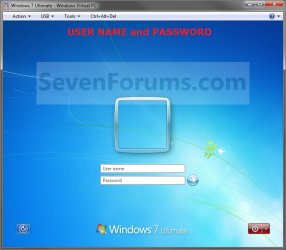
You might see if this may work for what you are wanting. It sets the log on screen to where the user must enter both their user name and password instead of selecting their user icon.

http://www.sevenforums.com/tutorials/61650-log-user-name-password.html

Hope this helps,
Shawn

Well, I saw that one... However, this was sort of shot down by one of my colleagues as we don't care that the username shows in the login, or the last user logged in. However, we don't want to deal with 'Joe' 'Jane' 'Jill' 'Jake' showing up and people clicking on that button, then putting in their password. We just want it so it will be only showing 'Joe', but users jane, jill and jake aren't showing... And no, not making the special 'hide me' accounts, but basically, new users using it to log onto the domain, for instance, we want them not to show up as a new icon, just basically the logon screen.

Now if there is no way to do it, meh... But the old XP logon, I know you could hack it to purge that information, but the default domain logon screen would remember the last user logon username, and require someone to put in the password.
 

My Computer My Computer

At a glance

Windows 7 Ultimate x64 and Home Premium x64Intel i7 960 (3.2 GHz Quad Core)12 Gigs (Triple Channel)Alienware OEM nVidia GTX 560 Ti (1.25 Gig)
Computer Manufacturer/Model Number
Alienware Area 51 Desktop and Dell Inspirion 17R (N7010)
OS
Windows 7 Ultimate x64 and Home Premium x64
CPU
Intel i7 960 (3.2 GHz Quad Core)
Motherboard
Alienware Intel based X58
Memory
12 Gigs (Triple Channel)
Graphics Card(s)
Alienware OEM nVidia GTX 560 Ti (1.25 Gig)
Sound Card
Creative Labs X-Fi Titanium
Monitor(s) Displays
Samsung PX2370 LED 23" Monitor
Screen Resolution
1920x1080
Hard Drives
2 320 Gig SATA in Raid 1 Configuration (System/App)
1 1 Tera SATA (Games)
1 1 Tera SATA (Data/Music/Videos)
PSU
750 Watt Power Supply
Case
Alienware Area 51 Desktop
Cooling
Liquid Cooled
Keyboard
Logitech G510
Mouse
Microsoft Trackball Explorer
Internet Speed
Cable
I'm afraid that's the only way that I know of to not have every single user's picture icon displaying at log on, and only have the below at log on. :(

Changed.jpg
 

My Computer My Computer

At a glance

64-bit Windows 11 Pro for WorkstationsIntel i7-8700K OC'd to 5 GHz64 GB (4x16GB) G.SKILL TridentZ RGB DDR4 3600...ASUS ROG-STRIX-GTX1080TI-O11G-GAMING
Computer type
PC/Desktop
Computer Manufacturer/Model Number
Self built custom
OS
64-bit Windows 11 Pro for Workstations
CPU
Intel i7-8700K OC'd to 5 GHz
Motherboard
ASUS ROG Maximus XI Formula Z390
Memory
64 GB (4x16GB) G.SKILL TridentZ RGB DDR4 3600 MHz
Graphics Card(s)
ASUS ROG-STRIX-GTX1080TI-O11G-GAMING
Sound Card
Integrated
Monitor(s) Displays
2 x Samsung Odyssey G7 27"
Screen Resolution
2560x1440
Hard Drives
1TB Samsung 990 PRO M.2,
4TB Samsung 990 PRO PRO M.2,
TerraMaster F8 SSD Plus NAS
PSU
Seasonic Prime Titanium 850W
Case
Thermaltake Core P3
Cooling
Corsair Hydro H115i
Keyboard
Logitech wireless K800
Mouse
Logitech MX Master 4
Internet Speed
2 Gb/s Download and 100 Mb/s Upload
Antivirus
Malwarebyte Anti-Malware Premium
Browser
Google Chrome
Other Info
Logitech Z625 speaker system,
Logitech BRIO 4K Pro webcam,
HP Color LaserJet Pro MFP M477fdn,
APC SMART-UPS RT 1000 XL - SURT1000XLI,
Galaxy S23 Plus phone
I'm afraid that's the only way that I know of to not have every single user's picture icon displaying at log on, and only have the below at log on. :(

View attachment 103279

Actually, it looks like the obscure reference is that in order to not have it show the other users but still have the last login name is that in windows 7, it has to be joined to an existing Workgroup or Domain (Which is where this was leading to earlier on to begin with.)

Unfortunately, doing the google search or on here wasn't yielding that identifying mark as easily as it should have. I've also noticed on searches to help 'enterprise' look Win7, that some things don't do what they should, like hiding the switch user, I did see an entry in here that it disables, but does not remove the option from the power button.
 

My Computer My Computer

At a glance

Windows 7 Ultimate x64 and Home Premium x64Intel i7 960 (3.2 GHz Quad Core)12 Gigs (Triple Channel)Alienware OEM nVidia GTX 560 Ti (1.25 Gig)
Computer Manufacturer/Model Number
Alienware Area 51 Desktop and Dell Inspirion 17R (N7010)
OS
Windows 7 Ultimate x64 and Home Premium x64
CPU
Intel i7 960 (3.2 GHz Quad Core)
Motherboard
Alienware Intel based X58
Memory
12 Gigs (Triple Channel)
Graphics Card(s)
Alienware OEM nVidia GTX 560 Ti (1.25 Gig)
Sound Card
Creative Labs X-Fi Titanium
Monitor(s) Displays
Samsung PX2370 LED 23" Monitor
Screen Resolution
1920x1080
Hard Drives
2 320 Gig SATA in Raid 1 Configuration (System/App)
1 1 Tera SATA (Games)
1 1 Tera SATA (Data/Music/Videos)
PSU
750 Watt Power Supply
Case
Alienware Area 51 Desktop
Cooling
Liquid Cooled
Keyboard
Logitech G510
Mouse
Microsoft Trackball Explorer
Internet Speed
Cable
Back
Top