Pc Games Keep Crashing (All)

You are welcome, Steven. :)
 

My Computer My Computer

Computer Manufacturer/Model Number
Home built
OS
Windows 7 Ultimate 32 bit
CPU
Intel(R) Pentium(R) 4 CPU 3.00GHz
Motherboard
ASUS P4P800-VM Motherboard Chipset: Intel 865G + ICH5
Memory
2.50 GB RAM
Graphics Card(s)
NVIDIA GeForce 7600 GS
Sound Card
SoundMax Integrated Digital Audio (Chip)
Monitor(s) Displays
ViewSonic VX 1962 wm
Screen Resolution
1680 X 1050
Hard Drives
Seagate Barracuda 7200.10 80 GB
ST380215A ATA Device 18.6 GB
Western Digital "My Book" external hard drive 750 GB
Cooling
Fan based
Keyboard
Microsoft Comfort Curve Keyboard 2000 v10 USB
Mouse
Logitec optic USB
Internet Speed
3.01 Mb/s download 0.64 Mb/s upload
Steven, to help you with your troubleshooting, uninstall Norton antivirus. Norton is known to cause BSOD's on some Win 7 systems. Use this tool to uninstall it: Tool. Download and install http://www.microsoft.com/security_essentials/ in its place.
 

My Computer My Computer

Computer Manufacturer/Model Number
Home built
OS
Windows 7 Ultimate 32 bit
CPU
Intel(R) Pentium(R) 4 CPU 3.00GHz
Motherboard
ASUS P4P800-VM Motherboard Chipset: Intel 865G + ICH5
Memory
2.50 GB RAM
Graphics Card(s)
NVIDIA GeForce 7600 GS
Sound Card
SoundMax Integrated Digital Audio (Chip)
Monitor(s) Displays
ViewSonic VX 1962 wm
Screen Resolution
1680 X 1050
Hard Drives
Seagate Barracuda 7200.10 80 GB
ST380215A ATA Device 18.6 GB
Western Digital "My Book" external hard drive 750 GB
Cooling
Fan based
Keyboard
Microsoft Comfort Curve Keyboard 2000 v10 USB
Mouse
Logitec optic USB
Internet Speed
3.01 Mb/s download 0.64 Mb/s upload
The OP is not getting any BSODs, he is just getting a display driver crash caused by a TDR event
 

My Computer My Computer

Computer type
PC/Desktop
Computer Manufacturer/Model Number
Custom Build
OS
Windows 10 Pro x64, Arch Linux
CPU
Intel Core 2 Quad Q8200 OC'd 3.08GHz
Motherboard
Asus Rampage formula LGA775
Memory
8GB DDR2 900Mhz
Graphics Card(s)
MSI GT730 2GB GDDR5 (Kepler)
Sound Card
Supreme FX2
Monitor(s) Displays
Samsung LS22F350 LED
Screen Resolution
1080P
Hard Drives
Kingston SSDNow UV400 120GB, 500GB Hitachi, 2TB Samsung, 500GB Seagate FreeAgent, 640GB Samsung, 160GB Toshiba (Arch)
PSU
AeroCool 500W Bronze
Cooling
Cooler Master V6 + 3X fans
Keyboard
Prolink keyboard
Mouse
Logitech M705
Internet Speed
1MiB/s
Browser
Chrome Beta
The OP is not getting any BSODs, he is just getting a display driver crash caused by a TDR event

Thanks and noted. We are trying to eliminate the hardware if it is causing the fault for now. :)

Stevens

How are things progressing?
 

My Computer My Computer

Computer Manufacturer/Model Number
Custom
OS
Win7 HP (x64)/Win7 Ultimate (x64)
CPU
Core i7 920
Motherboard
Intel X58
Memory
6 x 2GB Corsair XMS3
Graphics Card(s)
CF HD4890
Sound Card
Asus Xonar
Monitor(s) Displays
Dell 2408WFP
Screen Resolution
1920 x 1200
Hard Drives
2 x 150GB WDC Velociraptors (Raid 0)
1 x 1TB Seagate
1 x 1.5TB Seagate
PSU
Corsair HX1000W
Case
Antec 1200
Keyboard
Razer Lycosa/N52te
Mouse
Razer Lachesis
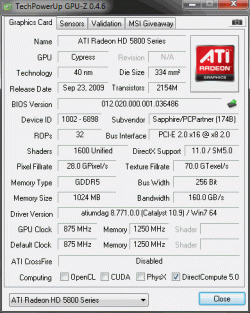
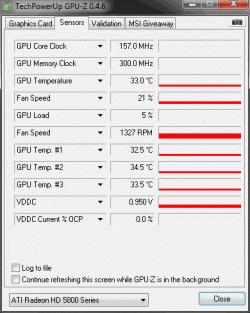
I attached two picks from GPU-Z hope this helps also, this was from just downloading some thing I think
 

Attachments

  • 1.gif
    1.gif
    16.9 KB · Views: 6
  • 2.gif
    2.gif
    11.7 KB · Views: 5

My Computer My Computer

Computer Manufacturer/Model Number
Home Made
OS
Windows 7 Home Premium (x64) (build 7600)
CPU
3.20 gigahertz AMD Phenom II X6 1090T
Motherboard
Gigabyte Technology Co., Ltd. GA-890GPA-UD3H
Memory
6GB RAM
Graphics Card(s)
Nvidia Gtx 580
Monitor(s) Displays
(TV)Samgung 32"
Screen Resolution
1920 x 1080
Hard Drives
1.81 TB
PSU
Antec true power quattro 1200 watt
Case
Antec Nine Hundred Two
Keyboard
Logitech G19
Mouse
Razor Naga
Internet Speed
50 MB
I attached two picks from GPU-Z hope this helps also, this was from just downloading some thing I think

Thanks - those appear fine. Any recent TDR errors like over the last 24-hours? Have you tried what Carl suggested i.e. uninstall Norton and replace with MSE for now? Regards
 

My Computer My Computer

Computer Manufacturer/Model Number
Custom
OS
Win7 HP (x64)/Win7 Ultimate (x64)
CPU
Core i7 920
Motherboard
Intel X58
Memory
6 x 2GB Corsair XMS3
Graphics Card(s)
CF HD4890
Sound Card
Asus Xonar
Monitor(s) Displays
Dell 2408WFP
Screen Resolution
1920 x 1200
Hard Drives
2 x 150GB WDC Velociraptors (Raid 0)
1 x 1TB Seagate
1 x 1.5TB Seagate
PSU
Corsair HX1000W
Case
Antec 1200
Keyboard
Razer Lycosa/N52te
Mouse
Razer Lachesis
Sorry m8 but what do you mean by TDR
 

My Computer My Computer

Computer Manufacturer/Model Number
Home Made
OS
Windows 7 Home Premium (x64) (build 7600)
CPU
3.20 gigahertz AMD Phenom II X6 1090T
Motherboard
Gigabyte Technology Co., Ltd. GA-890GPA-UD3H
Memory
6GB RAM
Graphics Card(s)
Nvidia Gtx 580
Monitor(s) Displays
(TV)Samgung 32"
Screen Resolution
1920 x 1080
Hard Drives
1.81 TB
PSU
Antec true power quattro 1200 watt
Case
Antec Nine Hundred Two
Keyboard
Logitech G19
Mouse
Razor Naga
Internet Speed
50 MB
Sorry m8 but what do you mean by TDR

More info here:

Q: What is TDR?
A: TDR (Timeout Detection and Recovery) is a windows vista and windows 7 feature. Its purpose is to detect when the GPU stops responding, disable it and reinitialize it without the need to exit windows or reboot.
Q: What does TDR have to do with atikmdag?
A: A TDR event is reported to the end user by a notification bubble. This bubble will indicate "The display driver [insert name here] has stopped responding as was recovered." The driver name for all ATI systems is atikmdag, for NVIDIA users the same error will be reported but with the driver name nvlddmkm.sys. Atikmdag will also appear in the event viewer log under the warning associated with the TDR event.
Q: What causes TDR to trigger an event?
A: This is a very complicated question. The events can be due to almost anything in your system hardware or software. This has caused much confusion, as the same error is a symptom for everything from bad memory to a software fault.
The following hardware issues are examples that can cause a TDR event:
- Failing overclock on CPU or GPU
- Bad sector in memory resulting in corrupt data being communicated between GPU and the system (either video or system memory)
- Corrupt hard drive/windows install resulting in corruption to the system registry or the page file
- Over heating of GPU or CPU again resulting in corrupt data being communicated.
- GPU failure due to any sort of issue from insufficient power(VERY common) to heat.
The following software issues are examples that can cause a TDR event:
-Incompatible drivers of any sort (either GPU, sound, etc)
-Messy registry
-Known vista issues resounding around multiple displays, aero, dreamscape, and various display drivers.
-Known vista issues that sometimes cause corrupt information to be sent to the video card from system memory (will be addressed completely in SP2, has had various fixes applied since vista's release)
-Bad direct x files
-bad system files
-Bad driver (some drivers will cause an event due to internal bugs, however these are not nearly as common as many think due to all of the previous things causing the same symptom)
Q: How do I fix my TDR events?
A: This entirely depends on what is causing the event. As one can see there are almost limitless causes. First you must determine if the issue is hardware or software related, which can be quite a headache.
Some fixes work for some users, some do not

 

My Computer My Computer

Computer Manufacturer/Model Number
Custom
OS
Win7 HP (x64)/Win7 Ultimate (x64)
CPU
Core i7 920
Motherboard
Intel X58
Memory
6 x 2GB Corsair XMS3
Graphics Card(s)
CF HD4890
Sound Card
Asus Xonar
Monitor(s) Displays
Dell 2408WFP
Screen Resolution
1920 x 1200
Hard Drives
2 x 150GB WDC Velociraptors (Raid 0)
1 x 1TB Seagate
1 x 1.5TB Seagate
PSU
Corsair HX1000W
Case
Antec 1200
Keyboard
Razer Lycosa/N52te
Mouse
Razer Lachesis
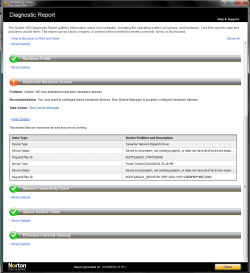
Not sure if its me or the forums but I see some writing then like 5mins later I see more like after I refresh the page alot also but if you mean any crashes still on games then yes I tryed uninstall the AIT driver and reinstalled but it didnt seem to work also Norton360 detected this -
 

Attachments

  • Untitled.png
    Untitled.png
    35.2 KB · Views: 14

My Computer My Computer

Computer Manufacturer/Model Number
Home Made
OS
Windows 7 Home Premium (x64) (build 7600)
CPU
3.20 gigahertz AMD Phenom II X6 1090T
Motherboard
Gigabyte Technology Co., Ltd. GA-890GPA-UD3H
Memory
6GB RAM
Graphics Card(s)
Nvidia Gtx 580
Monitor(s) Displays
(TV)Samgung 32"
Screen Resolution
1920 x 1080
Hard Drives
1.81 TB
PSU
Antec true power quattro 1200 watt
Case
Antec Nine Hundred Two
Keyboard
Logitech G19
Mouse
Razor Naga
Internet Speed
50 MB
Oh and I dont even get to see the bubble saying that the display driver has stoped responding I have to restart my pc all the time now when it crashes altho World of Warcraft seems to work fine altho I didnt get to raid yet since I was on a break to test would it crash or not
 

My Computer My Computer

Computer Manufacturer/Model Number
Home Made
OS
Windows 7 Home Premium (x64) (build 7600)
CPU
3.20 gigahertz AMD Phenom II X6 1090T
Motherboard
Gigabyte Technology Co., Ltd. GA-890GPA-UD3H
Memory
6GB RAM
Graphics Card(s)
Nvidia Gtx 580
Monitor(s) Displays
(TV)Samgung 32"
Screen Resolution
1920 x 1080
Hard Drives
1.81 TB
PSU
Antec true power quattro 1200 watt
Case
Antec Nine Hundred Two
Keyboard
Logitech G19
Mouse
Razor Naga
Internet Speed
50 MB
Not sure if its me or the forums but I see some writing then like 5mins later I see more like after I refresh the page alot also but if you mean any crashes still on games then yes I tryed uninstall the AIT driver and reinstalled but it didnt seem to work also Norton360 detected this -


Hi Stevens

Carl had suggested uninstalling Nortons and replacing with MSE for now - this would allow us to eliminate Nortons as the cause of the faults given that some users have had issues that were attributed to Nortons in previous cases such as this.

In relation to the ATI driver, what version of the driver are you using at present? Was the system stable with the original drivers (one that came with the box) for your graphics card?
 
Last edited:

My Computer My Computer

Computer Manufacturer/Model Number
Custom
OS
Win7 HP (x64)/Win7 Ultimate (x64)
CPU
Core i7 920
Motherboard
Intel X58
Memory
6 x 2GB Corsair XMS3
Graphics Card(s)
CF HD4890
Sound Card
Asus Xonar
Monitor(s) Displays
Dell 2408WFP
Screen Resolution
1920 x 1200
Hard Drives
2 x 150GB WDC Velociraptors (Raid 0)
1 x 1TB Seagate
1 x 1.5TB Seagate
PSU
Corsair HX1000W
Case
Antec 1200
Keyboard
Razer Lycosa/N52te
Mouse
Razer Lachesis
Oh and I dont even get to see the bubble saying that the display driver has stoped responding I have to restart my pc all the time now when it crashes altho World of Warcraft seems to work fine altho I didnt get to raid yet since I was on a break to test would it crash or not


Sorry could you clarify this please?

Thanks
 

My Computer My Computer

Computer Manufacturer/Model Number
Custom
OS
Win7 HP (x64)/Win7 Ultimate (x64)
CPU
Core i7 920
Motherboard
Intel X58
Memory
6 x 2GB Corsair XMS3
Graphics Card(s)
CF HD4890
Sound Card
Asus Xonar
Monitor(s) Displays
Dell 2408WFP
Screen Resolution
1920 x 1200
Hard Drives
2 x 150GB WDC Velociraptors (Raid 0)
1 x 1TB Seagate
1 x 1.5TB Seagate
PSU
Corsair HX1000W
Case
Antec 1200
Keyboard
Razer Lycosa/N52te
Mouse
Razer Lachesis
Sorry didnt see the 4th page lol, I will try what Carl sugested now sorry Carl I seemed to have missed that post andLomai you know the bubble saying that the "Display Driver AMD display driver has stoped responding and has sucsessfuly recoverd" or so, I used to see that and it dosnt show up any more the whole pc just freezes with a black or brown screen with thick lines, come to think about it I played Medel of honor the new one on Beta with out one crash before I updated stuff
 

My Computer My Computer

Computer Manufacturer/Model Number
Home Made
OS
Windows 7 Home Premium (x64) (build 7600)
CPU
3.20 gigahertz AMD Phenom II X6 1090T
Motherboard
Gigabyte Technology Co., Ltd. GA-890GPA-UD3H
Memory
6GB RAM
Graphics Card(s)
Nvidia Gtx 580
Monitor(s) Displays
(TV)Samgung 32"
Screen Resolution
1920 x 1080
Hard Drives
1.81 TB
PSU
Antec true power quattro 1200 watt
Case
Antec Nine Hundred Two
Keyboard
Logitech G19
Mouse
Razor Naga
Internet Speed
50 MB
This error is GPU/RAM related.
Either the GPU/RAM is faulty or the RAM is incorrectly configured

Running memtest86 might help
 

My Computer My Computer

Computer type
PC/Desktop
Computer Manufacturer/Model Number
Custom Build
OS
Windows 10 Pro x64, Arch Linux
CPU
Intel Core 2 Quad Q8200 OC'd 3.08GHz
Motherboard
Asus Rampage formula LGA775
Memory
8GB DDR2 900Mhz
Graphics Card(s)
MSI GT730 2GB GDDR5 (Kepler)
Sound Card
Supreme FX2
Monitor(s) Displays
Samsung LS22F350 LED
Screen Resolution
1080P
Hard Drives
Kingston SSDNow UV400 120GB, 500GB Hitachi, 2TB Samsung, 500GB Seagate FreeAgent, 640GB Samsung, 160GB Toshiba (Arch)
PSU
AeroCool 500W Bronze
Cooling
Cooler Master V6 + 3X fans
Keyboard
Prolink keyboard
Mouse
Logitech M705
Internet Speed
1MiB/s
Browser
Chrome Beta
yowanvista - hey sorry I remember you posting about that but got confused I will go threw it again on a min after the norton360 just to test each
 

My Computer My Computer

Computer Manufacturer/Model Number
Home Made
OS
Windows 7 Home Premium (x64) (build 7600)
CPU
3.20 gigahertz AMD Phenom II X6 1090T
Motherboard
Gigabyte Technology Co., Ltd. GA-890GPA-UD3H
Memory
6GB RAM
Graphics Card(s)
Nvidia Gtx 580
Monitor(s) Displays
(TV)Samgung 32"
Screen Resolution
1920 x 1080
Hard Drives
1.81 TB
PSU
Antec true power quattro 1200 watt
Case
Antec Nine Hundred Two
Keyboard
Logitech G19
Mouse
Razor Naga
Internet Speed
50 MB
ok done the memtest86 and it didnt boot up on the USB when I restarted the PC so it said I should go into BIOS settings and change so the USB boots 1st, will this affect anything? I mean I aint the best at PC's so will it be fine staying at USB to start 1st or will I change it back and it said it could take a few hours to test so I will wait till 2night.

I have uninstalled Norton360 and installed the MSE so that may help? I will try Gothic 4 now and see if it crashes like the other games and I will get back to you asap
 

My Computer My Computer

Computer Manufacturer/Model Number
Home Made
OS
Windows 7 Home Premium (x64) (build 7600)
CPU
3.20 gigahertz AMD Phenom II X6 1090T
Motherboard
Gigabyte Technology Co., Ltd. GA-890GPA-UD3H
Memory
6GB RAM
Graphics Card(s)
Nvidia Gtx 580
Monitor(s) Displays
(TV)Samgung 32"
Screen Resolution
1920 x 1080
Hard Drives
1.81 TB
PSU
Antec true power quattro 1200 watt
Case
Antec Nine Hundred Two
Keyboard
Logitech G19
Mouse
Razor Naga
Internet Speed
50 MB
Maby I forgot to say this but it just happend now but the screen at the bottom kinda jumped abit with a line or 2 going threw it , not that noticeable the graphics and picture is the same at that point.
 

My Computer My Computer

Computer Manufacturer/Model Number
Home Made
OS
Windows 7 Home Premium (x64) (build 7600)
CPU
3.20 gigahertz AMD Phenom II X6 1090T
Motherboard
Gigabyte Technology Co., Ltd. GA-890GPA-UD3H
Memory
6GB RAM
Graphics Card(s)
Nvidia Gtx 580
Monitor(s) Displays
(TV)Samgung 32"
Screen Resolution
1920 x 1080
Hard Drives
1.81 TB
PSU
Antec true power quattro 1200 watt
Case
Antec Nine Hundred Two
Keyboard
Logitech G19
Mouse
Razor Naga
Internet Speed
50 MB
Maby I forgot to say this but it just happend now but the screen at the bottom kinda jumped abit with a line or 2 going threw it , not that noticeable the graphics and picture is the same at that point.


Do the lines remain onscreen permanently?
 

My Computer My Computer

Computer Manufacturer/Model Number
Custom
OS
Win7 HP (x64)/Win7 Ultimate (x64)
CPU
Core i7 920
Motherboard
Intel X58
Memory
6 x 2GB Corsair XMS3
Graphics Card(s)
CF HD4890
Sound Card
Asus Xonar
Monitor(s) Displays
Dell 2408WFP
Screen Resolution
1920 x 1200
Hard Drives
2 x 150GB WDC Velociraptors (Raid 0)
1 x 1TB Seagate
1 x 1.5TB Seagate
PSU
Corsair HX1000W
Case
Antec 1200
Keyboard
Razer Lycosa/N52te
Mouse
Razer Lachesis
no for a split second
 

My Computer My Computer

Computer Manufacturer/Model Number
Home Made
OS
Windows 7 Home Premium (x64) (build 7600)
CPU
3.20 gigahertz AMD Phenom II X6 1090T
Motherboard
Gigabyte Technology Co., Ltd. GA-890GPA-UD3H
Memory
6GB RAM
Graphics Card(s)
Nvidia Gtx 580
Monitor(s) Displays
(TV)Samgung 32"
Screen Resolution
1920 x 1080
Hard Drives
1.81 TB
PSU
Antec true power quattro 1200 watt
Case
Antec Nine Hundred Two
Keyboard
Logitech G19
Mouse
Razor Naga
Internet Speed
50 MB
Ok thanks for that.
Keep us posted if you have another one of those events :)
Am signing out for today - in case it crashes again, try disabling (check the entry) Disable Catalyst A.I from your Catalyst Control Centre (System Tray Icon with ATI -right-click to open)>3D Menu>All Tab

Found this also in case you need a screenshot on how to go about the process(uses the AI Tab instead of All I mentoned above)

1- Locate Catalyst A.I., which is found under Graphics > 3D:
fixi.jpg


2- Under "AI", make sure "Disable Catalyst A.I." is checked, as seen here:
fix2l.jpg


3- Apply

Regards
 
Last edited:

My Computer My Computer

Computer Manufacturer/Model Number
Custom
OS
Win7 HP (x64)/Win7 Ultimate (x64)
CPU
Core i7 920
Motherboard
Intel X58
Memory
6 x 2GB Corsair XMS3
Graphics Card(s)
CF HD4890
Sound Card
Asus Xonar
Monitor(s) Displays
Dell 2408WFP
Screen Resolution
1920 x 1200
Hard Drives
2 x 150GB WDC Velociraptors (Raid 0)
1 x 1TB Seagate
1 x 1.5TB Seagate
PSU
Corsair HX1000W
Case
Antec 1200
Keyboard
Razer Lycosa/N52te
Mouse
Razer Lachesis
Back
Top