
Making a DVD out of a .vob File

EchoX860

Super Senior Member
Pro User
VIP
Local time
1:05 PM
Messages
563
So...I have a .wma Movie File and a Converted .vob Movie File. I want to put the vob File on a DVD that can be played on DVD Players. I did it before using Xilisoft DVD Creator, but that was TrialWare and has watermarks. I recently downloaded BurnAware, but has Audio_TS and Video_TS Folders. I don't have any of those, all I have is a simple vob file.

I know it can be done as I did it before using Xilisoft DVD Creator with the Green Zone (w/ Matt Damon, Good movie btw)

---------------- Now playing: Trapt - Waiting via FoxyTunes
 

My Computer My Computer

At a glance

Windows 7 Home Premium x64AMD Athlon II X4 6204.00GB Dual Channel DDR3 @ 666Mhz (9-9-9-24)HD Radeon 4200 (Integrated)
Computer Manufacturer/Model Number
HP p6270z
OS
Windows 7 Home Premium x64
CPU
AMD Athlon II X4 620
Motherboard
Foxconn ALOE (CPU 1)
Memory
4.00GB Dual Channel DDR3 @ 666Mhz (9-9-9-24)
Graphics Card(s)
HD Radeon 4200 (Integrated)
Sound Card
Realtek High Definition Audio
Monitor(s) Displays
HP 2311 (1920x1080) @ 60Hz
Screen Resolution
1920x1080
Hard Drives
488GB Seagate ST3500418AS SCSI Disk Device (RAID)

My Computer My Computer

At a glance

Windows 7 Ultimate x64AMD Sempron Dual Core3GBNVIDIA GeForce 6150SE nForce 430
Computer Manufacturer/Model Number
Compaq Desktop
OS
Windows 7 Ultimate x64
CPU
AMD Sempron Dual Core
Memory
3GB
Graphics Card(s)
NVIDIA GeForce 6150SE nForce 430
Screen Resolution
1024x768
Hard Drives
150GB Sata
Thanks! But it keeps saying that it can't open .vob files.
 

My Computer My Computer

At a glance

Windows 7 Home Premium x64AMD Athlon II X4 6204.00GB Dual Channel DDR3 @ 666Mhz (9-9-9-24)HD Radeon 4200 (Integrated)
Computer Manufacturer/Model Number
HP p6270z
OS
Windows 7 Home Premium x64
CPU
AMD Athlon II X4 620
Motherboard
Foxconn ALOE (CPU 1)
Memory
4.00GB Dual Channel DDR3 @ 666Mhz (9-9-9-24)
Graphics Card(s)
HD Radeon 4200 (Integrated)
Sound Card
Realtek High Definition Audio
Monitor(s) Displays
HP 2311 (1920x1080) @ 60Hz
Screen Resolution
1920x1080
Hard Drives
488GB Seagate ST3500418AS SCSI Disk Device (RAID)
Ah, sorry :o

You could try Windows DVD Maker which is part of Windows Live Essentials...

Windows Live Essentials 2011

I'm not sure of the file compatibility but it could be worth a try :)
 

My Computer My Computer

At a glance

Windows 7 Ultimate x64AMD Sempron Dual Core3GBNVIDIA GeForce 6150SE nForce 430
Computer Manufacturer/Model Number
Compaq Desktop
OS
Windows 7 Ultimate x64
CPU
AMD Sempron Dual Core
Memory
3GB
Graphics Card(s)
NVIDIA GeForce 6150SE nForce 430
Screen Resolution
1024x768
Hard Drives
150GB Sata
A .vob file IS a DVD file, you just need to assign two folders to the DVD you wish to burn. One is AUDIO_TS and should be empty, the other is VIDEO_TS where you need to put the .vob file. Burn the DVD and you're done.
 

My Computer My Computer

At a glance

Windows 7 Home Premium x64Intel Core i5 2500K8GB DDR3nVidia GeForce GTX650 Ti BOOST
Computer type
Laptop
Computer Manufacturer/Model Number
Custom
OS
Windows 7 Home Premium x64
CPU
Intel Core i5 2500K
Motherboard
MSI MS-7750
Memory
8GB DDR3
Graphics Card(s)
nVidia GeForce GTX650 Ti BOOST
Sound Card
Realtek
Monitor(s) Displays
21' Philips
Screen Resolution
Full HD
Hard Drives
1TB
PSU
500W
If you still have the .wma file, convert it to .avi. There are many free programs to do this. You then will have many more options. I use Cucusoft or ConvertXtoDvd. Both are not free but I do a ton of DVD's.
 

My Computer My Computer

At a glance

Windows 7 Professional 64bitIntel Celeron 2.4 GH4 GBNVidia GeForce 9800GT
Computer Manufacturer/Model Number
MSI
OS
Windows 7 Professional 64bit
CPU
Intel Celeron 2.4 GH
Memory
4 GB
Graphics Card(s)
NVidia GeForce 9800GT
Sound Card
ATI HDMI Audio
Monitor(s) Displays
Acer S231HL Dual Monitors
Hard Drives
Hitachi 300GB ATA
Maxtor 300GB USB
Cooling
Standard
Keyboard
Logitech wireless
Mouse
Logitech wireless
Internet Speed
Cable
I don't know what any of that means Gornot. I just have a .vob file and a .wma file. I don't have an Audio_TS or Video_TS Folder.

Roban, I converted it. Now what?

DVDStyler still won't accept it. I'm just better off buying Xilisoft.
 

My Computer My Computer

At a glance

Windows 7 Home Premium x64AMD Athlon II X4 6204.00GB Dual Channel DDR3 @ 666Mhz (9-9-9-24)HD Radeon 4200 (Integrated)
Computer Manufacturer/Model Number
HP p6270z
OS
Windows 7 Home Premium x64
CPU
AMD Athlon II X4 620
Motherboard
Foxconn ALOE (CPU 1)
Memory
4.00GB Dual Channel DDR3 @ 666Mhz (9-9-9-24)
Graphics Card(s)
HD Radeon 4200 (Integrated)
Sound Card
Realtek High Definition Audio
Monitor(s) Displays
HP 2311 (1920x1080) @ 60Hz
Screen Resolution
1920x1080
Hard Drives
488GB Seagate ST3500418AS SCSI Disk Device (RAID)
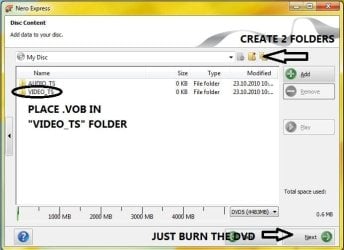
You need to CREATE the two folders when you burn the DVD:

DVD.JPG
 

My Computer My Computer

At a glance

Windows 7 Home Premium x64Intel Core i5 2500K8GB DDR3nVidia GeForce GTX650 Ti BOOST
Computer type
Laptop
Computer Manufacturer/Model Number
Custom
OS
Windows 7 Home Premium x64
CPU
Intel Core i5 2500K
Motherboard
MSI MS-7750
Memory
8GB DDR3
Graphics Card(s)
nVidia GeForce GTX650 Ti BOOST
Sound Card
Realtek
Monitor(s) Displays
21' Philips
Screen Resolution
Full HD
Hard Drives
1TB
PSU
500W
A .vob file IS a DVD file, you just need to assign two folders to the DVD you wish to burn. One is AUDIO_TS and should be empty, the other is VIDEO_TS where you need to put the .vob file. Burn the DVD and you're done.

Sorry to say but the main issue with that is there's no IFO files to direct DVD navigation and playback. Some DVD players may read VOB files directly but with out any structure files a lot of players would find 'No Media'...
 

My Computer My Computer

At a glance

Windows 7 Ultimate x64AMD Sempron Dual Core3GBNVIDIA GeForce 6150SE nForce 430
Computer Manufacturer/Model Number
Compaq Desktop
OS
Windows 7 Ultimate x64
CPU
AMD Sempron Dual Core
Memory
3GB
Graphics Card(s)
NVIDIA GeForce 6150SE nForce 430
Screen Resolution
1024x768
Hard Drives
150GB Sata
Sorry to say but the main issue with that is there's no IFO files to direct DVD navigation and playback. Some DVD players may read VOB files directly but with out any structure files a lot of players would find 'No Media'...

I am aware of that, but since he says that he only has a single .vob file, it's worth a shot, I never had problems in the past.
 

My Computer My Computer

At a glance

Windows 7 Home Premium x64Intel Core i5 2500K8GB DDR3nVidia GeForce GTX650 Ti BOOST
Computer type
Laptop
Computer Manufacturer/Model Number
Custom
OS
Windows 7 Home Premium x64
CPU
Intel Core i5 2500K
Motherboard
MSI MS-7750
Memory
8GB DDR3
Graphics Card(s)
nVidia GeForce GTX650 Ti BOOST
Sound Card
Realtek
Monitor(s) Displays
21' Philips
Screen Resolution
Full HD
Hard Drives
1TB
PSU
500W
I have used ConvertX2DVD for years... works flawlessly ... ;)
 

My Computer My Computer

At a glance

64-bit Windows 8.1 ProCore(TM) i5 CPU 4330 Haswell @ 3.20GHz12.00 GBIntel(R) HD Graphics
Computer type
PC/Desktop
Computer Manufacturer/Model Number
LENOVO K450 @3.0GHZ
OS
64-bit Windows 8.1 Pro
CPU
Core(TM) i5 CPU 4330 Haswell @ 3.20GHz
Motherboard
LENOVO
Memory
12.00 GB
Graphics Card(s)
Intel(R) HD Graphics
Sound Card
Intel HD integtrated
Monitor(s) Displays
HP 25' ISP Monitor
Screen Resolution
1900/1020
Hard Drives
(1) ST1000DM003-1CH162 (2) Generic STORAGE DEVICE USB Device (3) Generic STORAGE DEVICE USB Device
Internet Speed
100mb down/10mb up
Cannot add file C:\Users\Josh\Videos\Alice in Wonderland 2.vob

That's using BurnAware Free and DVDStyler when I try to put it in the Video_TS Folder
 

My Computer My Computer

At a glance

Windows 7 Home Premium x64AMD Athlon II X4 6204.00GB Dual Channel DDR3 @ 666Mhz (9-9-9-24)HD Radeon 4200 (Integrated)
Computer Manufacturer/Model Number
HP p6270z
OS
Windows 7 Home Premium x64
CPU
AMD Athlon II X4 620
Motherboard
Foxconn ALOE (CPU 1)
Memory
4.00GB Dual Channel DDR3 @ 666Mhz (9-9-9-24)
Graphics Card(s)
HD Radeon 4200 (Integrated)
Sound Card
Realtek High Definition Audio
Monitor(s) Displays
HP 2311 (1920x1080) @ 60Hz
Screen Resolution
1920x1080
Hard Drives
488GB Seagate ST3500418AS SCSI Disk Device (RAID)
Windows Movie Maker (free with WLE 2011) can open VOB files and burn to DVD :)
 

My Computer My Computer

At a glance

Windows 7 Ultimate x64AMD Sempron Dual Core3GBNVIDIA GeForce 6150SE nForce 430
Computer Manufacturer/Model Number
Compaq Desktop
OS
Windows 7 Ultimate x64
CPU
AMD Sempron Dual Core
Memory
3GB
Graphics Card(s)
NVIDIA GeForce 6150SE nForce 430
Screen Resolution
1024x768
Hard Drives
150GB Sata
I just bought the Xilisoft DVD Creator. I don't like hassle, I get frustrated. Thanks for the help guys.
 

My Computer My Computer

At a glance

Windows 7 Home Premium x64AMD Athlon II X4 6204.00GB Dual Channel DDR3 @ 666Mhz (9-9-9-24)HD Radeon 4200 (Integrated)
Computer Manufacturer/Model Number
HP p6270z
OS
Windows 7 Home Premium x64
CPU
AMD Athlon II X4 620
Motherboard
Foxconn ALOE (CPU 1)
Memory
4.00GB Dual Channel DDR3 @ 666Mhz (9-9-9-24)
Graphics Card(s)
HD Radeon 4200 (Integrated)
Sound Card
Realtek High Definition Audio
Monitor(s) Displays
HP 2311 (1920x1080) @ 60Hz
Screen Resolution
1920x1080
Hard Drives
488GB Seagate ST3500418AS SCSI Disk Device (RAID)
Well, we tried ;)

Although I do like the Xilisoft app it seems to do everything :)
 

My Computer My Computer

At a glance

Windows 7 Ultimate x64AMD Sempron Dual Core3GBNVIDIA GeForce 6150SE nForce 430
Computer Manufacturer/Model Number
Compaq Desktop
OS
Windows 7 Ultimate x64
CPU
AMD Sempron Dual Core
Memory
3GB
Graphics Card(s)
NVIDIA GeForce 6150SE nForce 430
Screen Resolution
1024x768
Hard Drives
150GB Sata
The whole Audio Video thing is confusing. With Xilisoft, I put in a Blank DVD, Load the vob File into the Program, Click Burn, and it makes the DVD.

SIMPLE!
 

My Computer My Computer

At a glance

Windows 7 Home Premium x64AMD Athlon II X4 6204.00GB Dual Channel DDR3 @ 666Mhz (9-9-9-24)HD Radeon 4200 (Integrated)
Computer Manufacturer/Model Number
HP p6270z
OS
Windows 7 Home Premium x64
CPU
AMD Athlon II X4 620
Motherboard
Foxconn ALOE (CPU 1)
Memory
4.00GB Dual Channel DDR3 @ 666Mhz (9-9-9-24)
Graphics Card(s)
HD Radeon 4200 (Integrated)
Sound Card
Realtek High Definition Audio
Monitor(s) Displays
HP 2311 (1920x1080) @ 60Hz
Screen Resolution
1920x1080
Hard Drives
488GB Seagate ST3500418AS SCSI Disk Device (RAID)

My Computer My Computer

At a glance

windows 7 ultimate 64bitIntel Core2 Extreme x9000 2.8GHZ4Gig2 NVidia GeForce 8800M GTX (SLi)
Computer Manufacturer/Model Number
Alienware AREA-51 M17x
OS
windows 7 ultimate 64bit
CPU
Intel Core2 Extreme x9000 2.8GHZ
Motherboard
Asus P965 Intel chipset
Memory
4Gig
Graphics Card(s)
2 NVidia GeForce 8800M GTX (SLi)
Sound Card
onboard
Monitor(s) Displays
17in. built-in, 47in JVC LCD
Screen Resolution
1080p
Hard Drives
2 250Gig Hitachi (RAID 0) @ 7200RPM
Case
17in. laptop
Mouse
touchpad, Logitech Anywhere Mouse cordless laser
Internet Speed
cable
Sothink didn't add the files either. So....

It even says .avi on the website. But it doesn't add it into the program. I'm startin to think it's my PC. Converted to .mp4 and it still doesn't do it.
 
Last edited:

My Computer My Computer

At a glance

Windows 7 Home Premium x64AMD Athlon II X4 6204.00GB Dual Channel DDR3 @ 666Mhz (9-9-9-24)HD Radeon 4200 (Integrated)
Computer Manufacturer/Model Number
HP p6270z
OS
Windows 7 Home Premium x64
CPU
AMD Athlon II X4 620
Motherboard
Foxconn ALOE (CPU 1)
Memory
4.00GB Dual Channel DDR3 @ 666Mhz (9-9-9-24)
Graphics Card(s)
HD Radeon 4200 (Integrated)
Sound Card
Realtek High Definition Audio
Monitor(s) Displays
HP 2311 (1920x1080) @ 60Hz
Screen Resolution
1920x1080
Hard Drives
488GB Seagate ST3500418AS SCSI Disk Device (RAID)
Converting Wma --> AVI --> DVD will end up being a very poor quality DVD.

Any time you recode, you always loose some quality. Its best to keep it as close to the original as possible.

The only other free option I know of is Windows Live Movie maker. Youll need to start with the original wmv file though i beleieve.
its also extremely limited in what it can do.


While i have no experience with the free program suggested, perhaps it just needs the original wma file to create the DVD?


The only ones I know of that do a good job are paid products.
Although many may not agree, here are a couple paid suggestions that offer a free trial to check it out.

One is Convert-X
It doesnt have the best quality IMO, best its fast, and can work with a large variety of files.

It basically just takes a Video File, and converts it to DVD, even with the option of creating menus.


Then theres NERO
This is what I use, as it gives decent quality. Also, allows the creation of menus, and allows you edit the movie. Cut or add scenes etc, then converts and burns to DVD.
 

My Computer My Computer

At a glance

Windows 7 Home Premium 64bitIntel Core i7 2700k8GB Mushkin Redline Ridgebacks @1866EVGA GTX570 SC
Computer Manufacturer/Model Number
Custom (Self Build)
OS
Windows 7 Home Premium 64bit
CPU
Intel Core i7 2700k
Motherboard
eVGA P67 SLI
Memory
8GB Mushkin Redline Ridgebacks @1866
Graphics Card(s)
EVGA GTX570 SC
Sound Card
XiFi Titanium HD
Monitor(s) Displays
LG W2453V
Screen Resolution
1920x1080
Hard Drives
Intel 320 80GB -- Intel X25-V 40GB --WD Black 1TB x2 -- WD Blue 640GB
PSU
Seasonic x750
Case
Corsair 600T SE White
Cooling
eVGA Superclocked CPU Cooler
Keyboard
Saitek Cyborg
Antivirus
Kaspersky
Browser
IE
Other Info
LG BD/DVD
Just for future reference, another way you can do it with free software is using DVDAuthorGui:
The homepage of DVDAuthorGUI

I've used this program for years. Choose PAL or NTSC click Add Title and browse to the .vob file. Click the Author DVD Button. You get a VIDEO_TS ready to burn with Imgburn or another burning app. You can also add menus if you like.
 

My Computer My Computer

At a glance

Windows 7 32 bitAMD 5200+ dual core2 GBNVidia GeForce 6150SE 128 MB
Computer Manufacturer/Model Number
HP Media Center
OS
Windows 7 32 bit
CPU
AMD 5200+ dual core
Memory
2 GB
Graphics Card(s)
NVidia GeForce 6150SE 128 MB
Monitor(s) Displays
CRT
Screen Resolution
1280x1024
Hard Drives
500 GB Sata internal :

SIIG USB 3.0 docking stations w/WD Caviar Black 6 Gb/s drives
Keyboard
PS/2
Mouse
PS/2 Wheel Mouse
Other Info
SIIG USB 3.0 PCIexpress card.
Back
Top