build 7127 Vs 7100 - Thoughts so far

I know the advice is to do a clean install of 7127 instead of an upgrade from 7100, but has anyone actually done the upgrade? If so, are there any bad experiences from that?

Asking because I've spent lots of hours customizing my 7100 installation and really don't want to start over again with 7127. I know I'll have to do that with the RTM -- but that's months down the road.
 

My Computer My Computer

At a glance

Win7 Pro 32-bit, Win8 Pro 32-bitAMD Phenom II X6 1090T4GB ddr3 1300AMD HD 4290 onboard
Computer type
PC/Desktop
Computer Manufacturer/Model Number
Custom
OS
Win7 Pro 32-bit, Win8 Pro 32-bit
CPU
AMD Phenom II X6 1090T
Motherboard
Gigabyte
Memory
4GB ddr3 1300
Graphics Card(s)
AMD HD 4290 onboard
Sound Card
Builtin Realtek HD Audio
Monitor(s) Displays
Samsung 24" widescreen, LG 23" widescreen
Screen Resolution
1920x1200/1920x1080
Hard Drives
Kingston 256GB SSD
Keyboard
Logitech Illuminated Keyboard
Mouse
Logitech M705 wireless mouse
Antivirus
Norton Av 2013
Browser
IE v10
I did an updgrade from 7100 becaue I'm limiting myself to one clean install per month.

No problems so far.
 

My Computer My Computer

At a glance

7264x64/7260x86
OS
7264x64/7260x86
I did an updgrade from 7100 becaue I'm limiting myself to one clean install per month.

lmfao.... that sounds like some kind of diet.. hahahaha


but yea, so far, after further review, 7127 has cured alot of my "blues". Especially when it comes to correctly and accurately reporting the connection, be it wired or wireless, as compared to the PUBLIC RELEASED windows 7 beta 2..."RC"

not too mention, there wasnt any 2 updates for the IE, or the x86 root security flaw as found for the BETA 2. And i've yet to have the language pack updates as well, just fyi. Tho not sure if they are included or not. I would presume yes, but then again....

I honestly think MS should state a public apology for their carelessness of releasing this build to the general public, and then release an actual RC available to the public.... but oh my... that would definitely let the cat out of the bag wouldnt it.... roll the dice i say MS.... reconciling this issue may speak well on your future reputation.
 

My Computer My Computer

At a glance

XP/win7 x86 build 7127Athlon64 X2 DUAL 4200+ 2.21ghz2GB Dual Chan DDR2 CorsairNvidia 6800GT
Computer Manufacturer/Model Number
CUSTOM
OS
XP/win7 x86 build 7127
CPU
Athlon64 X2 DUAL 4200+ 2.21ghz
Motherboard
ASUS K8 PRO SLI
Memory
2GB Dual Chan DDR2 Corsair
Graphics Card(s)
Nvidia 6800GT
Sound Card
nvidia
Monitor(s) Displays
19' LCD
Screen Resolution
1280x1024
Hard Drives
WD 250, 2x500, 2x1TB IDE/USB
WD 250 SATA (system)
SEAGATE 120 Sata
PSU
coolermaster 450
Case
SUPERFLOWER
Cooling
1 HDD bay fan, 5x80mm Case Fans, AEROGATE II Fan/Temp
Keyboard
MS wireless
Mouse
MS Wireless
Internet Speed
fassssssssst
i've been using 7127 for about a week now. besides the folder.jpg bugfix, one other major thing i've noticed is that my system no longer hangs after signing in from locked state or power saving mode - which it would persistently do at random in both 7077 and 7100.
 

My Computer My Computer

At a glance

Windows 7 x64 Ultimate Retail
OS
Windows 7 x64 Ultimate Retail
i've been using 7127 for about a week now. besides the folder.jpg bugfix,


are you talking about the extension "bug", the one thats been in existance for while, or is this something new?
 

My Computer My Computer

At a glance

XP/win7 x86 build 7127Athlon64 X2 DUAL 4200+ 2.21ghz2GB Dual Chan DDR2 CorsairNvidia 6800GT
Computer Manufacturer/Model Number
CUSTOM
OS
XP/win7 x86 build 7127
CPU
Athlon64 X2 DUAL 4200+ 2.21ghz
Motherboard
ASUS K8 PRO SLI
Memory
2GB Dual Chan DDR2 Corsair
Graphics Card(s)
Nvidia 6800GT
Sound Card
nvidia
Monitor(s) Displays
19' LCD
Screen Resolution
1280x1024
Hard Drives
WD 250, 2x500, 2x1TB IDE/USB
WD 250 SATA (system)
SEAGATE 120 Sata
PSU
coolermaster 450
Case
SUPERFLOWER
Cooling
1 HDD bay fan, 5x80mm Case Fans, AEROGATE II Fan/Temp
Keyboard
MS wireless
Mouse
MS Wireless
Internet Speed
fassssssssst
In 7127 ... I had to disable AVG's resident shield to be able to open a picture in Irfanview in less than 4>5 seconds ???
I didn't have this problem in 7100 ... So far, this is the only difference I've found.

For Photoshop users ... There's some neat context menu tricks going on here
 

My Computer My Computer

At a glance

XP MCE .... XP Pro 64 .... W7 U x64E6750, 2.67GHz C2D4GB, PC2 6400GeForce 9400GT
Computer Manufacturer/Model Number
HP d4996t (upgraded)
OS
XP MCE .... XP Pro 64 .... W7 U x64
CPU
E6750, 2.67GHz C2D
Memory
4GB, PC2 6400
Graphics Card(s)
GeForce 9400GT
Monitor(s) Displays
Twin Samsung 2443BWT
Screen Resolution
1920x1200
Hard Drives
Many .. 3 Installed
PSU
460W
Internet Speed
Cable
I know the advice is to do a clean install of 7127 instead of an upgrade from 7100, but has anyone actually done the upgrade? If so, are there any bad experiences from that?

Asking because I've spent lots of hours customizing my 7100 installation and really don't want to start over again with 7127. I know I'll have to do that with the RTM -- but that's months down the road.

I did an upgrade install from 7100 to 7127 and upgrade went without a hitch. I've done clean installs of every previous build but I just finished installing and setting up 7100 when 7127 came along, so I did my first upgrade. No regrets so far, if you had no problems with 7100 you will probably see some improvements with 7127. I say go for it.
 

My Computer My Computer

At a glance

Windows 7 Home Premium 64 bitIntel Core 2 Quad Q8200 @ 2.33 GHz8 GB DDR3ATI Radeon HD 4350
Computer Manufacturer/Model Number
HP Pavilion e9107c
OS
Windows 7 Home Premium 64 bit
CPU
Intel Core 2 Quad Q8200 @ 2.33 GHz
Memory
8 GB DDR3
Graphics Card(s)
ATI Radeon HD 4350
Monitor(s) Displays
HP 23 in. High Definition (w2338h)
Screen Resolution
1920 x 1080
Hard Drives
750 GB
Keyboard
Logitech Illuminated keyboard
Mouse
Logitech Laser mouse
are you talking about the extension "bug", the one thats been in existance for while, or is this something new?

not the extension bug, folder cover/thumbnail bug. refer to: link
 

My Computer My Computer

At a glance

Windows 7 x64 Ultimate Retail
OS
Windows 7 x64 Ultimate Retail
I keep hearing a lot of good things about 7127. Just installed 7100 but am already considering making the jump. But I'm tired of burning DVDs (I have a MacBook Pro, which means EFI; flash drive installation doesn't work so well yet).
 

My Computer My Computer

At a glance

Windows 7 64-bit (7127) & Mac OS X 10.5.72.53 GHz Intel Core2Duo (6MB L2 Cache)4GB DDR2 6678600M GT 512MB
Computer Manufacturer/Model Number
Apple MacBook Pro
OS
Windows 7 64-bit (7127) & Mac OS X 10.5.7
CPU
2.53 GHz Intel Core2Duo (6MB L2 Cache)
Memory
4GB DDR2 667
Graphics Card(s)
8600M GT 512MB
Monitor(s) Displays
15.4 LED backlit LCD
Screen Resolution
1440x900
Hard Drives
Hitachi 250GB 5400 RPM (soon to be replaced)
Mouse
Logitech
not the extension bug, folder cover/thumbnail bug. refer to: link

ahhh ty, i missed that thread... never ran into that... that goes without saying i dont use the OS that much as of yet for me to see that behavior. But thank you for pointing me to your thread, that was good info. I also wonder if this may have had anything to do with the "bug" of the HG libraries not showing up at times, and needed the fix of either restore to default, or change the optomize this foler for... Very interesting, again thanks.

edit: what I meant by "not showing up" was ... the library itself would show up, but when going into, no contents would be displayed until doing the above "fix"
 

My Computer My Computer

At a glance

XP/win7 x86 build 7127Athlon64 X2 DUAL 4200+ 2.21ghz2GB Dual Chan DDR2 CorsairNvidia 6800GT
Computer Manufacturer/Model Number
CUSTOM
OS
XP/win7 x86 build 7127
CPU
Athlon64 X2 DUAL 4200+ 2.21ghz
Motherboard
ASUS K8 PRO SLI
Memory
2GB Dual Chan DDR2 Corsair
Graphics Card(s)
Nvidia 6800GT
Sound Card
nvidia
Monitor(s) Displays
19' LCD
Screen Resolution
1280x1024
Hard Drives
WD 250, 2x500, 2x1TB IDE/USB
WD 250 SATA (system)
SEAGATE 120 Sata
PSU
coolermaster 450
Case
SUPERFLOWER
Cooling
1 HDD bay fan, 5x80mm Case Fans, AEROGATE II Fan/Temp
Keyboard
MS wireless
Mouse
MS Wireless
Internet Speed
fassssssssst
I hoped I could just install the newer versions right over my Build 7100 like an update, guess that's not the case after reading this thread :cry:
 

My Computer My Computer

At a glance

Windows Vista & 7
OS
Windows Vista & 7
lmfao.... that sounds like some kind of diet.. hahahaha


but yea, so far, after further review, 7127 has cured alot of my "blues". Especially when it comes to correctly and accurately reporting the connection, be it wired or wireless, as compared to the PUBLIC RELEASED windows 7 beta 2..."RC"

Hmm, never ran into that problem. Must of just been you. My build correctly reports my connection.

ahhh ty, i missed that thread... never ran into that... that goes without saying i dont use the OS that much as of yet for me to see that behavior. But thank you for pointing me to your thread, that was good info.

Sorry to jump on you, but you've been making it a habit lately of jumping on anyone that states how great 7100 has been. I'm another data point that thinks that 7100 is the fastest, most stable release yet. (not including 7127, as that is newer).

not too mention, there wasnt any 2 updates for the IE, or the x86 root security flaw as found for the BETA 2. And i've yet to have the language pack updates as well, just fyi. Tho not sure if they are included or not. I would presume yes, but then again....

I honestly think MS should state a public apology for their carelessness of releasing this build to the general public, and then release an actual RC available to the public.... but oh my... that would definitely let the cat out of the bag wouldnt it.... roll the dice i say MS.... reconciling this issue may speak well on your future reputation.

FFS, what do IE updates have to do with Win 7? Of course the 7127 build didn't need the updates, they were included. Guess what, RTM won't need those either.

As far as the root security error goes, well sh*t happens and they probably won't make the same mistake on RTM.

I'm sorry MS killed your dog, but they've been real nice to mine.

PhreePhly
 

My Computer My Computer

At a glance

Windows 7 x64 (RTM via MSDN)Intel Core 2 Duo T9300 (2.5 GHz)4 GB SODIMMS (System Max)nVidia 8600M GS 256MB
Computer Manufacturer/Model Number
MPC Transport T2500 Laptop
OS
Windows 7 x64 (RTM via MSDN)
CPU
Intel Core 2 Duo T9300 (2.5 GHz)
Motherboard
MPC
Memory
4 GB SODIMMS (System Max)
Graphics Card(s)
nVidia 8600M GS 256MB
Sound Card
Realtek On-Board
Monitor(s) Displays
15.4" LCD with a Dell 2005FPW 20" attached
Screen Resolution
1680x1050 (15.4") and 1680x1050 (20")
Hard Drives
Toshiba 2.5" 320 GB 7200 RPM
I hoped I could just install the newer versions right over my Build 7100 like an update, guess that's not the case after reading this thread :cry:

As stated previously, in this thread I think, you CAN DEFINITELY DO an upgrade install over 7100, if you want, and users who have done it are not reporting any problems that I've seen. Here are the instructions from the MS Engineering Blog:

How to do “upgrade” install of later build over RC:
[FONT=&quot]Here’s what you can do to bypass the check for pre-release upgrade IF YOU REALLY REALLY NEED TO:[/FONT]

  1. [FONT=&quot]Download the ISO as you did previously and burn the ISO to a DVD.[/FONT]
  2. [FONT=&quot]Copy the whole image to a storage location you wish to run the upgrade from (a bootable flash drive or a directory on any partition on the machine running the pre-release build).[/FONT]
  3. [FONT=&quot]Browse to the sources directory.[/FONT]
  4. [FONT=&quot]Open the file cversion.ini in a text editor like Notepad.[/FONT]
  5. [FONT=&quot]Modify the MinClient build number to a value lower than the down-level build. For example, change 7100 to 7000 (pictured below).[/FONT]
  6. [FONT=&quot]Save the file in place with the same name.[/FONT]
  7. [FONT=&quot]Run setup like you would normally from this modified copy of the image and the version check will be bypassed.[/FONT]
[FONT=&quot] These same steps will be required as we transition from the RC milestone to the RTM milestone.[/FONT] [In other words, if this is not already clear enough, you can do this same procedure to "upgrade" instead of clean install from a future RC to the RTM, when available.]

[FONT=&quot]Again, we know many people (including tens of thousands at Microsoft) are relying on the pre-release builds of Windows 7 for mission critical and daily work, making this step less than convenient. We’re working hard to provide the highest quality release we can and so we’d like to make sure for this final phase of testing we’re supporting the most real world scenarios possible, which incremental build to build upgrades are not. At the same time everyone on the beta has been so great we wanted to make sure we at least offered an opportunity to make your own expert and informed choice about how to handle the upgrade.[/FONT]
 

My Computer My Computer

At a glance

Windows 7 Ultimate x64 (Retail)i7-Q 7206 GBnVidia GeForce GT 230M (1GB)
Computer Manufacturer/Model Number
HP DV8t quad
OS
Windows 7 Ultimate x64 (Retail)
CPU
i7-Q 720
Motherboard
Motherboard Chipset Intel Ibex Peak-M PM55, Intel Lynnfield
Memory
6 GB
Graphics Card(s)
nVidia GeForce GT 230M (1GB)
Sound Card
IDT High Definition Audio CODEC
Monitor(s) Displays
18.4 inch HP Infinity FHD (Samsung 184HT03-001)
Screen Resolution
1920 x 1080
Hard Drives
Hitachi 500GB 7200 rpm (x2)
Seagate FreeAgent 1.5 TB External USB (x2)
Thermaltake BlacX eSATA/USB 2.0 3.5/2.5 HD dock
Cooling
Zalman NC-2000 notebook cooling pad
Keyboard
laptop
Mouse
Logitech VX Revolution
Other Info
Backup Unit: Lenovo T61p
As stated previously, in this thread I think, you CAN DEFINITELY DO an upgrade install over 7100, if you want, and users who have done it are not reporting any problems that I've seen. Here are the instructions from the MS Engineering Blog:[FONT=&quot].[/FONT]

Thank you harpua....
 

My Computer My Computer

At a glance

Windows Vista & 7
OS
Windows Vista & 7
Will this work?
Use Windows easy transfer, format C:, install 7127, use Windows easy transfer again with data from 7100.
Or is there too much difference between these 2 builds?
 

My Computer My Computer

At a glance

Windows 7 Ultimate x64Intel E6850 3,0 running 3,6 Ghz2x2 and Gb Corsair PC6400 CAS5 - 4GB totalNvidia Geforce 260GTX
OS
Windows 7 Ultimate x64
CPU
Intel E6850 3,0 running 3,6 Ghz
Motherboard
Gigabyte DS4 P35
Memory
2x2 and Gb Corsair PC6400 CAS5 - 4GB total
Graphics Card(s)
Nvidia Geforce 260GTX
Sound Card
Creative X-Fi Fata1ty Gamer Extreme
Monitor(s) Displays
Samsung 2493hm
Screen Resolution
1920*1200
Hard Drives
Intel X25-M SSD for system
2x 1Tb Samsung F1 as seperate discs
PSU
Zahlman 850HP
Case
Shg
Cooling
Evo 120
Keyboard
Logitech G15 (blue backlight)
Mouse
Logitech G5 laser
Internet Speed
25/25 mbit
Other Info
1 Samsung SATA dvd-burner
1 LiteOn SATA dvd-burner
Sven, if you are talking about Migration Wizard (Migwiz) then yes, should work fine. When I switched from Win 7 32bit to 64bit I had to, of course, do a clean install. I used Migwiz and it worked perfectly.
 

My Computer My Computer

At a glance

Win 7 64 bit, 7127Intel E6420 C2D 2.13 GHz/4MB2 GBnVidia 8600 GTS, 256 MB
Computer Manufacturer/Model Number
Dell XPS 410
OS
Win 7 64 bit, 7127
CPU
Intel E6420 C2D 2.13 GHz/4MB
Memory
2 GB
Graphics Card(s)
nVidia 8600 GTS, 256 MB
Monitor(s) Displays
19" LCD, 17" CRT
Screen Resolution
1400x900, 1152x864
Hard Drives
320 GB, 120 GB, 80 GB
Keyboard
Logitech G15 Gaming
Mouse
Logitech MX 518
Internet Speed
8 Mb Cable
Other Info
I like Jello
1 change i've noticed in 7127 so far:

Control Panel - Network and Internet: More options under Internet Settings, this is the same as in Build 7077
Control Panel (Network and Internet).PNG

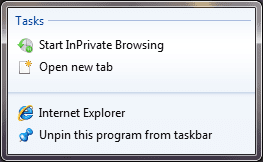
Internet Explorer - Start InPrivate Browsing: (thanks to redsoxm16 for this) When right-clicking the IE taskbar icon, InPrivate has been replaced with Start InPrivate Browsing.
Internet Explorer (Start InPrivate Browsing).png

More to follow as i find them. 7127 so far is a lot more zippy than 7100. 1 more thing :p what's taking up the other 170+MB? (See pic below)

7100 vs 7127 (size).PNG
 

My Computer My Computer

At a glance

Windows 7 Ultimate x64AMD Sempron Dual Core3GBNVIDIA GeForce 6150SE nForce 430
Computer Manufacturer/Model Number
Compaq Desktop
OS
Windows 7 Ultimate x64
CPU
AMD Sempron Dual Core
Memory
3GB
Graphics Card(s)
NVIDIA GeForce 6150SE nForce 430
Screen Resolution
1024x768
Hard Drives
150GB Sata
Kind of off topic, but did you run DPP/EOS Utility in 7100? I am and the EOS Utility doesn't recognize my 5D Mark II or 40D although they show up in explorer. I don't know if it's a software issue or Windows.

Hi there I don't have a 5D M2 but it works for a 1D MK2 and 1D Mk3 (also a new compact camera the Canon G10).

Install it in VISTA SP2 compatability mode - no probs so far.

Also download the latest version from the Canon site

Digital Photo Professional-E

cheers
jimbo
 

My Computer My Computer

At a glance

Linux CENTOS 7 / various Windows OS'es and se...Intel i7 Intel i58GB, 16GBOn Motherboard
Computer type
PC/Desktop
Computer Manufacturer/Model Number
Custom built, several laptops HP/ASUS
OS
Linux CENTOS 7 / various Windows OS'es and servers
CPU
Intel i7 Intel i5
Memory
8GB, 16GB
Graphics Card(s)
On Motherboard
Sound Card
Realtek HD audio
Monitor(s) Displays
Apple Cinema display, Samsung LCD
Screen Resolution
1920 X 1080
Hard Drives
4 X 1TB SATA
Mouse
Toshiba wireless laser
Internet Speed
> 20MB up
As stated previously, in this thread I think, you CAN DEFINITELY DO an upgrade install over 7100, if you want, and users who have done it are not reporting any problems that I've seen. Here are the instructions from the MS Engineering Blog:

How to do “upgrade” install of later build over RC:
[FONT=&quot]Here’s what you can do to bypass the check for pre-release upgrade IF YOU REALLY REALLY NEED TO:[/FONT]

  1. [FONT=&quot]Download the ISO as you did previously and burn the ISO to a DVD.[/FONT]
  2. [FONT=&quot]Copy the whole image to a storage location you wish to run the upgrade from (a bootable flash drive or a directory on any partition on the machine running the pre-release build).[/FONT]
  3. [FONT=&quot]Browse to the sources directory.[/FONT]
  4. [FONT=&quot]Open the file cversion.ini in a text editor like Notepad.[/FONT]
  5. [FONT=&quot]Modify the MinClient build number to a value lower than the down-level build. For example, change 7100 to 7000 (pictured below).[/FONT]
  6. [FONT=&quot]Save the file in place with the same name.[/FONT]
  7. [FONT=&quot]Run setup like you would normally from this modified copy of the image and the version check will be bypassed.[/FONT]
[FONT=&quot] These same steps will be required as we transition from the RC milestone to the RTM milestone.[/FONT] [In other words, if this is not already clear enough, you can do this same procedure to "upgrade" instead of clean install from a future RC to the RTM, when available.]

[FONT=&quot]Again, we know many people (including tens of thousands at Microsoft) are relying on the pre-release builds of Windows 7 for mission critical and daily work, making this step less than convenient. We’re working hard to provide the highest quality release we can and so we’d like to make sure for this final phase of testing we’re supporting the most real world scenarios possible, which incremental build to build upgrades are not. At the same time everyone on the beta has been so great we wanted to make sure we at least offered an opportunity to make your own expert and informed choice about how to handle the upgrade.[/FONT]

lol? I just ran the installer and click upgrade o.O no need to edit some .ini things :P and after 20 minutes 7100 evolved into 7127 :P
 

My Computer My Computer

At a glance

Windows 7 32bit RTM
OS
Windows 7 32bit RTM
lol? I just ran the installer and click upgrade o.O no need to edit some .ini things :P and after 20 minutes 7100 evolved into 7127 :P

And you lost nothing from the previous install (installed programs, documents, music ect....)??
 

My Computer My Computer

At a glance

Windows Vista & 7
OS
Windows Vista & 7
Back
Top