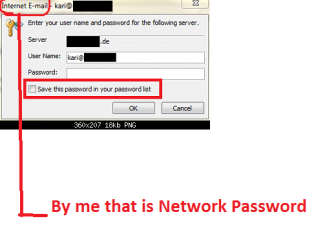
Network Password promt. doesn't want to fo away!!!

Core7

New member
Member
VIP
Local time
7:40 PM
Messages
525
Location
South Africa
When I send and receive my mail there comes a box up and asks me the whole time for a password and then i have to type it in all the time. is there anyway I can disable this please, I have tried the registry edit trick but that didn't solved it.

Thanks, hope someone can help me on this one because it driving me insane.
 

My Computer My Computer

At a glance

Window 7 Ultimate 32bitIntel core 2 duo @ 2.40 GhzHynix 2X1GBThe Club 3D GTS250 256bit
Computer Manufacturer/Model Number
Gigabyte
OS
Window 7 Ultimate 32bit
CPU
Intel core 2 duo @ 2.40 Ghz
Motherboard
Gigabyte
Memory
Hynix 2X1GB
Graphics Card(s)
The Club 3D GTS250 256bit
Sound Card
laptech
Monitor(s) Displays
Acer
Screen Resolution
1440X900
Hard Drives
Seagate 350gig
Seagate 250gig
PSU
Coolermaster GX 650
Case
Acer
Cooling
2 80mm fans
Keyboard
Acer
Mouse
Logitech
Internet Speed
54kb/s
Could you upload a Snip Showing us what is happening also What Password is it asking? A Wep Key??
 

My Computer My Computer

At a glance

Windows 7 Professional x64 SP1 ; Windows Serv...Intel Core i5 2400 @ 3.10GHz8.0GB DDR3 @ 665MHz (2GBx4)AMD Radeon HD 6870
Computer type
PC/Desktop
Computer Manufacturer/Model Number
Custom Built
OS
Windows 7 Professional x64 SP1 ; Windows Server 2012 R2 Standard
CPU
Intel Core i5 2400 @ 3.10GHz
Motherboard
Foxconn H67MP-S/-V/H67MP
Memory
8.0GB DDR3 @ 665MHz (2GBx4)
Graphics Card(s)
AMD Radeon HD 6870
Sound Card
Realtek High Definition Audio
Monitor(s) Displays
AOC 2243W & SMB1930NW
Screen Resolution
1440x900 & 1920x1080
Hard Drives
977GB Seagate ST31000524AS ATA Drive (SATA)
250GB WD iSCSI attached Drive
PSU
750W Gaming PSU
Case
Novatech Night
Cooling
Fan
Keyboard
Dell Standard PS/2 Keyboard
Mouse
R.A.T 07 Gaming Mouse
Internet Speed
Download: 10 Mbps Ping: 30ms Upload: 0.81 Mbps
Browser
Google Chrome
Other Info
Optiarc DVD RW AD-5260S ATA Device
A network password...I know this pass and when I type it in every time is works but it is annoying
 

My Computer My Computer

At a glance

Window 7 Ultimate 32bitIntel core 2 duo @ 2.40 GhzHynix 2X1GBThe Club 3D GTS250 256bit
Computer Manufacturer/Model Number
Gigabyte
OS
Window 7 Ultimate 32bit
CPU
Intel core 2 duo @ 2.40 Ghz
Motherboard
Gigabyte
Memory
Hynix 2X1GB
Graphics Card(s)
The Club 3D GTS250 256bit
Sound Card
laptech
Monitor(s) Displays
Acer
Screen Resolution
1440X900
Hard Drives
Seagate 350gig
Seagate 250gig
PSU
Coolermaster GX 650
Case
Acer
Cooling
2 80mm fans
Keyboard
Acer
Mouse
Logitech
Internet Speed
54kb/s
Are you connected using a Private Network? Does this happen on any Other network?
 

My Computer My Computer

At a glance

Windows 7 Professional x64 SP1 ; Windows Serv...Intel Core i5 2400 @ 3.10GHz8.0GB DDR3 @ 665MHz (2GBx4)AMD Radeon HD 6870
Computer type
PC/Desktop
Computer Manufacturer/Model Number
Custom Built
OS
Windows 7 Professional x64 SP1 ; Windows Server 2012 R2 Standard
CPU
Intel Core i5 2400 @ 3.10GHz
Motherboard
Foxconn H67MP-S/-V/H67MP
Memory
8.0GB DDR3 @ 665MHz (2GBx4)
Graphics Card(s)
AMD Radeon HD 6870
Sound Card
Realtek High Definition Audio
Monitor(s) Displays
AOC 2243W & SMB1930NW
Screen Resolution
1440x900 & 1920x1080
Hard Drives
977GB Seagate ST31000524AS ATA Drive (SATA)
250GB WD iSCSI attached Drive
PSU
750W Gaming PSU
Case
Novatech Night
Cooling
Fan
Keyboard
Dell Standard PS/2 Keyboard
Mouse
R.A.T 07 Gaming Mouse
Internet Speed
Download: 10 Mbps Ping: 30ms Upload: 0.81 Mbps
Browser
Google Chrome
Other Info
Optiarc DVD RW AD-5260S ATA Device
uhm I am connected to my own INTERNET and it is set as public network for home group reasons.
 

My Computer My Computer

At a glance

Window 7 Ultimate 32bitIntel core 2 duo @ 2.40 GhzHynix 2X1GBThe Club 3D GTS250 256bit
Computer Manufacturer/Model Number
Gigabyte
OS
Window 7 Ultimate 32bit
CPU
Intel core 2 duo @ 2.40 Ghz
Motherboard
Gigabyte
Memory
Hynix 2X1GB
Graphics Card(s)
The Club 3D GTS250 256bit
Sound Card
laptech
Monitor(s) Displays
Acer
Screen Resolution
1440X900
Hard Drives
Seagate 350gig
Seagate 250gig
PSU
Coolermaster GX 650
Case
Acer
Cooling
2 80mm fans
Keyboard
Acer
Mouse
Logitech
Internet Speed
54kb/s
That May be your Problem Could you go to Network and Discovery Settings in Control Panel and change it to Private After that tell me if the Problem Persists if So you may Change it back to Public

Hope This Helps,
Josh
 

My Computer My Computer

At a glance

Windows 7 Professional x64 SP1 ; Windows Serv...Intel Core i5 2400 @ 3.10GHz8.0GB DDR3 @ 665MHz (2GBx4)AMD Radeon HD 6870
Computer type
PC/Desktop
Computer Manufacturer/Model Number
Custom Built
OS
Windows 7 Professional x64 SP1 ; Windows Server 2012 R2 Standard
CPU
Intel Core i5 2400 @ 3.10GHz
Motherboard
Foxconn H67MP-S/-V/H67MP
Memory
8.0GB DDR3 @ 665MHz (2GBx4)
Graphics Card(s)
AMD Radeon HD 6870
Sound Card
Realtek High Definition Audio
Monitor(s) Displays
AOC 2243W & SMB1930NW
Screen Resolution
1440x900 & 1920x1080
Hard Drives
977GB Seagate ST31000524AS ATA Drive (SATA)
250GB WD iSCSI attached Drive
PSU
750W Gaming PSU
Case
Novatech Night
Cooling
Fan
Keyboard
Dell Standard PS/2 Keyboard
Mouse
R.A.T 07 Gaming Mouse
Internet Speed
Download: 10 Mbps Ping: 30ms Upload: 0.81 Mbps
Browser
Google Chrome
Other Info
Optiarc DVD RW AD-5260S ATA Device
Uhm sorry mate but I don't know how to change it to private is there like a screen shot for me please
 

My Computer My Computer

At a glance

Window 7 Ultimate 32bitIntel core 2 duo @ 2.40 GhzHynix 2X1GBThe Club 3D GTS250 256bit
Computer Manufacturer/Model Number
Gigabyte
OS
Window 7 Ultimate 32bit
CPU
Intel core 2 duo @ 2.40 Ghz
Motherboard
Gigabyte
Memory
Hynix 2X1GB
Graphics Card(s)
The Club 3D GTS250 256bit
Sound Card
laptech
Monitor(s) Displays
Acer
Screen Resolution
1440X900
Hard Drives
Seagate 350gig
Seagate 250gig
PSU
Coolermaster GX 650
Case
Acer
Cooling
2 80mm fans
Keyboard
Acer
Mouse
Logitech
Internet Speed
54kb/s
Are you talking about work/home?
 

My Computer My Computer

At a glance

Window 7 Ultimate 32bitIntel core 2 duo @ 2.40 GhzHynix 2X1GBThe Club 3D GTS250 256bit
Computer Manufacturer/Model Number
Gigabyte
OS
Window 7 Ultimate 32bit
CPU
Intel core 2 duo @ 2.40 Ghz
Motherboard
Gigabyte
Memory
Hynix 2X1GB
Graphics Card(s)
The Club 3D GTS250 256bit
Sound Card
laptech
Monitor(s) Displays
Acer
Screen Resolution
1440X900
Hard Drives
Seagate 350gig
Seagate 250gig
PSU
Coolermaster GX 650
Case
Acer
Cooling
2 80mm fans
Keyboard
Acer
Mouse
Logitech
Internet Speed
54kb/s
Are you talking about work/home?
Work and Home are both Private. Home was added with Windows 7 but only works if all computers on the network are Windows 7. Work is a type of private network that works with a mix of operating systems.
 

My Computer My Computer

At a glance

Windows 8 Pro w/MC 32-bitIntel Atom 1.86 GHz2 GBIntel GMA 500
Computer type
PC/Desktop
Computer Manufacturer/Model Number
OQO 2+
OS
Windows 8 Pro w/MC 32-bit
CPU
Intel Atom 1.86 GHz
Motherboard
OQO 2+
Memory
2 GB
Graphics Card(s)
Intel GMA 500
Sound Card
IDT
Monitor(s) Displays
LCD
Screen Resolution
800 x 480 (portable) 1280 x 1024 (docked)
Hard Drives
64 GB SSD
PSU
9 Ah Battery (portable) or OQO Brick (docked)
Case
Shirt Pocket Sized
Cooling
Tiny Fan
Keyboard
Slide out (portable) DiNovo Edge (docked)
Mouse
Eraser head (portable) Logitech Bluetooth (docked)
Internet Speed
WWAN or 802.11G (portable) T1 (docked)
Browser
IE 10
Other Info
DVD-RW OQO Docking Station
Exactly right roncerr!!
 

My Computer My Computer

At a glance

Windows 7 Ultimate 32bitINTEL Pentium4 3.2ghz(QuadCore MonthEnd!!!)2gb kingston DDR2 800hd powercolour 5570 512MB
Computer Manufacturer/Model Number
Custom
OS
Windows 7 Ultimate 32bit
CPU
INTEL Pentium4 3.2ghz(QuadCore MonthEnd!!!)
Motherboard
Asus P5QL-EM
Memory
2gb kingston DDR2 800
Graphics Card(s)
hd powercolour 5570 512MB
Sound Card
8ch onboard
Monitor(s) Displays
21" Samsung
Screen Resolution
Change alot
Hard Drives
samsung 500GB 7200rpm
PSU
Sparta 500w
Case
Alienware
Cooling
Aero cooling
Keyboard
Microsoft Multi-Media
Mouse
Scorpion 3000dpi
Internet Speed
none
Other Info
Xforce-5 5.1 Surround
Hi there I have done what you said but still that damm block comes up....I have just uninstall the office a few times but still it did not work but the funny thing is I can't get it to be brand new like the first time you open it. When I open it the emails is still the and my contacts and everything and when I delete the .pst file in the local folder under my user name it asks for it after i uninstalled it so I then have to put back the .pst file otherwise i have no Outlook. is there anyway to make me have a normal outlook????
 

My Computer My Computer

At a glance

Window 7 Ultimate 32bitIntel core 2 duo @ 2.40 GhzHynix 2X1GBThe Club 3D GTS250 256bit
Computer Manufacturer/Model Number
Gigabyte
OS
Window 7 Ultimate 32bit
CPU
Intel core 2 duo @ 2.40 Ghz
Motherboard
Gigabyte
Memory
Hynix 2X1GB
Graphics Card(s)
The Club 3D GTS250 256bit
Sound Card
laptech
Monitor(s) Displays
Acer
Screen Resolution
1440X900
Hard Drives
Seagate 350gig
Seagate 250gig
PSU
Coolermaster GX 650
Case
Acer
Cooling
2 80mm fans
Keyboard
Acer
Mouse
Logitech
Internet Speed
54kb/s
Is it that you want to stop having to log in to your PC or do you want to stop having to log in to your email program which, as we just learned, is Microsoft Outlook?
 

My Computer My Computer

At a glance

Windows 8 Pro w/MC 32-bitIntel Atom 1.86 GHz2 GBIntel GMA 500
Computer type
PC/Desktop
Computer Manufacturer/Model Number
OQO 2+
OS
Windows 8 Pro w/MC 32-bit
CPU
Intel Atom 1.86 GHz
Motherboard
OQO 2+
Memory
2 GB
Graphics Card(s)
Intel GMA 500
Sound Card
IDT
Monitor(s) Displays
LCD
Screen Resolution
800 x 480 (portable) 1280 x 1024 (docked)
Hard Drives
64 GB SSD
PSU
9 Ah Battery (portable) or OQO Brick (docked)
Case
Shirt Pocket Sized
Cooling
Tiny Fan
Keyboard
Slide out (portable) DiNovo Edge (docked)
Mouse
Eraser head (portable) Logitech Bluetooth (docked)
Internet Speed
WWAN or 802.11G (portable) T1 (docked)
Browser
IE 10
Other Info
DVD-RW OQO Docking Station
No, the problem is when i send and receive my emails I have to put in my email address password and that is really frustrating because i get like 300 emails a day. On my old laptop that I had it worked fine also windows 7 and I can't seem to get rid of the network password promt.
 

My Computer My Computer

At a glance

Window 7 Ultimate 32bitIntel core 2 duo @ 2.40 GhzHynix 2X1GBThe Club 3D GTS250 256bit
Computer Manufacturer/Model Number
Gigabyte
OS
Window 7 Ultimate 32bit
CPU
Intel core 2 duo @ 2.40 Ghz
Motherboard
Gigabyte
Memory
Hynix 2X1GB
Graphics Card(s)
The Club 3D GTS250 256bit
Sound Card
laptech
Monitor(s) Displays
Acer
Screen Resolution
1440X900
Hard Drives
Seagate 350gig
Seagate 250gig
PSU
Coolermaster GX 650
Case
Acer
Cooling
2 80mm fans
Keyboard
Acer
Mouse
Logitech
Internet Speed
54kb/s
No, the problem is when i send and receive my emails I have to put in my email address password and that is really frustrating because i get like 300 emails a day. On my old laptop that I had it worked fine also windows 7 and I can't seem to get rid of the network password promt.
I don't use Outlook, but it should have an option checked within each account set up to "remember password" somewhere near the place where you enter your "Logon Information" for that account.
 

My Computer My Computer

At a glance

Windows 8 Pro w/MC 32-bitIntel Atom 1.86 GHz2 GBIntel GMA 500
Computer type
PC/Desktop
Computer Manufacturer/Model Number
OQO 2+
OS
Windows 8 Pro w/MC 32-bit
CPU
Intel Atom 1.86 GHz
Motherboard
OQO 2+
Memory
2 GB
Graphics Card(s)
Intel GMA 500
Sound Card
IDT
Monitor(s) Displays
LCD
Screen Resolution
800 x 480 (portable) 1280 x 1024 (docked)
Hard Drives
64 GB SSD
PSU
9 Ah Battery (portable) or OQO Brick (docked)
Case
Shirt Pocket Sized
Cooling
Tiny Fan
Keyboard
Slide out (portable) DiNovo Edge (docked)
Mouse
Eraser head (portable) Logitech Bluetooth (docked)
Internet Speed
WWAN or 802.11G (portable) T1 (docked)
Browser
IE 10
Other Info
DVD-RW OQO Docking Station
When I send and receive my mail there comes a box up and asks me the whole time for a password and then i have to type it in all the time. is there anyway I can disable this please, I have tried the registry edit trick but that didn't solved it.

Thanks, hope someone can help me on this one because it driving me insane.

Would the password prompt be from your email program like Outlook?

It would help in figuring out what solution would be correct if you would tell us
what email program your using.

rich
 

My Computer My Computer

At a glance

Windows 7 Pro x64 SP1Intel Core I716 GigsNVIDIA GeForce GTX 670M
Computer type
Laptop
Computer Manufacturer/Model Number
Toshiba Laptop Qosimo X870
OS
Windows 7 Pro x64 SP1
CPU
Intel Core I7
Motherboard
Toshiba Qosmio
Memory
16 Gigs
Graphics Card(s)
NVIDIA GeForce GTX 670M
Monitor(s) Displays
17.7" laptop
Screen Resolution
1600 x 900
Hard Drives
256 Gig SanDisk SSD for C
256 Gig Intel SSD for D
Internet Speed
50/25 FIOS
Antivirus
Vipre (all you can eat for 10 machines)
Browser
IE and FF
Other Info
I have dos 6.22, wfwg 3.11, win98, 2000 and xp VHD's available for testing. MS's Virtual PC works great.
No, the problem is when i send and receive my emails I have to put in my email address password and that is really frustrating because i get like 300 emails a day. On my old laptop that I had it worked fine also windows 7 and I can't seem to get rid of the network password promt.
You were first talking about network password prompt, which made no sense. OK, now you told it's the email password and told you are using Outlook.

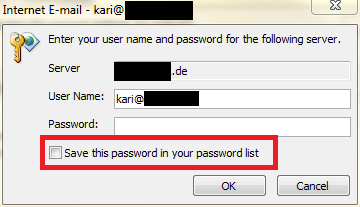
Is this the prompt you get every time? If so, just type your password and check the option Save this password in your password list:

Outlook_Password.png

(Screenshot from Outlook 2010. Other versions may not look exactly the same)

You must do this once for every email account you have setup in Outlook.


Work and Home are both Private. Home was added with Windows 7 but only works if all computers on the network are Windows 7. Work is a type of private network that works with a mix of operating systems.
A bit wrong information there. If a Windows computer is part of the network, it must belong to domain or workgroup. Additionally, if a Windows 7 computer belongs to a workgroup it can also join a homegroup, belong to both. To join a homegroup it must have Windows 7 operating system but all Windows computers on network can join and belong to a workgroup.

If you choose your network location as Home (other options Work and Public) in Windows 7, you most certainly can join any network or workgroup, also those including other Windows versions, as well as Linux and Mac machines.

Joining a workgroup, homegroup or domain is something completely different than choosing a network location, Public or Private in Vista and Home, Work or Public in Seven. Opposite to what you told, in a home network it's completely OK to set network location to Private on Vista machines, and to Home on Seven machines, and join them on the same workgroup.

What is the difference between a domain, a workgroup, and a homegroup?
Choosing a network location
http://www.sevenforums.com/tutorials/43629-network-location-set-home-work-public-network.html

Kari
 
Last edited:

My Computer My Computer

At a glance

Windows 10 Pro x64 EN-GB1.6 GHz Intel Core i7-720QM Processor6 GBATI Mobility Radeon HD 5850 Graphics
Computer type
Laptop
Computer Manufacturer/Model Number
HP ENVY 17-1150eg
OS
Windows 10 Pro x64 EN-GB
CPU
1.6 GHz Intel Core i7-720QM Processor
Memory
6 GB
Graphics Card(s)
ATI Mobility Radeon HD 5850 Graphics
Sound Card
Beats sound system with integrated subwoofer
Monitor(s) Displays
17" laptop display, 22" LED and 32" Full HD TV through HDMI
Screen Resolution
1600*900 (1), 1920*1080 (2&3)
Hard Drives
Internal: 2 x 500 GB SATA Hard Disk Drive 7200 rpm
External: 2TB for backups, 3TB USB3 network drive for media
Cooling
As Envy runs a bit warm, I have it on a Cooler Master pad
Keyboard
Logitech diNovo Media Desktop Laser (bluetooth)
Mouse
Logitech Performance Mouse MX
Internet Speed
50/10 Mbps VDSL
Antivirus
Windows Defender 4.3.9431.0
Browser
Maxthon 3.5.2., IE11
Kari, note the title of your last link "Network Location - Set as Home, Work, or Public". You only have that choice in Windows 7. In Vista it was Private or Public.
 

My Computer My Computer

At a glance

Windows 8 Pro w/MC 32-bitIntel Atom 1.86 GHz2 GBIntel GMA 500
Computer type
PC/Desktop
Computer Manufacturer/Model Number
OQO 2+
OS
Windows 8 Pro w/MC 32-bit
CPU
Intel Atom 1.86 GHz
Motherboard
OQO 2+
Memory
2 GB
Graphics Card(s)
Intel GMA 500
Sound Card
IDT
Monitor(s) Displays
LCD
Screen Resolution
800 x 480 (portable) 1280 x 1024 (docked)
Hard Drives
64 GB SSD
PSU
9 Ah Battery (portable) or OQO Brick (docked)
Case
Shirt Pocket Sized
Cooling
Tiny Fan
Keyboard
Slide out (portable) DiNovo Edge (docked)
Mouse
Eraser head (portable) Logitech Bluetooth (docked)
Internet Speed
WWAN or 802.11G (portable) T1 (docked)
Browser
IE 10
Other Info
DVD-RW OQO Docking Station
Kari, note the title of your last link "Network Location - Set as Home, Work, or Public". You only have that choice in Windows 7. In Vista it was Private or Public.
An extract from my post:
Joining a workgroup, homegroup or domain is something completely different than choosing a network location, Public or Private in Vista and Home, Work or Public in Seven.
You had very clearly mixed network location type Home with Homegroup, two totally different things, thus giving false information. Those links are there on purpose, to show you the difference.

Homegroup needs IPv6 address, which makes it impossible for older Windows versions to join Homegroup. But any XP or Vista computer can join the same workgroup than a Windows 7 computer with network location set to Home.

Very sincerely, Kari
 

My Computer My Computer

At a glance

Windows 10 Pro x64 EN-GB1.6 GHz Intel Core i7-720QM Processor6 GBATI Mobility Radeon HD 5850 Graphics
Computer type
Laptop
Computer Manufacturer/Model Number
HP ENVY 17-1150eg
OS
Windows 10 Pro x64 EN-GB
CPU
1.6 GHz Intel Core i7-720QM Processor
Memory
6 GB
Graphics Card(s)
ATI Mobility Radeon HD 5850 Graphics
Sound Card
Beats sound system with integrated subwoofer
Monitor(s) Displays
17" laptop display, 22" LED and 32" Full HD TV through HDMI
Screen Resolution
1600*900 (1), 1920*1080 (2&3)
Hard Drives
Internal: 2 x 500 GB SATA Hard Disk Drive 7200 rpm
External: 2TB for backups, 3TB USB3 network drive for media
Cooling
As Envy runs a bit warm, I have it on a Cooler Master pad
Keyboard
Logitech diNovo Media Desktop Laser (bluetooth)
Mouse
Logitech Performance Mouse MX
Internet Speed
50/10 Mbps VDSL
Antivirus
Windows Defender 4.3.9431.0
Browser
Maxthon 3.5.2., IE11
No, the problem is when i send and receive my emails I have to put in my email address password and that is really frustrating because i get like 300 emails a day. On my old laptop that I had it worked fine also windows 7 and I can't seem to get rid of the network password promt.
You were first talking about network password prompt, which made no sense. OK, now you told it's the email password and told you are using Outlook.

Is this the prompt you get every time? If so, just type your password and check the option Save this password in your password list:

View attachment 111853

(Screenshot from Outlook 2010. Other versions may not look exactly the same)

You must do this once for every email account you have setup in Outlook.


Work and Home are both Private. Home was added with Windows 7 but only works if all computers on the network are Windows 7. Work is a type of private network that works with a mix of operating systems.
A bit wrong information there. If a Windows computer is part of the network, it must belong to domain or workgroup. Additionally, if a Windows 7 computer belongs to a workgroup it can also join a homegroup, belong to both. To join a homegroup it must have Windows 7 operating system but all Windows computers on network can join and belong to a workgroup.

If you choose your network location as Home (other options Work and Public) in Windows 7, you most certainly can join any network or workgroup, also those including other Windows versions, as well as Linux and Mac machines.

Joining a workgroup, homegroup or domain is something completely different than choosing a network location, Public or Private in Vista and Home, Work or Public in Seven. Opposite to what you told, in a home network it's completely OK to set network location to Private on Vista machines, and to Home on Seven machines, and join them on the same workgroup.

What is the difference between a domain, a workgroup, and a homegroup?
Choosing a network location
http://www.sevenforums.com/tutorials/43629-network-location-set-home-work-public-network.html

Kari

DUDE I could figure that one out myself and was told to do this before and this doesn't work I have done it many times. And i have redone my settings and said save password. But still that dammmmmmmmmmmmmm block comes up.:cry:
 

My Computer My Computer

At a glance

Window 7 Ultimate 32bitIntel core 2 duo @ 2.40 GhzHynix 2X1GBThe Club 3D GTS250 256bit
Computer Manufacturer/Model Number
Gigabyte
OS
Window 7 Ultimate 32bit
CPU
Intel core 2 duo @ 2.40 Ghz
Motherboard
Gigabyte
Memory
Hynix 2X1GB
Graphics Card(s)
The Club 3D GTS250 256bit
Sound Card
laptech
Monitor(s) Displays
Acer
Screen Resolution
1440X900
Hard Drives
Seagate 350gig
Seagate 250gig
PSU
Coolermaster GX 650
Case
Acer
Cooling
2 80mm fans
Keyboard
Acer
Mouse
Logitech
Internet Speed
54kb/s
Mine is the same except for the network part
 

Attachments

  • Outlook_Password.png
    Outlook_Password.png
    17.5 KB · Views: 2

My Computer My Computer

At a glance

Window 7 Ultimate 32bitIntel core 2 duo @ 2.40 GhzHynix 2X1GBThe Club 3D GTS250 256bit
Computer Manufacturer/Model Number
Gigabyte
OS
Window 7 Ultimate 32bit
CPU
Intel core 2 duo @ 2.40 Ghz
Motherboard
Gigabyte
Memory
Hynix 2X1GB
Graphics Card(s)
The Club 3D GTS250 256bit
Sound Card
laptech
Monitor(s) Displays
Acer
Screen Resolution
1440X900
Hard Drives
Seagate 350gig
Seagate 250gig
PSU
Coolermaster GX 650
Case
Acer
Cooling
2 80mm fans
Keyboard
Acer
Mouse
Logitech
Internet Speed
54kb/s
Back
Top