HDMI-DVI Cable to LCD TV

slam

New member
Local time
5:09 AM
Messages
20
When I connect my Windows 7 computer to an LCD TV monitor, the resolution is set to 1920 x 1080, however I don't see the entire Desktop, rather it looks like it's been zoomed in. Any ideas?
 

My Computer My Computer

Computer Manufacturer/Model Number
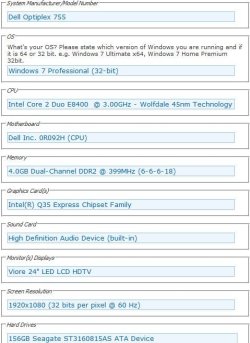
Dell Optiplex 755
OS
Windows 7 Professional (32-bit)
CPU
Intel Core 2 Duo E8400 @ 3.00GHz - Wolfdale 45nm Technology
Motherboard
Dell Inc. 0R092H (CPU)
Memory
4.0GB Dual-Channel DDR2 @ 399MHz (6-6-6-18)
Graphics Card(s)
Intel(R) Q35 Express Chipset Family
Sound Card
High Definition Audio Device (built-in)
Monitor(s) Displays
Viore 24" LED LCD HDTV
Screen Resolution
1920x1080 (32 bits per pixel @ 60 Hz)
Hard Drives
156GB Seagate ST3160815AS ATA Device
Keyboard
Dell
Mouse
Dell
Internet Speed
3.0 Mbits/sec @ Verizon DSL
Hello Slam,

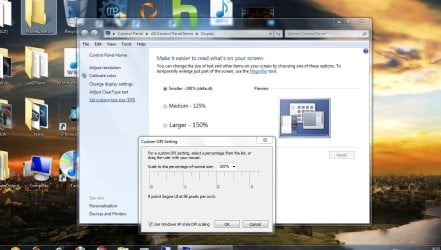
You might double check to see if your DPI settings may be set to something other than the default 96 DPI.

Hope this helps,
Shawn
 

My Computer My Computer

Computer type
PC/Desktop
Computer Manufacturer/Model Number
Self built custom
OS
64-bit Windows 11 Pro for Workstations
CPU
Intel i7-8700K OC'd to 5 GHz
Motherboard
ASUS ROG Maximus XI Formula Z390
Memory
64 GB (4x16GB) G.SKILL TridentZ RGB DDR4 3600 MHz
Graphics Card(s)
ASUS ROG-STRIX-GTX1080TI-O11G-GAMING
Sound Card
Integrated
Monitor(s) Displays
2 x Samsung Odyssey G7 27"
Screen Resolution
2560x1440
Hard Drives
1TB Samsung 990 PRO M.2,
4TB Samsung 990 PRO PRO M.2,
TerraMaster F8 SSD Plus NAS
PSU
Seasonic Prime Titanium 850W
Case
Thermaltake Core P3
Cooling
Corsair Hydro H115i
Keyboard
Logitech wireless K800
Mouse
Logitech MX Master 4
Internet Speed
2 Gb/s Download and 100 Mb/s Upload
Antivirus
Malwarebyte Anti-Malware Premium
Browser
Google Chrome
Other Info
Logitech Z625 speaker system,
Logitech BRIO 4K Pro webcam,
HP Color LaserJet Pro MFP M477fdn,
APC SMART-UPS RT 1000 XL - SURT1000XLI,
Galaxy S23 Plus phone
Hello Slam,

You might double check to see if your DPI settings may be set to something other than the default 96 DPI.

Hope this helps,
Shawn

Hi Shawn, it's on default, however still same result. Any other suggestions?
Here's what my screen looks like. Strange thing is, it's fine with VGA cables.

Thanks.
 

Attachments

  • HDMI-DVI.JPG
    HDMI-DVI.JPG
    121.5 KB · Views: 115

My Computer My Computer

Computer Manufacturer/Model Number
Dell Optiplex 755
OS
Windows 7 Professional (32-bit)
CPU
Intel Core 2 Duo E8400 @ 3.00GHz - Wolfdale 45nm Technology
Motherboard
Dell Inc. 0R092H (CPU)
Memory
4.0GB Dual-Channel DDR2 @ 399MHz (6-6-6-18)
Graphics Card(s)
Intel(R) Q35 Express Chipset Family
Sound Card
High Definition Audio Device (built-in)
Monitor(s) Displays
Viore 24" LED LCD HDTV
Screen Resolution
1920x1080 (32 bits per pixel @ 60 Hz)
Hard Drives
156GB Seagate ST3160815AS ATA Device
Keyboard
Dell
Mouse
Dell
Internet Speed
3.0 Mbits/sec @ Verizon DSL

My Computer My Computer

Computer Manufacturer/Model Number
Self Built
OS
Windows 7 ultimate 64 bit / XP Home sp3
CPU
intel Core 2 Duo E8400 3.0ghz
Motherboard
Asus P5ND bios 1401
Memory
8 gigs 1066 OCZ Fata1ty
Graphics Card(s)
EVGA GTX 580 Call of Duty Black Ops Edition
Sound Card
Creative Soundblaster Audigy 2zs
Monitor(s) Displays
Asus 24in LCD's 2MS X2
Screen Resolution
1920x1080p @60Hz
Hard Drives
WD Caviar 500 Black/ WD Caviar 200 Blue
PSU
OCZ 700W GameXtreme
Case
NZXT Apollo
Cooling
Corsair H50 CPU/120mm x3 /60mm x2 /Corsair Dominator Ram
Keyboard
Logitech Bluetooth Wireless MX5000
Mouse
Logitech Bluetooth Wireless MX1000
Internet Speed
Download 19.83 Upload 0.97
Other Info
Logitech Z2300 Speakers/ Bose Noise Cancelling Headphones/Avermedia PCI-e Hybrid TV Bravo/Epson NX415 all in one/ 4 Port Powered USB Hub/ LG 10x Bluray Burner /TSST Corp DVDRW External

Attachments

  • 755-specs.JPG
    755-specs.JPG
    56.5 KB · Views: 34
Last edited:

My Computer My Computer

Computer Manufacturer/Model Number
Dell Optiplex 755
OS
Windows 7 Professional (32-bit)
CPU
Intel Core 2 Duo E8400 @ 3.00GHz - Wolfdale 45nm Technology
Motherboard
Dell Inc. 0R092H (CPU)
Memory
4.0GB Dual-Channel DDR2 @ 399MHz (6-6-6-18)
Graphics Card(s)
Intel(R) Q35 Express Chipset Family
Sound Card
High Definition Audio Device (built-in)
Monitor(s) Displays
Viore 24" LED LCD HDTV
Screen Resolution
1920x1080 (32 bits per pixel @ 60 Hz)
Hard Drives
156GB Seagate ST3160815AS ATA Device
Keyboard
Dell
Mouse
Dell
Internet Speed
3.0 Mbits/sec @ Verizon DSL
You wouldn't have a link to your TV to post would you?
So when you connect via VGA everything is OK is what I understand, it's only when you use a HDMI cable that you experience this problem?

What happens if you uncheck Use Windows XP Style DPI scaling?
Fabe
 

My Computer My Computer

Computer Manufacturer/Model Number
Self Built
OS
Windows 7 ultimate 64 bit / XP Home sp3
CPU
intel Core 2 Duo E8400 3.0ghz
Motherboard
Asus P5ND bios 1401
Memory
8 gigs 1066 OCZ Fata1ty
Graphics Card(s)
EVGA GTX 580 Call of Duty Black Ops Edition
Sound Card
Creative Soundblaster Audigy 2zs
Monitor(s) Displays
Asus 24in LCD's 2MS X2
Screen Resolution
1920x1080p @60Hz
Hard Drives
WD Caviar 500 Black/ WD Caviar 200 Blue
PSU
OCZ 700W GameXtreme
Case
NZXT Apollo
Cooling
Corsair H50 CPU/120mm x3 /60mm x2 /Corsair Dominator Ram
Keyboard
Logitech Bluetooth Wireless MX5000
Mouse
Logitech Bluetooth Wireless MX1000
Internet Speed
Download 19.83 Upload 0.97
Other Info
Logitech Z2300 Speakers/ Bose Noise Cancelling Headphones/Avermedia PCI-e Hybrid TV Bravo/Epson NX415 all in one/ 4 Port Powered USB Hub/ LG 10x Bluray Burner /TSST Corp DVDRW External
You wouldn't have a link to your TV to post would you?
So when you connect via VGA everything is OK is what I understand, it's only when you use a HDMI cable that you experience this problem?

What happens if you uncheck Use Windows XP Style DPI scaling?
Fabe

TV (walmart link): LED24VF60

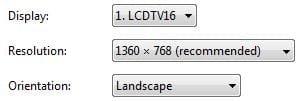
Correct, VGA is fine (1920x1080); I only get it with an HDMI-DVI cable. Interestingly, Windows recommends a lower resolution of 1360x768, but even at that resolution it doesn't look right.

Unchecking "Windows XP Style DPI scaling" didn't help.
 

Attachments

  • LCD2.JPG
    LCD2.JPG
    12 KB · Views: 1,272

My Computer My Computer

Computer Manufacturer/Model Number
Dell Optiplex 755
OS
Windows 7 Professional (32-bit)
CPU
Intel Core 2 Duo E8400 @ 3.00GHz - Wolfdale 45nm Technology
Motherboard
Dell Inc. 0R092H (CPU)
Memory
4.0GB Dual-Channel DDR2 @ 399MHz (6-6-6-18)
Graphics Card(s)
Intel(R) Q35 Express Chipset Family
Sound Card
High Definition Audio Device (built-in)
Monitor(s) Displays
Viore 24" LED LCD HDTV
Screen Resolution
1920x1080 (32 bits per pixel @ 60 Hz)
Hard Drives
156GB Seagate ST3160815AS ATA Device
Keyboard
Dell
Mouse
Dell
Internet Speed
3.0 Mbits/sec @ Verizon DSL
Slam,

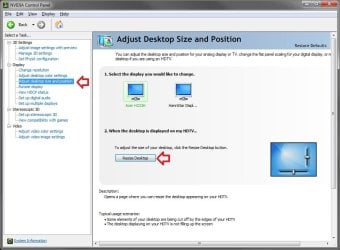
The image you posted above looks like you may need to use the Adjust desktop size and position option in either your graphics card driver or monitor settings like this setting for a NVIDIA graphics card below. It will allow you to adjust the top and side borders to fit the screen. I'm not sure of where these settings are for your graphics chip though, but go through all of its settings to see if you may have something similar.

Graphics.jpg
 

My Computer My Computer

Computer type
PC/Desktop
Computer Manufacturer/Model Number
Self built custom
OS
64-bit Windows 11 Pro for Workstations
CPU
Intel i7-8700K OC'd to 5 GHz
Motherboard
ASUS ROG Maximus XI Formula Z390
Memory
64 GB (4x16GB) G.SKILL TridentZ RGB DDR4 3600 MHz
Graphics Card(s)
ASUS ROG-STRIX-GTX1080TI-O11G-GAMING
Sound Card
Integrated
Monitor(s) Displays
2 x Samsung Odyssey G7 27"
Screen Resolution
2560x1440
Hard Drives
1TB Samsung 990 PRO M.2,
4TB Samsung 990 PRO PRO M.2,
TerraMaster F8 SSD Plus NAS
PSU
Seasonic Prime Titanium 850W
Case
Thermaltake Core P3
Cooling
Corsair Hydro H115i
Keyboard
Logitech wireless K800
Mouse
Logitech MX Master 4
Internet Speed
2 Gb/s Download and 100 Mb/s Upload
Antivirus
Malwarebyte Anti-Malware Premium
Browser
Google Chrome
Other Info
Logitech Z625 speaker system,
Logitech BRIO 4K Pro webcam,
HP Color LaserJet Pro MFP M477fdn,
APC SMART-UPS RT 1000 XL - SURT1000XLI,
Galaxy S23 Plus phone
Slam,

The image you posted above looks like you may need to use the Adjust desktop size and position option in either your graphics card driver or monitor settings like this setting for a NVIDIA graphics card below. It will allow you to adjust the top and side borders to fit the screen. I'm not sure of where these settings are for your graphics chip though, but go through all of its settings to see if you may have something similar.

After some googling, seems the issue I'm having is called Overscan. Unfortunately, unlike your NVIDIA graphics card, the Intel Q35 doesn't seem to have that option to resize the Desktop. Seems I'll have to go back to VGA for now.

Haven't noticed much difference in terms of quality between VGA and HDMI-DVI, whether using the computer or watching movies, so I don't mind. However, just a bit upset that I paid premium for a HDMI-DVI cable that is now pretty much useless. :(

I'm still open to suggestions however.
 

My Computer My Computer

Computer Manufacturer/Model Number
Dell Optiplex 755
OS
Windows 7 Professional (32-bit)
CPU
Intel Core 2 Duo E8400 @ 3.00GHz - Wolfdale 45nm Technology
Motherboard
Dell Inc. 0R092H (CPU)
Memory
4.0GB Dual-Channel DDR2 @ 399MHz (6-6-6-18)
Graphics Card(s)
Intel(R) Q35 Express Chipset Family
Sound Card
High Definition Audio Device (built-in)
Monitor(s) Displays
Viore 24" LED LCD HDTV
Screen Resolution
1920x1080 (32 bits per pixel @ 60 Hz)
Hard Drives
156GB Seagate ST3160815AS ATA Device
Keyboard
Dell
Mouse
Dell
Internet Speed
3.0 Mbits/sec @ Verizon DSL
Slam,

The image you posted above looks like you may need to use the Adjust desktop size and position option in either your graphics card driver or monitor settings like this setting for a NVIDIA graphics card below. It will allow you to adjust the top and side borders to fit the screen. I'm not sure of where these settings are for your graphics chip though, but go through all of its settings to see if you may have something similar.

After some googling, seems the issue I'm having is called Overscan. Unfortunately, unlike your NVIDIA graphics card, the Intel Q35 doesn't seem to have that option to resize the Desktop. Seems I'll have to go back to VGA for now.

Haven't noticed much difference in terms of quality between VGA and HDMI-DVI, whether using the computer or watching movies, so I don't mind. However, just a bit upset that I paid premium for a HDMI-DVI cable that is now pretty much useless. :(

I'm still open to suggestions however.

Also read through the manual that came with your TV it also has settings for desktop resizing. Mine has Normal, Zoom, Stretch & DOT by Dot. These settings can usually be found through the menu button and may be labeled differently as I described.
 

My Computer My Computer

Computer type
PC/Desktop
Computer Manufacturer/Model Number
My own abomination, I call it the Money Pit
OS
Windows 10 Pro x 2/Windows 11 Home
CPU
Intel i7 2600K @ 3.40 GHz
Motherboard
ASUS Sabertooth P67
Memory
Corsair Vengeance 16GB DDR3 1600MHz CL8 Dual Channel Kit
Graphics Card(s)
EVGA GeForce RTX 3080 XC3 ULTRA GAMING 10GB GDDR6X
Sound Card
Onboard Realtek or Nvidia High Definition Audio (HDMI)
Monitor(s) Displays
Samsung JS7000 50" SUHD TV or Samsung 27" FHD 60Hz 8ms GTG V
Screen Resolution
1920 x 1080
Hard Drives
1 x Samsung 870 EVO 250 GB SSD (Windows 10 Pro), 1 x Samsung 850 EVO 250 GB SSD (Windows 10 Pro)
PSU
Corsair AX860 - 860W Modular Power Supply
Case
Phanteks Enthoo Luxe Full Tower Case - Black
Cooling
CORSAIR Hydro Series H150i PRO RGB 360mm Liquid CPU Cooler
Keyboard
Logitech K830 Illuminated Living-Room Keyboard
Mouse
Logitech MX Anywhere 2S Wireless Mouse
Internet Speed
100 Mbps
Antivirus
ESET Internet Security
Browser
Latest Version Of Firefox & Microsoft Edge Chromium Stable
Other Info
LG Super Multi Blue Internal Blu-ray Disk Rewriter - BH10LS30
6x2 HDMI Switcher (6 inputs, 2 outputs) so I can send the output of my Cable Box, Roku, or any my 4 computers to either my TV or Monitor separately or simultaneously.
Slam,

The image you posted above looks like you may need to use the Adjust desktop size and position option in either your graphics card driver or monitor settings like this setting for a NVIDIA graphics card below. It will allow you to adjust the top and side borders to fit the screen. I'm not sure of where these settings are for your graphics chip though, but go through all of its settings to see if you may have something similar.

After some googling, seems the issue I'm having is called Overscan. Unfortunately, unlike your NVIDIA graphics card, the Intel Q35 doesn't seem to have that option to resize the Desktop. Seems I'll have to go back to VGA for now.

Haven't noticed much difference in terms of quality between VGA and HDMI-DVI, whether using the computer or watching movies, so I don't mind. However, just a bit upset that I paid premium for a HDMI-DVI cable that is now pretty much useless. :(

I'm still open to suggestions however.

Also read through the manual that came with your TV it also has settings for desktop resizing. Mine has Normal, Zoom, Stretch & DOT by Dot. These settings can usually be found through the menu button and may be labeled differently as I described.

I haven't checked the manual yet, but have pretty much exhausted everything else in terms of Settings on the TV, as well as Windows 7. I'll see if I can locate the manual, but I doubt it's going to be in there.
 

My Computer My Computer

Computer Manufacturer/Model Number
Dell Optiplex 755
OS
Windows 7 Professional (32-bit)
CPU
Intel Core 2 Duo E8400 @ 3.00GHz - Wolfdale 45nm Technology
Motherboard
Dell Inc. 0R092H (CPU)
Memory
4.0GB Dual-Channel DDR2 @ 399MHz (6-6-6-18)
Graphics Card(s)
Intel(R) Q35 Express Chipset Family
Sound Card
High Definition Audio Device (built-in)
Monitor(s) Displays
Viore 24" LED LCD HDTV
Screen Resolution
1920x1080 (32 bits per pixel @ 60 Hz)
Hard Drives
156GB Seagate ST3160815AS ATA Device
Keyboard
Dell
Mouse
Dell
Internet Speed
3.0 Mbits/sec @ Verizon DSL

My Computer My Computer

Computer Manufacturer/Model Number
Dell Optiplex 755
OS
Windows 7 Professional (32-bit)
CPU
Intel Core 2 Duo E8400 @ 3.00GHz - Wolfdale 45nm Technology
Motherboard
Dell Inc. 0R092H (CPU)
Memory
4.0GB Dual-Channel DDR2 @ 399MHz (6-6-6-18)
Graphics Card(s)
Intel(R) Q35 Express Chipset Family
Sound Card
High Definition Audio Device (built-in)
Monitor(s) Displays
Viore 24" LED LCD HDTV
Screen Resolution
1920x1080 (32 bits per pixel @ 60 Hz)
Hard Drives
156GB Seagate ST3160815AS ATA Device
Keyboard
Dell
Mouse
Dell
Internet Speed
3.0 Mbits/sec @ Verizon DSL
I used to have a problem like this with my Bravia kdlw4000 tv and found out the problem was on the tv part. In the tv you must find an option to Show all pixels. Could be called diferent on your tv.
 

My Computer My Computer

Computer Manufacturer/Model Number
Acer 7520G
OS
windows 7 64bit
CPU
AMD Turion 64X2 2.0GHz
Memory
Corsair 4Gb DDR2 800MHz
Graphics Card(s)
nVidia GeForce 8400M g
Sound Card
Realtek HD audio
Monitor(s) Displays
17 Inch, Sony TV
Hard Drives
2x160Gb Hitachi
This is directly from your user manual which I downloaded the .pdf

PC SETUP: If the video input signal comes from your PC, you may
adjust the V-Position, H-Position, Frequency, Phase or even
perform an Auto adjustment.

VGA port for connection to PC

The HDMI would best serve as the digital audio signal from your sound card if available and true digital signal.

Generally speaking when the manufacturer states the VGA port is the option for PC connection it realistically is the ONLY option to have correct screen resolution w/o issue. You will get a true HDTV signal from the VGA output which will be no less than what the HDMI would do if it were capable. Hope this clarifies things for you.
 
Last edited:

My Computer My Computer

Computer Manufacturer/Model Number
DELL XPS Studio 435T
OS
Vista 64 Ultimate, Windows 7 64 Ultimate, Ubuntu 9.10
CPU
i7 975 3.3 GHz Extreme (Factory OC'd to 3.6 GHz)
Motherboard
DELL provided
Memory
18 Gb Tri-Channel 1066
Graphics Card(s)
ATI 5970 2048 Mb
Sound Card
X-Fi Extreme Gamer
Monitor(s) Displays
Vizio 37" HD-TV
Screen Resolution
1920 x 1080
Hard Drives
1.5 Tb HDD
1.5 Tb HDD
2.0 Tb Network Drive
512 Gb Crucial SSD
PSU
DELL Provided 475 watts
Case
DELL
Cooling
3 fans
Keyboard
Logitech Performance K350 Wireless
Mouse
Logitech Performance MX Wireless
Internet Speed
3 Mb up 750 Kb down
Other Info
Bamboo Fun Tablet, Belkin N+ Wireless router, Pioneer Dolby System Wireless Headphones, Bose 5.1 Dolby Surround Sound System, LifeCam VX 3000 Webcam, Blu-Ray/Hi Def DVD +RW combo and Blu-ray +RW,l 15 in 1 media card reader, Logitech Rumblepad 2, Hauppauge 2250 DTV Tuner with MS Media Center Remote

Laptop:Alienware M17x, Q9100 CPU, 8Gb RAM, 1920x1200 WUXGA LCD driven by 4870's in CrossFireX, Bl
Generally speaking when the manufacturer states the VGA port is the option for PC connection it realistically is the ONLY option to have correct screen resolution w/o issue. You will get a true HDTV signal from the VGA output which will be no less than what the HDMI would do if it were capable. Hope this clarifies things for you.

This does clarify a lot, as it does seem my VGA connection looked as good as my HDMI. I've since switched back to VGA and gave up on HDMI, which I'm fine with. Now just have to figure out what to do with this unnecessary HDMI-DVI cable.
 

My Computer My Computer

Computer Manufacturer/Model Number
Dell Optiplex 755
OS
Windows 7 Professional (32-bit)
CPU
Intel Core 2 Duo E8400 @ 3.00GHz - Wolfdale 45nm Technology
Motherboard
Dell Inc. 0R092H (CPU)
Memory
4.0GB Dual-Channel DDR2 @ 399MHz (6-6-6-18)
Graphics Card(s)
Intel(R) Q35 Express Chipset Family
Sound Card
High Definition Audio Device (built-in)
Monitor(s) Displays
Viore 24" LED LCD HDTV
Screen Resolution
1920x1080 (32 bits per pixel @ 60 Hz)
Hard Drives
156GB Seagate ST3160815AS ATA Device
Keyboard
Dell
Mouse
Dell
Internet Speed
3.0 Mbits/sec @ Verizon DSL
Generally speaking when the manufacturer states the VGA port is the option for PC connection it realistically is the ONLY option to have correct screen resolution w/o issue. You will get a true HDTV signal from the VGA output which will be no less than what the HDMI would do if it were capable. Hope this clarifies things for you.

This does clarify a lot, as it does seem my VGA connection looked as good as my HDMI. I've since switched back to VGA and gave up on HDMI, which I'm fine with. Now just have to figure out what to do with this unnecessary HDMI-DVI cable.

Well if your soundcard sends a true digital signal you do have the option to rout it directly to the HDMI in from the HDMI out on your card or if you have a digital processor like a Surround Sound System you can use your cards output (whatever form available) and bring it to the Surround Sound Processor unit and use the HDMI out signal and bring it to the TV HDMI in this is what I use on my home theater.
 

My Computer My Computer

Computer Manufacturer/Model Number
DELL XPS Studio 435T
OS
Vista 64 Ultimate, Windows 7 64 Ultimate, Ubuntu 9.10
CPU
i7 975 3.3 GHz Extreme (Factory OC'd to 3.6 GHz)
Motherboard
DELL provided
Memory
18 Gb Tri-Channel 1066
Graphics Card(s)
ATI 5970 2048 Mb
Sound Card
X-Fi Extreme Gamer
Monitor(s) Displays
Vizio 37" HD-TV
Screen Resolution
1920 x 1080
Hard Drives
1.5 Tb HDD
1.5 Tb HDD
2.0 Tb Network Drive
512 Gb Crucial SSD
PSU
DELL Provided 475 watts
Case
DELL
Cooling
3 fans
Keyboard
Logitech Performance K350 Wireless
Mouse
Logitech Performance MX Wireless
Internet Speed
3 Mb up 750 Kb down
Other Info
Bamboo Fun Tablet, Belkin N+ Wireless router, Pioneer Dolby System Wireless Headphones, Bose 5.1 Dolby Surround Sound System, LifeCam VX 3000 Webcam, Blu-Ray/Hi Def DVD +RW combo and Blu-ray +RW,l 15 in 1 media card reader, Logitech Rumblepad 2, Hauppauge 2250 DTV Tuner with MS Media Center Remote

Laptop:Alienware M17x, Q9100 CPU, 8Gb RAM, 1920x1200 WUXGA LCD driven by 4870's in CrossFireX, Bl
Back
Top